
TL;DR
Walmart photo printing can work well for casual headshots, LinkedIn prints, event badges, and quick portfolio copies when the file is sharp, cropped correctly, and ordered in the right finish. For premium auditions, framed display prints, or client-facing brand materials, a pro lab or a stronger headshot source file is usually worth the upgrade.
A headshot can look polished on a screen and still print poorly if the crop, resolution, or finish is wrong. Walmart photo developing for headshot prints is a practical option for fast, low-cost output, especially since Walmart Photo search results list photo prints starting at $0.18 and same-day printing for select sizes in as little as 1 hour. For people who need a print-ready image before ordering, Looktara helps create professional headshot files that can be sized for LinkedIn, resumes, event badges, and profile use.
Table of Contents
Is Walmart photo developing suitable for headshot prints?
Walmart photo developing is suitable for everyday headshot prints when speed, price, and convenience matter more than gallery-grade color control. It works best for 4x6, 5x7, and 8x10 copies used in resumes, business profiles, event badges, office walls, and simple portfolios.
Walmart photo developing: a consumer photo service that prints digital images and, in some cases, processes film or disposable cameras into prints and digital copies.
Photographic processing: the chemical treatment of exposed photographic film or paper to create a negative or positive image, based on the standard meaning of photographic development. For modern headshots, the more relevant service is usually digital photo printing, not film development.
Walmart Photo's own search results emphasize custom prints, photo gifts, film processing, disposable camera developing, and same-day pickup for selected print products. That makes it strong for access, but less specialized than a professional headshot studio or color-managed print lab.
Key insight: Walmart is a good print destination, not a headshot retouching service. The final print quality mostly depends on the uploaded file.
Best-fit headshot use cases at a glance
| Use case | Walmart suitability | Recommended print size | Best finish |
|---|---|---|---|
| LinkedIn or resume leave-behind | High | 4x6 or 5x7 | Matte or lustre |
| Event badge insert | High | Badge template size or 4x6 cut-down | Matte |
| Small business display | Medium | 5x7 or 8x10 | Lustre |
| Acting or modeling portfolio | Medium | 8x10 | Lustre or pro lab finish |
| Framed executive portrait | Medium to low | 8x10 or larger | Pro lab preferred |
| Dating profile print gift | High | 4x6 or 5x7 | Glossy or lustre |
Job seekers and founders often need more than one version of the same portrait. A LinkedIn resume headshot generator can help create a cleaner source image before a fast retail print order.
What specs produce the best Walmart headshot print?
The best Walmart headshot print starts with a high-resolution image, a conservative crop, and a finish that controls glare. A 300 DPI target is a safe print standard, with the face centered, eyes placed in the upper third, and enough shoulder space for trimming.
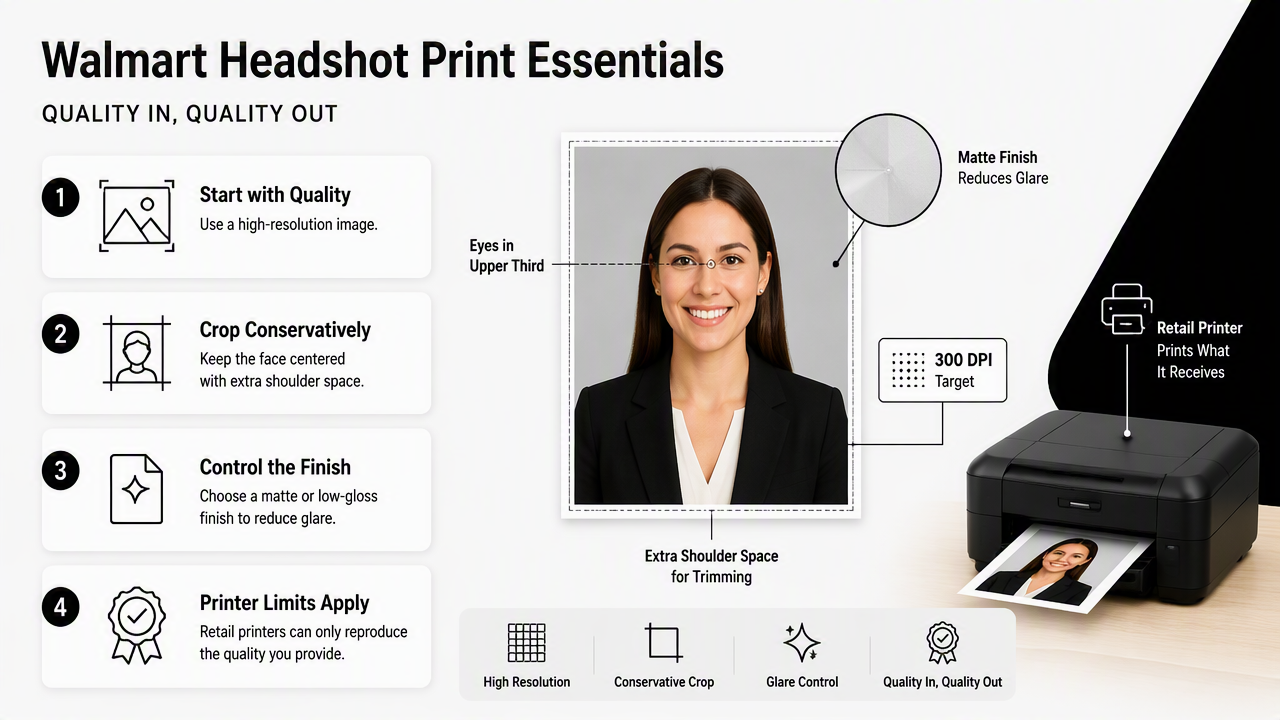
Retail printers can only reproduce the quality present in the file. A compressed social media download, screenshot, or tiny profile image may look acceptable on a phone but soft on paper. A fresh export from the original image is safer.
Practical file targets:
- 4x6 print: 1200 x 1800 pixels or larger at 300 DPI.
- 5x7 print: 1500 x 2100 pixels or larger at 300 DPI.
- 8x10 print: 2400 x 3000 pixels or larger at 300 DPI.
- Color: standard sRGB is the safest choice for consumer printing.
- Format: high-quality JPEG is usually fine for Walmart Photo uploads.
- Crop: leave space around hair, chin, and shoulders to avoid tight trimming.
Matte works well for badges, resumes, and office documents because it reduces reflections. Glossy can make color feel punchier, but it also shows fingerprints and glare. Lustre, when available, is a balanced option for professional portraits.
A person preparing several professional profiles may also need matching images for email headers or business updates. A newsletter resume headshot file can support that kind of consistent personal branding across print and digital formats.
Recommended crop and finish settings
| Print goal | Crop guidance | Finish choice | Why it works |
|---|---|---|---|
| Resume handout | Head and shoulders, centered | Matte | Looks clean under office lighting |
| LinkedIn backup print | Slightly wider than profile crop | Matte or lustre | Leaves room for trimming |
| Event badge | Face larger, shoulders minimal | Matte | Improves visibility and reduces glare |
| Portfolio page | Balanced head and torso | Lustre | Feels more professional than glossy |
| Desk or wall frame | Wider crop with background space | Lustre or pro lab | More forgiving in a frame |
Strong headshot prints usually avoid extreme filters, heavy smoothing, and very bright white backgrounds. Natural skin texture and clear eye detail matter more than dramatic edits.
How to order Walmart headshot prints online
Ordering Walmart headshot prints online is a simple upload, crop, size, finish, and pickup process. The safest workflow is to prepare the image first, check the crop preview carefully, select a common size, and inspect the print in-store before using it professionally.
- Export the headshot as a high-quality JPEG in sRGB.
- Choose a print size such as 4x6, 5x7, or 8x10.
- Upload the file to Walmart Photo and open the crop preview.
- Keep the face centered with space around the head and shoulders.
- Select matte or lustre for professional use.
- Choose pickup or delivery based on deadline.
- Review the print under normal light before distributing it.
Walmart's search results highlight same-day printing for select sizes and products, with some prints available in as little as 1 hour. Film processing and disposable camera developing are described separately as ready in days, so digital uploads are the better route for urgent headshot prints.
For entrepreneurs, a single headshot often has to match product pages, social posts, and sales materials. A Shopify resume headshot generator can help produce a cleaner business portrait before the retail print step.
Fast pickup is useful only when the source file is already finished. Retail printing should be the final step, not the editing step.
Pre-upload checklist for print-ready files
- The eyes look sharp at full size.
- The file is not a screenshot from a social app.
- The image has enough space for Walmart's crop tool.
- The background does not blend into hair or clothing.
- The face is bright without blown-out highlights.
- The clothing matches the intended use, such as job search, badge, brand profile, or dating profile.
Looktara is especially useful before this stage because the platform focuses on generating professional-looking portraits rather than simply enlarging a weak photo. That gives the print service a better file to reproduce.
When is a higher-end print option worth it?
A higher-end print option is worth it when color accuracy, skin tone consistency, paper quality, or presentation value affects the outcome. Walmart is practical for quick copies, but a pro lab is safer for acting submissions, framed executive portraits, premium portfolios, and paid client-facing brand materials.
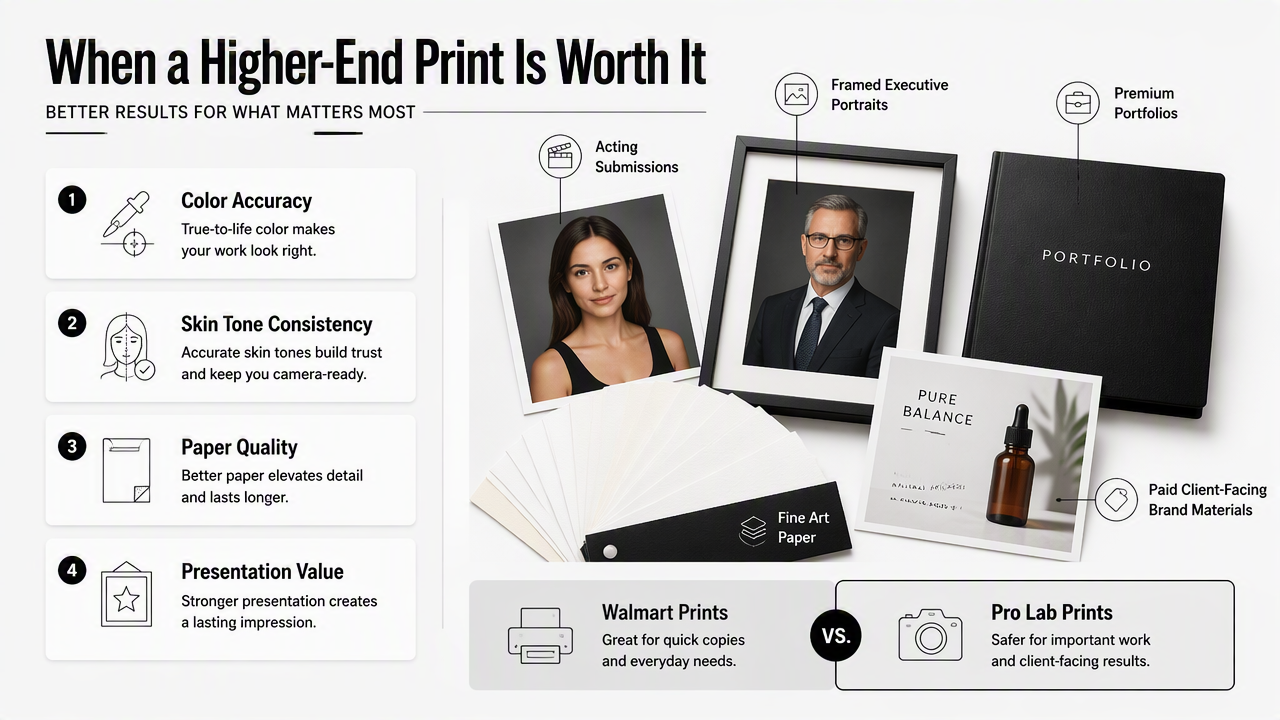
The biggest difference is control. Professional labs may offer better paper choices, tighter color management, and more predictable output across repeat orders. For many everyday needs, Walmart remains enough; for reputation-sensitive prints, the added cost may protect the final impression.
A common misconception is that a more expensive print can fix a weak source image. It cannot. Soft focus, harsh lighting, awkward crop, and low resolution remain visible. Better printing improves reproduction, not the underlying portrait.
Creators who also need profile visuals for social channels can prepare related images with an Instagram product photo generator or a Pinterest product photo generator when the same brand style needs to carry beyond the printed headshot.
Walmart prints versus pro lab prints
| Decision factor | Walmart Photo | Pro print lab | Better choice |
|---|---|---|---|
| Fast local pickup | Strong | Varies | Walmart |
| Low-cost copies | Strong | Usually higher cost | Walmart |
| Exact color matching | Limited | Stronger | Pro lab |
| Premium paper options | Limited | Stronger | Pro lab |
| Event badge photos | Strong | More than needed | Walmart |
| Acting headshots | Acceptable for drafts | Stronger for final copies | Pro lab |
| Small business branding | Good for casual use | Better for premium display | Depends on stakes |
A practical rule: Walmart works for distribution copies, badges, and quick updates. A pro lab works better when the print itself represents professional credibility.
FAQ about Walmart photo developing for headshot prints
Walmart headshot printing questions usually come down to size, finish, timing, and source-image quality. The answers below cover the most common decisions before placing an order in 2026.
Can Walmart print a professional headshot?
Walmart can print a professional headshot if the uploaded image is already sharp, well-lit, properly cropped, and high enough in resolution. The service is best viewed as a convenient printing option rather than a professional retouching or portrait creation service. For high-stakes executive or acting prints, a pro lab may be safer.
What size should a headshot be printed at Walmart?
The best size depends on the use. A 4x6 or 5x7 works for resumes, networking handouts, and small frames. An 8x10 is better for portfolios, auditions, or larger display. A 300 DPI file at the target print size gives the printer enough detail for a clean result.
Is matte or glossy better for headshot prints?
Matte is usually better for professional headshot prints because it reduces glare, fingerprints, and reflections under office or event lighting. Glossy can look bright and colorful, but it is less practical for badges and handouts. Lustre is often the best middle choice when available.
Does Walmart develop film for headshots?
Walmart Photo search results include film processing and disposable camera developing, but that route is not ideal for modern headshot needs. Film development may take days and gives less control over cropping and retouching. A digital upload is usually faster and more predictable for professional portraits.
Conclusion
Walmart photo developing for headshot prints is a smart choice for fast, affordable copies when the image file is already polished and sized correctly. The best results come from a sharp 300 DPI source, a centered crop, and a matte or lustre finish matched to the use case.
For job applications, business profiles, event badges, and creator materials, the practical next step is to prepare the headshot first, then print. Looktara can help create a professional-looking source image before ordering prints, and visitors can head to looktara.com when a fresh headshot file is needed before Walmart pickup or delivery.
Generated by EarlySEO.com