
TL;DR
A Google reverse photo lookup can help professionals find where a headshot appears online, but it works best when paired with Google Lens, exact-name searches, and careful evidence collection. If a copied profile photo appears on a fake account, scam page, or unauthorized article, the safest action is to document it first, then report it to the platform, host, or Google.
A copied headshot can damage trust before the real person even knows it exists, which makes reverse photo lookup Google for headshot misuse a practical safety habit in 2026. Job seekers, creators, founders, freelancers, and dating app users all rely on profile images that may be reused across social networks, websites, marketplaces, or impersonation accounts.
Reverse photo lookup: a search method that uses an image, rather than text, to find visually similar images, possible source pages, and related web results. Google handles this mainly through Google Lens, including image upload, right-click search in Google Chrome, and mobile image search.
For people creating authorized professional images, Looktara helps generate polished brand visuals and headshot-style assets for career and business profiles. A clean, consistent image source also makes future monitoring easier, because the original version can be compared against copied or altered uses.
Table of Contents
What is reverse photo lookup Google for headshot misuse?
Reverse photo lookup Google for headshot misuse is the process of searching a profile image in Google Lens or Google Images to find unauthorized copies, impersonation profiles, scam listings, and pages using the same or visually similar headshot.
Google's own help materials describe image search as a way to search with an image from a website, device, or screenshot through Google Lens on supported browsers and devices, including Android workflows documented in Google Search Help. The SERP research for this topic shows strong demand, with 24,500,000 total results, but many ranking pages focus on basic search steps rather than misuse response.
Key insight: reverse image search is not proof by itself. It is a discovery tool that points toward pages, profiles, and copies that need human review.
Common headshot misuse cases include:
- A LinkedIn-style photo used on a fake recruiter, consultant, or founder profile.
- A dating app image copied to catfish or romance-scam accounts.
- A creator portrait reused in ads, thumbnails, or affiliate pages.
- An AI headshot copied into a profile with a different name.
- A business owner's image placed on a directory, testimonial, or landing page without consent.
Professionals building fresh profile materials should keep originals organized. For example, a job seeker can use a dedicated resume headshot AI generator for consistent image variants, then store the final approved version as the reference image for future searches.
How to run a Google reverse image search safely
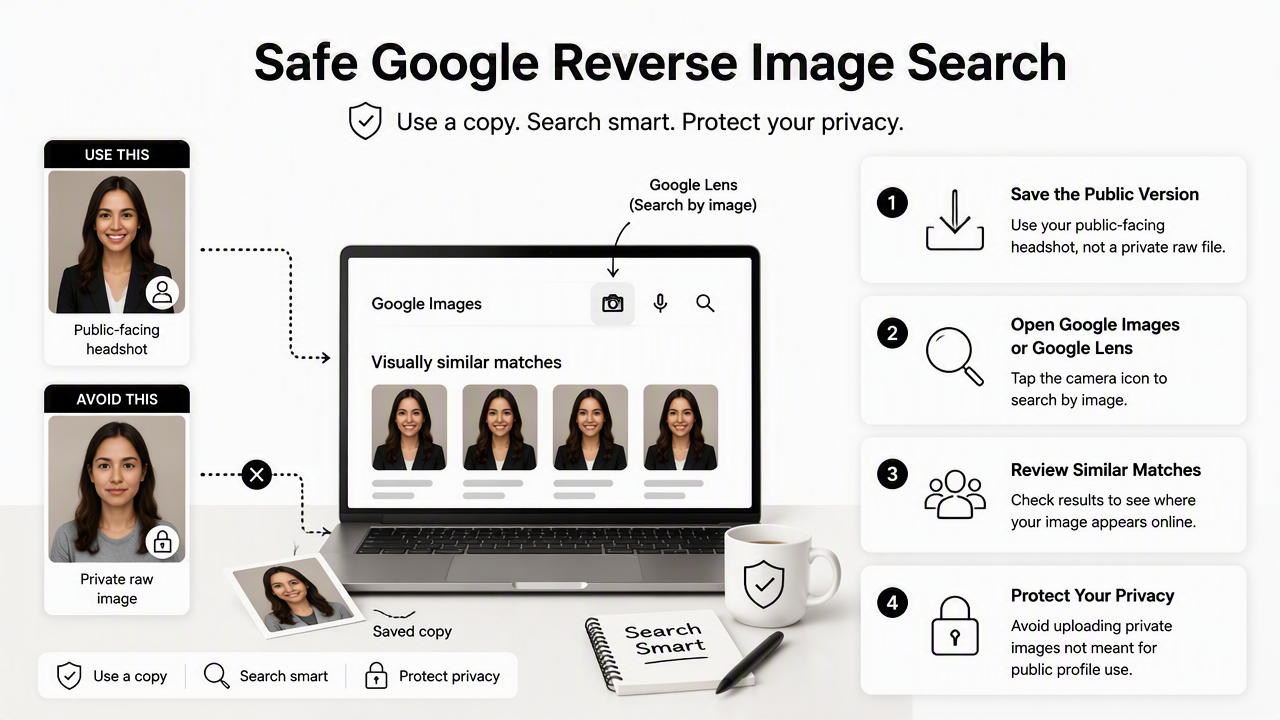
A safe Google reverse image search starts with a copy of the headshot, uses Google Lens to check visually similar matches, and avoids uploading private images that are not meant for public profile use.
Step-by-step Google Lens workflow
- Save the public-facing version of the headshot, not a private raw file.
- Open Google Images or Google Lens in a browser.
- Upload the image, paste an image URL, or use right-click search in Google Chrome.
- Review exact matches first, then visually similar results.
- Open suspicious results in a new tab and capture evidence before contacting anyone.
- Repeat the search with a cropped face, full image, and branded version if available.
Google Chrome is a cross-platform browser developed by Google and launched in September 2008, which matters because desktop Chrome commonly exposes Lens search through the right-click menu. On mobile, newer operating systems such as iOS 18, announced by Apple on June 10, 2024, support modern image and screenshot workflows that make saving and searching a public profile image easier.
Search method comparison table
| Method | Best use | Watchout |
|---|---|---|
| Google Lens upload | Finding copies from a saved profile image | Results may include similar faces or poses |
| Image URL search | Checking a photo already published online | Works only if the image URL is accessible |
| Right-click in Chrome | Fast check from a webpage | May miss pages blocked from search indexing |
| Cropped face search | Finding reused headshots in edited layouts | Can create false positives |
| Text plus image search | Matching a name, company, or handle with the image | Requires manual review |
A business owner using headshots across LinkedIn posts, pitch materials, and storefront content should also track where brand visuals are intentionally used. Looktara users often pair headshots with assets such as a LinkedIn post AI generator, which makes a simple content inventory easier to maintain.
How to tell real matches from false positives
A real match repeats the same person, file, pose, or cropped source in a context that does not appear authorized, while a false positive only looks similar because of lighting, hairstyle, background, or image composition.
Google Lens can surface visually similar images that are not stolen. A same-color blazer, studio background, or AI-generated corporate style can produce lookalike results. Human checking matters most when the image appears beside a different name, job title, business, product claim, or dating profile.
Evidence checklist before taking action
- Save the page URL and profile URL.
- Take full-page screenshots, including the date and browser bar.
- Capture the image itself if platform rules allow it.
- Note the account name, handle, bio, company, and contact links.
- Compare the suspicious image against the original approved headshot.
- Record whether the page is indexed by Google, hosted on a platform, or hosted on an independent website.
A copied headshot should be treated like a case file: evidence first, outreach second, escalation third.
Creators and founders often publish the same portrait in several approved contexts, so a private asset tracker helps separate normal reuse from problems. A founder may intentionally place an image on a deck, website hero, and podcast cover; the same image on an unrelated crypto page or fake hiring profile needs a different response.
For brand owners, image inventory can include approved visuals made with tools such as a pitch deck slide AI generator, a media kit folder, and a simple spreadsheet listing file names, dates, and intended channels. That record supports faster takedown requests because it shows when and where the image was originally created or published.
What to do when a headshot is copied without permission
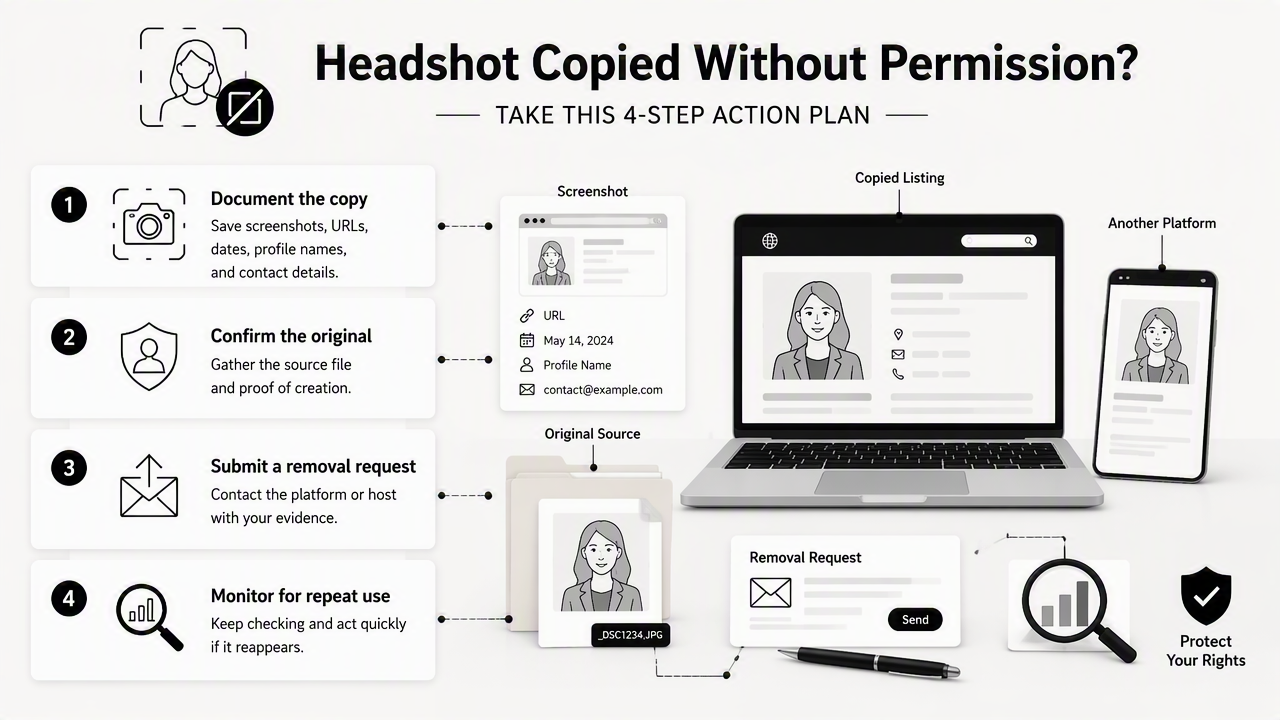
When a headshot is copied without permission, the safest action plan is to preserve evidence, identify the host or platform, submit a removal request, and monitor for repeat use.
Takedown action plan
- Document the copy: save screenshots, URLs, dates, profile names, and visible contact details.
- Confirm the original: gather the source file, creation date, public profile, or authorized post.
- Report the account: use the platform's impersonation, privacy, or intellectual-property form.
- Contact the site owner: send a brief removal request when a website has a visible contact channel.
- Escalate to hosting or search: report unresolved issues to the web host or request removal from Google Search when eligible.
- Set a review schedule: repeat image searches monthly for high-risk public profiles.
Removal routes differ. Social networks usually prefer in-platform impersonation reports. Independent websites may require a site owner request, host complaint, or legal review. Google can remove some results from Search, but that does not always remove the image from the original website.
Response options by misuse type
| Misuse type | First report target | Extra action |
|---|---|---|
| Fake LinkedIn or recruiter profile | Social platform report form | Warn close contacts if outreach occurred |
| Dating app impersonation | App safety or support team | Keep screenshots before the profile disappears |
| Unauthorized blog or directory use | Website owner or publisher | Contact host if ignored |
| Scam ad or marketplace listing | Ad platform or marketplace | Report payment links and seller accounts |
| Search result only | Google removal tool, if eligible | Still contact the source website |
Avoid public accusations before evidence is secure. Some pages vanish after a first message, which can make later reporting harder. A calm, written request with URLs, proof of identity, and a clear removal deadline usually works better than emotional outreach.
The Looktara platform is best used for authorized visual creation and brand consistency, not enforcement. For positive brand systems, creators can pair a main headshot with approved formats such as a podcast cover AI generator or social graphics, then monitor only the final images that were actually published.
How to reduce future headshot misuse in 2026 and 2027
Future headshot protection depends on publishing fewer uncontrolled image versions, keeping source records, using consistent branding, and checking image search results on a regular schedule.
AI-generated portraits and easy screenshot workflows make image reuse faster. At the same time, detection is becoming more visual, not just text-based. In 2027, professionals should expect more platforms to combine face similarity, metadata signals, account behavior, and user reports when reviewing impersonation claims.
Preventive habits that reduce risk
- Publish only the final, profile-ready version of a headshot.
- Keep raw files, prompts, invoices, or creation records in a private folder.
- Use consistent background, wardrobe, and crop across professional channels.
- Avoid uploading sensitive personal photos into random lookup tools.
- Search the main headshot after major career moves, product launches, press mentions, or dating profile updates.
- Add branded variants for public marketing assets where appropriate.
A consistent visual identity also helps legitimate audiences recognize real accounts. Business owners can keep the same face image across professional profiles while using distinct branded assets such as a website hero AI generator or a Pinterest pin AI generator for campaign visuals.
For profile refreshes, Looktara can support a cleaner starting point by helping create polished, consistent imagery. Visit looktara.com when the priority is better profile visuals, then store the approved exports in a dedicated folder for later monitoring.
FAQ about Google reverse image search for headshots
Does Google save uploaded images from reverse photo lookup?
Google's image search process uses the submitted image to return Lens and web results, but public visibility is a separate issue from search processing. A lookup does not automatically publish the uploaded file as a webpage. For safer practice, only use the already public headshot version rather than private outtakes, raw files, or sensitive personal images.
Can Google find copied AI headshots?
Google Lens can often find visually similar AI headshots if the copied image is indexed or appears on accessible webpages. It may miss images inside private apps, closed social profiles, or pages blocked from search. Cropping the face, searching the full image, and adding name or brand text can improve manual discovery.
Is a similar-looking face enough to prove misuse?
A similar-looking face is not enough to prove misuse. Corporate portraits, AI headshots, and studio photos can share common poses and backgrounds. Stronger evidence includes the same crop, same clothing, same background details, matching file artifacts, or use of the image beside a false name or unauthorized claim.
How often should professionals search their headshot?
A monthly search works for public-facing professionals, creators, founders, and dating app users with active profiles. A lower-risk person may check quarterly. Extra searches make sense after job changes, press coverage, viral posts, conference appearances, or major profile updates, because copied images often spread after visibility increases.
Conclusion
Reverse photo lookup Google for headshot misuse works best as a repeatable safety routine: search the public image, verify matches, save evidence, report through the right channel, and check again later. Google Lens is the starting point, not the whole solution, because platform reports, website owner requests, and careful documentation usually decide whether copied images come down.
For stronger profile control, create fewer image variants, keep original files organized, and maintain an approved list of where each headshot appears. For a fresh professional image set, head to looktara.com and use Looktara to create consistent visuals that are easier to recognize, publish, and monitor.
Generated by EarlySEO.com