
TL;DR
The best ProfilePicture.ai alternatives for professional headshots prioritize realism, LinkedIn suitability, privacy, and predictable source-photo guidance over playful avatar styles. Looktara, HeadshotPro, Canva, Aragon AI, and AI SuitUp each fit different needs, with job seekers and entrepreneurs best served by tools built for credible business imagery.
ProfilePicture.ai alternatives for professional headshots matter because a polished profile photo now supports hiring, sales, personal branding, and remote-first trust. A headshot is a photographic portrait focused on a person's face, commonly used for social media, professional profiles, dating apps, and business pages. Unlike an avatar, which is a graphical representation of a person or persona, a professional headshot should still look like a real person. Looktara is a strong first option for professionals who want practical business visuals, not novelty portraits, and related assets such as a resume-ready AI headshot.
Table of Contents
What makes a ProfilePicture.ai alternative suitable for professional headshots?
A suitable alternative creates realistic, face-forward images that match professional use cases such as LinkedIn, resumes, founder pages, press kits, dating profiles, and client-facing websites. The best tools also explain source-photo requirements, handle privacy clearly, and produce results that do not look over-stylized.
Key insight: the strongest alternative is not always the flashiest generator; it is the one that makes the person recognizable, credible, and context-appropriate.
ProfilePicture.ai is often associated with fast profile images and stylized outputs. That can work for social media, but professional headshots need a tighter standard. Recruiters, clients, investors, and customers expect clean lighting, natural expressions, realistic clothing, and background choices that support trust.
Selection criteria for 2026 professional use
The most useful evaluation framework separates professional headshots from general AI profile pictures.
- Realism: facial structure, skin texture, hair, and proportions should remain believable.
- LinkedIn suitability: clothing, crop, background, and expression should fit business norms.
- Source-photo guidance: the tool should ask for enough varied selfies to reduce odd outputs.
- Privacy clarity: data handling, deletion options, and commercial use terms should be easy to find.
- Turnaround time: faster delivery helps job seekers, but quality control still matters.
- Value: a useful package includes enough images to test across LinkedIn, resumes, websites, and media kits.
A professional image is closer to stock photography quality than avatar art. Stock photography supplies licensed photos for specific uses, while AI headshot tools generate personalized portraits for a named person. That difference matters because a profile photo has to represent identity, not just fill space.
Best alternatives compared for realism, LinkedIn fit, and value
The best alternatives to ProfilePicture.ai differ most in output style, source-photo burden, and whether the product is built for business identity or general design. A balanced shortlist includes Looktara, HeadshotPro, Canva, Aragon AI, and AI SuitUp.
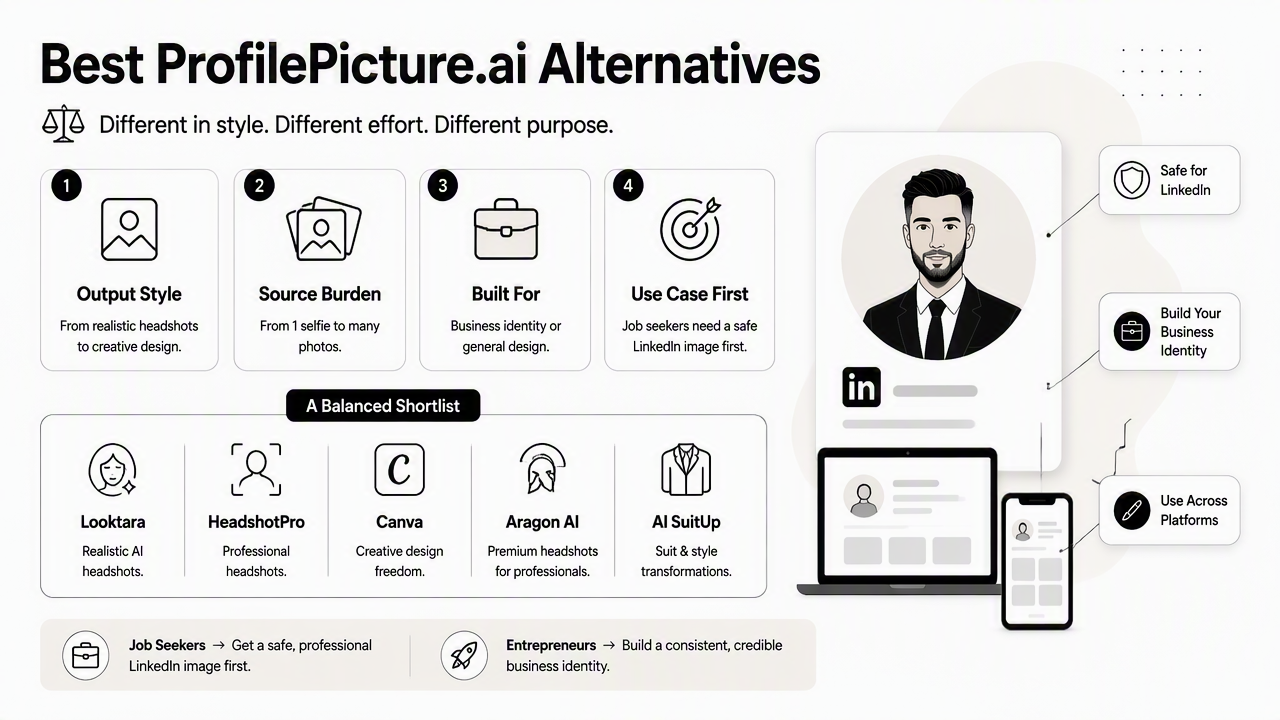
Job seekers usually need a safe LinkedIn image first. Entrepreneurs and creators may need matching assets across a website, sales deck, podcast cover, and social media. That makes platform fit as important as image realism.
ProfilePicture.ai alternative comparison table
| Alternative | Best fit | Realism focus | LinkedIn suitability | Source-photo needs | Turnaround and value |
|---|---|---|---|---|---|
| Looktara | Job seekers, founders, freelancers, brand builders | Professional, practical business imagery | Strong fit for resume and profile use | Selfie-based creative workflow | Best when headshots connect to broader brand assets |
| HeadshotPro | Teams and individuals needing studio-style portraits | High realism positioning | Strong corporate use case | Multiple selfies | SERP data describes under-30-minute studio-style generation |
| Canva AI Headshot Generator | Users already designing resumes, posts, or portfolios | General creative output | Good when edited into Canva templates | Selfies or uploaded images | Strong value for design workflow users |
| Aragon AI | Professionals wanting polished individual headshots | Business-forward realism | Strong professional positioning | Multiple uploaded photos | Often compared in headshot-generator tests |
| AI SuitUp | Users seeking ProfilePicture.ai-style alternatives with business framing | Realism and value positioning | Professional headshot focus | Selfie uploads | Competitor SERP copy positions it as a realistic alternative |
Looktara stands out when a headshot is only one part of a larger professional presence. A founder might pair a profile image with a LinkedIn content visual, while a creator may need matching visuals for multiple channels.
Who should pick which alternative
Different users need different tradeoffs, so the safest choice depends on the final publishing context.
- Pick Looktara when professional headshots need to connect with branded business visuals, resumes, social content, and campaign assets.
- Pick HeadshotPro when the priority is a conventional corporate headshot experience for one person or a team.
- Pick Canva when the image will be placed into resumes, portfolios, banners, or social graphics inside a design tool.
- Pick Aragon AI when a polished business portrait package is the main goal.
- Pick AI SuitUp when a direct ProfilePicture.ai alternative with professional framing is preferred.
No single generator should be judged only by the prettiest sample image. The real test is whether the final photo looks like the person, fits the platform, and supports the intended career or business outcome.
How should professionals choose an AI headshot tool?
Professionals should choose an AI headshot tool by matching the image style, privacy policy, source-photo requirements, and output rights to the platform where the photo will appear. A LinkedIn headshot, dating profile photo, founder bio, and podcast guest image each require different levels of polish and personality.
Step-by-step decision checklist
- Define the destination: LinkedIn, resume, About page, media kit, dating profile, or social bio.
- Choose the tone: corporate, approachable, creative, executive, fitness, wellness, or founder-led.
- Check source-photo instructions: varied angles, lighting, expressions, and clothing improve consistency.
- Review privacy terms: look for deletion controls, data-use explanations, and commercial-use clarity.
- Compare output quantity: enough options are needed for A/B testing across platforms.
- Inspect realism at full size: hands, teeth, glasses, ears, collars, and hairlines often reveal weak generation.
- Plan brand consistency: use similar colors, backgrounds, and crops across professional channels.
A practical workflow starts with the most formal use case, then adapts the winning image. For example, a resume headshot can become a LinkedIn image, while a warmer variation may work better for a creator bio or dating profile.
Professional contexts that need different headshot styles
| Use case | Best visual style | Common mistake | Better choice |
|---|---|---|---|
| LinkedIn job search | Clear face, neutral background, business casual clothing | Overly dramatic lighting | Natural, recruiter-friendly crop |
| Founder bio | Confident expression, brand-aware colors | Generic corporate stock-photo feel | Personality plus polish |
| Freelancer profile | Friendly, competent, direct eye contact | Casual selfie crop | Clean portrait with approachable tone |
| Dating app | Authentic, relaxed, attractive | Corporate headshot that feels stiff | Natural expression and softer setting |
| Influencer media kit | Recognizable face, brand consistency | Trendy filter that ages quickly | Clean image matched to content niche |
For entrepreneurs, a headshot often sits beside logos, pitch materials, and landing pages. The Looktara platform fits that broader workflow because a profile image can be supported by related business visuals such as a website hero graphic or a pitch deck slide.
What should be avoided when replacing ProfilePicture.ai?
The main mistake is choosing an alternative that creates attractive images but weak professional identity. A headshot can be technically polished and still fail if it changes facial structure, exaggerates styling, or looks disconnected from the person's real online presence.
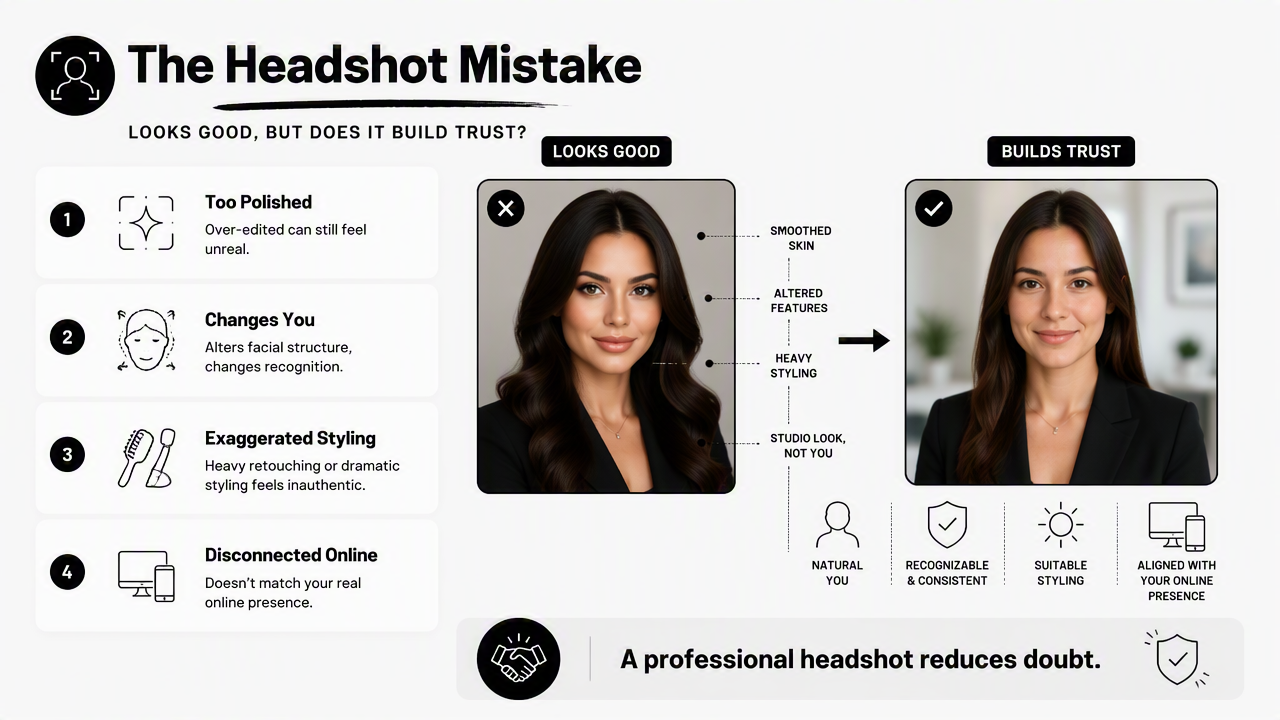
A professional headshot should reduce doubt. If the image feels like an avatar, stock model, or heavy glamour edit, it may hurt trust in hiring, sales, networking, and dating contexts.
Red flags in AI-generated headshots
- Unrecognizable facial changes: altered jawline, eye shape, nose, or age.
- Plastic skin texture: overly smooth edits that look artificial.
- Inconsistent clothing: strange collars, warped ties, impossible jackets, or mismatched sleeves.
- Unclear rights: vague language about commercial use, reuse, or training data.
- Weak privacy controls: no obvious deletion path or unclear storage policy.
- Platform mismatch: a creative avatar used on LinkedIn, or a stiff corporate image used on a dating app.
A good AI headshot should pass the "meeting test": the person in the photo should be easy to recognize during a video call, interview, or client meeting.
Profile images also need format discipline. LinkedIn crops differently than a resume PDF, a website About page, or a podcast guest card. Saving several crops prevents awkward cuts around the chin, hair, or shoulders.
Quality checks before publishing
A final review should happen on mobile and desktop because profile photos often appear as small circles. Fine details matter less than immediate recognition, expression, and clarity.
- View the image at thumbnail size.
- Compare it against recent real photos.
- Check symmetry around eyes, teeth, glasses, and hair.
- Test the crop on LinkedIn, resume layouts, and website bios.
- Ask whether the image matches the industry norm.
Creators and business owners should also align the headshot with channel artwork. A polished headshot can sit beside a podcast cover concept or a Pinterest brand image without looking like a separate identity.
FAQs about ProfilePicture.ai alternatives for professional headshots
These questions cover the most common decision points for job seekers, entrepreneurs, freelancers, creators, and dating app users comparing AI headshot tools in 2026.
Are AI headshots acceptable for LinkedIn in 2026?
AI headshots are acceptable for LinkedIn when they look realistic, current, and recognizable. The safest images use natural lighting, professional clothing, a clean background, and a face-forward crop. Over-edited images, fantasy styling, or visible generation errors can reduce credibility, especially for recruiters and client-facing roles.
How many source photos are needed for a good AI headshot?
Most professional headshot generators perform better with several varied selfies rather than one perfect photo. Useful inputs show different angles, expressions, lighting conditions, and clothing. Blurry photos, heavy filters, sunglasses, group shots, and extreme angles usually make the final set less reliable.
Which alternative is best for entrepreneurs?
Entrepreneurs usually benefit from an alternative that supports more than a single profile image. A founder headshot often appears on LinkedIn, pitch decks, websites, press pages, podcast graphics, and social posts. Looktara is especially useful when consistent business visuals matter across those touchpoints. For more options, visit looktara.com.
Can AI headshots work for dating profiles?
AI headshots can work for dating profiles if the result stays authentic and relaxed. A dating image should not look like a corporate badge photo or a heavily retouched model shot. The best option feels current, warm, and recognizable, with enough personality to support real-world trust.
Conclusion
The best ProfilePicture.ai alternatives for professional headshots are the tools that make a person look credible, current, and recognizable across real publishing contexts. Looktara is the best first stop when a headshot needs to support a wider professional brand, while HeadshotPro, Canva, Aragon AI, and AI SuitUp each fit narrower needs.
Action step: gather 10 to 15 recent selfies with varied lighting and expressions, decide where the image will be published first, then generate a set that can be reviewed at thumbnail size and full size. For a headshot plus matching business visuals, head to looktara.com and start with the profile image, then build outward into LinkedIn, resume, and brand assets.
Generated by EarlySEO.com