
TL;DR
A trustworthy professional photo shows clear eyes, a relaxed expression, clean lighting, simple framing, and platform-appropriate styling. The fastest action is to audit the current image against eye contact, expression, background, crop, attire, authenticity, and channel fit, then update matching visuals across LinkedIn, resumes, websites, and social profiles.
A profile photo often becomes the first credibility test before a résumé, website, offer page, or message gets read. For profile pictures for professional trust signals, the goal is simple: make the person look real, competent, approachable, and consistent across every public touchpoint. Avatar: a digital profile image that represents a person, brand, or persona in online spaces. Tools such as Looktara help professionals create polished visual assets, including profile-ready images and related brand graphics, without turning the result into something that feels fake.
Table of Contents
What is a trustworthy professional profile picture?
A trustworthy professional profile picture is a clear, current, face-forward image that helps a viewer identify the person and infer credibility within seconds. Strong trust signals include visible eyes, natural expression, flattering light, simple background, appropriate clothing, accurate likeness, and a crop that works on small screens.
Key insight: trust is not created by looking flawless; trust is created by looking recognizable, competent, and consistent.
Profile photos sit beside signals such as job title, bio, credentials, testimonials, and content history. The photo works first because it is processed faster than text. A weak image can make a strong profile feel less complete, while a clear image makes the written details easier to believe.
The same logic applies beyond LinkedIn. Founders use headshots on pitch decks and websites. Freelancers use them on marketplaces. Creators use them across video thumbnails, newsletters, and short-form profiles. Job seekers can pair a clean headshot with a focused résumé image using a tool such as the fitness Shopify resume headshot AI generator when a consistent professional image is needed quickly.
Core trust signals at a glance
- Eye contact: direct or near-direct gaze helps the profile feel present and accountable.
- Expression: a mild, natural smile usually reads as approachable without looking casual.
- Lighting: soft front light keeps facial details visible and reduces harsh shadows.
- Background: uncluttered settings keep attention on the person rather than the room.
- Crop: head-and-shoulders framing works well in small circular avatars.
- Attire: clothing should match the industry, seniority, and audience.
- Authenticity: the image should still look like the person in real meetings.
- Platform fit: LinkedIn, X, dating apps, and creator channels reward different levels of formality.
Which visual choices create trust in the first few seconds?
The fastest trust-building choices are eye contact, expression, lighting, background control, crop, attire, authenticity, and platform fit. Each one lowers uncertainty for a viewer by answering a silent question: is this person real, relevant, professional, and safe to contact?
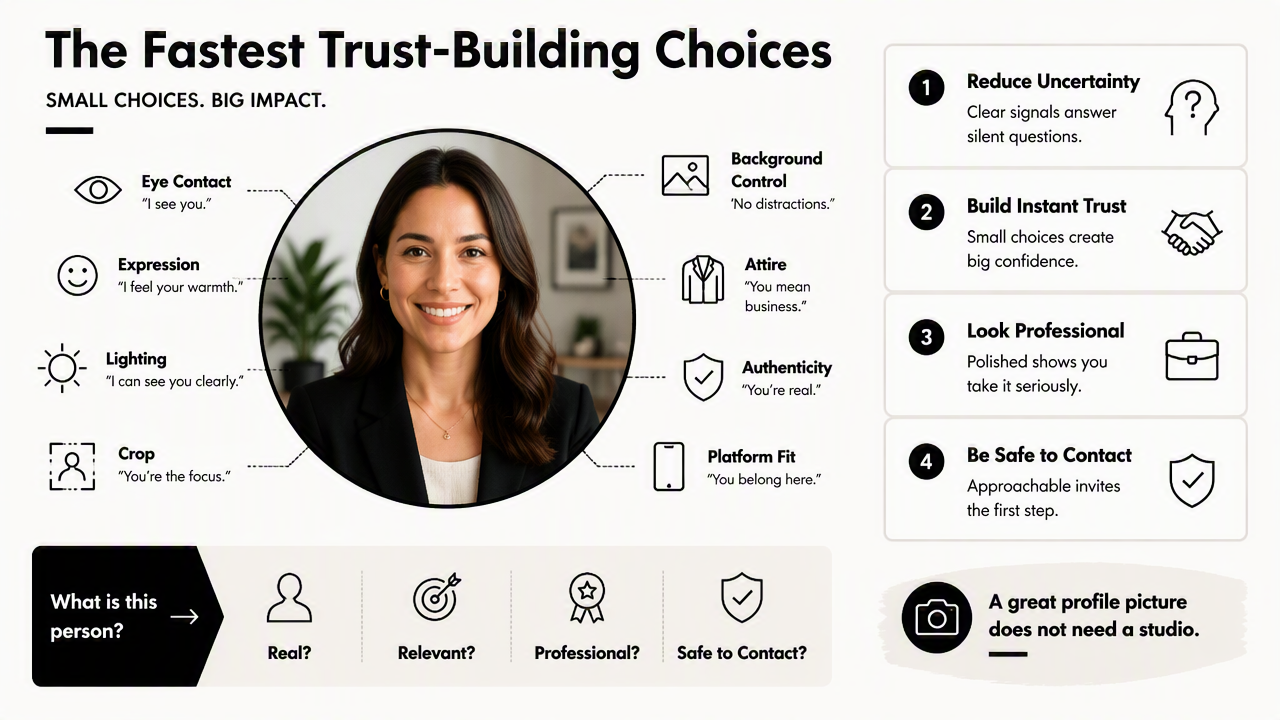
A good profile picture does not need studio-level perfection. It needs fewer distractions and stronger clarity. A viewer should be able to see the face, understand the role, and feel that the image matches the person's claimed professional identity.
Professional photo trust checklist
| Trust signal | What it communicates | Best practice for 2026 |
|---|---|---|
| Eye contact | Presence and accountability | Face the camera or look slightly toward it |
| Expression | Warmth and confidence | Use a relaxed mouth and natural eyes |
| Lighting | Clarity and care | Use soft window light or even front lighting |
| Background | Focus and relevance | Choose plain, office, studio, or subtle brand setting |
| Crop | Recognition on small screens | Keep face large enough for circular thumbnails |
| Attire | Role fit | Match clothing to the audience and platform |
| Authenticity | Believability | Avoid heavy retouching or identity-changing edits |
| Platform fit | Social fluency | Adjust formality by channel rather than reusing one image everywhere |
The checklist works because each element removes a possible source of doubt. Hidden eyes can feel evasive. Harsh shadows can feel careless. Busy backgrounds compete with the face. Extreme filters may create suspicion, especially when the photo is tied to hiring, consulting, coaching, finance, health, or sales.
A practical audit can happen in this order:
- Check whether the eyes are visible at thumbnail size.
- Confirm that the expression matches the intended tone.
- Remove clutter, hard shadows, and distracting colors.
- Crop from the upper chest or shoulders, not the full body.
- Match clothing to the platform's social norms.
- Compare the image with recent video calls or in-person appearance.
- Update adjacent visuals so the profile feels consistent.
How should profile photos change by platform?
Profile photos should change by platform because trust looks different on LinkedIn, business websites, creator channels, X, and dating apps. A board advisor, remote developer, personal trainer, podcast host, and founder may all need credibility, but each audience expects a different level of polish and personality.
LinkedIn favors clarity, role fit, and professional warmth. A company website favors brand consistency and confidence. X favors recognizability in fast-moving feeds. YouTube and TikTok need stronger contrast because the photo may appear beside thumbnails, channel art, and comments.
A single headshot can anchor identity, but platform-specific crops and supporting visuals make that identity feel intentional.
Platform-by-platform trust cues
| Platform or use case | Photo style that builds trust | Avoid overdoing |
|---|---|---|
| Clean head-and-shoulders image, business-casual styling | Stiff studio poses that feel dated | |
| Résumé or portfolio | Neutral, accurate, recent headshot | Highly stylized creator edits |
| Founder website | Confident portrait with brand-aligned background | Stock-photo sameness |
| X profile | High-contrast face, recognizable at small size | Tiny full-body shots |
| YouTube channel | Expressive face and clear visual identity | Backgrounds that compete with thumbnails |
| Dating app | Natural, recent, friendly image | Corporate headshot used as the only photo |
Content creators and entrepreneurs also need surrounding assets to match the photo. A LinkedIn profile image paired with inconsistent banners or posts can weaken the trust effect. The fitness Shopify LinkedIn post AI generator can help align content visuals with a polished professional image, while the fitness Shopify website hero AI generator supports business pages where the headshot appears near an offer or bio.
For social-first professionals, the profile image should be tested beside content formats. A face that reads clearly in a YouTube comment may also need matching thumbnail language from a fitness Shopify YouTube thumbnail AI generator. X profiles can benefit from consistent tone across profile photos, headers, and posts using a fitness Shopify X post AI generator.
How can AI editing improve trust without looking fake?
AI editing can improve trust by correcting technical issues while preserving identity, expression, skin texture, and real-world likeness. The safest use cases are lighting improvement, background cleanup, crop adjustment, color balance, and format resizing, not extreme face reshaping or artificial perfection.
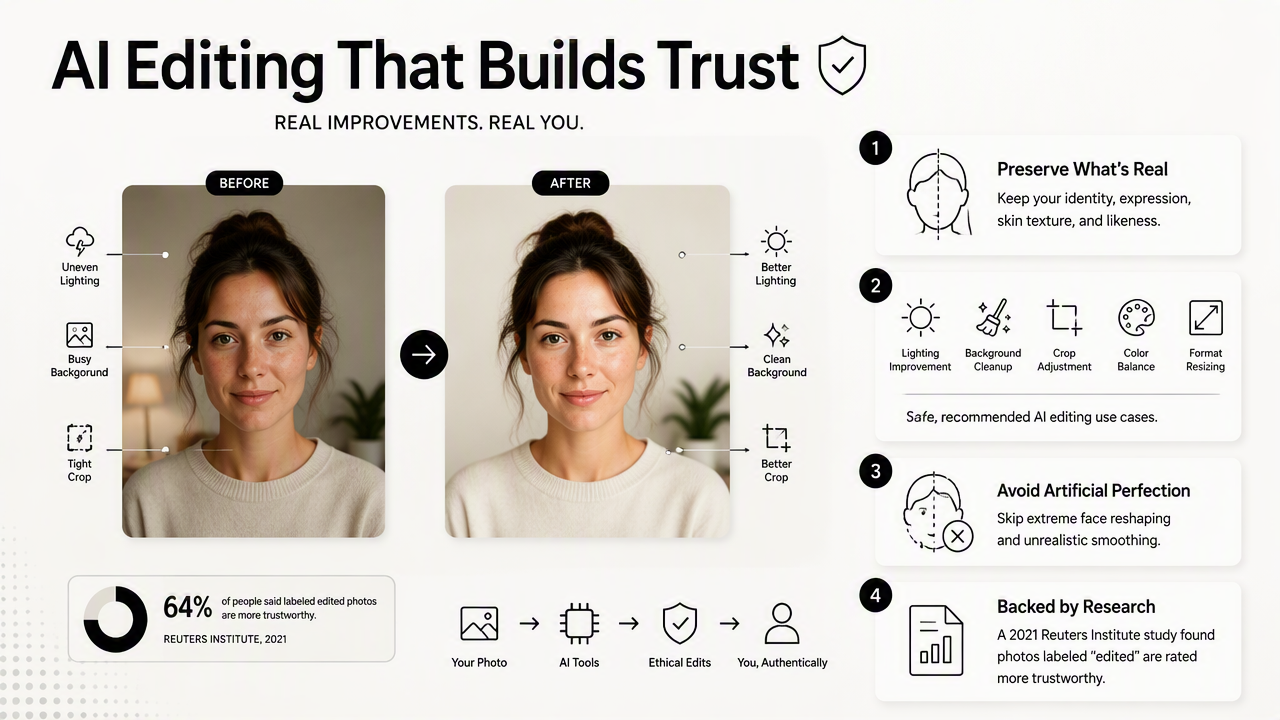
A 2021 review by Nantheera Anantrasirichai and David Bull examined artificial intelligence in the creative industries, showing how AI has become part of modern creative production. The GPT-4 Technical Report by OpenAI and collaborators also reflects the broader shift toward AI systems that can work across complex information formats. For professional images, that shift raises the standard for both quality and authenticity.
AI-generated or AI-assisted portraits should pass a simple realism test: if the person joined a video call right after sending the profile, the image should still feel honest.
Safe edits versus trust-breaking edits
| Editing choice | Trust effect | Better approach |
|---|---|---|
| Brightening a dim image | Usually positive | Keep skin tones natural |
| Replacing a cluttered background | Usually positive | Use office, studio, or subtle solid colors |
| Smoothing every skin detail | Risky | Reduce distractions without removing texture |
| Changing face shape | Trust-breaking | Preserve facial structure |
| Adding unrealistic clothing | Risky | Choose attire that matches real use cases |
| Over-sharpening eyes | Risky | Keep eyes clear but natural |
Common mistakes include plastic-looking skin, overly white teeth, mismatched shadows, blurred hair edges, and backgrounds that look detached from the person. These cues can make viewers question the whole profile, even when the written credentials are strong.
Better editing follows three rules:
- Fix presentation before changing appearance.
- Keep recognizable facial features intact.
- Match the final image to the platform, not to a generic beauty standard.
How Looktara handles this
Looktara is best suited for professionals who need a polished visual system around a credible profile image. The Looktara platform can support headshot-style assets, social posts, banners, and other profile-adjacent visuals so the public identity feels consistent from bio to content feed.
A useful workflow starts with a realistic headshot, then expands into matching brand materials for LinkedIn, websites, and creator channels. More examples and visual generators are available on looktara.com for professionals who want profile images and supporting assets to feel connected rather than pieced together.
FAQ about professional profile picture trust signals
Professional profile picture trust signals usually come down to clarity, realism, and context. The best photo makes the person easy to recognize, easy to place professionally, and easy to trust before any message, résumé, or sales page gets deeper attention.
What is the most important trust signal in a profile picture?
The most important trust signal is a clear, visible face with direct or near-direct eye contact. Eye visibility helps the person feel present and accountable. Strong lighting, natural expression, and a simple crop support that first impression, but hidden eyes or an unclear face weaken the image fastest.
Should a professional profile picture use a smile?
A professional profile picture should usually use a relaxed, natural smile or calm neutral expression. A forced grin can feel staged, while a severe expression can feel distant. The best expression depends on the role, but most career, freelance, and founder profiles benefit from warmth plus confidence.
Are AI-generated headshots acceptable for work profiles?
AI-generated or AI-assisted headshots are acceptable when they remain accurate, current, and recognizable. Editing that improves lighting, background, and crop can support trust. Edits that change facial structure, age, body shape, or identity can create doubt, especially for hiring, consulting, finance, and client-facing work.
How often should a professional profile picture be updated?
A professional profile picture should be updated whenever appearance, role, brand positioning, or platform strategy changes. Many professionals refresh photos after a new job, business launch, major haircut, rebrand, or shift into public-facing content. The image should match current meetings, video calls, and in-person expectations.
Conclusion
Profile pictures for professional trust signals work best when the image is clear, current, authentic, and tuned to the platform where it appears. The next step is a focused audit: check eye contact, expression, lighting, background, crop, attire, realism, and channel fit, then update the supporting visuals around the profile. For a faster refresh, create a realistic headshot direction, build matching social or website assets with Looktara, and visit looktara.com to keep the full professional presence visually consistent.
Generated by EarlySEO.com