
TL;DR
Photo booth pictures can work for professional profiles when the face is clear, lighting is even, the background is clean, and the expression matches the platform. Strong candidates should crop well as a head-and-shoulders image; casual, cluttered, or heavily filtered shots belong on social channels instead.
A great profile photo does not need a studio, but it does need intention. This picture booth photos style guide for professional profiles shows how to judge booth images for LinkedIn, company bios, creator pages, freelance portfolios, and polished social accounts. Photo booth: a vending machine or modern kiosk with an automated camera and digital photo output; most modern booths produce instant digital files that can be edited, cropped, and reused across profiles. For people who want a cleaner upgrade from a booth image, Looktara can help create polished professional profile photos from existing images while keeping the final look natural.
Table of Contents
What makes a photo booth picture professional?
A photo booth picture looks professional when it clearly shows the face, uses flattering light, avoids distracting props, and communicates the level of polish expected on the target platform.
Professional does not mean stiff. It means the viewer can quickly understand identity, confidence, and context. Research by Richard A. Rogers on visual media analysis for Instagram and other online platforms examined how platform visuals carry meaning, which matters because a LinkedIn headshot, newsletter avatar, and creator profile image all send different signals.
Key insight: A booth image becomes profile-ready when it reads clearly at thumbnail size and still feels credible when opened full screen.
Professional booth photo checklist
| Element | Professional signal | Better as casual social |
|---|---|---|
| Expression | Relaxed smile or calm neutral look | Exaggerated face, wink, or party pose |
| Framing | Head and shoulders with space above the head | Full-body strip or cropped-off forehead |
| Lighting | Even light across both eyes | Harsh flash, deep shadows, red-eye effect |
| Background | Plain curtain, wall, or subtle booth backdrop | Busy crowd, props, signage, or clutter |
| Styling | Clean neckline, neat hair, minimal distractions | Costume pieces, novelty glasses, loud accessories |
| Editing | Natural contrast and skin tone | Heavy filters, blur, beauty effects, fake grain |
A single-image booth output usually works better than a collage strip. Collages can show personality, but most professional platforms crop profile photos into circles or small squares. Tiny frames in a strip often lose detail.
The strongest file should also match the profile goal. A recruiter-facing LinkedIn image needs more polish than a casual creator avatar. A fitness coach, trainer, or wellness creator may need a more active brand cue, making a tool like a fitness LinkedIn profile picture generator useful when the original booth photo lacks the right professional context.
How should picture booth photos be styled for LinkedIn and company bios?
Picture booth photos for LinkedIn and company bios should use simple clothing, direct eye contact, neutral backgrounds, and a crop that keeps the face large enough to recognize in a small circle.
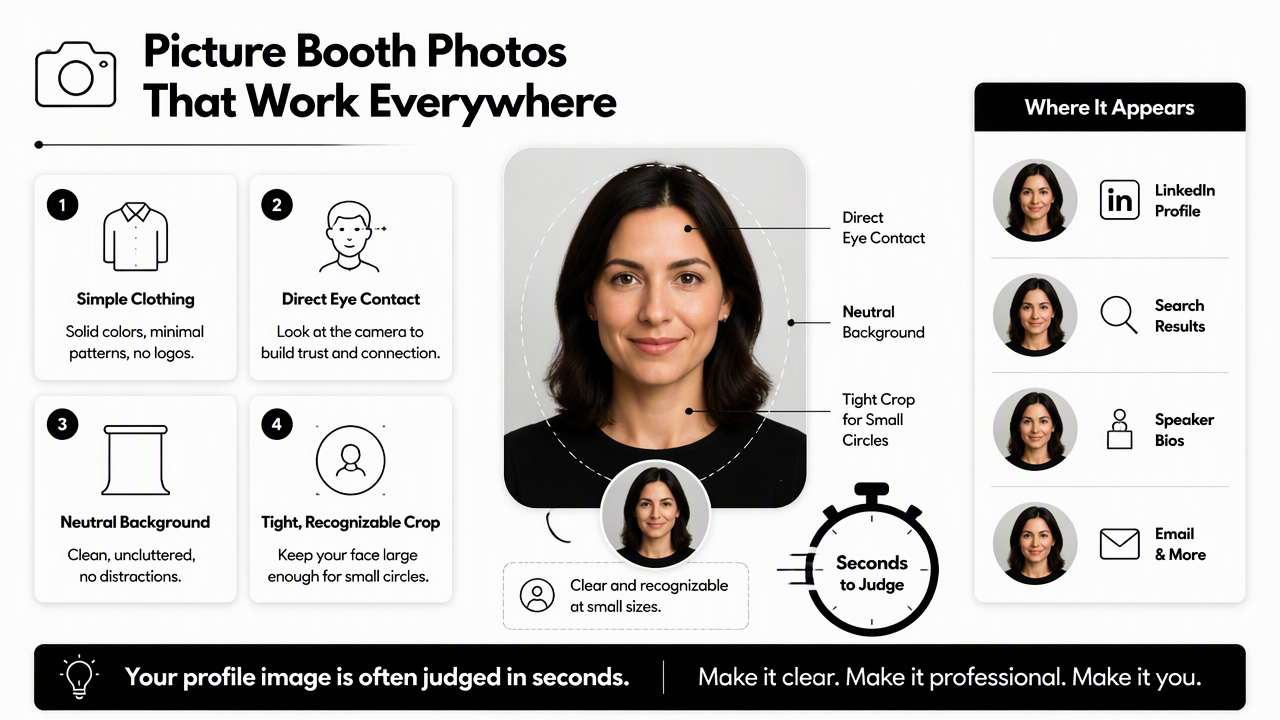
A professional profile image is often judged in seconds. It appears beside job titles, search results, speaker bios, email signatures, and team pages. That means the photo should be clear before it is artistic.
A 2024 headshot preparation guide from London photographer Koby Inc. notes that layering can photograph well and minimalist accessories help keep attention on the face. That guidance transfers well to booth photos because small spaces, fixed lighting, and automated timing leave little room for correction.
Best styling choices before stepping into the booth
- Choose a solid top in navy, charcoal, cream, forest green, burgundy, or another flattering mid-tone.
- Add a simple jacket, cardigan, overshirt, or structured layer if it matches the role.
- Keep jewelry, glasses, and accessories clean and low-glare.
- Smooth collars, necklines, and hair before the first shot.
- Face the camera directly, then angle the shoulders slightly for shape.
- Take at least one frame with a natural smile and one with a calm, neutral expression.
Patterns can work, but tight stripes and tiny checks may create visual noise. Logos should be avoided unless the profile represents a founder, creator brand, team, or product community where the logo has clear meaning.
Company bios usually benefit from consistency. If a whole team uses booth images at an event, the booth should have one backdrop, the same lighting setup, and a shared crop style. A consistent set looks more trustworthy than a mix of random portraits.
LinkedIn versus creator profile styling
| Profile use | Best booth style | Main risk to avoid |
|---|---|---|
| Clean headshot, business-casual styling, clear eye contact | Looking like an event snapshot | |
| Company bio | Consistent crop, neutral background, polished clothing | Mismatched team images |
| Newsletter author photo | Warm expression, simple crop, strong face visibility | Overly corporate tone |
| Instagram creator profile | More personality, brand color, natural smile | Too much clutter at small size |
| Dating profile | Authentic expression, approachable styling | Over-edited or overly formal look |
For creators, the booth image can carry more personality. A trainer or health creator may prefer an image that feels energetic but still sharp, while a newsletter writer may need warmth and authority. Looktara supports these different uses, including profile image workflows for fitness newsletter avatars and social-first professional images.
Which booth photo should be rejected for professional use?
A booth photo should be rejected for professional use when lighting distorts the face, the crop hides key features, the background competes for attention, or the mood feels disconnected from the intended role.
The easiest test is thumbnail clarity. If the face, eyes, and expression are not clear when the image is reduced to a small circle, the photo will underperform on most professional platforms. This applies even when the full-size version looks fun.
Digital skills research by Sonia Livingstone, Giovanna Mascheroni, and Mariya Stoilova reviewed outcomes of digital skills for young people's lives and wellbeing. The broader point for profile photos is practical: digital presentation is a skill, and choosing the right image is part of managing online identity.
Common rejection signs
- Harsh flash: shiny forehead, blown-out cheeks, or eyes lost in shadow.
- Party context: drinks, novelty props, crowded backgrounds, or event signage.
- Face obstruction: sunglasses, masks, hands, microphones, or heavy hair across the eyes.
- Awkward crop: chin too low, forehead cut off, or face too far from the camera.
- Extreme expression: duck face, exaggerated laugh, or ironic pose.
- Heavy filter: plastic skin, fake blur, color cast, or beauty effect that changes facial features.
A photo can still be valuable even if it is not professional-profile material. The same image may work well for Instagram Stories, a personal post, a dating app prompt, or a behind-the-scenes creator update.
Rule of thumb: If the image needs an explanation to feel appropriate, it probably should not be the main professional profile photo.
When casual is the better category
Casual booth photos often shine because they feel spontaneous. That strength can become a weakness on LinkedIn, a consulting page, or an investor deck. The image may suggest energy, but not always reliability.
Dating profiles and creator accounts allow more emotion and context. A warm laugh or slightly playful pose can help, as long as the face remains clear and the photo feels authentic. For fitness and lifestyle creators who need platform-specific polish, a fitness Instagram profile picture generator may better match the expectations of social discovery.
How should booth photos be cropped, edited, and exported?
Booth photos should be cropped into a head-and-shoulders frame, edited lightly for brightness and color balance, and exported in a clean square format that still works when displayed as a circle.
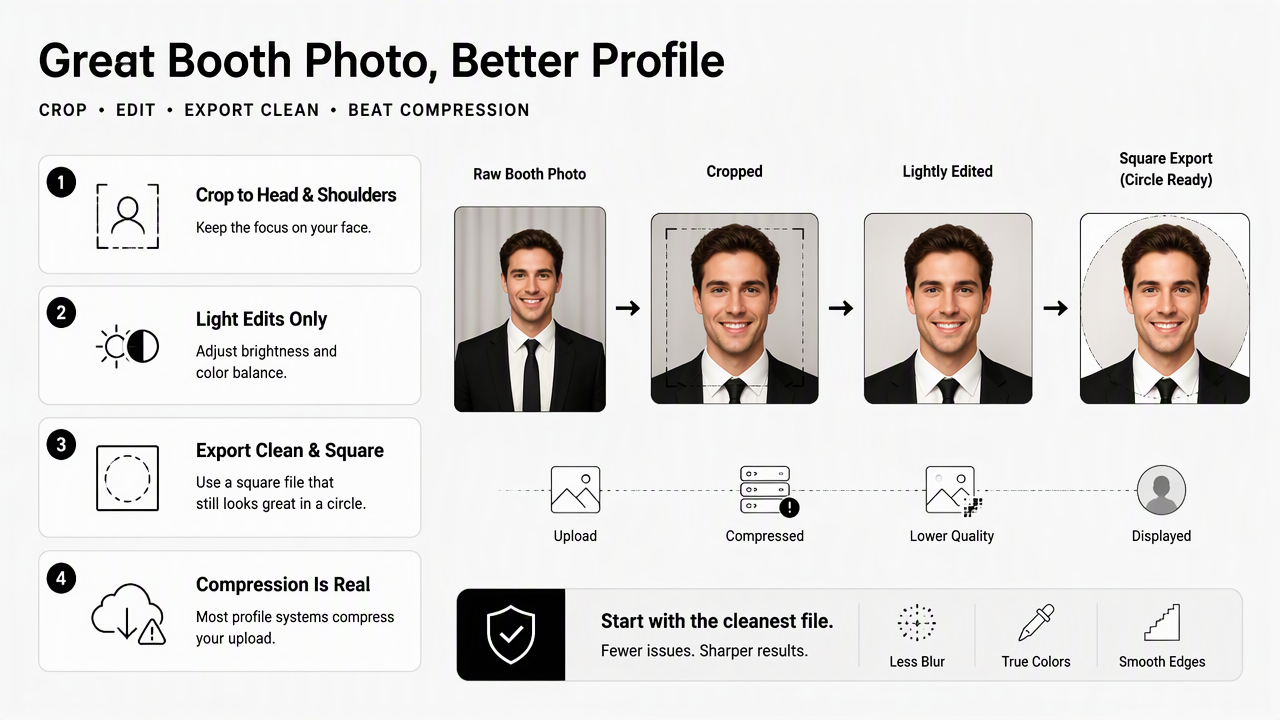
Most profile systems compress uploads. Starting with the cleanest available file reduces blur, color shifts, and jagged edges after upload. A scan of a printed booth strip can work, but a direct digital file is usually better.
Editing should improve clarity, not rewrite the person. Natural skin texture, real hair shape, and normal facial structure help the final image feel credible.
Simple editing workflow
- Select the sharpest frame with the best eye contact.
- Crop to a square with the eyes slightly above center.
- Leave space around the head so circular crops do not cut hair or shoulders.
- Raise exposure only enough to make the face clear.
- Reduce strong color casts from booth curtains or flash.
- Remove temporary distractions, such as dust marks or red-eye, without changing identity.
- Export a high-quality JPEG or PNG for upload.
A slight background blur can help if the booth curtain has texture, but aggressive blur often looks artificial. Black-and-white booth photos can look stylish, yet color usually works better for recognition on job platforms.
For visual platforms where the profile photo supports a larger brand system, the crop can be more expressive. A coach or creator building visual consistency across boards may pair a booth-style portrait with branded graphics using a fitness Pinterest profile picture generator.
Recommended crop targets by use case
| Destination | Crop | Expression | Editing level |
|---|---|---|---|
| Square head-and-shoulders | Confident smile or calm neutral | Light correction only | |
| Company website | Consistent team crop | Friendly and steady | Match team style |
| Speaker bio | Slightly wider crop | Engaged and warm | Polished but natural |
| Creator profile | Face-forward crop with brand cue | Expressive but clear | Moderate color styling |
| Dating app | Natural close crop | Open and approachable | Minimal retouching |
The Looktara platform can help when the best booth frame has a good expression but lacks professional finish. It is most useful when the goal is a cleaner headshot look without scheduling a full shoot. For direct access, visit looktara.com and choose a style that matches the target profile rather than forcing every image into a corporate template.
FAQ: Picture booth profile photo choices
Picture booth profile photo decisions usually come down to platform fit, facial clarity, and whether the image feels intentional rather than accidental.
Can a photo booth picture be used on LinkedIn?
A photo booth picture can be used on LinkedIn if it looks like a clean headshot, not an event souvenir. The face should be sharp, the background should be simple, and the crop should work in a small circle. Business-casual styling and calm eye contact make the image feel more credible.
Are black-and-white booth photos professional enough?
Black-and-white booth photos can look professional when contrast is balanced and facial detail remains clear. They work best for creative roles, speakers, founders, and personal brands with a stylish visual identity. Color may be safer for corporate profiles because it supports faster recognition and feels less editorial.
Should a booth photo include props?
Props usually weaken a professional profile photo unless they clearly support the person's work. A microphone may fit a podcaster, and a subtle fitness cue may fit a trainer, but novelty glasses, signs, hats, and party props are better saved for casual social posts.
How many booth shots should be taken before choosing one?
Several frames should be taken because small changes in posture, blinking, and expression can make a major difference. A good set includes one smiling option, one neutral option, and one slightly angled pose. The final choice should be based on clarity and profile fit, not the funniest moment.
Conclusion
A strong booth image can become a polished profile photo when the expression is steady, the crop is clean, the light is even, and the background stays quiet. The practical next step is simple: choose the clearest frame, test it as a tiny circle, reject anything that feels like a party snapshot, then make only light edits. For a cleaner result from an existing image, Looktara can help turn a promising booth frame into a professional profile-ready portrait. Head to looktara.com with this picture booth photos style guide for professional profiles in mind and create a version that matches the platform, role, and personal brand.
Generated by EarlySEO.com