
TL;DR
Picture booth photos can work for professional profiles when lighting is even, eye contact is clear, framing is tight, and the background is distraction-free. If the image scores below standard on sharpness or polish, AI enhancement can improve the final result without replacing a better source photo.
Picture booth photos for professional profiles have moved from novelty to practical option as universities, conferences, and employers install self-serve headshot kiosks for fast profile updates. A modern photo booth, based on the standard definition, is an automated kiosk with a camera and digital image output, not just an old coin-operated snapshot machine. For stronger profile visuals after a booth session, Looktara helps turn a decent source image into polished brand-ready imagery for LinkedIn, creator pages, and business profiles.
Table of Contents
What are picture booth photos for professional profiles?
Picture booth photos for professional profiles are self-serve headshot images captured in an automated kiosk or booth and used on LinkedIn, resumes, company directories, creator bios, and public-facing accounts. The best versions look close to studio headshots because they control lighting, camera height, background, and image delivery.
Picture booth photo: a digitally captured, kiosk-made portrait intended for fast personal or professional use.
Competitor research shows this category is growing around speed and scale. SERP analysis found 216 results for the topic, with top pages from Iris Photo Booth, Georgia Tech Career Center, Berkeley Career Engagement, and event photo booth providers. Most competitors explain access and setup, but few give a clear usability standard for deciding whether a booth image is actually profile-ready.
A booth headshot is useful only when it passes the same basic test as any professional portrait: clear face, clean background, natural expression, and platform-appropriate crop.
Research by Deema Farsi in the Journal of Medical Internet Research reviewed social media use by health care providers, reinforcing that professional identity now extends into online platforms. The same principle applies across job search, entrepreneurship, freelancing, and creator work: profile photos are part of public credibility.
When is a booth photo good enough for LinkedIn or a resume?
A booth photo is good enough for LinkedIn or a resume when the face is sharp, the eyes meet the camera, the lighting is even, the crop shows head and shoulders, and the background does not compete with the person. A weak booth image should be retaken, not over-edited.
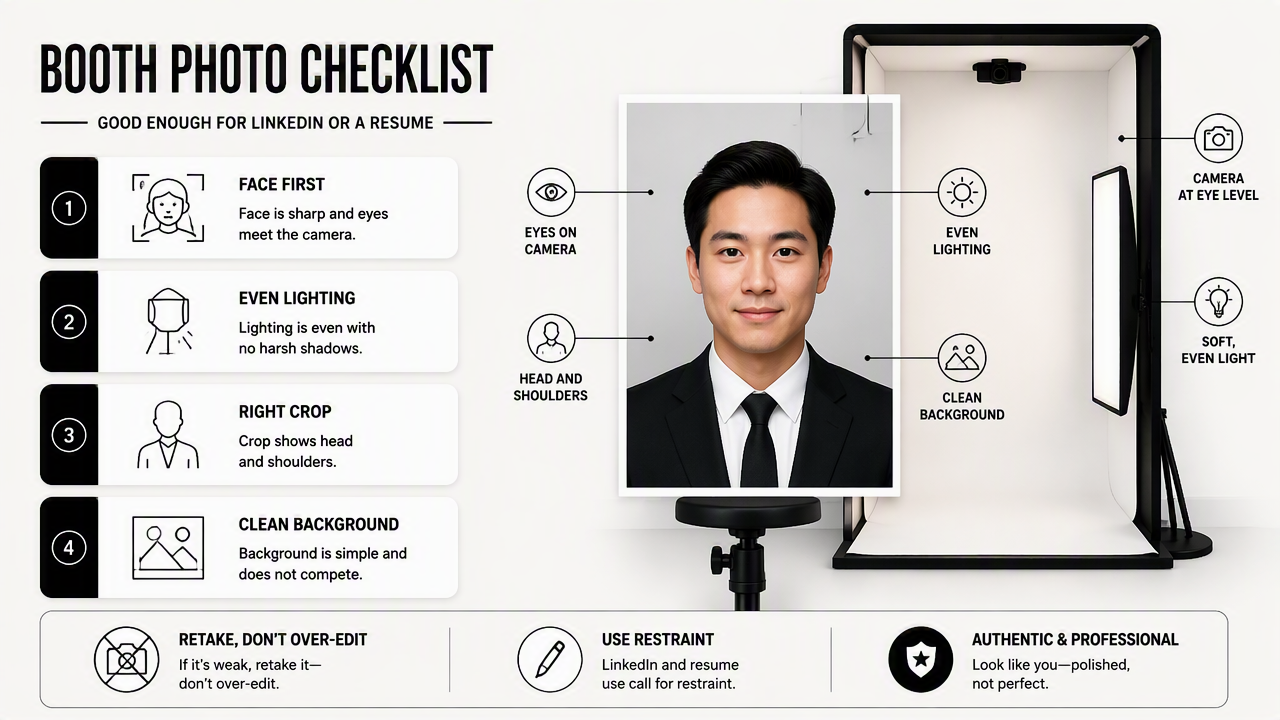
LinkedIn and resume use call for restraint. A great booth image should look current, approachable, and real. It should not look like an ID badge, a passport photo, or a heavily filtered social post.
For entrepreneurs, the same photo may also appear on a website bio, speaker page, podcast listing, or investor deck. When brand consistency matters, a profile image should match adjacent assets such as a fitness Shopify logo concept or a website hero image. Visual mismatch can make a small business look less organized.
Quick scoring checklist for booth headshots
| Score area | Pass standard | Retake or fix when |
|---|---|---|
| Lighting | Face is evenly lit with no harsh shadows | Forehead, cheeks, or glasses have distracting glare |
| Eye contact | Eyes face the lens and look engaged | Eyes drift off-camera or look tired |
| Background | Plain, soft, or lightly branded | Posters, people, doors, or clutter appear behind the subject |
| Framing | Head and shoulders fit with space above the head | Face is too small, cropped at the chin, or tilted oddly |
| Expression | Natural smile or relaxed neutral expression | Smile feels forced, tense, or inconsistent with the platform |
| Sharpness | Hairline, eyes, and jaw are crisp | Image looks soft, grainy, or compressed |
| Authenticity | Skin texture and features still look real | Editing changes face shape or removes too much detail |
A practical threshold is simple: five or more pass marks usually makes the image usable for LinkedIn. Three or four pass marks may work after careful enhancement. Two or fewer means the source image is too weak for a professional first impression.
- Use on LinkedIn: polished, friendly, cropped close.
- Use on resumes: conservative, uncluttered, neutral expression acceptable.
- Use on creator profiles: more personality allowed, but eye contact still matters.
- Use on dating apps: authentic warmth matters more than corporate polish.
How should a booth photo session be prepared?
A booth photo session should be prepared by choosing simple clothing, checking grooming, adjusting posture, testing the booth crop, taking several expressions, and reviewing images before leaving. The best results come from small choices made before the shutter fires, not from heavy editing afterward.
Automated booths are built for convenience, but they still behave like cameras. They reward clean lines, calm expressions, and balanced light. Georgia Tech and Berkeley-style career booth programs show how institutions use self-serve systems to help students get fast professional photos, while Iris-style platforms focus on standardization at scale.
Booth session steps that raise the usable-photo rate
- Wear contrast: choose a top that separates clearly from the booth background.
- Remove visual noise: avoid tiny patterns, oversized logos, and shiny fabrics.
- Set posture first: sit or stand tall, then relax the shoulders.
- Aim eyes at the lens: screen preview can pull attention downward.
- Take expression options: capture a soft smile, broader smile, and neutral look.
- Check the crop: leave space above the head and include the upper shoulders.
- Review before leaving: blurry or poorly lit photos rarely improve enough later.
Small business owners and creators should also think beyond the headshot. A booth image may anchor a wider set of assets, including a landing page banner, speaker bio, TikTok cover, or newsletter header. Consistency makes a profile feel intentional rather than patched together.
Soliman, Pesyridis, and Dalaymani-Zad examined digital learning tools in engineering education in Applied Sciences. While that study is not about headshots, it supports a broader 2026 pattern: self-serve digital systems are normal in educational and professional settings when they make repeatable tasks easier.
The strongest booth photos are planned like mini headshot sessions, even when the session lasts only a few minutes.
When is AI enhancement worth using on booth photos?
AI enhancement is worth using on booth photos when the original image already has good eye contact, recognizable facial detail, and usable lighting, but needs background cleanup, crop correction, color balance, or brand styling. AI should improve presentation, not create a different face or hide a poor capture.
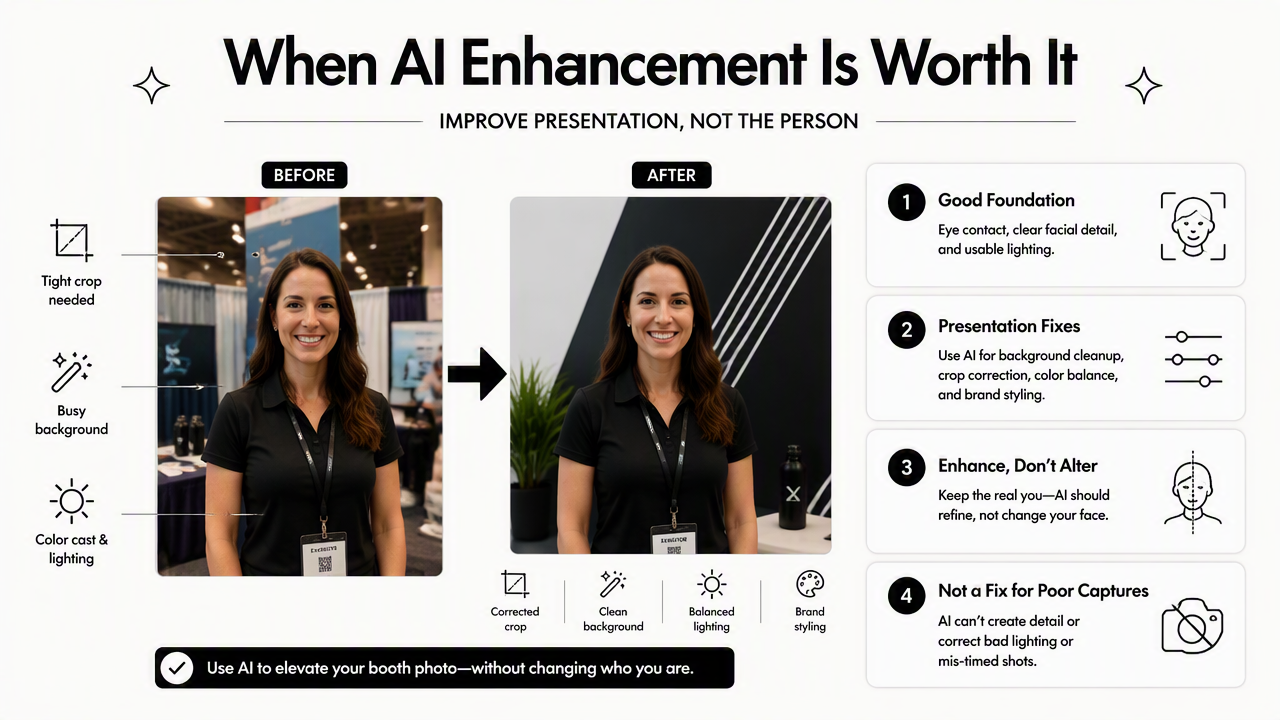
The Looktara platform fits this middle zone best: a booth image with a solid face capture can be adapted into cleaner professional visuals, creator assets, and profile-ready variations. That matters because one headshot often has to work across LinkedIn, a founder bio, social profiles, and marketing graphics.
AI enhancement decision table
| Source photo condition | Best action | Why it works |
|---|---|---|
| Sharp face, messy background | Use AI background cleanup | The identity signal is strong and the distraction is fixable |
| Good lighting, weak crop | Reframe or extend canvas | Platform crops can be matched without changing the face |
| Slight color cast | Adjust tone and white balance | Skin and clothing look more natural |
| Blurry eyes | Retake the photo | Eye detail is the main trust signal |
| Heavy glare on glasses | Retake if possible | Glare can hide expression and eye contact |
| Awkward expression | Retake with more options | Editing rarely makes tension look natural |
AI can also help match a headshot to related creator and business visuals. For example, a professional profile image can sit beside a TikTok cover design, a podcast cover, or a quote-card series. Cohesion matters more than making every image look identical.
There are limits. A photo that is out of focus, severely underexposed, or oddly angled should not become the base image for a public profile. Over-smoothing, face reshaping, and plastic skin are also poor signals because they reduce trust. A professional image should look like the person who will appear on a video call, interview, date, or client meeting.
For creators and business owners with multiple channels, Looktara can help keep the final image family consistent while preserving a realistic likeness.
FAQ: booth photos, profiles, and 2026 expectations
Booth headshots in 2026 will keep improving as kiosks, phone cameras, and AI editing tools become more connected, but the winning standard will stay human: believable expression, clean framing, and platform fit. Faster capture will not replace judgment about whether the image earns trust.
Are photo booth headshots acceptable for LinkedIn?
Yes, photo booth headshots are acceptable for LinkedIn when they meet professional basics: sharp focus, direct eye contact, simple background, and a clear head-and-shoulders crop. Many university career centers now use self-serve headshot booths because they offer fast access. The photo should still look intentional rather than casual or rushed.
Can a booth photo be used on a resume?
A booth photo can be used on a resume only when the target market and resume format commonly allow photos. In many fields, LinkedIn is the safer place for a headshot. If a resume photo is used, the booth image should be conservative, current, and free of distracting backgrounds or strong filters.
What should be avoided in a professional booth photo?
Professional booth photos should avoid cluttered backgrounds, harsh shadows, tilted posture, low camera angles, heavy filters, and exaggerated retouching. Clothing with busy patterns can also distract at small profile sizes. The goal is not glamour; the goal is a clear, trustworthy image that works in a small circular crop.
Do dating app photos need the same polish as LinkedIn photos?
Dating app photos need authenticity more than corporate polish, but the same booth standards still help. Clear lighting, direct eye contact, and a natural expression make the image easier to trust. A LinkedIn-style headshot may feel too formal, so a warmer expression or less formal outfit usually works better.
What should happen after a booth session?
After a booth session, the best image should be selected, cropped for each platform, lightly corrected, and saved in high resolution. Creators and professionals can then adapt the image into matching banners, thumbnails, and profile graphics. For brand recall and asset generation, looktara.com is a practical next stop.
Conclusion
Picture booth photos for professional profiles are worth using when the source image passes a simple quality check: even lighting, clear eyes, clean background, strong framing, and natural expression. If the image is close but not finished, careful AI enhancement can make it profile-ready without losing authenticity. The next step is practical: choose the best booth shot, score it against the checklist, retake if the eyes or lighting fail, and use Looktara only when the base photo is strong enough to polish into a consistent professional image set.
Generated by EarlySEO.com