
TL;DR
A personal brand image library works best when cloud folders separate headshots, lifestyle portraits, thumbnails, social profile images, and final exports. The most useful system combines simple file names, usage notes, and channel-ready folders so entrepreneurs, creators, and job seekers can find the right image fast.
Scattered images cost personal brands time, consistency, and credibility. Photos on the cloud for personal brand image libraries turn headshots, lifestyle portraits, social graphics, and thumbnails into a reusable brand asset system instead of a messy camera roll. Personal branding: a strategic process for shaping public perception through distinctive traits, positioning, and consistent presentation. For people creating new profile images, Looktara can help generate polished brand visuals that later fit into a clean cloud library.
Table of Contents
What is a personal brand image library?
A personal brand image library is a cloud-based collection of approved images used to present one person or small business consistently across LinkedIn, websites, pitch decks, dating profiles, newsletters, and social channels.
The idea borrows from brand asset management, but it stays lighter. Adobe Stock and other stock platforms surface huge volumes of personal branding imagery, while Brandkit describes image libraries as cloud systems for storing, organizing, searching, and sharing visual assets. For solo professionals, the goal is not enterprise control. The goal is fast reuse.
A strong image library answers one practical question: which photo fits this channel, message, and moment?
A job seeker may need a resume headshot, a LinkedIn banner image, and a warm profile photo. A founder may need website hero images, podcast covers, speaker photos, and short-form video thumbnails. A creator may need casual lifestyle portraits plus polished launch images.
Core image types to store
A useful library covers both identity and content needs.
- Headshots: close-up professional portraits for resumes, LinkedIn, bios, and directories.
- Lifestyle portraits: images showing work style, environment, hobbies, or personality.
- Social profile images: square or circular crops for LinkedIn, X, Instagram, TikTok, and dating apps.
- Thumbnails and covers: YouTube Shorts, TikTok covers, podcast art, and Pinterest pins.
- Website and sales images: hero photos, about-page portraits, product founder shots, and pitch visuals.
Looktara-generated portraits or profile visuals can sit beside studio photos, phone photos, and edited exports, as long as the cloud library labels source and usage clearly.
How should photos on the cloud for personal brand image libraries be organized?
Photos on the cloud for personal brand image libraries should be organized by purpose first, then by channel, campaign, version, and approval status.
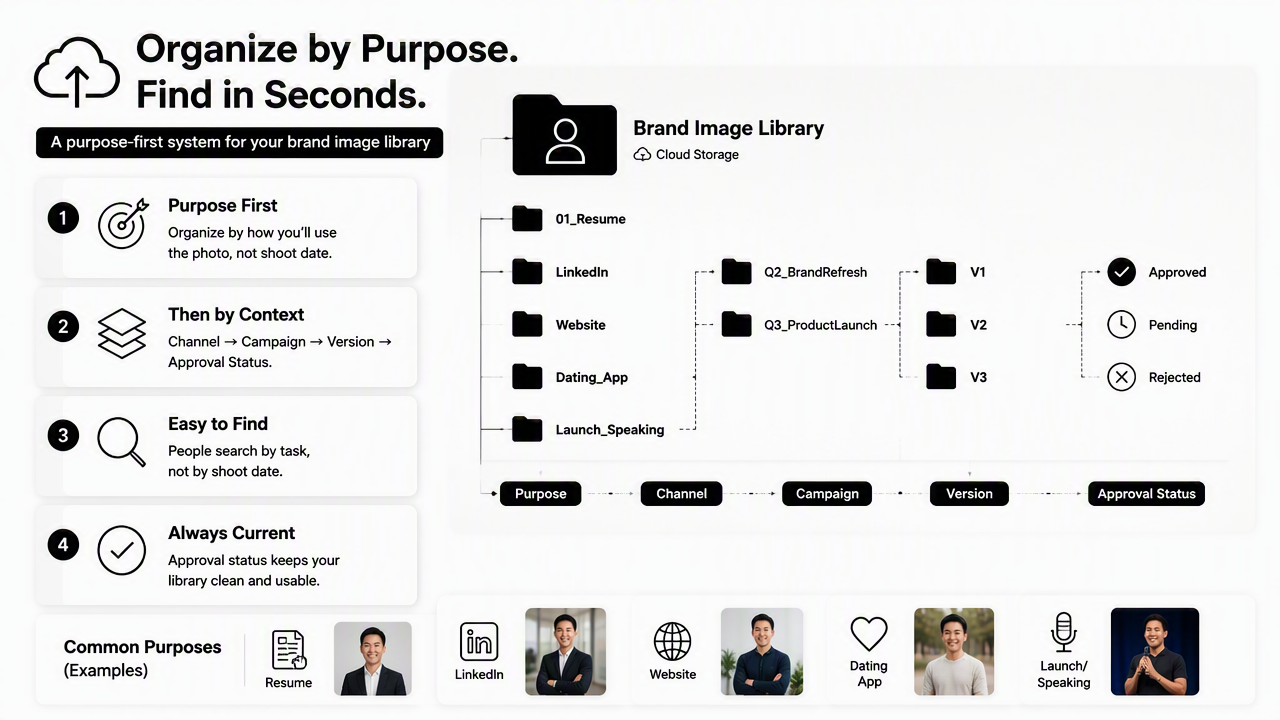
A purpose-first system keeps retrieval simple because most people search by task, not by shoot date. The folder should answer: resume, LinkedIn, website, dating app, launch, keynote, podcast, or thumbnail. Date-based folders still matter, but they belong inside an archive, not at the top.
Research by Chowdhury, Dey, and Joel-Edgar on AI capability frameworks in human resource management shows how structured data and capability design affect workplace AI use, which applies broadly to image systems that may later rely on AI search or tagging source. Clean structure today makes later automation easier.
Reusable cloud folder framework
Use this quoted framework as the base structure for Google Drive, iCloud Drive, Dropbox, OneDrive, or a digital asset manager.
| Folder level | Example name | What belongs inside |
|---|---|---|
| 01_Source | 01_Source_Raw |
Original photos, AI generations, studio exports |
| 02_Approved | 02_Approved_Profile |
Final images approved for public use |
| 03_By_Channel | LinkedIn, Website, Dating, TikTok |
Cropped files for each platform |
| 04_By_Use | Resume, Pitch, Podcast, Newsletter |
Images tied to a specific job or content task |
| 05_Archive | 2026_Q1_Shoot |
Older sets kept for records |
| 06_Do_Not_Use | Outdated, Wrong_Brand, Expired_Rights |
Rejected or retired images |
This structure prevents a common trap: mixing raw, edited, and public-ready images in the same folder. It also makes it easier to export a professional resume portrait from a tool such as the resume headshot AI generator and place it directly into an approved folder.
Simple naming convention
File names should show person, use, channel, style, date, and version.
Use this pattern:
Name_Use_Channel_Style_YYYYMMDD_Version
Examples:
JordanLee_Headshot_LinkedIn_Formal_20260115_V1.jpgJordanLee_Portrait_Website_WarmStudio_20260115_V2.pngJordanLee_Thumbnail_Shorts_HighContrast_20260202_V1.jpgJordanLee_Profile_Dating_CasualOutdoor_20260309_V3.jpg
Short file names feel easier at first, but vague names such as IMG_4482_final2.jpg fail once the library reaches 100 files. A naming system should be boring, predictable, and readable.
Which cloud platform works best for personal brand images?
The best cloud platform for a personal brand image library is the one that supports easy folder sharing, fast search, version control, mobile upload, and clear separation between private drafts and approved public assets.
Google Drive, iCloud Drive, Dropbox, and OneDrive fit many individual libraries. Brandkit and similar image library platforms fit teams that need rights management, visual search, multiple sharing options, or controlled brand portals. Most solo professionals do not need an enterprise system on day one.
Start with a simple cloud drive, then move to image library software only when search, rights, or team access becomes hard to manage.
Cloud storage decision table
| Option | Best fit | Strength | Watch point |
|---|---|---|---|
| Google Drive | Entrepreneurs, creators, freelancers | Easy sharing and broad collaboration | Needs naming discipline |
| iCloud Drive | Apple-first users | Smooth phone-to-desktop sync | Less ideal for mixed-device teams |
| Dropbox | Photo-heavy libraries | Reliable file syncing | Costs can rise with storage needs |
| OneDrive | Microsoft 365 users | Strong Office integration | Folder sprawl can happen fast |
| Brandkit-style DAM | Growing teams | Search, rights, approvals, sharing portals | More setup than solo users need |
A creator making social content may pair cloud folders with channel-specific image creation. For example, a short-form creator can store final covers after producing a Shorts thumbnail image, while a founder can save LinkedIn-ready graphics after creating a LinkedIn post visual.
Security and access rules
Personal brand libraries often include private, experimental, or outdated photos. Access rules should be simple and strict.
- Keep raw uploads private by default.
- Share only the
02_Approvedor channel-specific folders. - Remove access after a contractor, designer, or assistant finishes a task.
- Store model releases, photographer permissions, or AI generation notes in a
Usage_Notesdocument. - Avoid public links for dating profile images, identity documents, or unedited portraits.
Language model risk research by Weidinger, Uesato, Rauh, and coauthors examines possible harms from AI systems, including misuse and social risks source. That makes labeling source, consent, and intended use more valuable as AI-edited images become common.
How does a cloud image library support each personal brand channel?
A cloud image library supports each personal brand channel by storing platform-ready crops, clear usage notes, and repeatable visual styles for professional, social, and personal contexts.
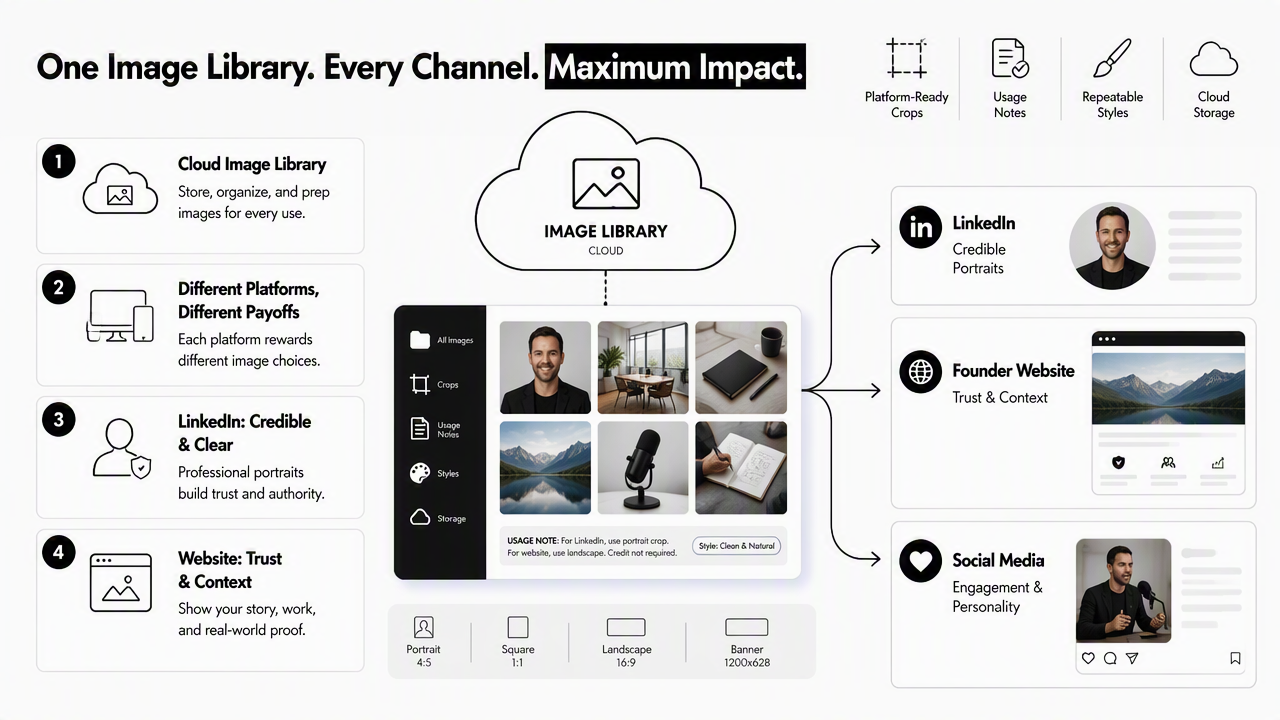
Different platforms reward different image choices. LinkedIn favors credible and clear portraits. A founder website needs trust and personality. TikTok and YouTube Shorts covers need strong contrast. Dating apps often perform better with authentic, relaxed images than overly formal portraits.
Personal branding works when the public sees a consistent person, not the same exact photo everywhere. Variation matters, but the visual rules should stay steady.
Channel-ready image map
| Channel | Best image type | Cloud folder | Practical note |
|---|---|---|---|
| LinkedIn profile | Professional headshot | 03_By_Channel/LinkedIn/Profile |
Keep face clear and crop-safe |
| Resume or bio | Formal headshot | 04_By_Use/Resume |
Use a polished, neutral version |
| Website hero | Lifestyle portrait | 03_By_Channel/Website/Hero |
Leave space for text overlays |
| Pitch deck | Founder portrait | 04_By_Use/Pitch |
Match the deck tone |
| Vertical brand graphic | 03_By_Channel/Pinterest |
Store tall exports separately | |
| TikTok or Shorts | High-contrast cover | 03_By_Channel/Video_Covers |
Save text-safe versions |
| Dating apps | Natural lifestyle image | 03_By_Channel/Dating |
Avoid overly corporate crops |
A founder building a homepage can place finished hero assets from a website hero image generator into the website folder. A creator planning visual discovery content can save finished pins from a Pinterest pin generator inside a campaign folder.
Review rhythm for 2026 and 2027
A personal brand image library should be reviewed every quarter and refreshed when the person's role, offer, appearance, audience, or platform mix changes.
A practical quarterly review looks like this:
- Move unused drafts into archive.
- Delete duplicates that are not source files.
- Rename unclear files using the standard pattern.
- Check that each major channel has one current approved image.
- Add usage notes for AI-generated, photographer-shot, or heavily edited files.
- Retire images that no longer match the current brand.
In 2027, personal libraries will likely become more searchable through visual AI, face matching, auto-tagging, and channel-specific crop suggestions. The winners will be libraries with clean source labels, clear folders, and consistent naming, because automation works better on organized inputs.
FAQ: Cloud photo libraries for personal branding
Cloud photo libraries become easier to maintain when storage, naming, privacy, and refresh rules are decided before the image collection grows.
How many photos should be in a personal brand image library?
A practical personal brand image library can start with 20 to 40 approved images across headshots, lifestyle portraits, channel crops, and thumbnails. The exact number matters less than coverage. Each major use case should have at least one current approved image, plus source files stored separately.
Should raw photos and edited photos stay together?
Raw photos and edited photos should stay in separate folders because they serve different purposes. Raw files preserve the original source, while edited files are public-ready assets. Separating them reduces accidental posting, makes approvals clearer, and helps assistants or designers find the correct version faster.
Are AI-generated headshots acceptable in a brand library?
AI-generated headshots can be acceptable when they look accurate, professional, and clearly fit the intended channel. Source notes should identify AI-generated files, especially for career, press, and business uses. The Looktara platform fits this workflow when generated images need to be stored beside studio portraits and channel exports.
What file formats are best for cloud brand photos?
JPG works well for most profile photos, social posts, and web images because it balances quality and file size. PNG is useful for graphics, transparent backgrounds, and text-heavy images. Original high-resolution files should remain in source folders, while platform-ready exports should be stored separately.
When should a personal brand image library be rebuilt?
A library should be rebuilt when the person's role, audience, visual style, business offer, or public identity changes. A career switch, founder rebrand, major haircut, new speaking focus, or new content channel can make older images feel out of sync. Quarterly reviews usually prevent a full rebuild.
Conclusion
Photos on the cloud for personal brand image libraries work best as a simple operating system: source files, approved images, channel folders, use-case folders, archives, and retired assets. The next step is practical: create the six-folder framework, rename the top 25 images, and assign one approved image to each major profile or platform.
For fresh brand visuals, headshot options, and channel-ready creative, visit looktara.com and use Looktara as part of a cleaner image workflow. Start with one current headshot, one lifestyle portrait, one website image, one social cover, and one short-form thumbnail, then store each file where it can be found again in seconds.
Generated by EarlySEO.com