
TL;DR
AI portraits usually work better for distributed teams, consistent internal directories, and low-friction retakes. Photo booths still fit on-site hiring events, conferences, and badge pickup days where staff already gather in one place.
Employee badge photos now affect security, internal trust, LinkedIn presence, and brand consistency, not just ID cards. The comparison of photobooth photo booth for employee badges vs AI portraits matters because hybrid work has made the old "stand in line on badge day" workflow harder to manage. Photo booth: according to the Wikipedia definition of a photo booth, a photo booth is a vending machine or modern kiosk with an automated camera and processor, and most are now digital. AI portrait: an AI portrait is a generated or enhanced professional image created from uploaded face photos, prompts, and model guidance. For teams that need polished, repeatable headshots across locations, Looktara gives badge and profile programs a faster AI-first path while keeping the process friendly for employees.
Table of Contents
What is the difference between a badge photo booth and an AI portrait workflow?
A badge photo booth captures employees at a physical kiosk, while an AI portrait workflow creates standardized professional images from uploaded photos. The main difference is operational: photo booths depend on place, timing, equipment, and staffing; AI portraits depend on image input quality, consent, review rules, and brand settings.
SERP research for this topic shows about 35,000 results, but the competitor benchmark article averaged only 446 words and focused mostly on event name badges. That leaves major unanswered questions for HR, security, people operations, and remote-work teams.
Key insight: the best choice is less about camera technology and more about the employee workflow around capture, approval, storage, and updates.
Core terminology for badge-image planning
Employee badge photo: a face image used on a physical or digital ID credential for workplace identification.
Internal directory portrait: a professional image used in tools such as HRIS platforms, intranets, Slack, Microsoft Teams, Google Workspace, or org charts.
Retake workflow: the policy and process for replacing an unsatisfactory or outdated photo.
Brand-consistent portrait: an image that follows agreed rules for crop, background, lighting style, clothing tone, and expression.
Side-by-side workflow comparison
| Criteria | Physical photo booth | AI portrait workflow |
|---|---|---|
| Best fit | On-site badge days, conferences, campuses | Hybrid teams, remote onboarding, directories |
| Capture location | Fixed kiosk or event station | Employee uploads from any location |
| Consistency | Strong if lighting and staff are controlled | Strong if prompts, templates, and review rules are consistent |
| Retakes | Requires another booth session or staff help | Usually easier, since new source photos can be submitted |
| Remote employees | Difficult without mailing badges or local sessions | Natural fit for distributed teams |
| Per-person friction | Queue, schedule, and physical presence | Upload, review, approve |
| Brand control | Camera setup and background control | Style presets, crops, and output rules |
| Badge security fit | Strong for live identity checks | Strong when paired with HR verification and approval |
When does a physical photo booth still make sense for employee badges?
A physical booth still makes sense when most employees are already in one place and the badge process needs live verification. Campus employers, factories, hospitals, trade shows, universities, and corporate events can capture many faces quickly when attendance is predictable and staff can check identity in person.
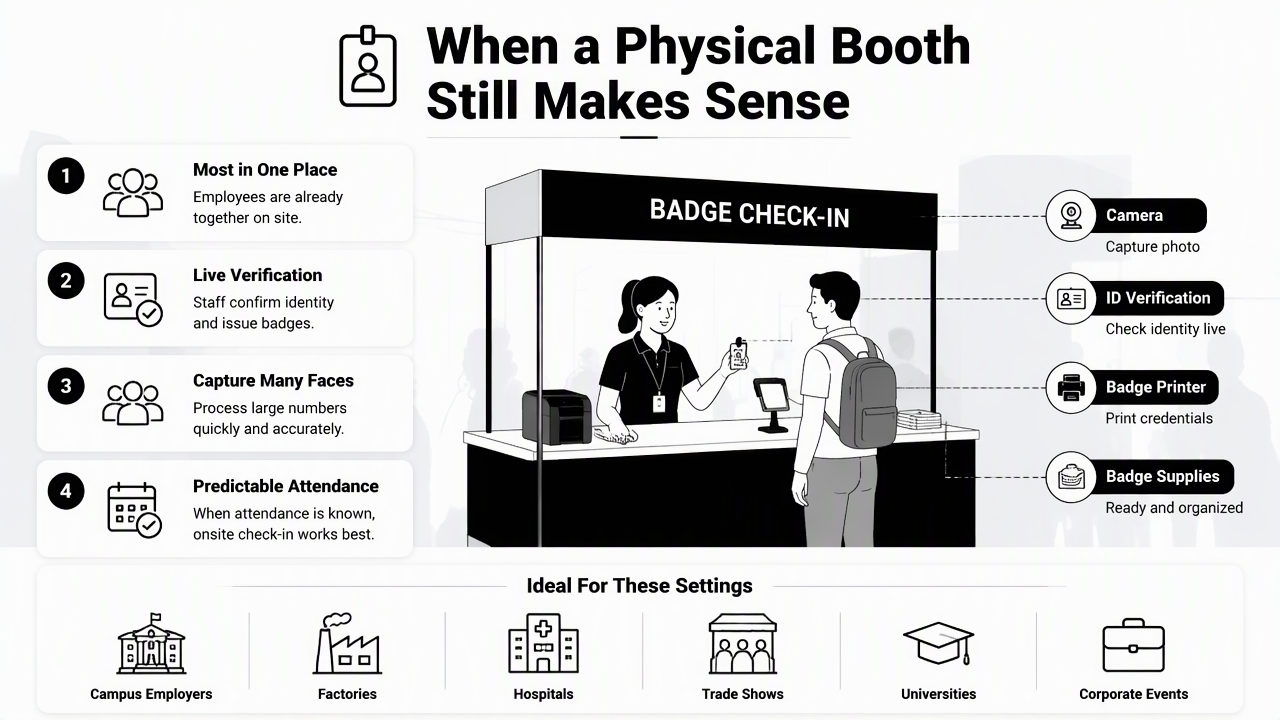
Physical booths also create a clear chain of custody. A badge team can confirm the person, capture the image, print the credential, and hand it over in one controlled workflow. That simplicity matters for facilities where access control is the main requirement.
The event-photo-booth market also keeps adding AI features. SERP data includes 2026 content about generative AI photo booths that take a guest photo and rebuild it through a prompt or model. For badges, though, novelty effects need careful limits because IDs should identify a real person clearly.
Photo booth advantages for on-site programs
- Live identity confirmation: security staff can compare the person, employee record, and badge data at the same time.
- Predictable equipment: a controlled camera, background, and printer reduce random image quality problems.
- Fast event throughput: booths can work well when badge pickup is already part of orientation or conference registration.
- Low employee decision load: staff simply stand, look at the camera, and receive a finished result.
A booth is strongest when the badge is the end product. It becomes weaker when the same image must also serve as a polished directory portrait, sales bio photo, LinkedIn image, or media profile.
Photo booth tradeoffs HR teams should budget for
Booths bring logistical costs that do not always show up in the camera rental price. Space, queue management, staff time, missed appointments, lighting tests, printer supplies, and rescheduled employees all affect the real program cost.
Remote employees create the hardest gap. A company can ship badges, ask for local office visits, or accept mismatched self-submitted images, but each workaround adds coordination. Retakes can also become political when one employee gets a better-looking result than another because the session happened on a different day.
When are AI portraits better for badges and directories?
AI portraits are better when the organization needs consistent images across locations, repeatable retakes, and profile-ready photos beyond the badge itself. The workflow works especially well for remote employees, freelancers, executives, recruiters, consultants, and sales teams that need the same visual standard in several systems.
The strongest use case is not replacing identity checks. The stronger use case is separating portrait creation from badge issuance. HR can approve the person through existing systems, then use a standardized AI portrait for the directory, company profile, or badge design.
People-facing teams often need images outside the badge system. For LinkedIn-style professional presentation, a page such as AI product photos for LinkedIn-focused fitness branding shows how consistent commercial portrait style can support public-facing credibility. For social channels, AI product photos for Instagram fitness content illustrates the same image-standard idea in a more visual setting.
AI portrait advantages for distributed teams
- Set image rules first: crop, background, expression, clothing tone, and file dimensions should be documented before submissions start.
- Collect source images: employees submit clear face photos from approved angles and lighting conditions.
- Generate portrait options: the AI system creates badge-ready and directory-ready variations.
- Review for identity match: HR, security, or the employee record owner confirms the portrait still looks like the real person.
- Export to systems: approved files move into badge software, HRIS records, intranet profiles, and communication tools.
This process reduces the need for a single capture day. It also makes annual refreshes easier because employees can update images without waiting for a booth to return.
Where AI portraits need governance
AI portraits need written rules because badges are identity tools, not just brand assets. The image should not change facial structure, remove important identifying features, or create a style that makes recognition harder.
Privacy also needs attention. Teams should define where uploaded source photos go, who can approve outputs, how long files are retained, and whether portraits may be used for external marketing. Consent should be specific, plain-language, and separate from general HR paperwork.
Practical rule: AI can polish lighting, background, and styling, but employee badge portraits should preserve recognizable identity.
How Looktara handles AI portraits for employee image programs
Looktara fits employee image programs that need professional-looking portraits without gathering everyone around a kiosk. The Looktara platform is especially relevant when the same person needs a badge image, internal directory photo, and polished business profile asset from one guided workflow.
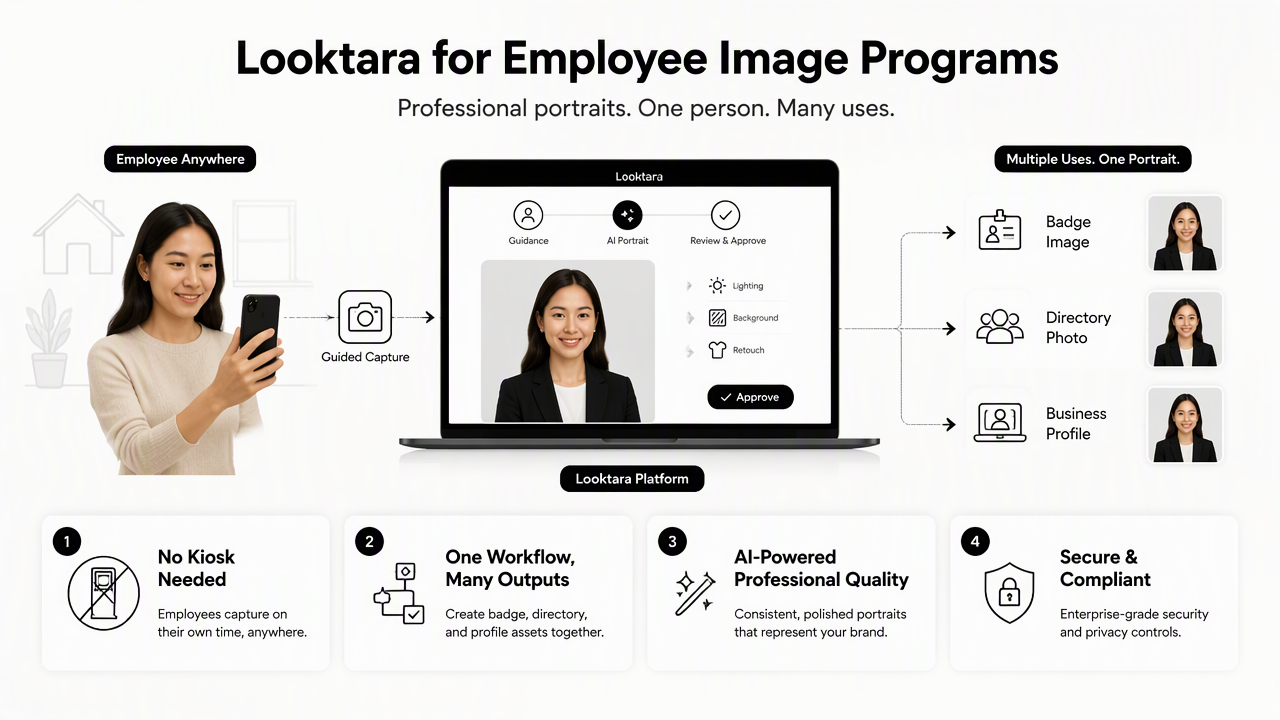
A good AI portrait program starts with repeatability. That means consistent crops, neutral backgrounds, realistic facial likeness, and easy output formats. Looktara supports this direction by focusing on professional image generation that can extend beyond a single ID card into broader personal branding.
For teams that publish staff photos in newsletters or internal announcements, AI product photos for newsletter-style fitness branding shows how controlled portrait imagery can support repeat visual formats. For teams that care about visual discovery or creator-style presentation, AI product photos for Pinterest-focused fitness content provides another example of channel-specific image consistency.
Who should pick which option?
| Organization need | Better choice | Reason |
|---|---|---|
| Single-location onboarding day | Photo booth | Live capture and badge handoff are efficient |
| Remote-first hiring | AI portraits | No travel, queue, or event setup is required |
| High-security access control | Photo booth plus approval process | Live identity checks can be built into issuance |
| Internal directory refresh | AI portraits | Consistency and retakes are easier at scale |
| Conference or trade-show badges | Photo booth | Attendees are already present |
| Executive or client-facing profiles | AI portraits | Images can match a professional brand standard |
| Annual photo refresh | AI portraits | Employees can submit updates without a new booth event |
Procurement checklist for 2026
- Identity accuracy: faces must remain recognizable, not idealized beyond real appearance.
- Consent: employees should know how source photos and final portraits will be used.
- Export needs: badge systems may require specific file sizes, crops, or formats.
- Retake policy: define how many revisions are allowed and who approves final images.
- Remote inclusion: the workflow should treat office and remote workers equally.
- Brand fit: backgrounds and clothing guidance should match the company's visual standards.
Looktara works best in this kind of planned rollout, where image quality, employee experience, and repeatable standards matter together.
FAQ: Badge photo booths and AI portraits
The most common questions focus on trust, consistency, cost control, and remote employee access. Short answers help teams set a policy before buying equipment, booking an event vendor, or selecting an AI portrait workflow.
Are AI portraits acceptable for employee badges?
AI portraits can be acceptable for employee badges when the final image remains recognizable, realistic, and approved against the employee record. They work best when paired with HR verification, clear consent, and a rule that AI may improve lighting or background but must not materially change identity.
Are photo booths cheaper than AI portraits?
A photo booth can look cheaper for a one-day event, but real cost depends on staffing, space, scheduling, reshoots, missed employees, and remote-worker handling. AI portraits may reduce coordination costs when teams are spread across cities or when images need frequent refreshes.
Can one image work for badges, directories, and LinkedIn?
One approved portrait can often support badges, directories, and professional profiles if the crop, resolution, and style are planned in advance. Badge images usually need tighter identity clarity, while LinkedIn and bios may allow more polished lighting and composition.
What should HR avoid with AI badge portraits?
HR should avoid outputs that change face shape, age, skin features, hairline, or other identity markers in a way that makes recognition less reliable. Teams should also avoid vague consent, unclear retention rules, and approving portraits without human review.
Conclusion
The practical answer to photobooth photo booth for employee badges vs AI portraits is based on workforce shape. A physical booth fits centralized, on-site issuance where live verification and immediate printing matter. AI portraits fit hybrid teams, directory refreshes, professional profiles, and repeatable retakes across locations.
A sensible 2026 plan is to run a small pilot before a full rollout: test 20 to 50 employees, compare approval time, retake volume, badge-system exports, and employee satisfaction, then choose the workflow that creates the least friction while preserving identity accuracy. For teams leaning toward an AI-first portrait standard, head to looktara.com and build a controlled portrait process before the next onboarding cycle.
Generated by EarlySEO.com