
TL;DR
AI headshots print best when the file is high resolution, commercially usable, lightly retouched, and previewed in the exact crop before ordering. A local photo shop can add value through color correction, paper selection, badge sizing, and proof checks, while an AI platform should supply print-ready images first.
A polished AI headshot can look sharp online and still fail on paper if the file is too small, over-retouched, or cropped without a print preview. Photo shoppe services for AI headshot prints matter because resumes, portfolios, ID badges, event materials, and storefront marketing all expose details that screens can hide. Looktara helps professionals create brand-ready AI headshots, then a local print provider can prepare the final physical output for real-world use.
Table of Contents
What are photo shoppe services for AI headshot prints?
Photo shoppe services for AI headshot prints are local or retail photo-printing services that turn AI-generated portraits into physical prints, badges, portfolio sheets, resume inserts, or marketing materials. The service usually covers file review, cropping, color correction, paper selection, retouching advice, and print proofing before final production.
AI-generated headshot: A synthetic or AI-assisted portrait made from uploaded photos or prompts, designed to resemble a professional studio headshot for digital or printed use.
A 2026 print workflow has two jobs. The AI platform should create a realistic, high-resolution portrait, and the photo shop should make sure that portrait survives paper, lighting, trimming, and handling.
SERP research for this topic found 71,500,000 results, but many ranking pages focus on headshot generation rather than printing. That gap matters because a LinkedIn-ready image is not automatically ready for a 5 x 7 portfolio print or laminated conference badge.
Key insight: AI headshot quality is judged twice, first on screen and then in print. The print stage needs its own checklist.
Common printed uses and shop requirements
Printed AI headshots serve different purposes, so the shop should match the file treatment to the final use.
| Print use | Best shop service | Detail to confirm |
|---|---|---|
| Resume or CV insert | Small-format photo print | Neutral crop and natural skin tone |
| Portfolio leave-behind | Matte or satin print | Consistent color across multiple copies |
| Company badge | Exact-size crop and lamination | Face centered inside badge template |
| Event speaker card | Proof print before batch run | Background does not band or blur |
| Local advertising | Enlarged print or flyer | File has enough resolution for size |
| Dating or social profile print | Lifestyle-style print | Image still looks authentic on paper |
How should AI headshot files be prepared before printing?
AI headshot files should be prepared for printing by checking resolution, file format, crop safety, realism, color, and commercial-use permissions before sending them to a photo shop. A print-ready file should look natural at full size, include enough pixels for the requested dimensions, and avoid last-minute edits at the counter.
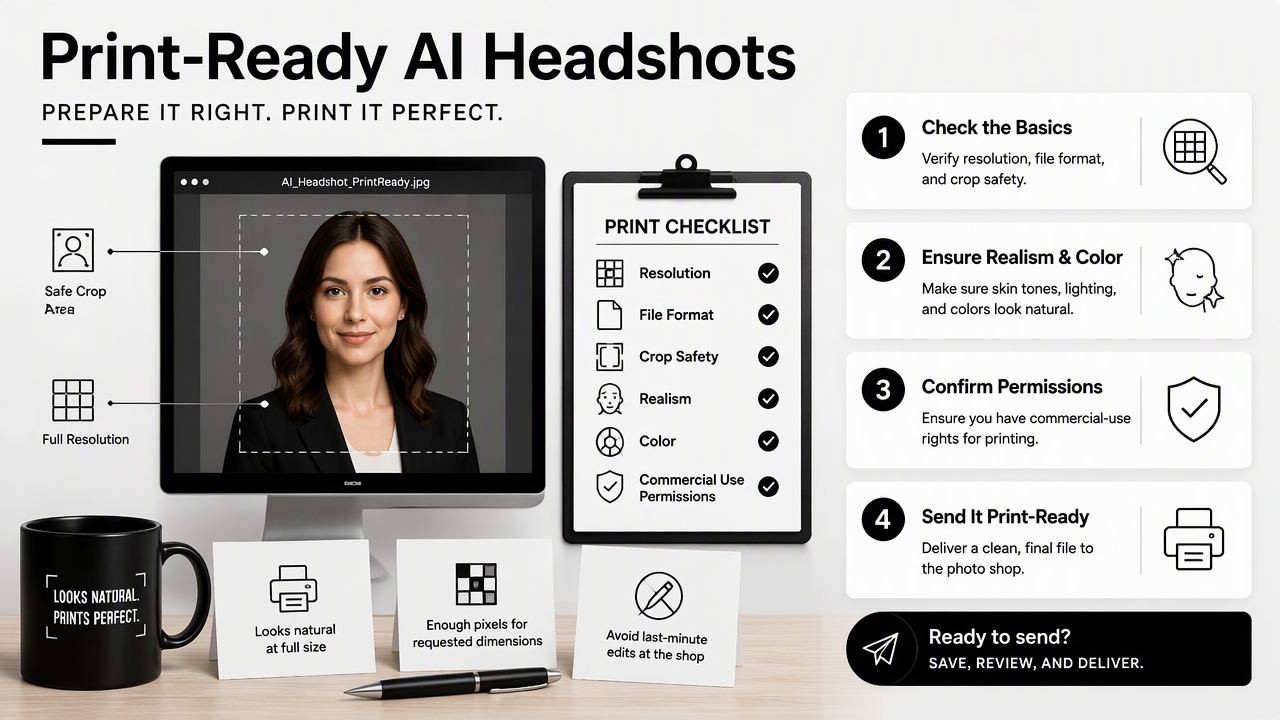
Professionals who need resume-ready portraits can start with an AI generator built for professional profile use, such as the fitness and resume headshot AI generator, when that style fits the role or personal brand. The stronger the source file, the less a print technician has to rescue later.
Pre-print file checklist
- Confirm the final size: A 2 x 2 badge image, 4 x 6 print, and 8 x 10 portfolio image need different crops.
- Check pixel dimensions: The image should have enough pixels for the print size. A shop can advise whether enlargement will soften the face.
- Use a common file type: High-quality JPEG works for most photo prints, while PNG or TIFF may help when transparency or heavier editing is involved.
- Inspect at 100 percent zoom: Teeth, eyes, hairlines, hands, collars, and glasses should look believable before printing.
- Keep edits light: Over-smoothing can look acceptable on a phone but artificial on glossy paper.
- Save an untouched backup: A customer should keep the original AI output and a separate print-adjusted copy.
- Verify usage rights: Commercial flyers, book covers, staff boards, and paid ads require files cleared for that use.
Some AI headshot competitors market speed heavily. Real-time analysis found one top-ranking competitor page centered on generating headshots in minutes, while review content compared tools such as Aragon.ai, Headshot Pro, Secta.ai, and professional photographers. Speed helps, but print success depends on file control after generation.
A good print file should require only small adjustments, not a full repair job at the photo counter.
What should a local photo shop check before producing AI headshot prints?
A local photo shop should check print size, resolution, crop previews, color balance, retouching limits, paper finish, and licensing needs before producing AI headshot prints. The best shops treat AI portraits like professional photo files, not novelty images, and they confirm the output before producing final copies.
Photo technicians can often spot issues that AI tools miss. Common examples include mismatched earrings, oddly sharp eyes, plastic-looking skin, distorted collar lines, or backgrounds that show banding when printed.
Questions to ask before ordering prints
| Checkpoint | Question for the shop | Why it matters |
|---|---|---|
| Resolution | Is the file large enough for the requested print size? | Prevents soft or pixelated output |
| Crop preview | Can the final trim be previewed before printing? | Avoids cutting off hair, shoulders, or badges |
| Color correction | Will the shop adjust warmth, contrast, and skin tone? | Screens and paper display color differently |
| Retouching | Are only minor fixes recommended? | Heavy edits can make AI artifacts worse |
| Paper choice | Should the print be matte, satin, or glossy? | Finish changes perceived sharpness and glare |
| Batch consistency | Can multiple copies be matched in color? | Helps team photos and event materials look uniform |
| Commercial use | Does the order need proof of file rights? | Reduces risk for ads, signage, and paid materials |
Local shops may also offer in-person proofing. That step is helpful for entrepreneurs ordering business cards, real estate flyers, or booth signage because small color shifts can affect brand trust.
When retouching helps and when it hurts
Retouching helps when a shop adjusts exposure, removes a small lint mark, softens glare, or corrects color. Retouching hurts when it changes facial structure, redraws eyes, reshapes hair, or hides obvious AI artifacts.
A practical rule works well: if the fix changes presentation, it may be safe; if the fix changes identity, the file should go back to the AI source or a human photographer.
- Good shop edits: brightness, crop, mild sharpening, color balance, paper-specific contrast.
- Risky shop edits: face reshaping, fake teeth, rebuilt ears, dramatic skin smoothing.
- Better source fixes: choosing a new AI headshot, regenerating with a cleaner input set, or using a more realistic style.
Print providers should not be expected to solve every AI problem. Their strongest value is turning a good file into a reliable physical result.
How does Looktara fit into the print workflow?
Looktara fits into the print workflow by helping create polished AI headshots before a local shop handles physical output, crop proofing, and paper selection. That split keeps the creative generation stage separate from the print-production stage, which gives job seekers, founders, freelancers, and creators more control.
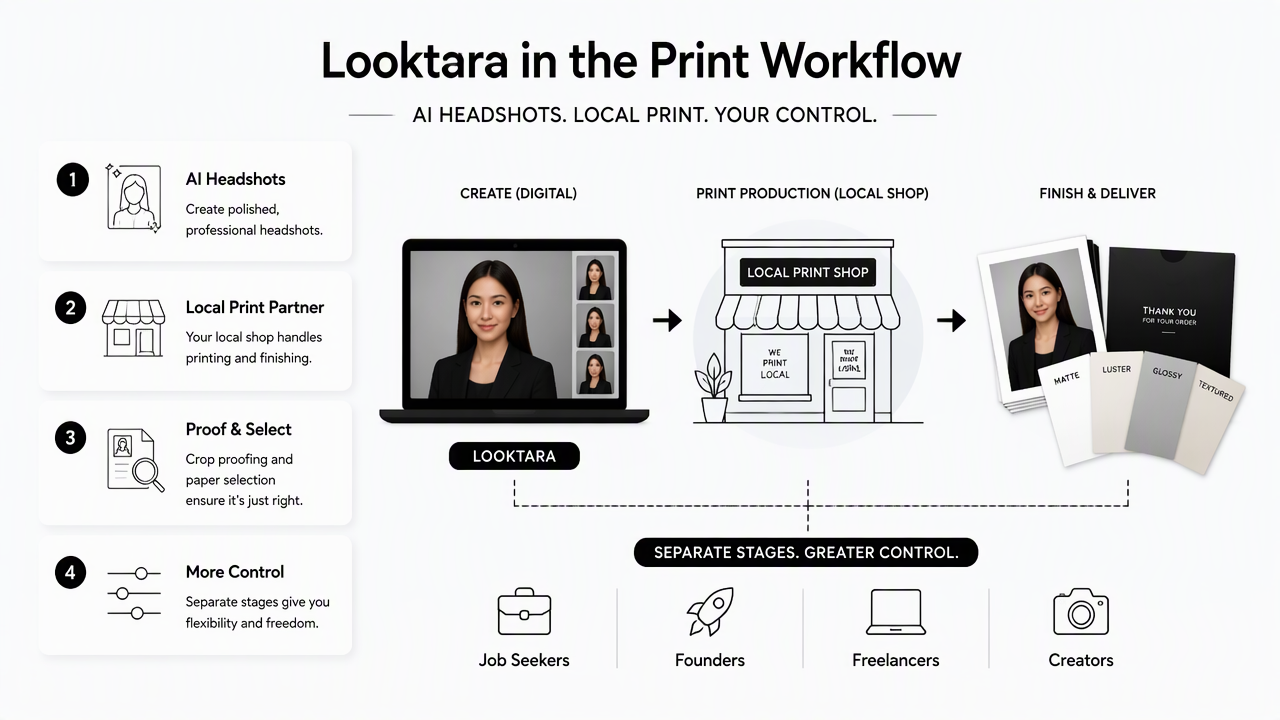
The Looktara platform is most useful near the beginning of the process, when the goal is choosing a professional-looking image that matches the intended use. A resume photo, speaker bio, founder page, and social profile may all need different expressions, outfits, and backgrounds.
For creators who need imagery beyond a formal headshot, product-style and social visuals can be developed through tools such as the Instagram product photo AI generator. That kind of brand consistency can make printed cards, media kits, and profile materials feel more unified.
AI platform vs photo shop responsibilities
| Task | AI headshot platform | Local photo shop |
|---|---|---|
| Create portrait options | Primary responsibility | Not usually responsible |
| Match role or brand style | Primary responsibility | Can advise after selection |
| Confirm print crop | Can export flexible images | Primary responsibility |
| Adjust paper color output | Not applicable | Primary responsibility |
| Produce badge or photo print | Not applicable | Primary responsibility |
| Spot visible artifacts | Shared responsibility | Shared responsibility |
A simple workflow keeps the process calm:
- Generate several headshot options.
- Pick the image that looks most natural, not just the most polished.
- Download the largest available file.
- Send the file to the shop with the intended print size.
- Review a crop proof or small test print before ordering multiples.
looktara.com is a good starting point for creating the digital headshot file before print decisions begin.
What should professionals expect from AI headshot printing in 2026?
Professionals should expect AI headshot printing in 2026 to become more practical, more brand-driven, and more dependent on clear file permissions. As AI portrait tools improve, local photo shops will likely spend less time fixing obvious artifacts and more time advising on paper, crops, color, and format.
The competitive field is already crowded. SERP analysis found an average competitor benchmark of 5,195 words among analyzed ranking pages, with many pages centered on AI headshot generators and app reviews. A shorter, print-focused checklist can be more useful for anyone already holding a headshot file and trying to produce physical materials.
2026 buying checklist for print orders
- Bring the largest available image file, not a screenshot.
- State the exact use: resume, badge, flyer, portfolio, dating profile print, or marketing handout.
- Request a crop preview for every final size.
- Ask whether color correction is included or billed separately.
- Choose matte or satin for professional materials where glare is a concern.
- Order one proof before ordering a large batch.
- Keep records showing that the file is approved for commercial use when used in paid marketing.
A useful next step is creating two versions of the same headshot: one optimized for digital profiles and one adjusted for printing. The digital version can stay brighter and tighter, while the print version may need more shoulder room and gentler contrast.
FAQ about AI headshot prints
What file type is best for AI headshot prints?
JPEG is usually the easiest file type for standard photo printing because most retail and local shops support it. PNG or TIFF can be useful when a designer or print technician needs more editing flexibility. The best choice depends on the shop workflow, print size, and whether the image needs extra correction.
Can AI headshots be used on resumes and business cards?
AI headshots can be used on resumes, business cards, and marketing materials when the image looks accurate and the file license allows that use. Commercial-use rights matter most for paid ads, brochures, signage, product packaging, and client-facing brand materials. A natural likeness is also important for trust.
Should a photo shop retouch an AI headshot before printing?
A photo shop should make light retouching adjustments only when they improve print quality without changing identity. Color correction, exposure fixes, and minor cleanup are usually reasonable. Face reshaping, heavy smoothing, or rebuilding distorted features can make the print feel less authentic and should be avoided.
Is a test print necessary for AI headshots?
A test print is highly useful when the headshot will appear in badges, portfolios, flyers, or large-format materials. Screens can hide noise, soft edges, and odd color shifts. One proof print gives the customer and shop a chance to correct crop, paper finish, and skin tone before producing the full order.
Conclusion
Photo shoppe services for AI headshot prints work best when the digital file is strong before it reaches the counter and the print provider checks the details that paper makes visible. The practical next step is to generate a realistic headshot, save the highest-quality file, confirm commercial-use rights, and ask a local shop for a crop proof before ordering final prints. For professionals who need a fresh source image first, Looktara can help create the AI headshot, and looktara.com is the simplest place to start before visiting a print shop.
Generated by EarlySEO.com