
TL;DR
Most professional headshots print best at 8x10 inches for portraits, 5x7 inches for press kits, and 2x3 or 2.125x3.375 inches for badges and cards. Files should be prepared at 300 pixels per inch, with extra background space for cropping across print and digital formats.
A strong headshot can look polished online and still fail in print if the crop ratio, pixel size, or paper format is wrong. The safest approach to photo print sizes for professional headshots is to start with the final use: event badge, speaker poster, press kit, office display, or framed portrait. For professionals who need polished digital headshots before ordering prints, Looktara can help create brand-ready imagery that fits modern profile and marketing needs.
Table of Contents
What are photo print sizes for professional headshots?
Photo print sizes for professional headshots are standard photographic paper dimensions used to reproduce a portrait cleanly for business, media, events, and display. Wikipedia defines standard photographic print sizes as commonly sold cut sheets for photographic printing, which makes format selection more predictable across labs and office printers.
Photo print size: a physical print dimension, such as 5x7 inches or 8x10 inches, used to output a headshot on photo paper.
Aspect ratio: the width-to-height relationship of an image, such as 4:5 for an 8x10 portrait or 5:7 for a 5x7 print.
PPI: pixels per inch, the file resolution used to estimate sharpness at a chosen print size.
Best practice: choose the print size first, then crop the image to match that aspect ratio before ordering prints.
Most professional uses fall into three groups: small identification prints, handout-ready portrait prints, and larger display prints. Actor and corporate portrait norms often favor 8x10 inches, while event programs and one-sheets often use 5x7 inches because the format fits folders and press packets easily.
Modern AI image tools can help with digital consistency, but print output still depends on classic production rules. A 2021 review by Anantrasirichai and Bull examined artificial intelligence in creative industries, showing how AI has become part of visual production workflows. The printing stage still needs human checks for crop, resolution, and color.
Which headshot print size fits each professional use?
The right headshot print size depends on where the image will appear, how close viewers will stand, and whether the portrait needs space for text, logos, or badges. A recruiting profile, speaker bio, lobby wall, and media kit rarely need the same crop.
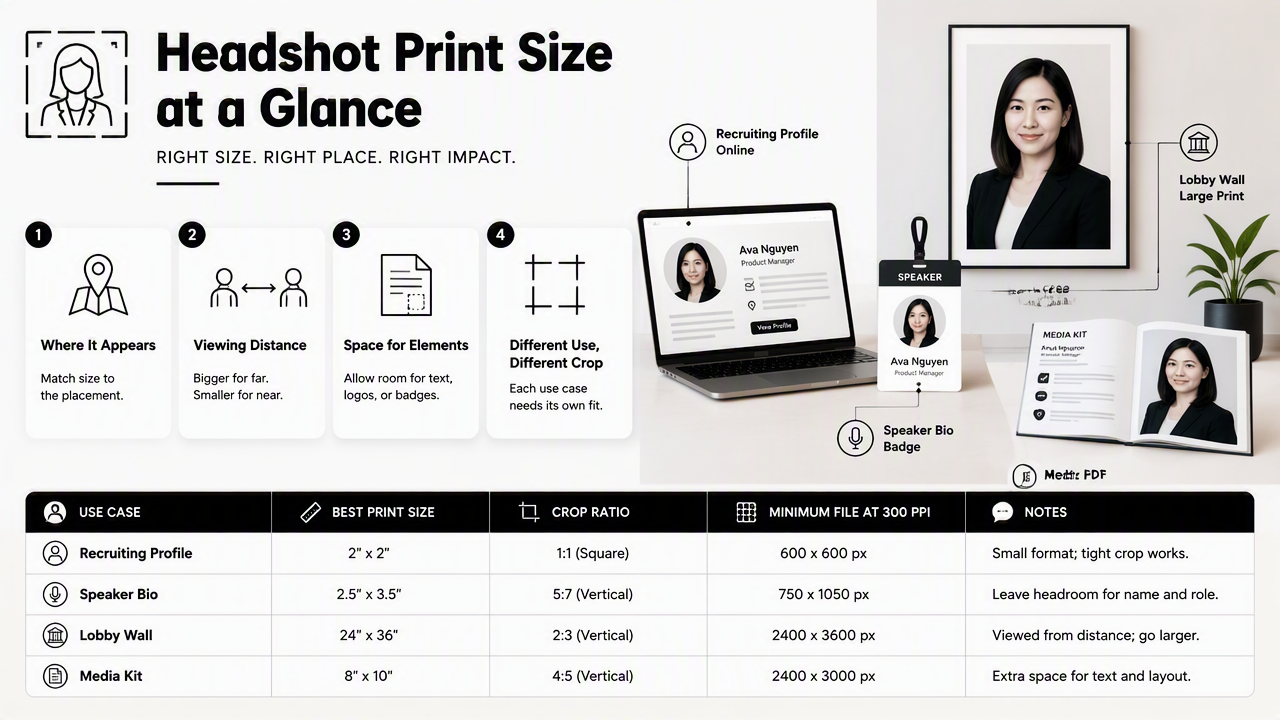
Recommended headshot print size chart
| Use case | Best print size | Crop ratio | Minimum file at 300 PPI | Notes |
|---|---|---|---|---|
| Event badge photo | 2x3 in | 2:3 | 600x900 px | Leave room above the head for badge templates |
| Business card portrait | 2x3.5 in | near 4:7 | 600x1050 px | Use a tight crop with simple background |
| Press kit insert | 5x7 in | 5:7 | 1500x2100 px | Good for media packets and speaker sheets |
| Classic professional headshot | 8x10 in | 4:5 | 2400x3000 px | Standard portrait format for headshots |
| Office display | 11x14 in | 11:14 | 3300x4200 px | Works for framed team walls |
| Small poster or event sign | 16x20 in | 4:5 | 4800x6000 px | Needs a very sharp source file |
The 8x10 inch print remains the safest all-purpose professional portrait because its 4:5 ratio fits shoulders-up crops without feeling cramped. A 5x7 print works better when the headshot must sit beside a bio, company logo, or short event description.
Smaller badges need a different mindset. The image should be simpler, brighter, and more centered because lanyards, plastic sleeves, and small print areas reduce visible detail.
Professionals building branded assets around a headshot can match print portraits with related visuals, such as a fitness Shopify pitch deck slide for investor materials or a fitness Instagram flyer for local promotion.
How should a headshot be cropped for printing?
A headshot should be cropped to the exact print ratio while preserving the face, shoulders, and enough background for trimming. The safest workflow is to keep one uncropped master file, then export separate versions for 4:5, 5:7, square, and badge formats.
Print-ready crop workflow
- Start with the highest-resolution master image available.
- Choose the final print size before cropping.
- Match the crop ratio to the print format, such as 4:5 for 8x10.
- Keep the eyes in the upper third of the frame.
- Leave margin around hair, shoulders, and clothing.
- Export at 300 PPI for professional printing.
- Save a separate file for each print or platform.
A 4:5 crop works well for 8x10 portraits, LinkedIn-style profile updates, and speaker headshots. A 5:7 crop feels slightly narrower and often suits media kits. A 1:1 square crop should be treated as a digital version, not the only print master.
Never make the square social profile image the only source file. Print labs need a larger frame with more background and shoulder room.
Bleed and trim also matter. Labs may cut a tiny edge from the print, especially on borderless output. A little extra background prevents hair, shoulders, or collars from landing too close to the edge.
Brand teams that publish portraits across social channels can pair a print crop with a campaign asset, such as a fitness Shopify TikTok cover or a fitness Shopify YouTube thumbnail, so the same face reads consistently across formats.
What resolution is needed for sharp headshot prints?
Sharp headshot prints generally need 300 pixels per inch at the final print size. That means an 8x10 inch portrait should be at least 2400x3000 pixels, while a 5x7 inch print should be at least 1500x2100 pixels.
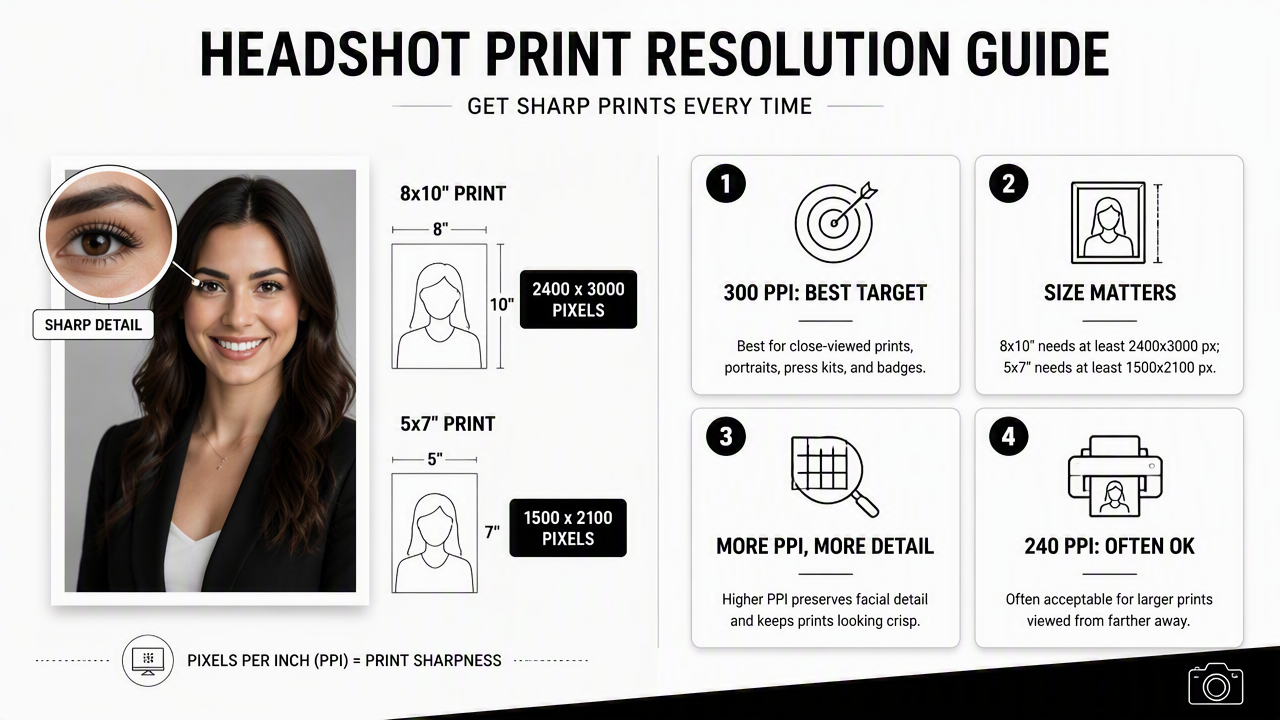
Resolution rules that prevent soft prints
- 300 PPI: best target for close-viewed prints, portraits, press kits, and badges.
- 240 PPI: often acceptable for good-quality small prints when the source image is clean.
- 150 PPI: suitable mainly for larger displays viewed from farther away.
- 72 PPI: common screen metadata, not a print quality target by itself.
Pixel dimensions matter more than the PPI number saved in the file. A file marked 72 PPI can still print well if it contains enough pixels for the chosen paper size. A tiny file marked 300 PPI will still look soft if the pixel count is too low.
Large prints need special care because facial detail attracts attention. Skin texture, eyes, hairlines, jewelry, and suit fabric all reveal softness faster than landscapes or abstract graphics.
Research into multimodal systems, such as the 2024 Gemini 1.5 technical report, reflects how image understanding keeps improving across large visual contexts. For print decisions, though, production math remains simple: inches multiplied by 300 gives the minimum pixel target.
The Looktara platform is useful when a professional needs a polished digital portrait set before print planning. After generation, the selected image should still be checked for final pixel dimensions, crop ratio, and printer requirements.
When is a digital AI headshot enough?
A digital AI headshot is enough when the image will appear on LinkedIn, a remote-work profile, a website bio, a webinar slide, or a small social graphic. Printed badges, office walls, framed portraits, and press kits still need print-size planning.
Digital-only versus print-ready decision guide
| Situation | Digital file only | Print-ready file needed | Best action |
|---|---|---|---|
| LinkedIn profile | Yes | No | Use a square or 4:5 crop |
| Company website bio | Yes | Sometimes | Keep a high-res master |
| Webinar speaker slide | Yes | No | Export for screen dimensions |
| Printed event badge | No | Yes | Use 2x3 inches at 300 PPI |
| Press kit | No | Yes | Prepare 5x7 or 8x10 |
| Office wall display | No | Yes | Use 11x14 or larger |
AI-generated or AI-enhanced headshots are especially practical for fast digital updates. They suit job seekers refreshing profiles, founders building pitch materials, freelancers updating portfolios, and creators needing consistent images across channels.
For printed work, the final review should include three checks: facial realism, background cleanliness, and output dimensions. Small digital artifacts may go unnoticed online but become more visible in an 8x10 or 11x14 print.
Looktara can support the digital side of that process, especially when portraits need to match branded assets such as a fitness Instagram infographic. For print orders, the final file should still be exported to the lab's stated size and format requirements.
FAQ about professional headshot print sizes
Professional headshot print questions usually come down to size, ratio, resolution, and whether a digital image can handle physical output. These quick answers cover the most common decisions before sending files to a printer.
What is the most common print size for a professional headshot?
The most common professional headshot print size is 8x10 inches because it uses a portrait-friendly 4:5 ratio and gives enough room for a shoulders-up crop. It is widely used for corporate portraits, actor headshots, speaker packets, and framed office images.
Is 5x7 or 8x10 better for a press kit?
A 5x7 print is often better for compact press kits because it fits folders, event packets, and speaker sheets easily. An 8x10 print is better when the portrait needs to stand alone, feel more formal, or support higher-end media presentation.
Can a LinkedIn photo be printed as a headshot?
A LinkedIn photo can be printed only if the original file has enough pixels and room for a print crop. A downloaded profile image is often too small. The original high-resolution version should be used, then cropped to 5x7 or 8x10 before printing.
Should headshots be glossy or matte?
Matte or luster finishes usually work best for professional headshots because they reduce glare and fingerprints. Glossy paper can look sharp but may reflect light under office, event, or frame glass conditions. For press kits and office walls, matte is usually safer.
Conclusion
The best photo print sizes for professional headshots start with the job the image must do: 2x3 inches for badges, 5x7 inches for media kits, 8x10 inches for classic portraits, and 11x14 inches or larger for office display. A 300 PPI export, matched crop ratio, and uncropped master file prevent most print problems.
For a practical next step, select the final print use, export the correct crop, and order one test print before producing a full batch. Professionals who need fresh digital portraits first can visit looktara.com, create a polished headshot set with Looktara, then prepare the chosen file for the exact print size required.
Generated by EarlySEO.com