
TL;DR
Clean source selfies help AI portrait tools read the face, lighting, and background more accurately. The safest edits are cropping, brightness correction, mild sharpening, lens cleanup, and distraction removal, while face reshaping, heavy filters, and beauty effects can reduce likeness.
A better AI portrait often starts before generation, with a cleaner selfie instead of a stronger prompt. A photo editor for cleaning source selfies before AI portraits improves the input image without changing identity markers, so tools such as Looktara can create professional headshots, social profile images, or brand photos that still look like the real person. Source selfie: the original face photo uploaded into an AI portrait generator as reference material.
Table of Contents
What does a photo editor for cleaning source selfies before AI portraits do?
A photo editor for cleaning source selfies before AI portraits makes small technical fixes to the reference image so an AI model can read the face, hairline, skin tone, pose, and lighting more accurately. The goal is cleaner input, not a new face, because identity consistency depends on clear source details.
A good pre-editing workflow treats the selfie like data. Blur, dim light, harsh shadows, clutter, and lens smudges all reduce usable facial information. Clean edits keep the same facial structure while making the image easier for the model to interpret.
Key insight: The best source selfie edit is almost invisible; the AI portrait should benefit from clarity, not inherit a distorted identity.
Helpful pre-edits usually include:
- Crop: center the face, shoulders, and upper torso.
- Exposure: brighten underlit faces without washing out skin.
- White balance: correct color casts from lamps or screens.
- Sharpness: reduce mild blur, especially around the eyes.
- Object cleanup: remove background clutter near the head.
- Straightening: align tilted selfies so the face reads naturally.
Research on digital visual culture, such as Post-Digital, Post-Internet Art and Education by Tavin, Kolb, and Tervo (2021), frames images as already shaped by digital systems, not separate from them: source. For AI portraits, that means the uploaded selfie is not neutral. It carries lighting, compression, blur, and editing choices into the final result.
Which edits help AI portraits keep a real likeness?
The safest edits improve visibility while preserving facial geometry, skin texture, eye shape, mouth shape, and hair detail. Light cleanup helps AI portrait tools produce cleaner outputs for LinkedIn, business pages, creator profiles, dating apps, and remote-work avatars without making the face feel synthetic.
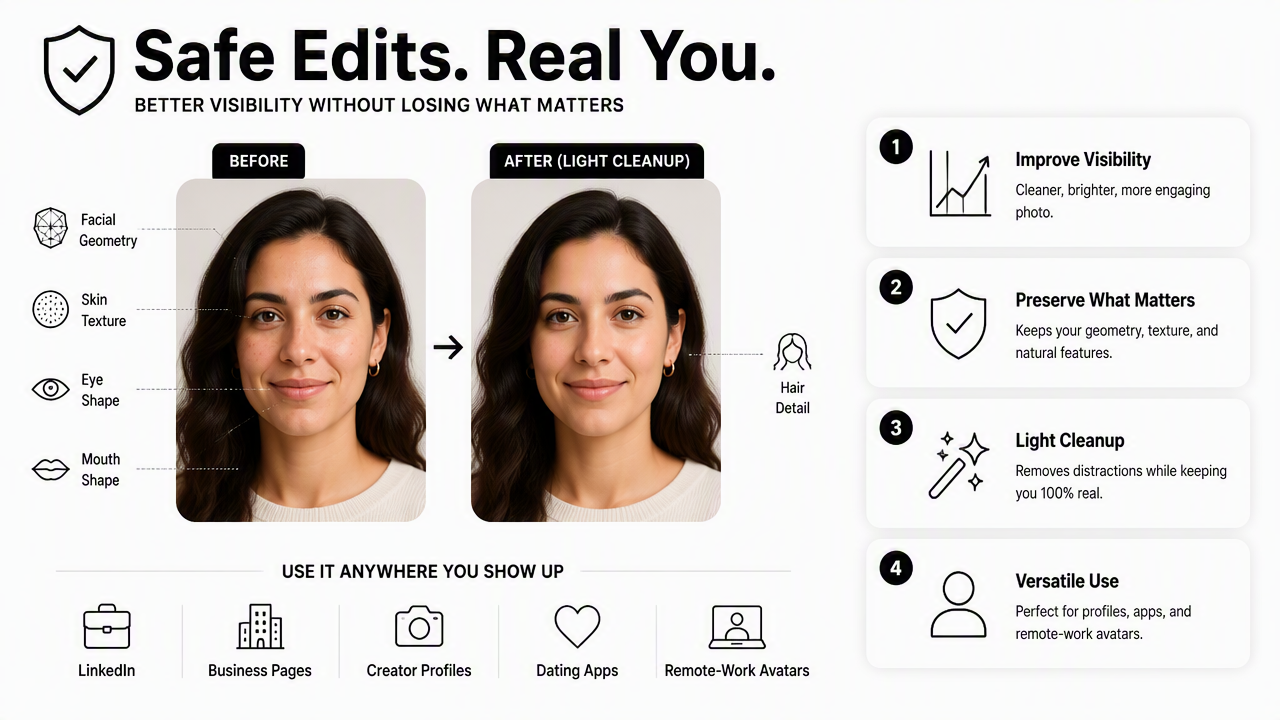
Safe cleanup edits by purpose
| Edit type | What it fixes | Safe range | Why it helps AI portraits |
|---|---|---|---|
| Crop and straighten | Off-center selfie, tilted head position | Face and shoulders visible | Gives the model a stable composition |
| Brightness and contrast | Dim room, flat lighting | Natural skin detail still visible | Helps detect facial contours |
| White balance | Yellow, green, or blue color cast | Skin tone looks believable | Reduces odd color transfer |
| Mild sharpening | Slight motion blur | Eyes and brows clearer, no crunchy edges | Improves feature recognition |
| Background cleanup | Objects touching head or shoulders | Remove distractions only | Prevents false shapes around hair |
| Lens spot removal | Smudges, dust, glare | Fix spots outside key features | Keeps texture noise out of the portrait |
A face-forward crop is usually the highest-value edit. The image should show the full head, both eyes, the jawline, and enough shoulder context for the generator to infer posture and clothing style.
Brightness correction also matters because dark selfies hide the edges of the nose, lips, cheeks, and hair. A clean editor should raise exposure gradually, then adjust highlights so the forehead, cheeks, and nose do not turn flat white.
The Looktara platform works best with clear, natural source selfies because the portrait result depends on the quality of the reference set. For professional use cases, the same preparation principles apply to AI images for fitness, LinkedIn, and product-style profiles.
Which edits can reduce likeness or make AI portraits look fake?
Edits that change facial structure, erase normal texture, or add stylized beauty effects can reduce likeness because the AI model may learn the edited face instead of the real one. A polished source photo is useful, but a transformed source photo can cause portraits that look attractive yet unfamiliar.
Risky edits include:
- Face slimming or jaw reshaping: changes the geometry the model needs to preserve.
- Eye enlargement: can produce uncanny portraits and mismatched gaze.
- Heavy skin smoothing: removes pores, smile lines, and real texture.
- Makeup filters: may transfer false eyelash, lip, or contour patterns.
- AI face enhancement: can invent details before the portrait tool starts.
- Strong HDR or clarity effects: creates harsh edge halos.
- Background replacement touching hair: may cut away curls, flyaways, or ears.
A 2022 arXiv survey, Deepfake Detection: A complete Survey from the Reliability Perspective, reviews reliability issues around synthetic face analysis and detection: source. While AI portrait generation is not the same task as deepfake detection, both fields show why facial detail, artifacts, and identity cues deserve careful handling.
Warning: If an edit would make friends pause and ask whether the person looks different, it is too heavy for a source selfie.
Privacy also belongs in the pre-upload checklist. Before sending selfies to any AI editor or portrait generator, a person should check the data policy, retention window, deletion controls, and whether images can be used for model training. Lower-risk tools explain these points in plain language and provide practical removal options.
How should source selfies be prepared step by step?
Source selfies should be prepared by selecting clear originals, making small visibility edits, exporting in high quality, and reviewing the face at full size before upload. The process should protect likeness first and polish second, since AI portrait systems rely on source images as identity references.
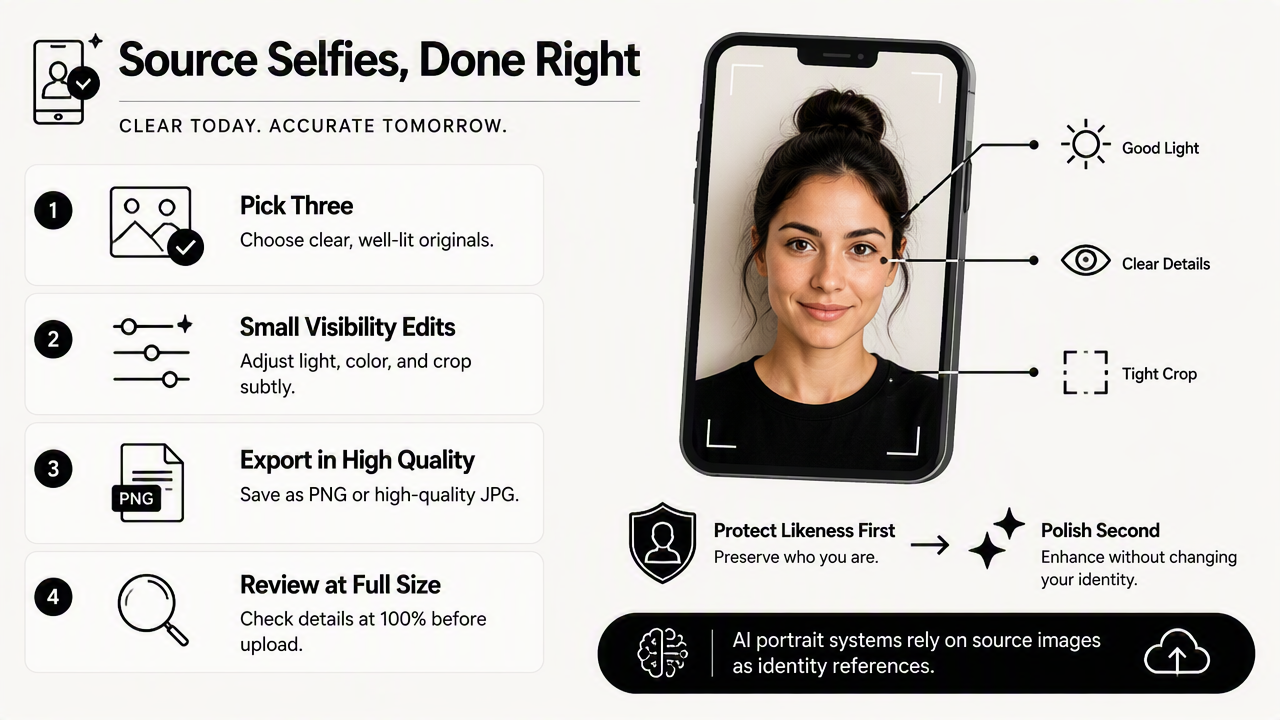
Clean-source workflow before upload
- Pick three to eight natural selfies. Use recent photos with different angles, expressions, and lighting, while keeping the face unobstructed.
- Crop for face and shoulders. Leave space around hair and avoid cutting off the chin, ears, or forehead.
- Fix exposure first. Raise brightness until both eyes and cheek contours are visible.
- Correct color second. Remove strong yellow bathroom light or blue screen glow.
- Sharpen lightly. Improve eye and brow definition without creating hard outlines.
- Remove distractions. Clean objects behind the head, mirror spots, and background clutter.
- Export without over-compression. Use a high-quality JPEG or PNG when possible.
- Check at 100 percent zoom. Look for warped facial edges, smeared hair, or plastic skin before upload.
A practical quality test is simple: the edited selfie should still look like a normal camera photo. If it looks like a magazine retouch, a beauty-filter screenshot, or a synthetic headshot already, the AI portrait tool may copy those artifacts.
Eva Pietroni's 2025 preprint on multisensory museums, hybrid realities, and authenticity discusses technology through the lens of perceived authenticity in designed experiences: source. For portrait workflows, perceived authenticity is the difference between a polished profile image and a picture that feels too artificial for professional or personal trust.
For a fast rule, source selfies should pass these checks:
- The face is not blocked by sunglasses, hair, hands, or a phone.
- The image is not a tiny crop from a group photo.
- The lighting shows both sides of the face.
- The background does not merge with the hair.
- The edit history did not reshape the face.
With Looktara, clean inputs help the system focus on the desired output style instead of repairing avoidable source problems. For brand recall and direct access, many users simply head to looktara.com after preparing source photos.
FAQ: cleaning selfies before AI portraits
Clean selfie preparation raises common questions about file quality, filters, privacy, and the line between helpful editing and identity-changing retouching. The answers below focus on practical choices that improve AI portrait results without making the final image feel fake.
What is the best photo editor for cleaning selfies before AI portraits?
The best editor is one that offers crop, exposure, white balance, mild sharpening, spot removal, and object cleanup without forcing beauty filters. Adobe Lightroom, Snapseed, Apple Photos, Google Photos, and similar tools can work when edits stay light. The editor matters less than restraint and source-photo quality.
Should acne, scars, or wrinkles be removed before AI portraits?
Temporary blemishes can be softened if the goal is a professional portrait, but permanent features should usually remain. Removing scars, deep lines, moles, or natural texture can change recognizability. Light cleanup is safest when it corrects camera noise or a short-term skin issue rather than rewriting identity.
Can blurry selfies be fixed before uploading to an AI portrait generator?
Mild blur can be improved with sharpening or deblur tools, especially around the eyes. Severe blur cannot reliably restore true facial detail because the missing information may be guessed by software. A sharper original is safer than an aggressively reconstructed face, especially for headshots and dating profiles.
Are filtered selfies good source images for AI portraits?
Filtered selfies are usually weak source images because they may alter eye size, skin texture, face shape, color, and lighting. An AI portrait generator may treat those changes as real identity traits. Unfiltered camera photos with light technical cleanup give more reliable, natural-looking results.
How many cleaned selfies are enough for a strong AI portrait set?
A small set of clear, varied selfies is usually better than many low-quality uploads. Three to eight recent images can give useful coverage when they show different angles, expressions, and lighting. Consistency matters: every image should represent the same real face without heavy retouching.
Conclusion
A clean source selfie is the quiet step that often separates a believable AI portrait from a polished but unfamiliar face. The best workflow uses a photo editor for cleaning source selfies before AI portraits to crop, brighten, color-correct, sharpen lightly, and remove distractions while leaving facial structure and real texture alone. For professional headshots, creator profiles, and personal branding, prepare a small set of natural images, review each at full size, then generate portraits with Looktara. Visit looktara.com after the source images pass the clean-input checklist.
Generated by EarlySEO.com