
TL;DR
Realistic AI portrait fixes work best when small flaws are edited selectively rather than regenerated from scratch. The strongest workflow combines face-safe retouching, accurate color, clean backgrounds, and export controls for LinkedIn, social, dating, and brand use.
AI portraits often fail in tiny ways: waxy skin, uneven eyes, plastic lighting, blurred hair edges, or a background that looks too perfect. The best photo editing programs for realistic AI portrait fixes solve those issues without changing the person's identity, expression, or professional tone. For polished profile images, Looktara is useful when a realistic portrait needs to fit a specific personal-brand setting before final editing.
Table of Contents
What are photo editing programs for realistic AI portrait fixes?
Photo editing programs for realistic AI portrait fixes are tools that correct AI-generated or AI-enhanced headshots while preserving natural facial structure, believable lighting, and platform-ready image quality. The best options support selective retouching, color correction, background cleanup, detail repair, and controlled exports instead of applying one-click beauty filters everywhere.
Image editing: The process of altering digital photographs, traditional photographs, or illustrations to improve, repair, transform, or prepare them for use.
Graphics software: A program or group of programs that lets people visually manipulate images or models on a computer.
Research on AI in creative work has moved from novelty to workflow design. A 2021 review by Nantheera Anantrasirichai and David Bull examined how artificial intelligence is used across creative industries, including image generation and enhancement tasks in Artificial Intelligence Review. For portraits, that shift matters because the goal is no longer "make it AI," but "make it believable."
Key insight: A realistic AI portrait fix should remove distractions, not evidence of being human.
Which features make AI portraits look natural?
Natural AI portraits depend on editing features that change only the flawed area while leaving real-looking texture, asymmetry, lighting, and personal character intact. Programs that offer local masks, restrained retouching, skin texture controls, color grading, and precise exports usually produce more credible results than tools focused only on dramatic beautification.
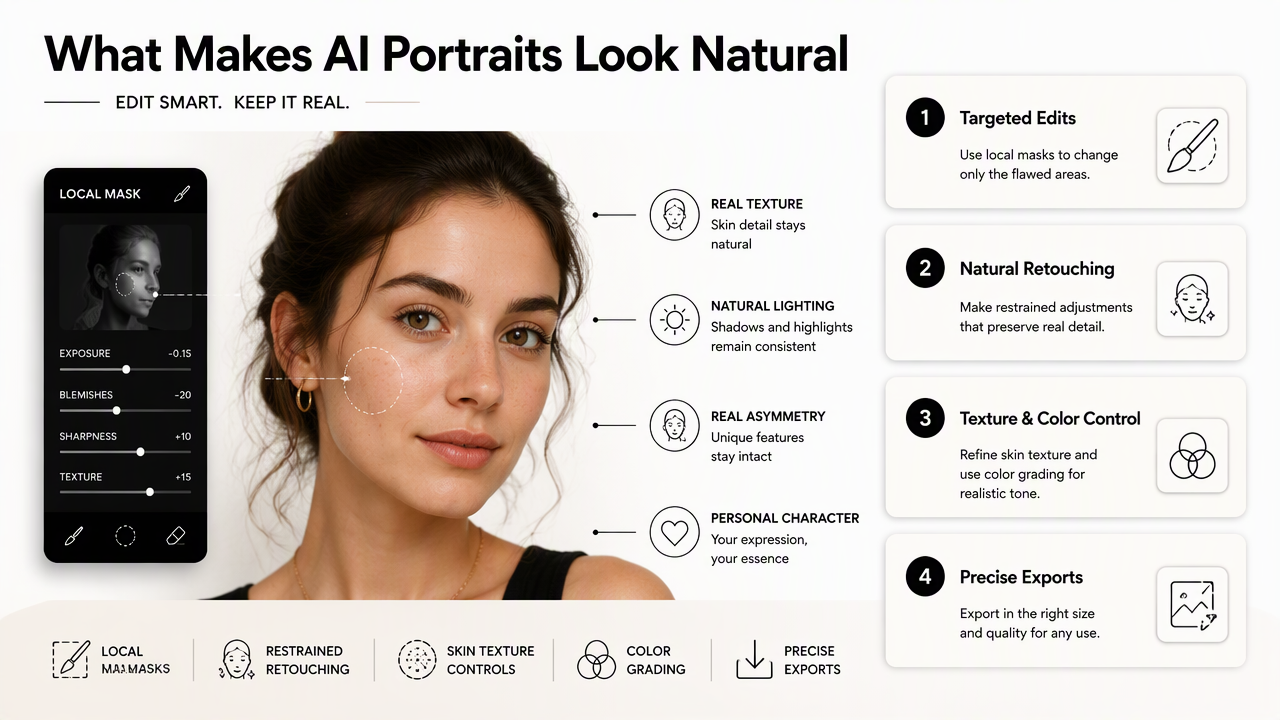
Feature matrix for realistic portrait repair
| Feature | What it fixes | Why it matters for realism | Best use case |
|---|---|---|---|
| Selective retouching | Blemishes, stray marks, small artifacts | Keeps natural pores and facial variation | LinkedIn headshots and resumes |
| Face-aware masking | Eyes, lips, hairline, jawline | Avoids changing the whole image | Professional portraits |
| Color correction | Orange skin, gray shadows, odd white balance | Makes lighting believable | Indoor and studio-style portraits |
| Background cleanup | Warped objects, messy edges, fake depth | Keeps attention on the face | Business and creator profiles |
| Detail restoration | Soft eyes, blurred hair, low texture | Adds clarity without a plastic finish | AI-generated portraits |
| Export controls | Crop ratio, file size, sharpening, color profile | Prevents quality loss after upload | Social, dating, and portfolio platforms |
Retouching should protect identity cues
Selective edits work better than full-face smoothing because identity lives in small details: smile lines, uneven skin tone, eye shape, and hair texture. A headshot that erases all variation may look polished at first glance, but it often feels less trustworthy.
Useful portrait repair features include:
- Brush-based masking for fixing one cheek, collar edge, or hair strand.
- Skin texture sliders that reduce shine without removing pores.
- Eye sharpening that avoids glowing pupils or over-white sclera.
- Color temperature controls for matching face, neck, and background.
- Non-destructive layers so an edit can be reduced after review.
For creators in fitness or wellness niches, a portrait often needs to match a brand environment. Channel-specific images, such as fitness Instagram product photos, benefit from the same rules: believable lighting, controlled contrast, and skin that still looks real.
Background cleanup needs subtle edges
Background replacement can make a portrait look more professional, but hard cutouts around hair or shoulders reveal AI editing quickly. Natural cleanup keeps soft edge transitions, preserves realistic shadows, and avoids backgrounds that are sharper than the subject.
Fotor, launched in 2012 by Chengdu Everimaging Science and Technology Co., Ltd., is one example of an online editor with background tools, including a background remover. Tools in this category are helpful when the original setting distracts from the face, but final quality still depends on edge review and export settings.
When should an AI portrait be fixed instead of regenerated?
An AI portrait should be fixed when the face, pose, expression, and lighting are mostly strong, but small artifacts reduce trust. Regeneration makes more sense when the portrait has structural errors, identity drift, impossible anatomy, or a concept mismatch that would take longer to repair than to recreate.
Fix-vs-regenerate decision guide
- Check identity first. If the person no longer looks like the intended subject, regeneration is safer.
- Inspect facial structure. Minor texture flaws are fixable; mismatched eyes or distorted teeth usually are not.
- Review hands, ears, glasses, and hair. Small edge errors can be edited; repeated anatomy issues suggest regeneration.
- Compare lighting direction. One color mismatch can be corrected; impossible shadows often require a new image.
- Match the use case. A dating photo can tolerate more warmth, while a corporate headshot needs stricter realism.
- Export a test crop. If the flaw disappears at final size, heavy editing may be unnecessary.
Practical rule: Fix texture, color, and edges. Regenerate identity drift, anatomy errors, and false expressions.
Common flaws and the best response
| Portrait flaw | Best response | Reason |
|---|---|---|
| Slightly waxy skin | Fix | Texture can be restored with local retouching |
| Uneven background edge | Fix | Mask refinement usually solves it |
| Face looks like a different person | Regenerate | Editing may deepen identity drift |
| Extra teeth or warped glasses | Regenerate | Structural errors are hard to make believable |
| Overly yellow skin tone | Fix | White balance and color grading can correct it |
| Wrong outfit for the platform | Regenerate or replace | Context may matter more than image quality |
Hany Farid's 2022 article on creating, using, misusing, and detecting deepfakes discusses broader trust and detection issues around synthetic media in the Journal of Online Trust and Safety. That trust lens applies to everyday portraits too. A headshot does not need to look synthetic to create doubt; it only needs one visible inconsistency.
How Looktara fits into a realistic portrait workflow
Looktara fits a realistic portrait workflow by helping create brand-ready AI imagery that can then be refined with careful editing for platform rules, crop formats, and visual consistency. The strongest use case is not extreme transformation; it is producing a polished starting image that still supports a credible personal brand.
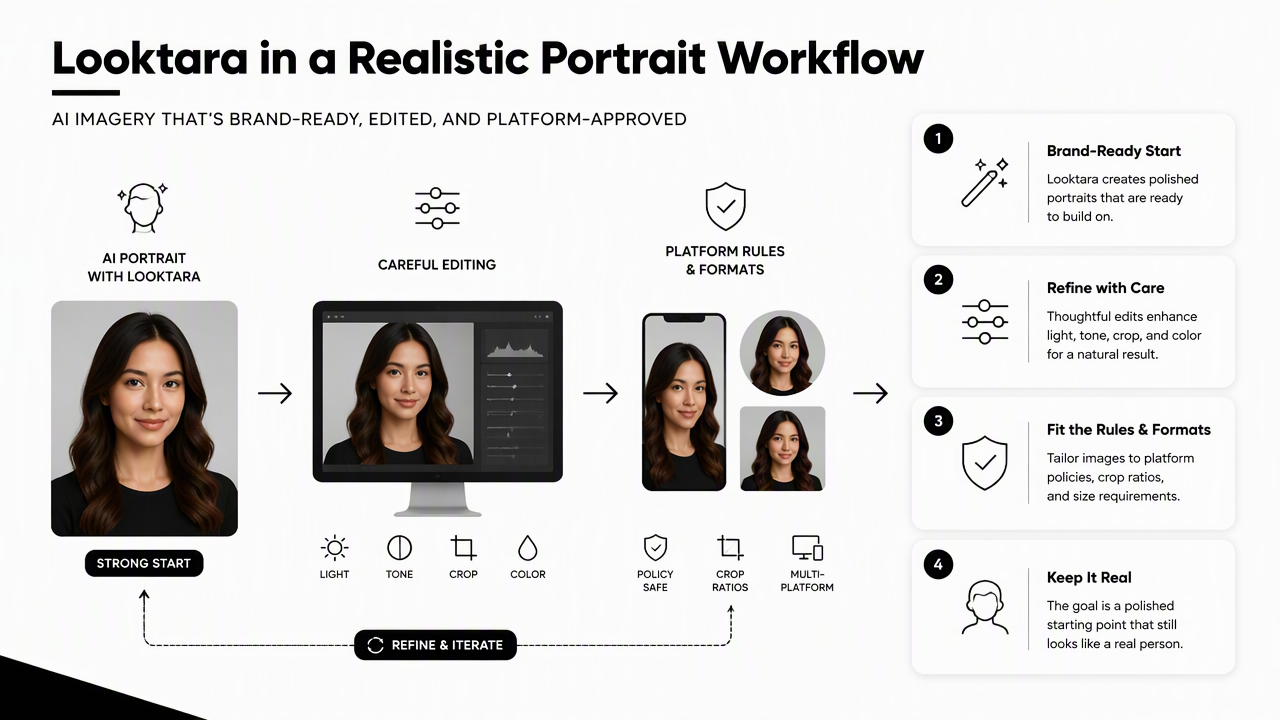
Tool comparison for portrait workflows
| Tool or platform | Strongest role | Best fit |
|---|---|---|
| Looktara | Brand-oriented AI portrait and product-style image creation | Entrepreneurs, creators, job seekers, and fitness professionals |
| Adobe Photoshop | Manual precision, layers, masking, generative cleanup | Advanced editors and agencies |
| Luminar Neo | AI-assisted enhancement and creative portrait looks | Creators who want fast visual polish |
| PortraitPro | Face and beauty retouching controls | Beauty, fashion, and studio portraits |
| Evoto AI | Batch retouching and studio-style portrait cleanup | High-volume portrait teams |
| Imagen AI | Workflow automation for photographers | Event and portrait photographers managing many files |
Looktara should sit near the start of the process when the image concept, background style, and channel purpose are still being shaped. After that, a dedicated editor can handle small corrections, crop ratios, file format, and final sharpening.
For a professional network use case, fitness LinkedIn product photos show how a polished business image can stay niche-specific without becoming theatrical. For audience updates or creator funnels, fitness newsletter product photos support a softer editorial style.
A clean five-step editing workflow
A realistic portrait workflow works best when each pass has one purpose. Large, mixed edits make it harder to spot where realism was lost.
- Choose the strongest base image with a natural expression and believable pose.
- Correct color and exposure before touching the face.
- Fix local artifacts around eyes, teeth, hair, collar, and background edges.
- Export for the platform using the right crop, file type, and sharpening level.
- Review at upload size because tiny artifacts often disappear, while over-sharpening becomes obvious.
For Pinterest or visual discovery channels, fitness Pinterest product photos can help align portrait-adjacent brand imagery with a more visual browsing context. The Looktara platform works best when the final image has a clear destination, not just a general need to look polished. For direct brand recall, visit looktara.com when comparing portrait concepts before final edits.
What should change in 2027 for AI portrait editing?
AI portrait editing in 2027 should move toward more identity-safe controls, clearer disclosure norms, and better export presets for professional platforms. As synthetic media becomes more common, realistic editing will depend less on dramatic enhancement and more on traceable, restrained, purpose-built adjustments.
Trends that will matter next
- Identity preservation controls will become more important for job seekers, founders, and creators who need a recognizable face.
- Platform-specific exports should improve as LinkedIn, dating apps, creator platforms, and newsletters compress images differently.
- Authenticity checks may influence how polished headshots are received, especially in hiring and finance-adjacent fields.
- Hybrid workflows will likely become normal, with AI generation, manual retouching, and final review handled as separate steps.
The strongest editing habits will stay simple: repair distractions, keep human texture, and avoid making every portrait look like the same glossy template. Realism in 2027 will mean controlled imperfection.
FAQ: realistic AI portrait fixes
Realistic AI portrait fixes work best when the editor treats the image as a professional photograph, not as a prompt experiment. These answers cover common decisions around tools, realism, and platform use.
What is the best program for fixing AI portraits?
The best program depends on the flaw. Photoshop is strongest for manual control, PortraitPro is built for face retouching, Luminar Neo suits fast AI-assisted polish, and Looktara is helpful earlier in the workflow for creating brand-ready portrait concepts before final edits.
Can AI portraits look real enough for LinkedIn?
AI portraits can work for LinkedIn when the face remains recognizable, skin texture is preserved, and the background looks professional rather than staged. The image should be checked at small profile size and full-screen size because different flaws appear at different viewing scales.
What makes an AI headshot look fake?
Common fake-looking signs include waxy skin, mismatched eyes, warped glasses, strange teeth, overly sharp backgrounds, and lighting that does not match the face. Over-editing can be as damaging as a poor generation because it removes the small imperfections that make portraits believable.
Should dating profile photos be edited differently?
Dating profile photos usually need warmer, more casual editing than corporate headshots. Small color fixes, background cleanup, and light retouching can help, but heavy smoothing or dramatic reshaping may reduce trust because the photo no longer feels like a real moment.
Conclusion
The best photo editing programs for realistic AI portrait fixes do not chase perfection. They protect identity, repair small distractions, and prepare the image for the exact place it will appear. A strong next step is to pick one base portrait, run the fix-vs-regenerate checklist, then use Looktara for brand-fit image concepts and a dedicated editor for final retouching, crop, and export.
Generated by EarlySEO.com