
TL;DR
A strong personal brand photo workflow starts with clear image goals, consistent editing rules, platform-specific exports, and organized storage. The best process keeps portraits authentic, creates reusable assets for LinkedIn, websites, social posts, and pitch materials, then schedules regular refreshes before images feel outdated.
Personal brand images work hardest when they are planned as a reusable content system, not a one-time photo folder. A practical photo and editing workflow for personal brand photos helps job seekers, founders, creators, freelancers, and dating app users turn a small set of source images into consistent profile, website, and social assets. Personal branding: the strategic process of creating, positioning, and maintaining a positive public perception through distinctive personal traits, visual cues, and communication. For fast brand-image production, Looktara can support polished visual assets alongside profile photography, especially when a professional refresh needs to move from headshot to social content quickly.
Table of Contents
What is a photo and editing workflow for personal brand photos?
A photo and editing workflow for personal brand photos is a repeatable process for planning, selecting, editing, exporting, storing, and updating images used across professional and social platforms. It turns raw portraits into consistent assets for LinkedIn, websites, newsletters, media kits, creator profiles, and dating apps without restarting from scratch each time.
The workflow matters because personal images carry different jobs. A LinkedIn headshot needs clarity and trust. A website hero image needs room for text. A podcast cover or speaker bio needs stronger framing. A dating profile needs warmth and realism.
Core workflow terms:
- Source photo: the original image captured by a camera or phone before edits.
- Select: a chosen image that fits the brand goal and platform need.
- Edit preset: a saved color, contrast, and tone recipe used for consistency.
- Export: the final file prepared for a specific platform, size, and format.
- Archive: the organized storage folder that keeps originals, edits, and finals findable.
A good workflow does not make every image look identical. It makes every image feel like it belongs to the same person and brand.
Competitor content often focuses on photographer tools, such as Lightroom, Imagen AI, galleries, or billing apps. A stronger personal workflow connects the whole chain: image intent, selection rules, editing boundaries, file naming, platform exports, and refresh timing.
How should source photos be planned and selected?
Source photos should be planned around use cases first, then selected for expression, clarity, composition, and brand fit. A practical shoot list should cover headshots, three-quarter portraits, work-in-context images, lifestyle images, negative-space banners, and vertical social crops.
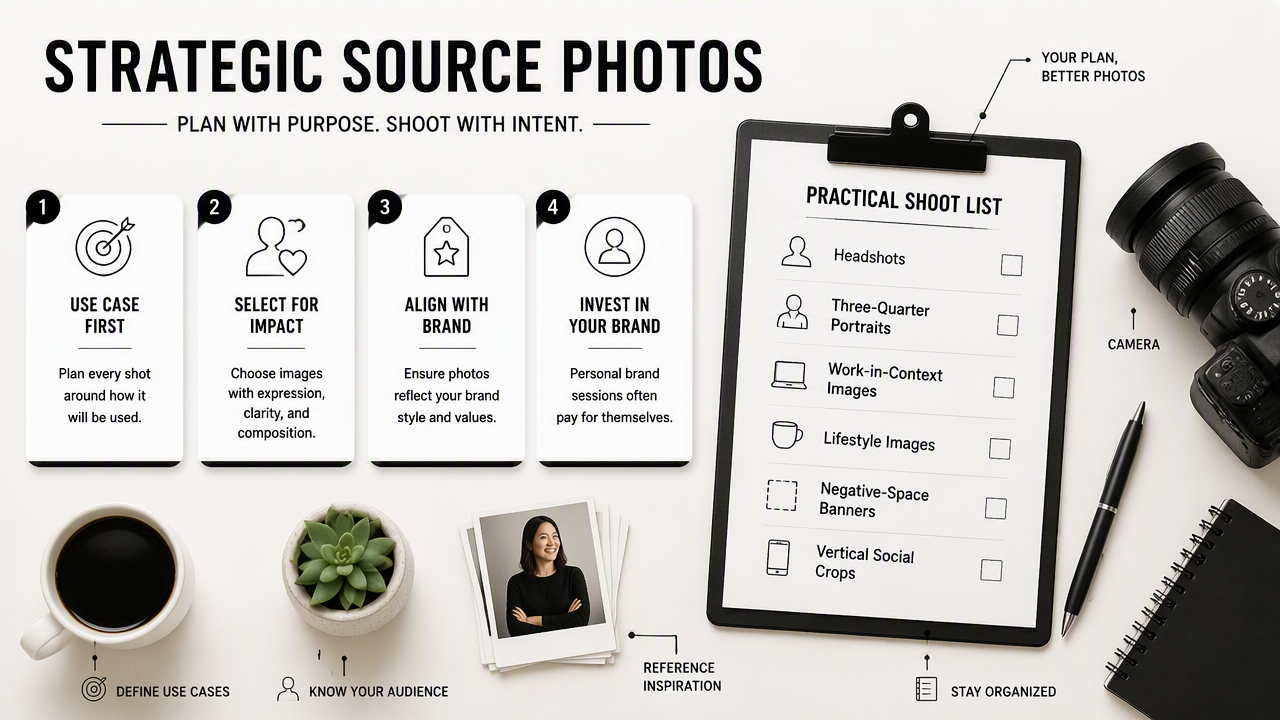
Personal brand sessions often fail when every frame has the same pose and background. A more useful set includes variety that still feels coherent. For example, a founder might need a direct headshot for LinkedIn, a side-facing laptop image for a website hero, a casual outdoor portrait for Instagram, and a clean crop for a pitch deck.
Source-photo selection checklist
- Define the primary platform before choosing the image.
- Pick photos with sharp eyes and natural posture.
- Keep expressions aligned with the intended audience.
- Save both horizontal and vertical options.
- Check background clutter before editing begins.
- Flag images with space for headlines, logos, or captions.
A job seeker may choose a centered portrait with soft eye contact for a resume profile. A creator may choose a more expressive vertical image for TikTok or Shorts covers. A business owner may need images that match brand colors, website style, and product positioning.
Best-use matrix for source images
| Image type | Best platform use | Selection rule |
|---|---|---|
| Tight headshot | LinkedIn, resume, speaker bio | Face clear at small thumbnail size |
| Three-quarter portrait | About page, media kit, newsletter | Hands and posture support the message |
| Work-in-context image | Website, sales page, press kit | Shows expertise without visual clutter |
| Lifestyle portrait | Instagram, dating app, creator profile | Feels natural, current, and relaxed |
| Negative-space banner | Website hero, LinkedIn cover, X header | Leaves clean room for text overlays |
| Vertical crop | Reels, Shorts, TikTok, Pinterest | Subject stays readable on mobile |
For related asset planning, creators can pair portraits with a LinkedIn post visual generator when profile images need matching announcement graphics. Fitness founders or coaches can also adapt a portrait-led style into a website hero image for a more consistent brand landing page.
How should personal brand photos be edited without losing authenticity?
Personal brand photos should be edited for clarity, consistency, and platform readability while preserving real facial structure, skin texture, and recognizable features. The safest edit improves light, color, crop, and distractions rather than changing the person into an unrealistic version of the brand.
A modern editing pass usually starts with exposure and white balance. Skin should look healthy, not plastic. Backgrounds can be softened, cleaned, or brightened, but the final image still needs to match how the person appears in real meetings, interviews, or dates.
Research by Nantheera Anantrasirichai and David Bull in Artificial Intelligence in the Creative Industries: a Review examined AI across creative work, including its role in supporting production processes. For personal brand photos, that means AI can help with consistency and speed, but human judgment still needs to guide taste, identity, and appropriateness.
Editing order that keeps portraits believable
- Cull: remove blurred, awkward, or duplicate frames.
- Correct: fix exposure, white balance, lens distortion, and crop.
- Clean: remove temporary distractions such as lint, flyaway objects, or background clutter.
- Polish: adjust contrast, skin tone, eye brightness, and brand color mood.
- Crop: create square, vertical, horizontal, and banner versions.
- Review: compare edits beside originals to avoid over-processing.
Authenticity is a quality-control step. If an edited image would surprise a hiring manager, client, follower, or date in person, the edit has gone too far.
Canva, launched in 2013, provides a graphic design platform for presentations, websites, and other visual content. Lightroom-style editors, AI retouching platforms, and design tools each serve different stages. The Looktara platform is especially useful when a polished portrait set needs matching branded graphics for posts, banners, and campaign visuals after the core photo edits are complete.
Generative AI research continues to shape creative production. A 2024 IEEE Access review by Gokul Yenduri and coauthors on GPT enabling technologies, applications, challenges, and future directions covered the broader direction of generative systems. For 2026 workflows, the practical lesson is clear: AI tools help produce variants faster, but brand review still protects trust.
How should finished images be exported, stored, and reused?
Finished images should be exported in platform-specific sizes, named consistently, stored in three layers, and reused through templates for social, website, pitch, and profile updates. The export stage turns good edits into practical brand assets that are easy to find and easy to publish.
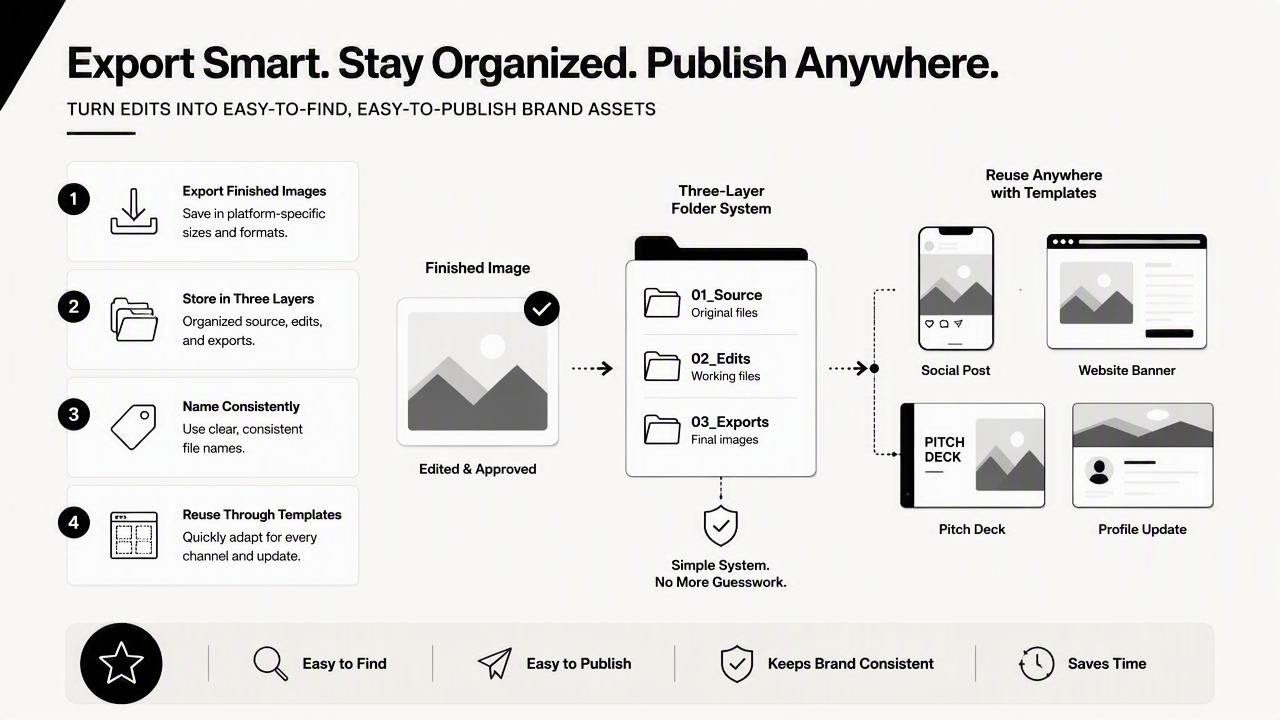
A simple folder system prevents future rework. Originals should stay untouched. Edited masters should keep the highest practical quality. Platform exports should be smaller, clearly named, and ready to upload.
Export and storage system
| Folder | What goes inside | Example filename |
|---|---|---|
01_originals |
Raw camera or phone files | 2026-03-brandshoot-raw-001.dng |
02_selects |
Chosen images before final edits | alex-portrait-select-hero-01.jpg |
03_masters |
Full-size edited finals | alex-brand-headshot-master-2026.jpg |
04_exports |
Platform-ready crops | alex-linkedin-profile-2026.jpg |
05_templates |
Canva, post, deck, and banner files | alex-webinar-promo-template.png |
Exports should match where the image will appear. Square crops suit profile thumbnails. Vertical crops fit mobile-first content. Horizontal crops work for website headers, LinkedIn covers, X headers, and email banners.
A personal brand library becomes more valuable when photos feed repeatable content formats. A consultant might use one portrait in a pitch deck slide design, another in a podcast cover concept, and a third in a Pinterest pin layout. Each format should feel related, but not copied.
Monthly reuse routine
- Refresh profile images only when appearance, offer, or audience changes.
- Rotate social portraits by theme: authority, lifestyle, teaching, behind the scenes.
- Keep one current headshot approved for press, podcasts, and event bios.
- Update website banners when the main offer, tagline, or visual direction changes.
- Review filenames and folders quarterly so old drafts do not become accidental finals.
A strong archive also helps collaborators. Designers, assistants, recruiters, publicists, and social media managers can move faster when assets are labeled by platform and use case. looktara.com can fit into that broader refresh cycle when brand photos need related social and business visuals.
What should change in a 2026 personal brand photo refresh?
A 2026 personal brand photo refresh should prioritize platform consistency, AI-assisted production, mobile-first crops, and authenticity signals. Static headshots still matter, but the strongest personal brands now need a small visual library that supports search, social discovery, short-form video, newsletters, and sales pages.
Profile images are no longer isolated. Search results, AI answer engines, LinkedIn cards, podcast directories, dating apps, creator pages, and website previews often show images at small sizes. Faces need to read clearly. Backgrounds need to support the message without competing for attention.
Repeatable refresh cadence for creators and professionals
- Quarterly: check profile photos across LinkedIn, website, email signature, social profiles, and dating apps.
- Twice yearly: create new crops, banners, and campaign graphics from the best current images.
- Annually: plan a fresh portrait session if hairstyle, role, niche, location, or brand tone has shifted.
- Before launches: prepare event-specific images for webinars, offers, press, podcasts, and product pages.
Personal brand visuals should also account for AI discovery. Entity-rich pages, consistent names, clear portraits, and matching bios help platforms connect a person to a business, niche, or public role. That does not require heavy editing. It requires repetition, clarity, and sensible file use.
The best 2026 refresh is not more photos. It is a cleaner system for turning a few strong images into many accurate brand touchpoints.
For entrepreneurs building a broader identity system, a logo concept generator can sit beside the photo workflow, while headshot exports stay tied to the person. Looktara can help extend a portrait session into branded visual assets without turning the person into a generic stock image.
FAQ: Personal brand photo workflow questions
Personal brand photo workflows work best when small decisions are made before editing starts. These answers cover the common practical issues that slow down refreshes, especially for professionals managing LinkedIn, websites, creator channels, business pages, and profile-based platforms at the same time.
How many photos are needed for a personal brand refresh?
A practical refresh usually needs 8 to 15 finished images: one primary headshot, two alternate profile crops, several lifestyle or work-in-context photos, and a few horizontal or vertical images for banners and posts. The exact number depends on platform count, content frequency, and whether the person needs press, podcast, dating, or speaker assets.
What is the biggest editing mistake with brand portraits?
The biggest mistake is over-editing the face until trust drops. Smoothing skin too much, reshaping features, whitening eyes heavily, or changing facial structure can make an image feel artificial. Better edits improve exposure, crop, color, and distractions while keeping the person recognizable in meetings, interviews, and real-life introductions.
Should AI be part of the editing workflow?
AI can be part of the workflow when it speeds up repetitive tasks such as background cleanup, crop variations, color matching, and social asset creation. Human review should still decide whether an image feels accurate, warm, professional, and brand-safe. For high-stakes uses such as executive bios, press, and dating profiles, realism should lead.
How often should personal brand photos be updated?
Personal brand photos should be reviewed quarterly and refreshed when appearance, role, audience, or offer changes. A full new shoot once a year works for many professionals, while creators and founders may need smaller seasonal updates. The best signal is mismatch: if the photo no longer reflects the current person or positioning, it is time.
Conclusion
A photo and editing workflow for personal brand photos gives every image a job: attract attention, build trust, support a profile, or carry a message across channels. The practical next step is simple: choose 10 source images, edit them with one consistent style, export platform-ready crops, name files clearly, and schedule the next refresh date before the folder is closed. For a faster brand-content layer after the photos are ready, visit looktara.com and turn approved portraits into matching visuals for posts, profiles, and business assets.
Generated by EarlySEO.com