
TL;DR
For 2026, a LinkedIn headshot should be a square image, ideally 400 x 400 pixels or larger, with the face centered for LinkedIn's circular crop. JPG or PNG works best, and the safest upload keeps the file under 8MB with eyes, hair, and shoulders inside the middle of the frame.
A LinkedIn profile photo is often judged before a headline, résumé, or portfolio gets read. The safest answer for LinkedIn headshot dimensions 2026 is simple: upload a high-quality square image, keep the face centered, and plan for a circular crop that appears differently across desktop, mobile, search, comments, and messaging. Looktara helps professionals create profile-ready images that match those practical requirements without turning a headshot into a stiff studio portrait.
Table of Contents
What are the LinkedIn headshot dimensions for 2026?
LinkedIn headshot dimensions 2026 are best handled as a 1:1 square image at 400 x 400 pixels or larger, saved as JPG or PNG, with the file kept under 8MB. SERP data for current LinkedIn image guides also lists 300 x 300 pixels as a common minimum and 7680 x 4320 pixels as an upper display-related limit.
LinkedIn headshot: a square professional profile image that LinkedIn displays inside a circular crop across profile pages, feeds, messages, search results, and connection suggestions.
The square upload matters because LinkedIn's visible profile image is not displayed as a full square in most placements. The platform crops the image into a circle, so corners disappear and edge details can be cut off.
Key takeaway: the upload should be square, but the composition should be planned for a circle.
Recommended 2026 LinkedIn profile photo specs
| Requirement | Best 2026 choice | Why it matters |
|---|---|---|
| Pixel dimensions | 400 x 400 px or larger | Matches common LinkedIn profile photo guidance and preserves clarity |
| Aspect ratio | 1:1 square | Prevents uneven cropping before LinkedIn applies the circle |
| Minimum practical size | 300 x 300 px | Smaller uploads can look soft or compressed |
| Maximum file size | 8MB | Matches current social image size guidance from SERP data |
| File type | JPG or PNG | Best balance of compatibility and quality |
| Crop planning | Center face in the middle 70-80% | Keeps hair, chin, and shoulders away from the circular edge |
A larger square, such as 800 x 800 pixels or 1200 x 1200 pixels, can be useful when the original image is sharp. Uploading a bigger file does not guarantee better display quality if the source photo is blurry, over-filtered, or poorly lit.
Research on professional face perception supports taking the image seriously. A 2022 paper in the Journal of Accounting Research, Face Value: Trait Impressions, Performance Characteristics, and Market Outcomes for Financial Analysts, examined how facial trait impressions relate to professional outcomes in financial analyst settings.
How should a LinkedIn headshot be cropped?
A LinkedIn headshot should be cropped as a square first, then checked as a circle before upload. The best crop places the eyes slightly above center, keeps the full head inside the circle, and leaves enough room for hair, chin, and shoulders to survive smaller mobile and feed placements.
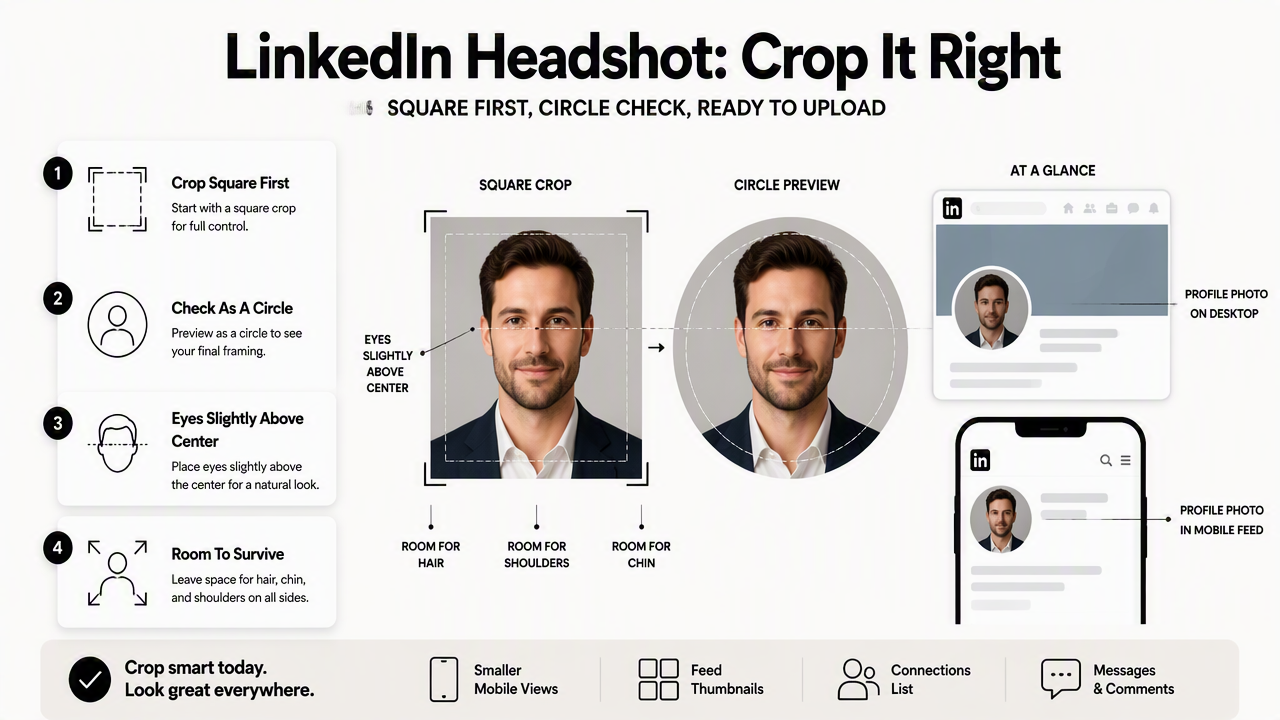
The profile photo appears at different sizes across LinkedIn. A crop that looks good on a desktop profile can feel too tight in comments, messaging, and connection recommendations.
A safe crop also depends on expression and posture. A straight-on or lightly angled headshot usually works better than a dramatic side profile because LinkedIn's small circular display reduces detail.
Safe crop checklist for LinkedIn's circle
- Keep both eyes clearly visible and slightly above the horizontal center line.
- Leave space above the hair so the top of the head is not clipped.
- Keep the chin and upper shoulders inside the central circle area.
- Avoid placing glasses, earrings, hands, or props near the edge.
- Use a clean background that still looks clear when reduced to a small circle.
- Check the image at thumbnail size before final upload.
A practical rule is to make the face large enough to be recognizable, but not so large that the forehead, hair, or jaw touches the circular boundary. The head and upper shoulders should feel balanced rather than crowded.
For professionals building a résumé-facing profile, a dedicated LinkedIn résumé headshot generator can help create a square image with the right framing from the start.
Headshot crop mistakes that reduce clarity
| Mistake | What happens on LinkedIn | Better choice |
|---|---|---|
| Uploading a wide rectangle | LinkedIn crops away side detail | Start with a square crop |
| Face too close to edge | Hair, chin, or shoulders may be clipped | Keep the face inside the center safe zone |
| Full-body photo | Face becomes too small in comments | Use head-and-shoulders framing |
| Busy background | Thumbnail loses contrast | Use a simple background |
| Heavy filter | Skin and facial features look unnatural | Use natural color and sharpness |
A common misconception is that a perfect studio background matters more than sizing. In practice, LinkedIn's small displays reward a clear face, strong lighting, and a calm crop more than elaborate editing.
Another mistake is reusing a dating app photo or event selfie without cropping for the professional circle. The image may be attractive, but LinkedIn's format can turn casual framing into a confusing thumbnail.
Which file format and image quality should be used?
JPG and PNG are the safest file formats for a LinkedIn profile photo in 2026. JPG usually works best for natural portraits because it keeps file size manageable, while PNG can preserve sharper edges in images with clean backgrounds, text-free graphics, or subtle edits.
A profile image should look clean before compression. LinkedIn may process uploaded files, so a sharp original gives the platform more visual information to preserve.
Best practical setup: export a square JPG at high quality, confirm the file is under 8MB, then preview the circle crop before upload.
Export settings that usually work best
- Start with the sharpest available original photo.
- Crop to a 1:1 square before uploading.
- Export at 400 x 400 pixels or larger, preferably 800 x 800 pixels for extra source detail.
- Save as JPG for most portrait photos or PNG for clean-edged edits.
- Keep the file under 8MB.
- Preview the image as a small circle on a phone screen.
Avoid increasing the size of a low-resolution image just to reach a larger number. Upscaling a blurry selfie rarely adds real detail, and LinkedIn's compression can make the softness more obvious.
Professionals updating the rest of a LinkedIn presence should also check the banner. A profile photo and background image work together visually, so a matched LinkedIn banner image can make the profile feel more complete.
Profile image, banner, and post dimensions are not interchangeable
| LinkedIn asset | Common recommended shape | Typical use |
|---|---|---|
| Profile photo | 1:1 square | Personal identity and recognition |
| Cover photo | Wide rectangle, commonly 1584 x 396 px in SERP data | Profile branding |
| Page or shared link image | 1.91:1, commonly 1200 x 627 px in SERP data | Link previews and pages |
| Portrait feed post | 4:5, commonly 1080 x 1350 px in SERP data | Vertical post visibility |
A headshot should not be exported using banner dimensions. A banner is too wide, and LinkedIn will crop it heavily if used as a profile image.
Creators who publish LinkedIn content can keep profile visuals consistent by pairing the headshot with a LinkedIn blog header graphic or a LinkedIn app screenshot visual when sharing product updates.
How Looktara handles profile-ready headshots
Looktara is built for people who need a polished professional image without guessing every crop, background, and export decision. The Looktara platform is especially useful when a profile photo needs to look credible on LinkedIn while still feeling natural for founders, freelancers, creators, remote workers, and job seekers.
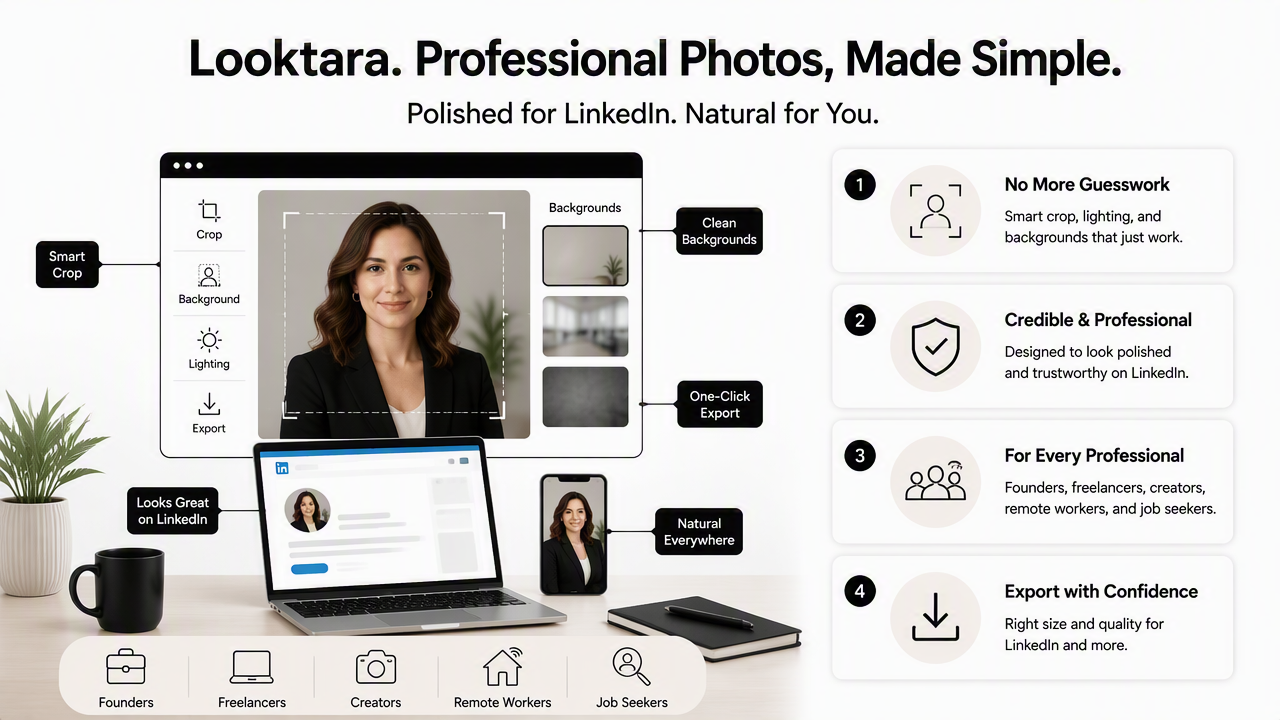
A strong AI headshot workflow should solve three practical needs: correct square framing, professional lighting, and an authentic expression. Overprocessing can make a profile feel less trustworthy, so the best result still looks like a real person.
The same visual system can extend beyond the profile circle. Fitness professionals, consultants, and small business owners can create supporting LinkedIn content with a LinkedIn post image generator when a profile refresh is part of a broader brand update.
Who benefits most from a purpose-built headshot workflow
| Profile goal | Best image style | Why it works |
|---|---|---|
| Job search | Clear, friendly, résumé-ready headshot | Helps recruiters identify the person quickly |
| Founder profile | Confident, approachable portrait | Supports trust before a pitch or message |
| Freelancer profile | Warm, direct eye contact | Makes service pages and outreach feel personal |
| Creator profile | Polished but not stiff | Fits both LinkedIn and social channels |
| Dating profile crossover | Natural expression, less corporate styling | Keeps the photo attractive without feeling staged |
A single headshot can work across several platforms, but the LinkedIn version should be the most restrained. Bright lighting, natural skin texture, and simple clothing usually age better than trendy effects.
For teams or solo professionals planning a profile refresh, visit looktara.com and prepare a square version first, then adapt wider assets only after the headshot is approved.
FAQ about LinkedIn profile photo sizing
LinkedIn profile photo sizing questions usually come down to three issues: square upload size, circular crop safety, and file quality. The answers below cover the decisions that most often affect how a headshot appears in search results, comments, mobile views, and recruiter workflows.
Is 400 x 400 pixels enough for a LinkedIn headshot?
Yes. A 400 x 400 pixel square is widely listed as the recommended LinkedIn profile photo size in current 2026 image guidance. A larger square, such as 800 x 800 pixels, can provide more source detail, but the original photo still needs to be sharp, well lit, and properly cropped.
Can a LinkedIn profile photo be rectangular?
A rectangular file can be uploaded in some cases, but a square crop is the safer choice because LinkedIn displays profile photos inside a circle. Starting with a 1:1 square gives better control over what stays visible after the platform crops the image.
Should a LinkedIn headshot be JPG or PNG?
JPG is usually best for portraits because it keeps photo quality high while managing file size. PNG can work well when the image has a clean background or edited edges. Either format should remain under the commonly listed 8MB file limit.
How much of the body should appear in the profile photo?
A LinkedIn profile photo should usually show the head and upper shoulders. Full-body images make the face too small in comments, messaging, and search results. A tight head-only crop can also feel cramped, so a balanced head-and-shoulders crop is usually safest.
What is the safest final checklist before uploading?
The safest checklist is simple: square crop, 400 x 400 pixels or larger, JPG or PNG format, under 8MB, face centered, eyes visible, and no important detail near the circular edge. A quick mobile preview catches most crop and clarity issues before the image goes live.
Conclusion
The practical answer to LinkedIn headshot dimensions 2026 is a square, high-quality JPG or PNG at 400 x 400 pixels or larger, with the face centered for a circular crop and the file kept under 8MB. The next step is to export one square version, preview it as a small circle, and check that the photo still looks clear in mobile view. For a faster profile refresh, create a professional headshot with Looktara, then head to looktara.com to build matching LinkedIn visuals around the finished image.
Generated by EarlySEO.com