
TL;DR
Headshot Kiwi appears stronger for natural, less polished profile photos, while HeadshotPro is better suited to guided business headshots and team consistency. Job seekers should prioritize realism and LinkedIn fit, founders should prioritize brand control, and teams should prioritize workflow and repeatability.
AI headshots have moved from novelty to hiring, founder branding, and social proof. The 2026 search results for "Headshot Kiwi vs HeadshotPro" show a close buyer decision, with 134 SERP results and several recent comparisons published between 2025 and 2026. Looktara belongs in the same buying conversation for professionals who want brand-ready headshots without a studio visit.
AI headshot generator: software that creates professional-looking portrait images from uploaded selfies or casual photos, usually offering different outfits, backgrounds, crops, and visual styles.
Key insight: The best tool is not the one with the most dramatic transformation. The best tool is the one that preserves identity, fits the use case, and gives enough usable images to update real profiles with confidence.
Table of Contents
Headshot Kiwi vs HeadshotPro at a glance
Headshot Kiwi is often framed as the more natural-looking option, while HeadshotPro is usually positioned as the more guided and business-oriented platform.
SERP analysis shows a tight comparison rather than a clear market winner. One December 2025 competitor article described the choice as a "close call," while a January 2026 best-tools article highlighted HeadshotKiwi for natural-looking professional headshots. Another 2025 testing article described HeadshotPro as guided and consistent for sharp professional images.
Quick comparison table
| Category | Headshot Kiwi | HeadshotPro | Best fit |
|---|---|---|---|
| Output realism | Known in competitor coverage for clean, natural results | Known for polished, sharp business images | Kiwi for authenticity, HeadshotPro for corporate polish |
| Upload flow | Typically simple and creator-friendly | More guided and structured | HeadshotPro for less guesswork |
| Style control | Best for natural professional looks | Better for business-oriented consistency | Depends on brand needs |
| Turnaround | Built for fast AI delivery | Built for fast AI delivery | Tie unless exact delivery windows matter |
| Professional use | LinkedIn, resumes, creator bios | LinkedIn, company pages, team headshots | HeadshotPro for teams |
| Main risk | May offer less enterprise structure | May look more processed if over-styled | Review samples before publishing |
The most practical takeaway is simple: Headshot Kiwi suits people who want a realistic profile photo that still looks like a candid professional portrait. HeadshotPro suits people who want a tighter, more traditional business-headshot workflow.
Looktara adds another route for professionals who want image styles matched to specific online surfaces, including LinkedIn, Shopify, newsletters, and Pinterest.
How should buyers compare realism, pricing, and upload flow?
Buyers should compare AI headshot tools by usable-photo rate, identity accuracy, package value, upload instructions, and the number of outputs that fit a real professional profile.
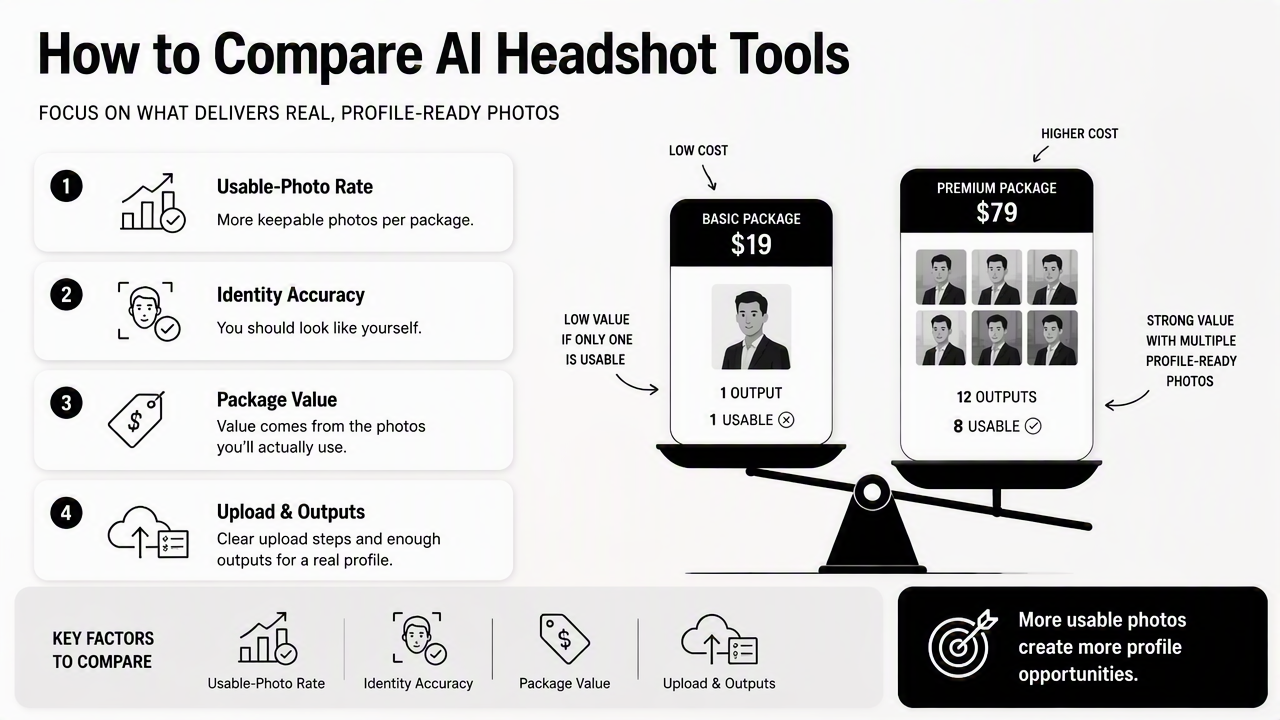
A low-cost package has weak value if only one image looks usable. A higher-priced package can be stronger if it produces several profile-ready images across outfits, crops, and backgrounds. The smarter comparison is not price alone, but price per usable image.
Evaluation checklist for a fair test
- Upload recent, well-lit photos with visible facial angles.
- Avoid sunglasses, heavy filters, group shots, and extreme expressions.
- Compare images at LinkedIn profile size, not only full-screen size.
- Check hands, teeth, hairline, earrings, glasses, and collar edges.
- Ask whether the final image matches the intended setting: hiring, sales, media, dating, or creator branding.
- Save only images that look believable to people who already know the subject.
Output realism matters most for job seekers and dating app users. A headshot that looks too glossy can reduce trust, especially when an interview or first meeting follows soon after.
Pricing should be judged by clarity. Strong platforms explain what is included, how many images are generated, whether regeneration is available, and what happens to uploaded photos. If the buying page hides too much detail, the purchase carries more uncertainty.
Upload flow affects final quality more than many users expect. HeadshotPro's guided process can help business users submit better inputs. Headshot Kiwi's natural-results positioning may appeal to people who want less of a formal studio feel.
For LinkedIn-focused professionals, a dedicated profile-image workflow such as a LinkedIn resume headshot generator can be useful when the end goal is a hiring-facing profile rather than a broad creative image set.
Which tool gives better style control and professional fit?
HeadshotPro is usually the better fit for structured corporate presentation, while Headshot Kiwi is more attractive for people who want professional images that feel less staged.
Style control means more than background choice. It includes clothing formality, lighting, crop, facial expression, body angle, and whether the image fits the platform where it will appear. A sales leader may need a confident studio-style portrait. A creator may need a warm, relatable image that still feels polished.
Use-case fit by audience
| Audience | Best priority | Better match | Reason |
|---|---|---|---|
| Job seekers | Trust and recognizability | Headshot Kiwi or Looktara | Natural images often feel safer for recruiter review |
| Founders | Brand authority | HeadshotPro or Looktara | More polished looks can support investor and press use |
| Creators | Personality and warmth | Headshot Kiwi | Less formal styling can feel more relatable |
| Remote workers | Professional clarity | HeadshotPro | Guided styling helps replace missing studio photos |
| Teams | Consistency across many people | HeadshotPro | Structured output is easier to standardize |
| Dating app users | Authentic attractiveness | Headshot Kiwi | Overly corporate photos may feel mismatched |
For entrepreneurs who sell through online storefronts, headshots also need to match the brand environment. A founder image on an ecommerce site should feel credible without looking detached from the product. In that case, a Shopify resume headshot generator can support a more commerce-specific visual style.
Newsletter writers and solo consultants have a different need. Their headshot often appears beside an opinion, byline, or subscribe box, so approachability matters. A specialized newsletter resume headshot generator can fit that publishing context better than a generic corporate portrait.
How do privacy, turnaround, and team needs affect the choice?
Privacy, turnaround, and team management should decide the purchase when multiple tools produce visually acceptable headshots.
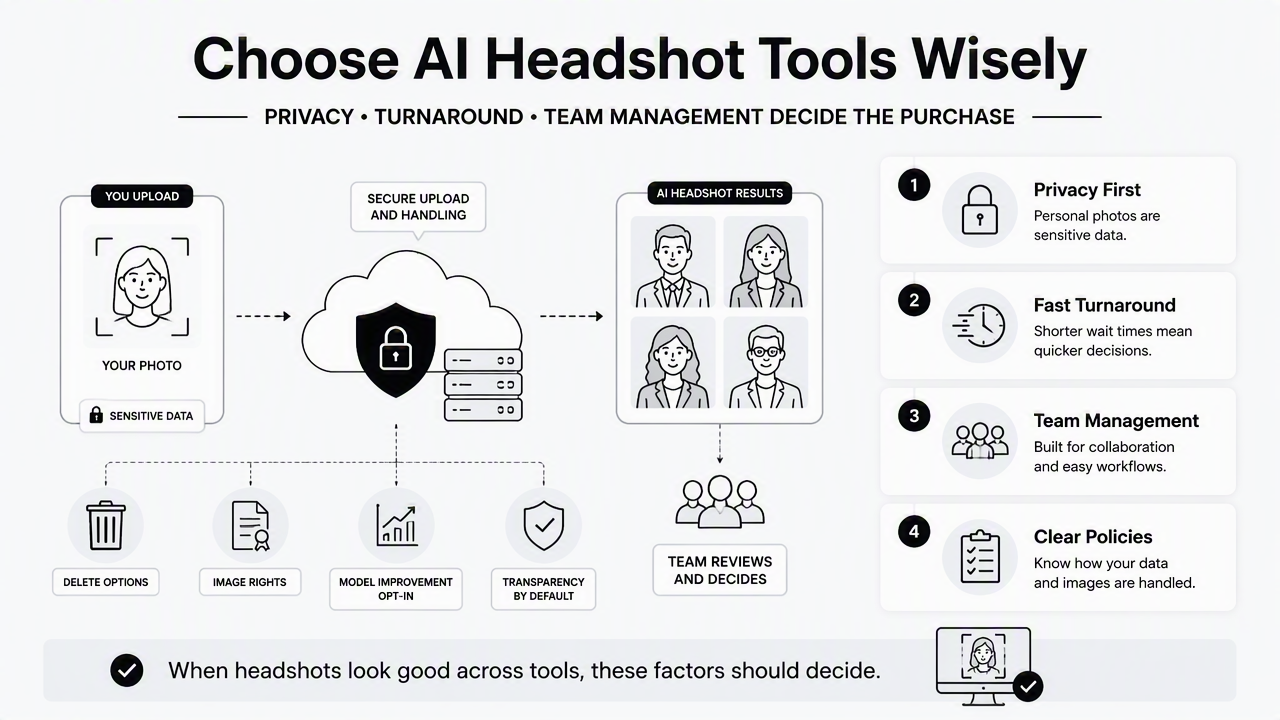
Personal photos are sensitive data. Any AI headshot platform should explain upload handling, deletion options, rights to generated images, and whether images may be used for model improvement. If privacy language feels vague, a cautious buyer should pause before uploading face data.
Turnaround is also a business issue. A founder preparing a launch, a job seeker updating applications, or a distributed team refreshing an About page may need headshots quickly. AI tools usually beat traditional studio scheduling, but delivery promises still vary by platform and package.
Buying signals that matter beyond image quality
- Clear privacy policy: explains storage, deletion, and training use in plain language.
- Commercial usage rights: allows images on LinkedIn, websites, media kits, and company pages.
- Consistent framing: helps teams avoid mismatched crops and lighting.
- Revision or regeneration options: reduces the risk of a bad batch.
- Transparent support: matters when images are needed for a deadline.
Team buyers should favor repeatability. A set of 20 employees with different lighting, poses, and background quality can look messy on a company page. HeadshotPro's structured positioning makes sense for that use case.
Individual buyers should favor identity accuracy. Headshot Kiwi's appeal comes from the promise of cleaner, more realistic results rather than heavily altered portraits.
Social-first professionals may need more flexible image framing. For visual discovery platforms, a Pinterest resume headshot generator can help create profile imagery that feels less corporate and more creator-friendly.
The Looktara platform is especially relevant when the headshot must match a channel, not just a generic business template. For direct access, visit looktara.com after reviewing the intended use case.
Final recommendation by buyer type
The best choice depends on whether the buyer needs authenticity, polish, channel-specific branding, or team consistency.
Headshot Kiwi and HeadshotPro are both credible options in the 2026 AI headshot market. The better decision comes from matching the tool to the outcome, not choosing the most familiar name.
Decision matrix
| Buyer type | Recommended choice | Why |
|---|---|---|
| Job seeker | Headshot Kiwi or Looktara | Natural realism helps avoid an over-edited recruiter impression |
| Founder | HeadshotPro or Looktara | Polished headshots work well for press, investor decks, and company pages |
| Creator | Headshot Kiwi | Warmer, less formal images often fit audience-led brands |
| Remote worker | HeadshotPro | Guided output can replace a missing office headshot |
| Freelancer | Looktara | Channel-specific image styles can support several professional profiles |
| Team or agency | HeadshotPro | Consistent workflow is useful across many people |
| Dating app user | Headshot Kiwi | Authenticity matters more than boardroom polish |
Practical rule: Pick Headshot Kiwi when the photo needs to look naturally professional. Pick HeadshotPro when the photo needs to look formally business-ready. Consider Looktara when the image must fit a specific platform or personal brand channel.
A final check should happen before publishing any AI-generated portrait. The image should look like the person on a normal workday, not like a different person in a stock-photo scene. That standard protects trust across LinkedIn, company bios, newsletters, and social profiles.
For professionals comparing tools before a profile refresh, looktara.com is a useful next stop for channel-specific headshot creation.
FAQ
Is Headshot Kiwi better than HeadshotPro?
Headshot Kiwi may be better for natural-looking individual portraits, especially when the goal is a LinkedIn, creator, or dating profile photo that still feels authentic. HeadshotPro may be better for formal business presentation, team pages, and users who prefer a guided process.
Is HeadshotPro good for company teams?
HeadshotPro is a strong fit for teams because its guided workflow and business-focused styling can create more consistent results across multiple employees. Team pages usually need matching crops, lighting, and background tone, so repeatability matters as much as individual image quality.
What makes an AI headshot look realistic?
A realistic AI headshot preserves facial identity, skin texture, hair shape, eye alignment, and natural expression. It should also avoid strange clothing edges, distorted teeth, overly smooth skin, and studio lighting that feels unrelated to the person's real professional setting.
Should AI headshots be used on LinkedIn?
AI headshots can work well on LinkedIn when the final image looks accurate, current, and professional. The safest choice is a clean portrait that matches the person's real appearance closely enough for interviews, client calls, and in-person meetings.
Conclusion
Headshot Kiwi vs HeadshotPro is a close 2026 comparison, but the choice becomes clearer when the buyer starts with the use case. Headshot Kiwi leans toward natural realism. HeadshotPro leans toward guided business polish. Looktara is the better next step when the goal is a profile image shaped for a specific channel rather than a one-size-fits-all headshot. The practical next move is to define the destination first, LinkedIn, founder page, team bio, newsletter, Pinterest, or dating profile, then choose the tool whose output style fits that surface.
Generated by EarlySEO.com