
TL;DR
Google reverse image search is a useful first safety check for dating profile photos, especially when an image looks too polished, appears on multiple sites, or seems mismatched with a profile. It cannot prove identity alone, so safer decisions combine image checks, profile context, video verification, and realistic personal photos.
A dating profile photo can feel trustworthy in seconds, but the same image may also appear on old social accounts, stock libraries, influencer pages, or scam profiles. A google reverse search photo for dating profile safety check helps reveal whether an image is original, reused, stolen, or simply hard to verify. The safest approach in 2026 pairs reverse image search with common-sense profile review, privacy care, and photos that look natural rather than overproduced.
Table of Contents
What is google reverse search photo for dating profile safety?
Google reverse search photo for dating profile safety means using an image, rather than typed keywords, to look for visually similar images across Google-indexed web pages. It helps dating app users check whether a profile photo appears elsewhere, but it should be treated as a signal, not proof of a person's identity.
Reverse image search: a content-based image retrieval method where a search system receives an image and searches its dataset for visually similar matches.
Google Search is the broader search engine operated by Google, while Google Lens and image search features are the practical tools many people use for visual lookups. For dating safety, the goal is not to investigate someone aggressively. The goal is to reduce risk before sharing personal details, money, private images, or location information.
Key insight: A reverse image match can show where a photo has appeared, but a clean result does not prove that a profile is real.
Research on visual AI helps explain why image checks are powerful but imperfect. A 2021 review in Proceedings of the IEEE by Samek, Montavon, and Lapuschkin examined methods for explaining deep neural networks and their applications, which matters because modern visual search often depends on complex model behavior rather than simple filename matching: Explaining Deep Neural Networks and Beyond.
Reverse image search vs other dating safety checks
| Safety check | Best use | Main limit |
|---|---|---|
| Google reverse image search | Finding reused public images | Misses private, cropped, or newly uploaded photos |
| Google Lens | Checking visual matches, objects, places, and faces | Results vary by region, crop, and image quality |
| In-app verification | Confirming basic account presence | Verification rules differ by dating app |
| Video call | Confirming live appearance and behavior | Still requires judgment and boundaries |
| Profile consistency review | Comparing bio, photos, age, city, and claims | Cannot confirm legal identity |
A layered check works better than one tool. Reverse image search catches obvious reuse, while a short video call or in-app verification can reveal whether the person matches the profile. Profile consistency also matters, especially when photos show different ages, locations, or lifestyles.
How can Google reverse image search check a dating profile photo?
Google reverse image search can check a dating profile photo by comparing a saved image, screenshot, or cropped face against images indexed across the web. The best workflow is careful, privacy-aware, and repeatable: capture the image, crop distractions, search with Google Lens, compare results, then verify through another channel.
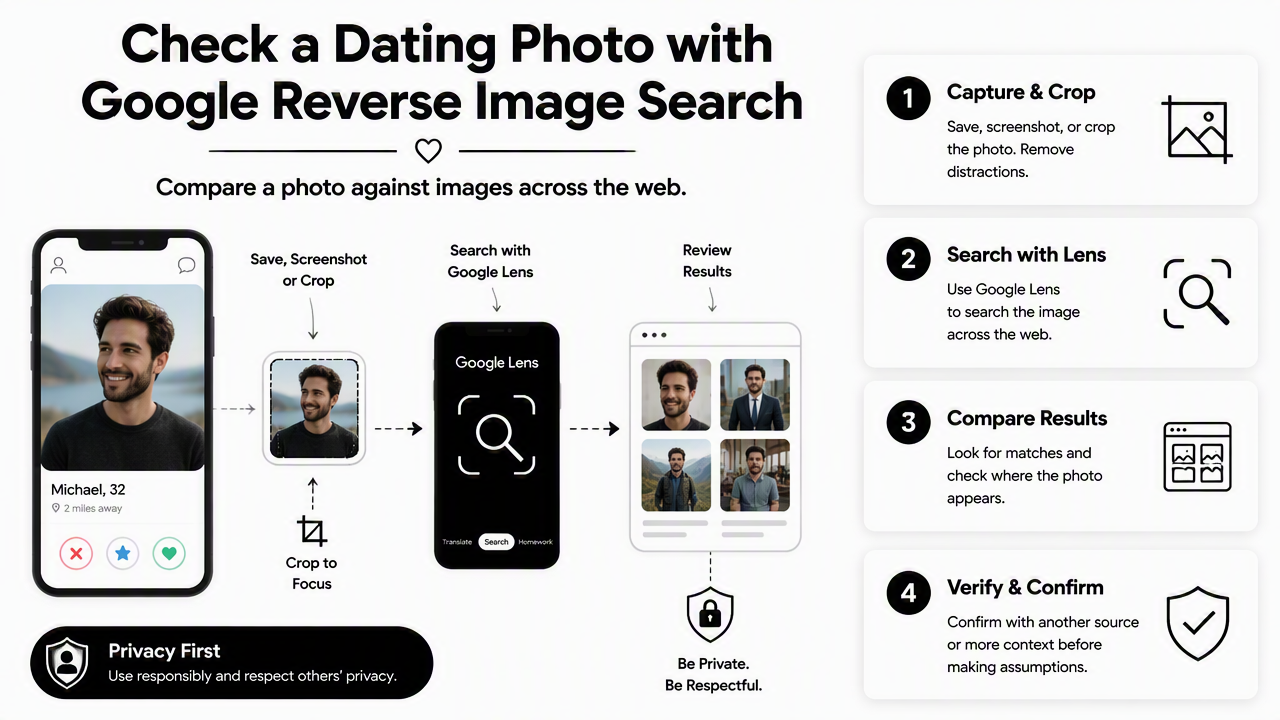
- Save or screenshot the profile photo where local laws and app rules allow it.
- Crop out text, buttons, and background clutter.
- Open Google Lens or Google Images and upload the image.
- Review exact matches, visually similar images, and pages using the same photo.
- Repeat with a different crop, such as the face, full body, or background landmark.
- Compare results against the dating profile's name, city, job, and bio.
- Use in-app verification or a brief video call before meeting.
Search results should be interpreted with care. A match to an Instagram post may be normal if the name and details align. A match to a model portfolio, old news image, stock site, or unrelated person's social profile needs more caution.
Some paid services in search results position themselves as deeper dating-photo search tools, including services that claim broad dating-site coverage. Google remains a good first pass because it is free, fast, and familiar, but it does not search every app, private account, or deleted page.
Practical search paths for phone and desktop
- On Android: use Google Lens from the Google app, Chrome, or Photos when available.
- On iPhone: use the Google app, Chrome image search, or save the image and upload it through Google Lens.
- On desktop: visit Google Images, select image search, then upload or drag the image.
- For screenshots: crop the dating app interface first so the search focuses on the person, not app buttons.
- For group photos: search each visible face separately only when there is a clear safety reason.
Clean inputs produce cleaner results. Cropping a face too tightly can remove useful clues, while leaving the entire dating app screen can confuse visual search. A balanced crop usually includes the person and a small amount of background.
What signs make a dating profile photo suspicious?
A dating profile photo becomes suspicious when reverse search results, image quality, and profile details point in different directions. Warning signs include photos reused under different names, images tied to public figures, inconsistent age across pictures, or a profile that avoids normal verification after a match asks reasonable questions.
Not every polished photo is fake. Entrepreneurs, creators, actors, and job seekers often use professional images across platforms. The issue is mismatch: a photo that appears under another person's name, in another country, or on unrelated promotional pages deserves a slower pace.
Key insight: The safest response to uncertainty is not accusation. The safer move is slower sharing, more verification, and clearer boundaries.
A reverse image result should be combined with behavioral cues. Requests for money, pressure to move off-app quickly, refusal to video chat, and vague answers about basic life details all carry more weight when the photo also appears questionable.
A 2022 IEEE Access paper by Park and Kim on metaverse taxonomy, components, applications, and open challenges reflects a wider shift toward persistent digital identity and virtual presence: A Metaverse: Taxonomy, Components, Applications, and Open Challenges. Dating safety now sits inside that broader identity problem, where images can be copied, generated, altered, or reused across many online spaces.
Signal checklist for reused or misleading photos
| Signal | What it may mean | Safer next step |
|---|---|---|
| Same face appears under many names | Possible stolen image or impersonation | Pause contact and request in-app verification |
| Photo appears on a stock site | Possible fake or promotional image | Do not share private details |
| Profile has only studio-quality images | Could be real, but less context is available | Ask for a casual recent photo or video call |
| Background conflicts with stated city | Old photo, travel photo, or false location | Ask a neutral location question |
| Search finds no results | Could be original, private, new, or edited | Use other checks before trusting |
Context separates caution from overreaction. A public-facing founder may have photos on a company site, LinkedIn, and podcast pages. A safer profile still has consistent names, current details, and normal willingness to verify.
Why should personal dating profile photos look authentic?
Personal dating profile photos should look authentic because trust starts before the first message. Natural lighting, current appearance, realistic expressions, and everyday settings usually communicate more safety than photos that look heavily edited, overly glossy, or disconnected from daily life.
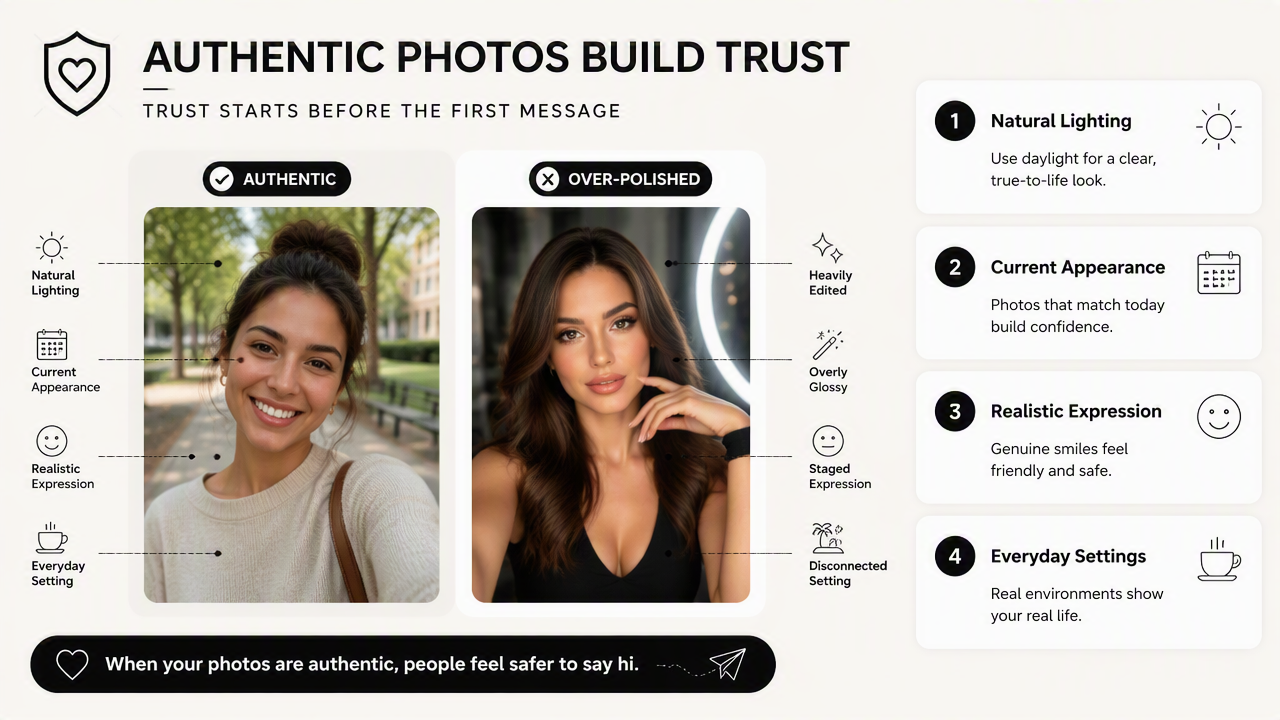
Over-polished images can create the wrong signal even when the person is genuine. Dating app users often scan for signs of realness: a clear face, recent style, varied settings, and images that match the written profile. A photo set should look attractive, but not like an ad campaign for a different person.
For people updating dating, work, and social profiles, Looktara can help create clean, consistent images while keeping the final result grounded and human. The best profile photo set usually includes one sharp headshot, one relaxed lifestyle image, one full-body image, and one social or hobby context image.
The Looktara platform also fits users who need a professional presence beyond dating. A freelancer might use a polished headshot for client trust, then choose a warmer, more casual image for a dating profile. Related visual tools can support that broader identity system, including a resume headshot generator for professional profile updates, a LinkedIn post image generator for public credibility, and a website hero image generator for entrepreneurs.
Authentic profile photo rules that build trust
A trustworthy dating photo set should make recognition easy and expectations realistic.
- Use recent photos from the last year when possible.
- Keep at least one image close to everyday appearance.
- Avoid heavy face reshaping, extreme filters, and misleading angles.
- Include varied settings, such as outdoor, hobby, and social contexts.
- Match the photo style to the profile's tone and stated lifestyle.
- Use consistent visual identity across public channels when personal branding matters.
Creators and small business owners often need different image formats for different platforms. A creator may keep dating photos natural while using a Pinterest pin generator for visual content planning or a quote post generator for social media branding.
What should dating app users expect from image safety in 2027?
Dating image safety in 2027 will likely rely on more verification layers, better AI detection, and clearer signals of real-time presence. Reverse image search will still matter, but it will share space with live video prompts, app-level identity checks, content provenance tools, and smarter scam-detection systems.
Visual search is getting more advanced, yet image manipulation is also easier. A 2022 review in Automation in Construction by Baduge, Thilakarathna, and Perera examined machine learning and deep learning methods for smart vision applications, showing how widely visual AI techniques now apply beyond social media: Artificial intelligence and smart vision for building and construction 4.0. That wider adoption helps improve image tools, but it also raises expectations for explainability and trust.

Dating platforms may add more prompts that prove presence without exposing sensitive documents. Still, no tool can replace careful pacing. The safest standard remains simple: verify before meeting, meet in public, keep early financial and location details private, and treat pressure as a warning sign.
FAQ: Dating photo reverse search and safety
Can Google reverse image search prove a dating profile is fake?
Google reverse image search cannot prove a dating profile is fake by itself. It can show whether an image appears elsewhere online, which may reveal reuse or impersonation. A safer judgment combines search results with profile consistency, app verification, video chat, message behavior, and whether the person respects boundaries.
Why does a dating photo show no reverse image results?
A photo may show no results because it is private, newly posted, cropped, edited, low-resolution, or not indexed by Google. No result can be a neutral sign rather than a safety guarantee. Other checks still matter, especially when the profile has limited details or avoids normal verification.
Is it okay to use AI-enhanced photos on dating apps?
AI-enhanced photos can be okay when they still reflect current appearance and do not mislead matches. Light cleanup, better lighting, and background polish are usually less concerning than face reshaping or unrealistic body changes. With Looktara, the strongest dating-photo strategy is believable improvement, not a totally different identity.
What should happen after a suspicious image match?
A suspicious match should lead to slower communication, not confrontation. The safer path is to avoid sharing private information, ask for in-app verification, suggest a short video call, and stop contact if pressure, money requests, or inconsistent answers continue. Visit looktara.com when the goal is to create profile photos that feel polished and real.
Conclusion
Google reverse search photo for dating profile safety is best treated as a first filter, not a final verdict. A safer dating process uses image search, profile consistency, app verification, and calm boundaries before trust grows. For anyone improving a profile, the next step is simple: check questionable matches with reverse image search, refresh personal photos so they look current and genuine, and choose one clear headshot, one casual lifestyle photo, and one context-rich image before the next profile update.
Generated by EarlySEO.com