
TL;DR
Google Photos can help identify visually similar images inside a personal library, while Google Lens and desktop image search are better for finding public matches online. For profile photos, the smartest workflow is to check public copies, review privacy exposure, then refresh professional images when needed.
A profile picture can travel farther than expected, from LinkedIn and dating apps to scraped pages, cached thumbnails, and social reposts. A google photos reverse image search for profile pictures helps answer one practical question: where else does this image appear, and could it affect trust, privacy, or reputation? For people updating a professional image, Looktara can help create polished headshots before the final photo gets checked across public search tools.
Reverse image search: a search method that uses an image, rather than text, to find visually similar images, possible sources, or related pages.
Key insight: Google Photos is best for searching a personal photo library; Google Lens and desktop image search are better for checking public web visibility.
Table of Contents
What is reverse image search for profile pictures?
Reverse image search for profile pictures is the process of using a face photo, headshot, avatar, or dating image as the search query to find visually similar images or public appearances online. The goal is not only identification; it is also verification, brand control, and privacy review.
A search system compares visual features such as shapes, colors, backgrounds, objects, and facial patterns. Google Lens is an image recognition technology that analyzes visual content and returns related information based on what it detects. Research in AI vision, including a 2022 review of machine and deep learning applications by Baduge, Thilakarathna, and Perera, shows how visual analysis has moved into practical recognition tasks across industries source.

Profile-photo searches matter because identity signals now sit across many platforms. A hiring manager may see a LinkedIn image, a client may check an entrepreneur's website, and a match may compare dating photos against public social profiles.
Common profile-photo search terms
- Google Photos search: finds images stored in a Google Photos account, including visually related memories and faces if available.
- Google Lens search: analyzes an uploaded or selected image and returns related web results, products, places, or visual matches.
- Desktop image search: uses a browser to upload or drag an image into Google Images or Lens for public web discovery.
- Face verification search: checks whether an image appears with a different name, account, or context.
A clean professional photo also helps reduce mismatched impressions. A person building a resume or LinkedIn presence can pair search checks with a fresh image from the fitness Shopify resume headshot AI generator when an older photo feels too casual or widely reused.
How to run google photos reverse image search for profile pictures
A google photos reverse image search for profile pictures works best as a three-part workflow: search inside Google Photos, open the image in Google Lens, then repeat from desktop for broader public results. Each step checks a different source, so skipping one can leave gaps.
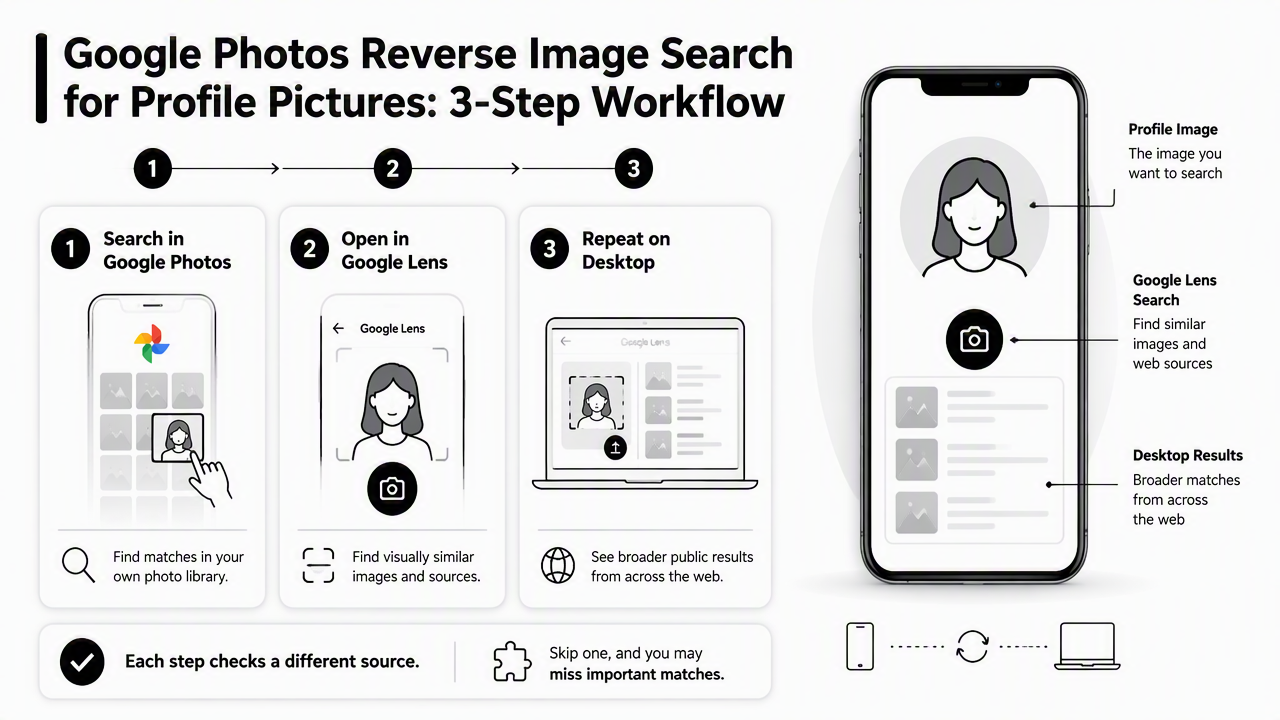
- Open the profile image in Google Photos.
- Use search or Lens options inside the app when available.
- Save a clean copy of the image.
- Search the same image with Google Lens.
- Repeat on desktop by uploading or dragging the image into image search.
- Compare names, domains, dates, and contexts before taking action.
Best practice: one search result rarely proves misuse. Several matching pages, reused names, or inconsistent profile details create a stronger signal.
Phone workflow with Google Photos and Lens
Start with the image stored in Google Photos. If face grouping or visual search is active, Google Photos may surface similar images in the same account, which helps locate older versions, cropped copies, or related shots from the same session.
Next, open the image with Google Lens. Lens is better suited for public discovery because it can connect the selected image to related web pages and visual matches. For profile pictures, crop to the face and shoulders first, then run a second search with the full image to capture background clues.
Creators who use profile pictures across social channels can also align image checks with content updates, such as refreshed LinkedIn visuals from a fitness Shopify LinkedIn post AI generator.
Desktop workflow for broader public results
Desktop search is useful when precision matters. Download the image, use a browser-based image search, upload the file, then review visually similar matches and pages that include the image.
Keep a simple record:
- Search date
- Image version searched
- Matching URL or platform
- Account name shown beside the image
- Action needed, such as ignore, save, report, or update
Desktop results can reveal places mobile search misses, especially when a photo has been resized, compressed, or used inside an article thumbnail.
Which image search tool should check a profile picture?
Google Photos, Google Lens, desktop Google image search, TinEye, and people-search services serve different profile-picture checks in 2026. Google tools are convenient for visual matching, while dedicated reverse-search sites may focus on original-source discovery or identity verification.
Competitor pages in the search results often frame reverse search as a way to "find people by photo" or verify identities. A better approach is narrower: use each tool for its strongest purpose, then avoid treating visual similarity as proof of identity.
Profile-picture search tool comparison
| Tool or method | Best use | Main limitation | Good fit |
|---|---|---|---|
| Google Photos | Finding similar images in a personal library | Not designed as a full public web search | Locating old profile-photo versions |
| Google Lens | Finding related public visual matches | Results can vary by crop, device, and context | Checking LinkedIn, creator, and dating photos |
| Desktop image search | Uploading clean files for broader review | May miss private or blocked pages | Reputation checks before publishing |
| TinEye | Finding duplicate or modified copies | Smaller or different index than Google | Source tracking and duplicate checks |
| Social Catfish-style services | Identity verification workflows | Often commercial and broader than image search | Dating safety and scam checks |
No single tool sees the whole web. Private profiles, app-only images, deleted posts, and pages blocked from indexing may not appear. Search results should guide judgment, not replace it.
Visual AI keeps improving, but image recognition still depends on the available index and the quality of the query image. A 2021 review by Anantrasirichai and Bull examined artificial intelligence in creative industries, a useful reminder that image generation, editing, and recognition are now connected parts of the same media system source.
How profile-photo privacy checks protect reputation
Profile-photo privacy checks protect reputation by showing where an image appears, whether it is tied to outdated content, and whether it could be confused with another identity. The most useful checks happen before a photo becomes the default image across LinkedIn, business pages, dating apps, and creator profiles.
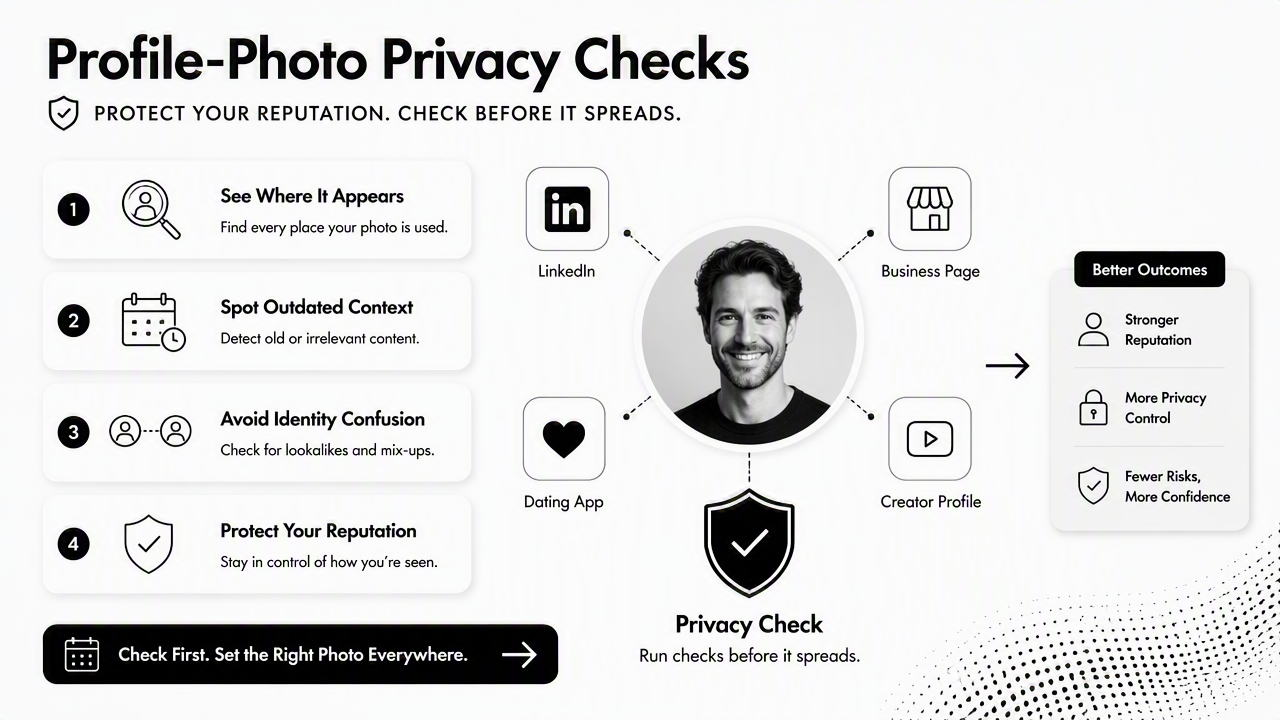
A strong profile image should be consistent enough to build trust, but not so reused that every personal and professional account becomes easy to connect. That balance matters for job seekers, founders, freelancers, and public-facing creators.
For brand-heavy profiles, supporting visuals also matter. Business owners may use a fitness Shopify website hero AI generator or a fitness Shopify logo AI generator so a headshot sits inside a cleaner visual identity, not a random collection of mismatched assets.
A safe review checklist before publishing
- Search the final image with Google Lens.
- Search a cropped face version and a full-frame version.
- Check whether old accounts, forums, or cached pages appear.
- Compare public names attached to the image.
- Remove EXIF location data before uploading when possible.
- Avoid reusing the same photo across private dating profiles and public business pages.
- Save screenshots of suspicious matches before reporting.
Practical rule: a professional headshot should make a person easy to recognize in the right context, not easy to track across every context.
The Looktara platform fits the positive side of that workflow: refreshing images for a more current role, campaign, or profile update. For creators and founders, looktara.com can support a consistent visual presence after privacy checks are complete.
When an AI headshot changes the search result
AI headshots can reduce exact duplicate matches because they may create a new image rather than reusing an old public photo. Still, similar face structure, styling, clothing, and background can remain searchable through visual matching.
AI-generated or AI-edited portraits should still be checked before publication. Modern search and optimization systems rely on complex matching methods; a 2023 review by Rajwar, Deep, and Das covered search and optimization algorithms across applications, which helps explain why search tools can compare patterns beyond exact file matches source.
A fresh image is not a privacy shield. It is a reputation reset point when paired with careful posting choices, platform settings, and periodic searches.
FAQ about profile-picture reverse search
Reverse image search questions usually come down to visibility, accuracy, and control. The short answers below cover the most common concerns for LinkedIn, dating apps, AI portraits, and public web results.
Can LinkedIn profile photos be found with reverse image search?
LinkedIn profile photos can sometimes be found through reverse image search if the image is public, indexed, reused elsewhere, or visible on pages that search engines can access. Results vary by privacy settings, account visibility, image uniqueness, and whether the same photo appears on personal websites, press pages, or other social platforms.
Can dating app photos be found online?
Dating app photos can be found online when the same image is reused on public profiles, social media, creator pages, or old websites. App-only images that are private or not indexed may not appear. A safer approach is to use dating photos that are authentic but not identical to business headshots or public social profile images.
Can AI headshots appear in reverse image search?
AI headshots can appear in reverse image search if they are uploaded to public websites, reused across platforms, or visually similar to indexed images. Exact matches may be less common for newly generated portraits, but visual search can still connect similar faces, poses, clothing, and backgrounds depending on the tool and index.
Is Google Photos the same as Google Lens?
Google Photos and Google Lens are related but not the same. Google Photos organizes and searches images inside a personal photo library. Google Lens analyzes an image to identify objects, text, places, or related visual matches, including public web results in many cases. For profile-photo checks, both tools can be useful.
How often should profile photos be checked?
Profile photos should be checked before major updates, job searches, media launches, dating profile changes, or brand campaigns. A light quarterly check is reasonable for public-facing professionals. Influencers, founders, and freelancers may benefit from more frequent searches because their images are copied, reposted, and screenshotted more often.
Conclusion
A google photos reverse image search for profile pictures is most useful when treated as a privacy and reputation habit, not a one-time trick. Google Photos helps locate personal-library copies, Google Lens finds related public matches, and desktop search adds a broader review layer.
The next step is simple: pick the final profile image, run the three-part search workflow, document any concerning matches, then update the photo where needed. After that check, Looktara can help create cleaner professional visuals for resumes, profiles, and campaigns; related assets such as a fitness Shopify pitch deck slide AI generator can keep the broader personal brand consistent. Visit looktara.com when a refreshed, search-ready image set is the next move.
Generated by EarlySEO.com