
TL;DR
The best AI headshot results usually come from a varied source-photo set, not a single perfect selfie. Search Google Photos by face, date, place, clothing, and activity, then keep only clear images with natural light, multiple angles, and consistent identity cues before uploading to an AI portrait tool.
A strong AI headshot often starts with a camera roll search, not a photo shoot. A google photo finder for AI headshot source photos is the practical process of using Google Photos, Google Images, and Google Lens to locate clear, varied portraits that an AI headshot tool can read accurately. Google photo finder: a workflow for finding, filtering, and organizing existing images so they work as high-quality source photos for AI-generated headshots. For profile owners who want a faster route from everyday selfies to polished portraits, Looktara can turn a well-chosen source set into professional brand imagery.
Table of Contents
What is a google photo finder for AI headshot source photos?
A google photo finder for AI headshot source photos is not one single Google product; it is a search workflow that combines Google Photos library search, Google Lens visual search, and Google Images context checks to identify upload-ready selfies for AI headshot generation. The goal is to find photos with enough facial detail, lighting variety, and identity consistency for realistic outputs.
Google Photos is usually the main source because it can group personal images by people, places, dates, objects, and activities. Google Lens is useful when a person wants to search using an image, screenshot, or camera input, while Google Images is better for checking pose ideas or style references rather than personal source photos.
One common naming trap matters here. Google Person Finder, described in Wikipedia data as an open-source registry and message board for people affected by natural disasters, is unrelated to finding headshot source photos. The relevant tools are Google Photos search, Google Lens, and Google Images.
Key insight: AI headshot quality depends less on having glamorous selfies and more on giving the model clear, varied, repeatable facial information.
Google tools compared for headshot sourcing
| Tool | Best use | Good source-photo role | Main caution |
|---|---|---|---|
| Google Photos | Searching a personal camera roll | Finds real selfies, portraits, travel photos, and work images | Needs careful filtering for blur, lighting, and face size |
| Google Lens | Searching with an image or screenshot | Helps locate similar images or identify visual context | Not a replacement for a personal photo library |
| Google Images | Broad web image search | Helps compare headshot styles, poses, and crops | Public images should not be uploaded as identity source photos |
| Google Person Finder | Disaster registry use case | No role in AI headshot sourcing | Often confused by name only |
How to find the best source photos in Google Photos
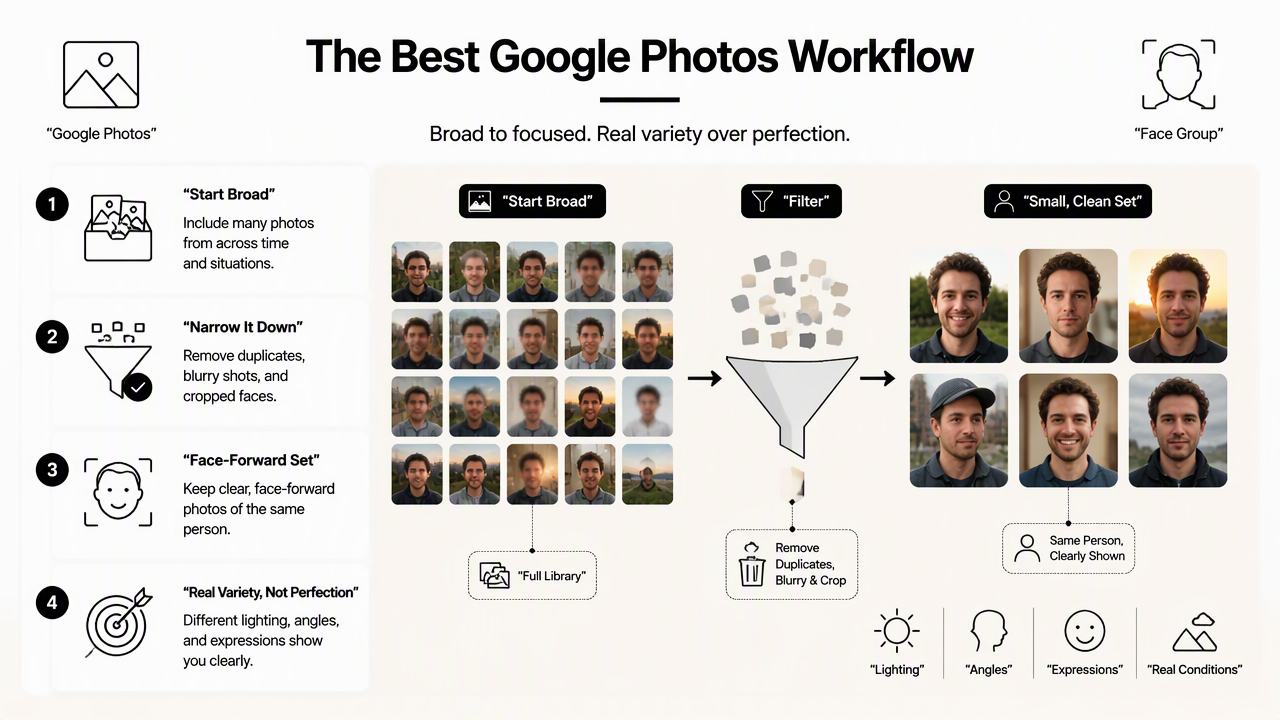
The best Google Photos workflow starts broad, then narrows the library into a small, clean set of face-forward images with different lighting, angles, and expressions. The target is not perfection; the target is a set that shows the same person clearly in several realistic conditions.
Google support materials describe reverse image search through Google Lens as a way to search with an image on Android devices, including uploaded photos and camera input through the Google app's Lens option in Search with an image on Google. For source-photo discovery, that same image-first mindset helps users inspect what a tool can "see": face clarity, background clutter, and visual similarity.
Step-by-step Google Photos workflow
- Open Google Photos and search the person's name or face group if face grouping is enabled.
- Search by context terms such as
selfie,portrait,work,wedding,gym,travel,outdoor, andoffice. - Filter by recent years first, since current hair, weight, glasses, and facial hair help the AI output look current.
- Open each candidate full screen and remove blurry, shadowed, heavily filtered, or cropped images.
- Save strong candidates to a new album named something like
AI headshot source photos. - Balance the album with straight-on, three-quarter, left-facing, and right-facing views.
- Export or download the final set at original quality rather than screenshotting thumbnails.
A small album also reduces decision fatigue. Ten useful photos usually beat 50 mixed-quality uploads because weak inputs can confuse facial structure, skin texture, hairstyle, or expression.
Search terms that uncover better portraits
- Places: office, conference, cafe, hotel, city, beach, park.
- Events: graduation, wedding, networking, interview, birthday, speaking.
- Clothing: blazer, shirt, dress, suit, sweater, uniform.
- Lighting: outdoor, window, morning, daylight, golden hour.
- Activities: presentation, podcast, client meeting, workout, product shoot.
People often miss strong source photos because they search only for "selfie." Event and location searches often surface higher-quality images taken by someone else, with better framing and more natural posture.
Which photos work best for AI headshots?
The best AI headshot source photos are sharp, recent, well-lit images where the face is visible from multiple angles and expressions without heavy filters or extreme edits. A good set should show the same identity repeatedly, while still giving the AI model enough variety to create natural-looking portraits.
A 2021 ACM paper by Ángel Alexander Cabrera, Abraham J. Druck, and Jason Hong examined how crowdsourced failure reports can help discover and validate AI errors in human-computer interaction systems (ACM paper). The practical lesson for headshots is simple: input quality matters because AI systems can fail in ways that are hard to predict from a single image.
Source photos should act like evidence: clear face, current appearance, natural light, and enough variation to prove the same person across conditions.
Source-photo checklist for AI headshot tools
| Checkpoint | Best choice | Avoid |
|---|---|---|
| Lighting | Soft window light, open shade, clean daylight | Harsh overhead light, deep shadows, colored party lighting |
| Face angle | Straight-on plus left and right three-quarter views | Only one angle across the whole set |
| Expression | Neutral, slight smile, full smile, relaxed face | Same expression in every photo |
| Resolution | Original downloads with a clear face area | Screenshots, thumbnails, compressed social uploads |
| Background | Simple, uncluttered, not too bright | Crowds, mirrors, messy rooms, busy patterns |
| Edits | Natural color and normal skin texture | Beauty filters, face reshaping, heavy sharpening |
| Recency | Current hairstyle, glasses, facial hair, and body shape | Old photos that no longer match real appearance |
| Framing | Head and shoulders visible, face not cut off | Sunglasses, hats covering face, extreme close-ups |
A balanced upload set should include at least a few images where the whole face is visible without obstruction. Glasses can be included when they are part of the person's normal look, but glare-heavy frames should be filtered out.
Common source-photo mistakes to remove early
- Cropped group shots where the face is small.
- Mirror selfies with the phone covering part of the face.
- Low-light restaurant photos with motion blur.
- Vacation photos with sunglasses or hats blocking key features.
- Old images that no longer match current hair, skin, or facial hair.
- Overedited social media photos that change jawline, eyes, or skin texture.
Removing weak images before upload saves time and protects realism. When one photo shows a beard, another shows no beard, and a third shows heavy face smoothing, the final output may drift away from the person's current identity.
How to match source photos to profile goals
Different profile goals need different source-photo mixes, because a LinkedIn headshot, founder portrait, creator profile image, and dating-app photo all signal different levels of polish and personality. The same Google Photos album can support several outputs if the source set includes both professional and relaxed images.
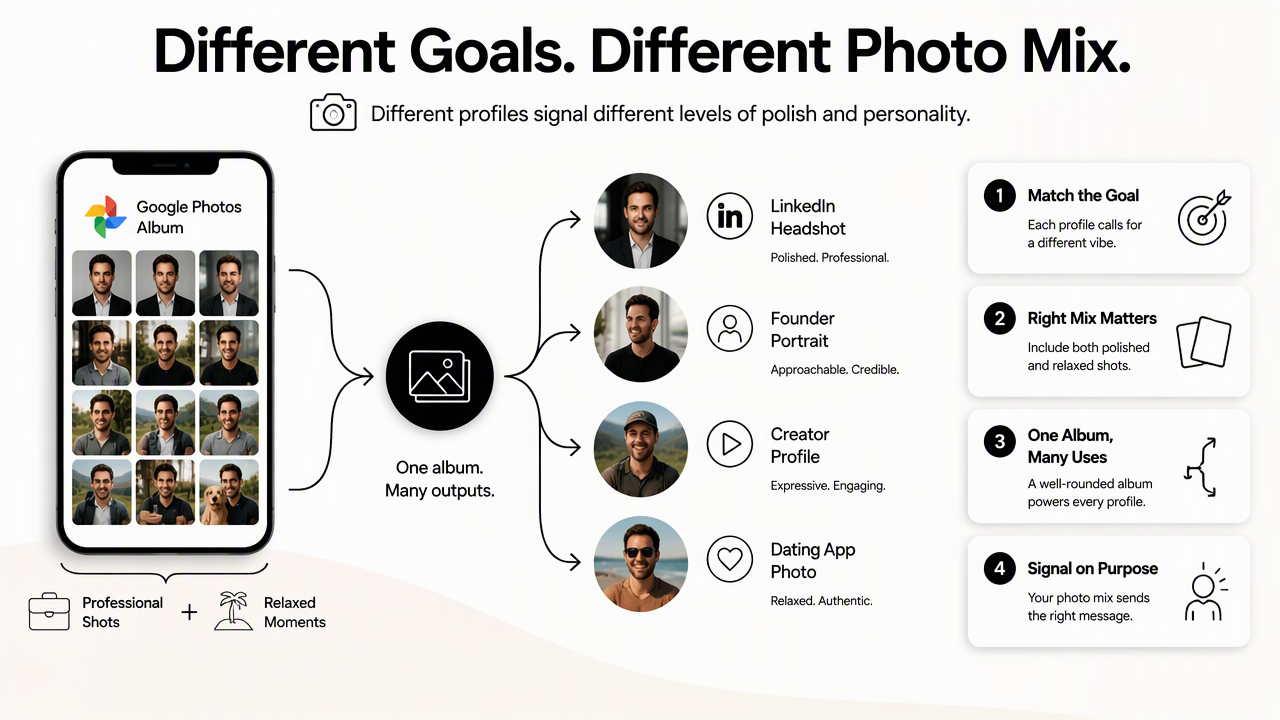
For career profiles, neutral expressions, office-like clothing, and clean shoulder framing matter most. A person updating a CV, LinkedIn profile, or job board image can pair the Google Photos workflow with a LinkedIn resume headshot AI generator to keep the final image aligned with hiring expectations.
Entrepreneurs and solo business owners may need photos that feel confident but not stiff. A founder who sells services, coaching, fitness programs, or digital products can choose source images with clear eye contact, natural posture, and wardrobe variety, then adapt the results for landing pages, email signatures, and ads such as a LinkedIn Google Display Ad image.
Creators and social media professionals often need more expressive range. A Google Photos search for brand shoots, events, product demos, or lifestyle images can support assets for Instagram, thumbnails, and campaign pages, including visuals made with an Instagram product photo AI generator.
Profile use cases and photo priorities
| Profile goal | Best source-photo mix | Final image style |
|---|---|---|
| LinkedIn or resume | Clear face, blazer or smart top, neutral background | Polished, approachable, professional |
| Founder brand | Confident eye contact, varied outfits, natural posture | Credible, warm, business-ready |
| Freelancer portfolio | Work setting, casual professional clothing, relaxed expressions | Skilled, personal, trustworthy |
| Creator profile | Expressive photos, lifestyle context, strong lighting | Memorable, energetic, platform-friendly |
| Dating app | Natural smile, recent face shots, relaxed setting | Authentic, attractive, not overly corporate |
How Looktara handles source-photo sets
Looktara is built for people who already have useful selfies but need a more polished visual result. The Looktara platform works best when the upload set includes current, well-lit face photos from multiple angles rather than a random camera-roll dump.
For job seekers, founders, creators, and freelancers, the cleanest workflow is simple: find candidates in Google Photos, filter with the checklist above, then generate profile-ready imagery with Looktara. Related brand assets can also be created for campaigns such as Instagram Google Display Ad images or newsletter Google Display Ad images when a consistent visual identity is needed across channels.
What to expect from photo search in 2027
Photo search is moving from keyword matching toward image-first discovery, so source-photo selection will likely become more visual, contextual, and automated in 2027. Google Lens already frames search around cameras, images, and screenshots, which points to a future where people find usable portraits by visual similarity, not just album labels.
For AI headshots, the practical change may be faster pre-screening. Tools may become better at warning when photos are blurry, inconsistent, too old, or too filtered before generation starts. That would make the source-photo checklist even more valuable because it gives people a clear standard for judging recommendations.
AI headshot sourcing FAQ
How many Google Photos images are enough for an AI headshot?
Most AI headshot tools work best with a small set of clear, varied images rather than a huge mixed album. A practical target is enough photos to show the face from several angles, expressions, and lighting conditions. Quality matters more than quantity, especially when older or filtered images no longer match current appearance.
Can Google Images be used for AI headshot source photos?
Google Images should be used for style research, not as identity source material. Public web images can help compare crops, wardrobe, backgrounds, and lighting, but source photos for an AI headshot should show the actual person. Using personal images from Google Photos gives the model the identity information it needs.
Is Google Lens useful for choosing source photos?
Google Lens is useful for image-based search and visual context checks. It can help inspect similar visuals or identify what an image contains, but the main selection work still happens inside a personal photo library. The strongest source set usually comes from Google Photos albums, not external visual matches.
Should dating profile photos use the same source set as LinkedIn headshots?
Dating profile images and LinkedIn headshots can share some source photos, but the final style should differ. LinkedIn favors polished, professional framing. Dating profiles usually benefit from warmer expressions, natural settings, and relaxed body language. A mixed source set gives the AI more range for both outcomes.
Conclusion
A google photo finder for AI headshot source photos works best as a repeatable workflow: search broadly in Google Photos, build a focused album, remove weak images, and upload only clear, current, varied portraits. The checklist should guide every decision: natural lighting, multiple angles, expression range, original resolution, and no heavy edits.
The next step is practical. Create a dedicated source-photo album, narrow it to the strongest images, then use a headshot tool that rewards clean inputs. For a polished profile image built from an existing photo set, visit looktara.com and start with the best 10 to 20 candidates from the album.
Generated by EarlySEO.com