
TL;DR
Headshot files are easiest to manage when every name includes date, person, platform, crop, style, version, and approval status. Store final files in cloud folders by year and use short, consistent labels so LinkedIn, resume, website, press, and dating profile versions never get mixed up.
A strong headshot loses value fast when the right file cannot be found before a job application, speaker bio, press request, or profile update. The best cloud for storing photos naming conventions for headshots is a short, repeatable system that says who the image is for, where it belongs, what size it is, and whether it is approved. Headshot naming convention: a structured file-name format that identifies a portrait by date, subject, use case, crop, style, version, and status. Professionals creating fresh headshots with Looktara can save time later by naming final exports before uploading them to Google Drive, iCloud, Dropbox, OneDrive, or a digital asset management folder.
Table of Contents
What should a headshot file name include?
A headshot file name should include the shoot date, person or brand name, platform, crop size, style, version number, and approval status. This gives every cloud file enough context to be found, shared, and replaced without opening the image or guessing which portrait fits LinkedIn, resumes, websites, newsletters, press kits, or dating profiles.
Use plain words, hyphens, and a predictable order. Avoid spaces, vague labels, and special characters that can behave differently across cloud services.
A headshot name should answer five questions at a glance: who, when, where, what format, and whether it is final.
The research data defines iCloud as Apple's personal cloud service, launched in 2011, for storing and syncing data across devices, including Apple Photos. Google Drive, Dropbox, and OneDrive serve similar practical goals for headshot storage, even though each service handles search, previews, sharing, and syncing differently.
Core terms:
- Date: the capture, creation, or export date in
YYYY-MM-DDformat. - Subject: the person, founder, creator, team member, or brand shown.
- Platform: the intended use, such as
linkedin,resume,website,press,newsletter, ordating. - Crop: the final aspect ratio or dimensions, such as
1x1,4x5,16x9, or1200x1200. - Style: the image direction, such as
studio,outdoor,casual,formal, oreditorial. - Status: the review stage, such as
draft,review,approved, orarchive.
Use this naming formula for cloud headshot libraries
The most practical naming formula for cloud headshot libraries is YYYY-MM-DD_subject_platform_crop_style_v##_status.ext. It keeps files chronological, searchable, and clear across shared folders, mobile apps, and desktop sync tools.
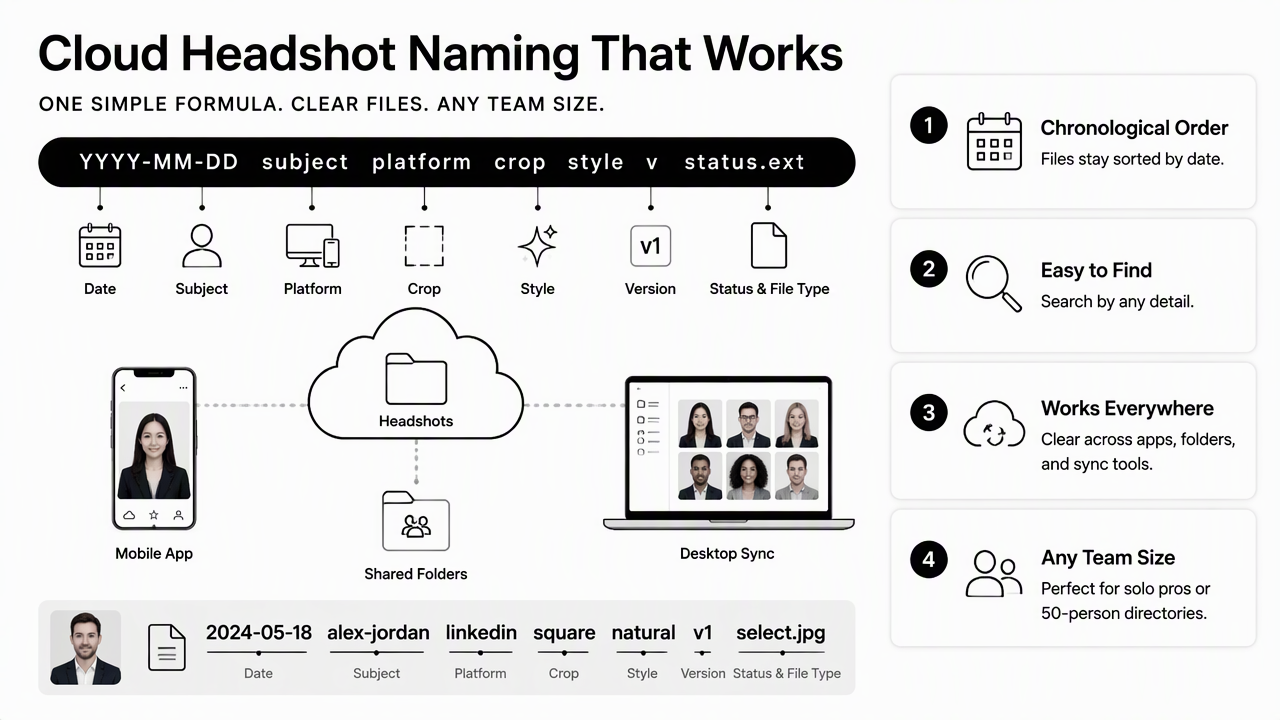
A good format works for a solo job seeker and a 50-person company directory. The same pattern also fits AI-generated headshots, photographer exports, edited retouches, and resized social profile versions.
Recommended file-name pattern
| Element | Example | Why it matters |
|---|---|---|
| Date | 2026-02-18 |
Sorts files by time across cloud folders |
| Subject | maya-chen |
Identifies the person without opening previews |
| Platform | linkedin |
Separates LinkedIn, resume, website, and press uses |
| Crop | 1x1 or 1200x1200 |
Prevents wrong-size uploads |
| Style | formal-gray |
Shows tone, background, or wardrobe direction |
| Version | v01, v02 |
Tracks edits without overwriting |
| Status | approved |
Makes the final choice obvious |
Example final names:
2026-02-18_maya-chen_linkedin_1x1_formal-gray_v03_approved.jpg2026-02-18_maya-chen_resume_4x5_formal-gray_v02_approved.png2026-02-18_maya-chen_press_16x9_editorial-blue_v01_review.jpg2026-02-18_maya-chen_dating_4x5_casual-outdoor_v02_approved.jpg
People creating role-specific portraits, such as fitness coaches or trainers, can pair this structure with a dedicated LinkedIn and resume headshot generator for fitness professionals. The exported files can then follow the same names as traditional photo-session files.
Keep the formula short enough for daily use. Long names improve clarity until they become so detailed that people stop following the system.
How should cloud folders be organized for headshots?
Cloud folders should be organized by year, person or brand, use case, and approval status. This structure keeps active headshots separate from old versions while still preserving original exports, final crops, and press-ready images for later reuse.
A simple folder structure beats a clever one. The goal is fast retrieval, not perfect archival theory.
Simple folder tree for headshots
Headshots/2026/Maya-Chen/01-originals/02-edits/03-final-approved/04-platform-exports/linkedin/resume/website/press/newsletter/dating/99-archive/
Photographer-focused competitors in the research, including Filecamp and Nations Photo Lab, emphasize folder structure and digital asset management as major parts of image organization. A headshot-specific system can go further by naming files around real publishing destinations instead of only client, shoot, or gallery categories.
Teams should reserve approved for images cleared for public use. Review should mean pending selection, and archive should mean retained but no longer current.
Cloud search works better when folder names and file names use the same words. If a final portrait is named for newsletter, the folder should not call the same use case email-blast.
For creators preparing visual assets across profiles and campaigns, a separate newsletter resume headshot generator can support email bio images while the cloud folder keeps approved crops easy to find.
Which naming examples fit LinkedIn, resumes, websites, press, and dating?
Each platform needs a different headshot label because the same portrait may require a different crop, tone, file type, or approval process. LinkedIn and resumes usually need polished close crops, websites may need wider hero images, press kits need shareable media files, and dating apps favor authentic lifestyle portraits.
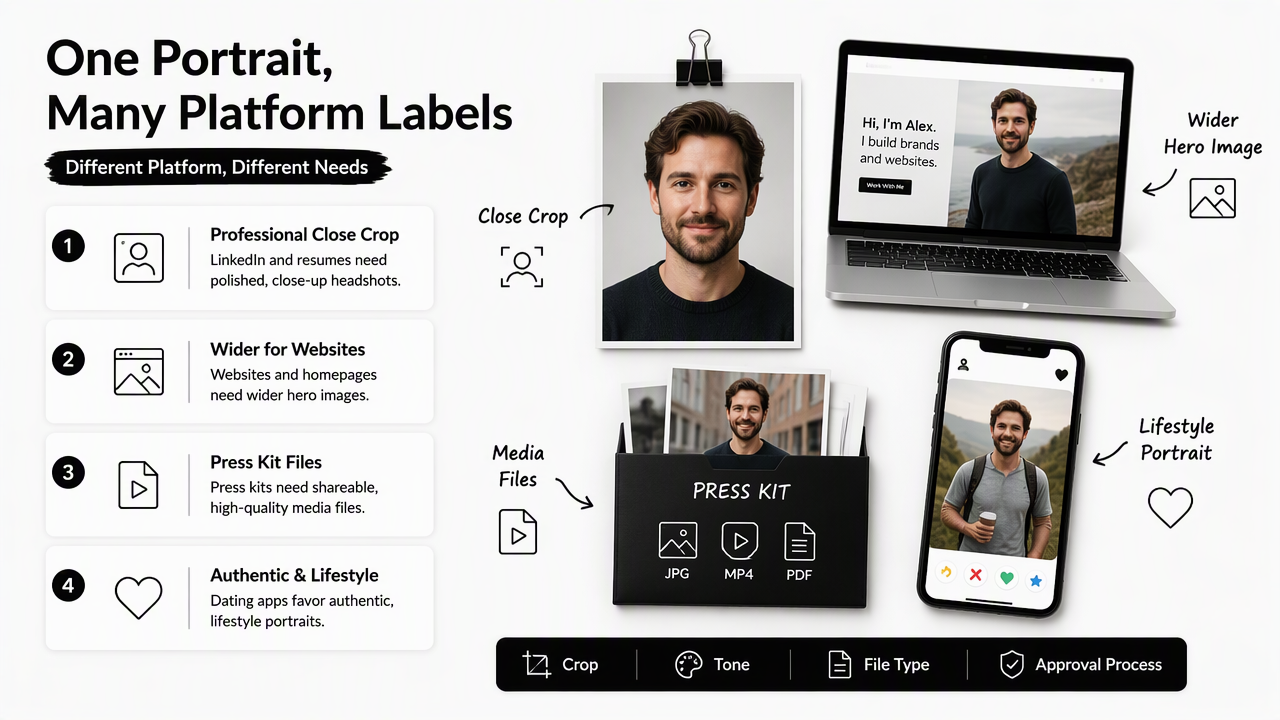
The file name should match the decision being made. A hiring manager, editor, designer, or founder should be able to pick the correct asset from a shared folder without asking for clarification.
Platform-ready headshot examples
| Use case | Best naming example | Notes |
|---|---|---|
| LinkedIn profile | 2026-03-04_ari-patel_linkedin_1x1_business-casual_v02_approved.jpg |
Best for profile squares and recruiter visibility |
| Resume header | 2026-03-04_ari-patel_resume_4x5_formal-white_v01_approved.png |
Useful when a CV design includes a portrait |
| Personal website | 2026-03-04_ari-patel_website_16x9_editorial-office_v03_approved.jpg |
Better for hero sections and bio pages |
| Press kit | 2026-03-04_ari-patel_press_3000px_editorial-dark_v01_approved.jpg |
Keeps high-resolution media easy to share |
| Newsletter bio | 2026-03-04_ari-patel_newsletter_1x1_warm-studio_v02_approved.jpg |
Works for author boxes and email intros |
| Dating app | 2026-03-04_ari-patel_dating_4x5_casual-outdoor_v01_approved.jpg |
Signals a softer, less corporate style |
Looktara can help produce headshot sets for professional and personal-brand use, while the naming system above keeps each final export tied to the right destination. For commerce-minded creators, product and profile visuals can also be separated with a LinkedIn product photo generator or an Instagram product photo generator.
Avoid mixing platform tags with emotional labels such as best, favorite, or nice-one. Those words feel useful during selection but create confusion once several approved files exist.
Good replacement tags include:
formalfor conservative career use.casualfor creator, dating, or founder profiles.editorialfor press and personal websites.studiofor controlled lighting and clean backgrounds.outdoorfor warmer, natural portraits.approvedonly after the final image has been chosen.
How will headshot storage change in 2027?
Headshot storage in 2027 will likely depend more on metadata, AI search, and automated resizing, but clean file names will still matter. Cloud tools can recognize faces and text, yet structured names remain the safest way to share approved images with recruiters, designers, assistants, journalists, clients, and collaborators.
AI search creates a useful shortcut, not a replacement for organization. A cloud account may find images by face, location, or visual similarity, but external recipients often see only a downloaded file name.
2027-ready naming habits
- Keep
YYYY-MM-DDat the start so files sort correctly outside the original cloud service. - Add platform labels because AI search may not know the intended use.
- Save approved files separately from drafts to reduce accidental uploads.
- Keep high-resolution press files separate from small social crops.
- Export web-ready copies with dimensions in the name when size matters.
- Review archived headshots yearly so outdated portraits do not remain active.
Future cloud search may become smarter, but clear names still travel better than hidden metadata.
The Looktara platform fits this shift because generated headshots often produce several useful styles at once. Naming those variations by platform, crop, and approval status turns a large set of options into a practical photo library. For small business owners, a Shopify resume headshot generator or newsletter product photo generator can sit beside the same cloud naming rules.
Visit looktara.com when a fresh batch of professional images is needed, then save the final selections with the system in this guide.
FAQ
What is the best file name for a LinkedIn headshot?
The best LinkedIn headshot file name includes date, name, platform, crop, style, version, and approval status. A strong example is 2026-04-12_jordan-lee_linkedin_1x1_business-casual_v02_approved.jpg. This format keeps the file searchable in cloud storage and clear after download.
Should headshot file names use spaces or hyphens?
Headshot file names should use hyphens inside phrases and underscores between major fields. For example, maya-chen_linkedin_1x1 is easier to scan than a long string of spaces. This approach also travels well across cloud sync apps, email attachments, web uploads, and shared folders.
Is the date in a headshot name the shoot date or export date?
The date can be either the shoot date or the export date, but the chosen rule should stay consistent. For most professionals, the export date is more practical because it marks the exact file version that entered the cloud library and became available for publishing.
How many headshot versions should be kept in cloud storage?
Cloud storage should keep originals, edited working files, and final approved exports, but old rejected drafts should move into an archive folder. The active folder should contain only current approved files for each use case, such as LinkedIn, resume, website, press, newsletter, and dating.
Conclusion
A reliable cloud for storing photos naming conventions for headshots turns a pile of portraits into a usable professional asset library. Start with YYYY-MM-DD_subject_platform_crop_style_v##_status.ext, create separate folders for originals, edits, approved finals, and platform exports, then review the archive once a year. For new professional portraits, create the images with Looktara, save approved versions using this formula, and head to looktara.com when the next profile refresh is due.
Generated by EarlySEO.com