
TL;DR
Store professional headshots by use case, not by random download date: LinkedIn, resume, website, press, social, and dating profiles all need different crops and permissions. A simple folder structure, clear file naming, restricted sharing, and a quarterly archive check keep the best version easy to find.
One strong headshot rarely stays as one file for long; it becomes a LinkedIn crop, a resume insert, a website image, a press photo, a social avatar, and sometimes a dating profile option. Cloud photo storage for professional headshot versions solves that small but frustrating problem by keeping every approved version findable, secure, and ready to send. For people refreshing images with Looktara, the best workflow starts before downloading: decide where each version belongs, how it will be named, and who can access it.
Table of Contents
What is cloud photo storage for professional headshot versions?
Cloud photo storage for professional headshot versions is a shared file system for saving, labeling, backing up, and controlling access to multiple approved headshot files across career, business, media, and personal profiles.
Cloud photo storage: Online file storage that keeps photos on remote servers so they can be backed up, synced, shared, and restored across devices.
Headshot version: A finished image variant made for a specific use, such as a square LinkedIn crop, a transparent website portrait, a high-resolution press file, or a warmer dating profile photo.
Google Photos is widely known as a photo sharing and storage service developed by Google, while services such as Dropbox, Google Drive, iCloud Drive, and Microsoft OneDrive are common general file-storage choices. Competitor research shows most photo-storage guides focus on photographers and backup volume, not the practical problem of managing final headshot versions across many public profiles.
Key insight: The goal is not to save every image forever. The goal is to protect the best approved image for each real-world use case.
Headshot version types worth separating
| Version | Best use | Storage note |
|---|---|---|
| Master edit | Long-term source file | Keep highest quality and never overwrite |
| LinkedIn crop | Professional profile | Square or portrait crop, current role friendly |
| Resume file | PDF or document insert | Smaller file size, clean background |
| Website bio | About page or portfolio | Match site dimensions and brand colors |
| Press kit | Media requests | High-resolution file with clear rights |
| Social avatar | Instagram, X, creator pages | Cropped for small-screen recognition |
| Dating profile | Personal profile | Natural expression, less corporate finish |
How should headshot files be organized in the cloud?
Headshot files should be organized by identity, year, use case, and approval status so the newest public version is obvious without opening every image.
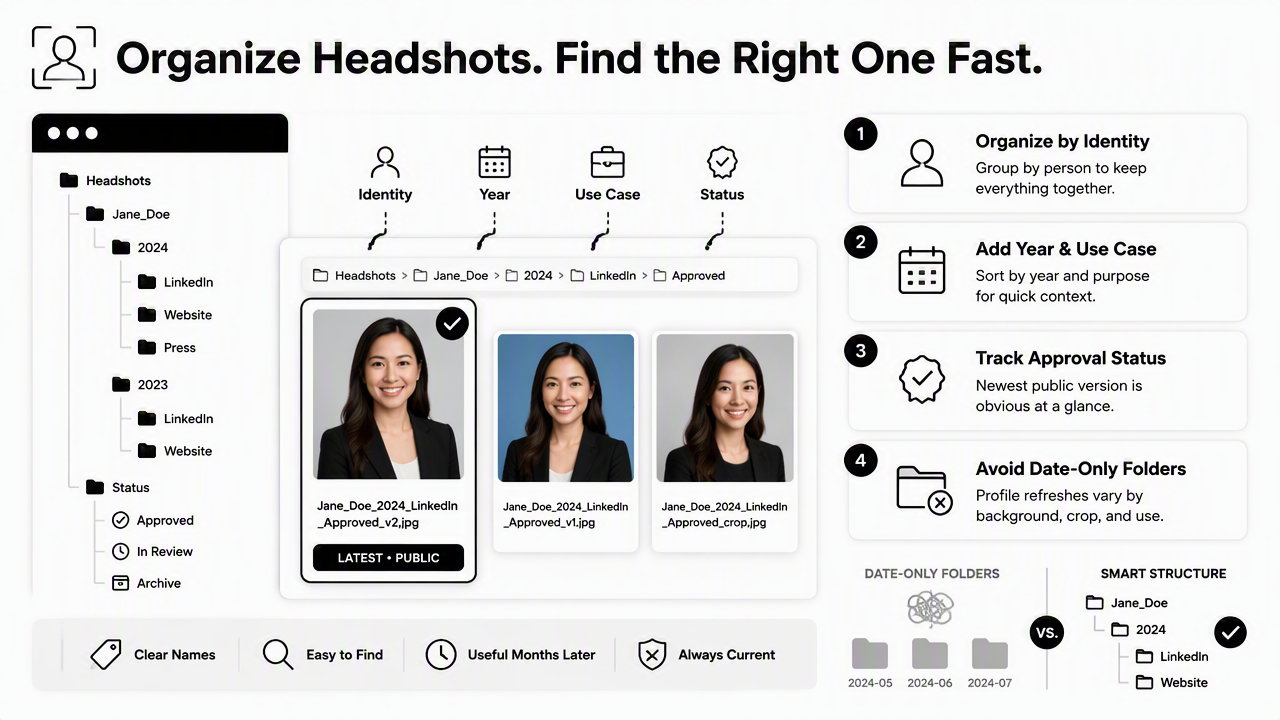
A strong folder structure keeps images useful even months later. Date-only folders become messy fast because a profile refresh can include different backgrounds, crops, tones, and file sizes. Use folders that reflect decisions, not just upload history.
Recommended top-level structure:
Headshots2026-Approved2026-WorkingArchive-2025-and-earlierPress-KitPrivate-Do-Not-Share
Inside 2026-Approved, split images by destination. For example, create LinkedIn, Resume, Website, Press, Social, and Dating. A freelancer can also add Client-Proposals, while a founder can add Investor-Decks or Speaking-Bio.
A naming convention that prevents version confusion
| Pattern element | Example | Why it helps |
|---|---|---|
| Person name | maria-chen |
Separates household or team images |
| Year and month | 2026-02 |
Shows freshness without guessing |
| Use case | linkedin |
Makes destination obvious |
| Crop or size | square-1200 |
Prevents wrong upload format |
| Status | approved |
Stops draft files from going public |
| Version | v02 |
Keeps history without overwriting |
A full filename could be maria-chen-2026-02-linkedin-square-1200-approved-v02.jpg. Press images may need larger files, such as maria-chen-2026-02-press-hires-approved-v01.png.
Looktara users who generate multiple style options can save favorites into Working, then move only the final choices into Approved. The folder move matters because it turns creative choice into a repeatable publishing workflow.
Which privacy and sharing settings matter most?
The most important privacy settings are restricted link access, two-factor authentication, device sync control, metadata review, and a clear rule for who can download originals.
Headshots are public-facing images, but the storage folder behind them should not be public by default. A polished portrait can reveal more than intended when stored beside drafts, filenames, location data, or older images. A 2024 IEEE Access survey by Abenezer Golda, Kidus Abebe Mekonen, and Amit Pandey examined privacy and security concerns in generative AI, which is relevant because professional images now move through AI editing, file hosting, and profile platforms more often than before: Privacy and Security Concerns in Generative AI.
Use this control checklist:
- Turn on two-factor authentication for Google, Apple, Microsoft, Dropbox, and any editing account.
- Share folders with named people, not public links, whenever possible.
- Set shared links to expire after a media deadline, job application period, or website project.
- Store dating profile images separately from professional press and resume files.
- Remove GPS metadata before uploading images to public profiles.
- Keep a
Do-Not-Sharefolder for drafts, test generations, and rejected crops.
Privacy settings by platform type
| Platform type | Safer default | Risk to avoid |
|---|---|---|
| General cloud drive | Restricted access by email | Anyone-with-link access left active |
| Photo gallery app | Private album | Auto-sharing with contacts or family groups |
| Team workspace | Viewer-only links | Editors replacing approved files |
| Press folder | Download allowed for approved images only | Drafts included in media kit |
| Dating app prep folder | Private, separate storage | Mixing personal and career images |
A 2023 Journal of Cybersecurity study by Sergi D. Bray, Shane D. Johnson, and Bennett Kleinberg tested human ability to detect deepfake images of human faces: Testing human ability to detect deepfake images of human faces. That research topic supports a practical rule for 2026: keep source files, final exports, and editing notes together so image authenticity can be explained when needed.
How should each profile get the right headshot version?
Each profile should use the headshot version that matches its audience, crop shape, file size, and emotional tone.
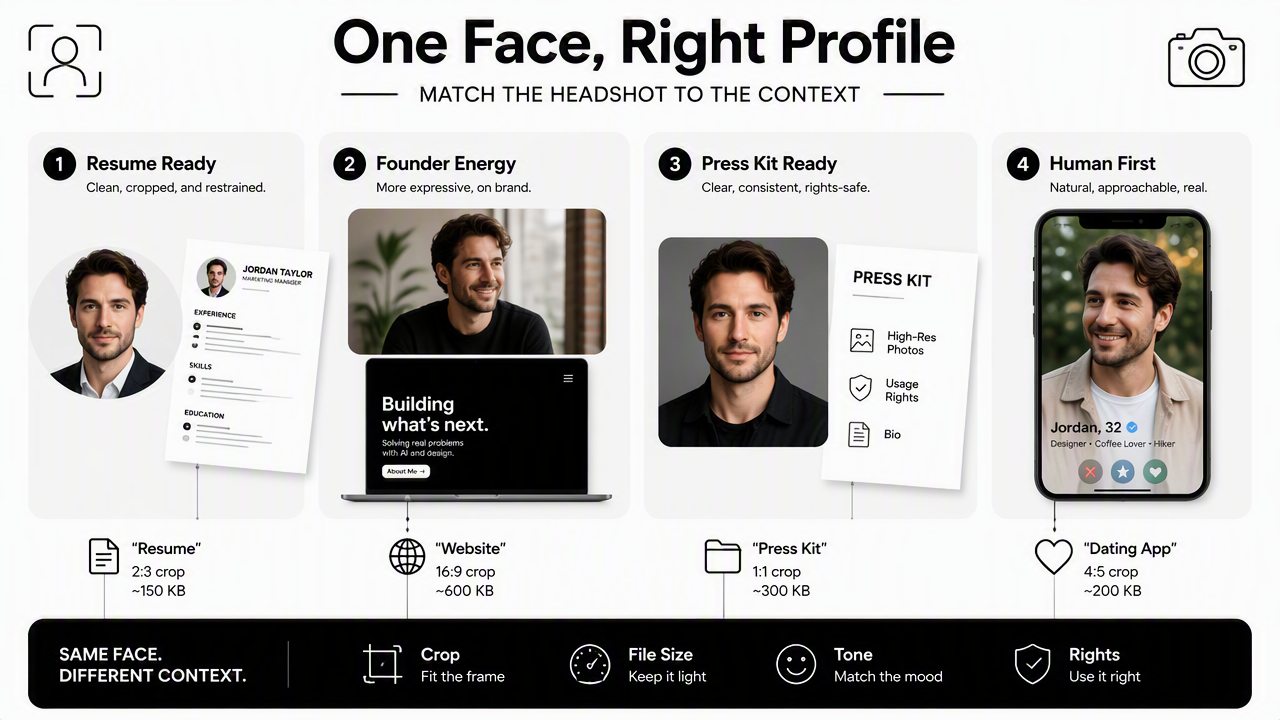
A resume headshot usually needs restraint. A founder website can look more expressive. A press kit needs clarity and rights. A dating app photo should feel human, not like a corporate badge. The same face can serve every purpose, but the same exact image should not be forced into every channel.
Best version by destination
| Destination | Recommended version | Practical reason |
|---|---|---|
| Polished square crop | Works in feeds, comments, and search results | |
| Resume | Small professional portrait | Keeps PDF size manageable |
| Personal website | Branded portrait | Supports credibility and visual consistency |
| Press kit | High-resolution approved photo | Helps journalists avoid grabbing old images |
| Instagram or creator bio | Recognizable close crop | Reads clearly on small screens |
| Dating profile | Natural, friendly image | Feels less staged and more approachable |
For career documents, a clean resume version should be saved apart from social images. A person building a new professional image can create a fresh set with the AI resume headshot generator, then store only the final export in the resume folder.
For creators and entrepreneurs, product-adjacent portraits often need a different look than a formal headshot. A social profile image made near brand visuals can be planned alongside the Instagram product photo generator, especially when a profile picture and product content need to feel consistent.
The Looktara platform is most useful when the storage workflow treats generated options as candidates, not final assets. Approved images should be renamed, moved, and backed up before being uploaded to public profiles.
When should older headshots be archived or replaced?
Older headshots should be archived when they no longer match current appearance, role, brand, audience, or usage rights, but they should not be deleted if they support press history or identity records.
Replacement does not need to happen every month. A quarterly review is enough for most professionals. A faster refresh makes sense after a major haircut, new glasses, a role change, a rebrand, a book launch, or a move from employment to consulting.
Archive using this order:
- Move replaced images from
ApprovedtoArchive-2025-and-earlieror the relevant year. - Add a short note file, such as
archived-reason.txt. - Keep press images that may still appear in articles or event pages.
- Remove public share links connected to older folders.
- Update the
Approvedfolder with one current default per destination.
Key insight: Archiving is safer than deleting because public profiles, conference pages, and media mentions may still point to older images.
What to expect in 2027
Headshot storage will likely become more provenance-aware. Content credentials, AI-editing labels, and platform-level authenticity signals are becoming more familiar across media and social platforms. For professional use, that means cloud folders may need to store not only the final image, but also proof of creation date, edit history, and permission notes.
Amazon Drive is a useful reminder that cloud services can change over time; it was formerly a cloud storage application managed by Amazon. Long-term headshot storage should not depend on one account only. A second backup, such as an external drive or another cloud provider, protects approved images if a service changes plans, sync rules, or availability.
FAQ about managing headshot versions
Headshot version management works best when common questions are answered before files scatter across downloads, messages, and profile uploads.
How many professional headshot versions should be kept?
Most professionals should keep one master edit, one LinkedIn version, one resume version, one website version, one press version, and one archive folder for older images. Creators, founders, and dating app users may also keep separate social and personal-profile versions because the tone and crop usually differ.
Should headshots be stored in photo apps or file drives?
Photo apps are convenient for browsing, while file drives are usually better for naming, folders, permissions, and press sharing. A practical setup can use both: a private photo album for review and a cloud drive folder for final approved files. The approved folder should be treated as the source of truth.
What file format is best for headshot storage?
JPEG works well for most LinkedIn, resume, dating, and social uploads because it balances quality and file size. PNG can be useful for website portraits, transparent backgrounds, or press kits. The master version should be stored at the highest available quality so future crops do not degrade the image.
How often should a LinkedIn headshot be updated?
A LinkedIn headshot should be updated when the image no longer matches current appearance, professional role, or personal brand. Many people can review it once per quarter and replace it only when needed. A new job search, promotion, public speaking campaign, or business launch is a natural trigger.
Conclusion
Cloud photo storage for professional headshot versions is a simple system: create one approved folder, name files by use case, protect sharing permissions, and archive older images on a schedule. A job seeker, founder, creator, freelancer, or dating app user can avoid profile-photo confusion with a 20-minute cleanup and a repeatable naming rule. For fresh image options, create the next set with Looktara, save the best exports into the right cloud folders, and visit looktara.com when a new professional image is ready to build.
Generated by EarlySEO.com