
TL;DR
AI headshot privacy depends on separating source photos, rejected outputs, and final downloads, then applying different retention rules to each file type. Keep only the images needed for profiles, delete raw uploads after approval, and share final headshots with limited-access links instead of public folders.
Cloud photo storage privacy for AI-generated headshots matters because a headshot set often includes more than a polished final image: it may contain raw selfies, rejected generations, metadata, and share links that travel across devices. Cloud photo storage privacy: the practice of controlling where personal images are stored, who can access them, how long they remain available, and whether they can be analyzed or reused by a service. Professionals creating profile images with Looktara should treat headshots like identity documents, not casual snapshots. For career use, a polished image from a resume headshot AI generator may be public, while source photos should stay private and short-lived.
Key insight: the safest headshot workflow keeps raw uploads temporary, final images organized, and sharing links narrow.
Table of Contents
What does cloud photo storage privacy for AI-generated headshots mean?
Cloud photo storage privacy for AI-generated headshots means managing raw uploads, generated outputs, and final downloads as separate privacy categories rather than placing every image in one synced folder.
AI headshot projects create a small identity trail. A typical set can include source selfies, reference photos, prompt notes, rejected images, edited finals, thumbnails, and profile-ready exports. Each file has a different risk level because each file reveals a different amount about a person's face, location, style, or professional role.
Research on generative AI privacy and security has become more formal since 2024. A survey by Abenezer Golda, Kidus Abebe Mekonen, and Amit Pandey in IEEE Access reviewed privacy and security concerns in generative AI, including the need to consider data handling across the AI pipeline. For headshots, that pipeline starts before generation and continues after download.
- Source photos: original selfies or portraits used to generate a headshot.
- Rejected outputs: AI images that were not selected, often because they look inaccurate, awkward, or too stylized.
- Final downloads: approved profile images intended for LinkedIn, resumes, websites, press kits, or social media.
- Metadata: hidden file information such as device details, time, location, or editing history, depending on capture and storage settings.
A smart privacy plan starts with classification. Source photos deserve the strictest controls because they show the unedited person and may contain background details. Rejected outputs deserve cleanup because inaccurate images can still resemble a real person. Final downloads can be stored longer, but only in folders meant for public-facing use.
Which headshot files should be kept, deleted, or archived?
AI headshot files should be kept only when they serve a clear professional purpose, while raw uploads and rejected outputs should be deleted after final images are approved.
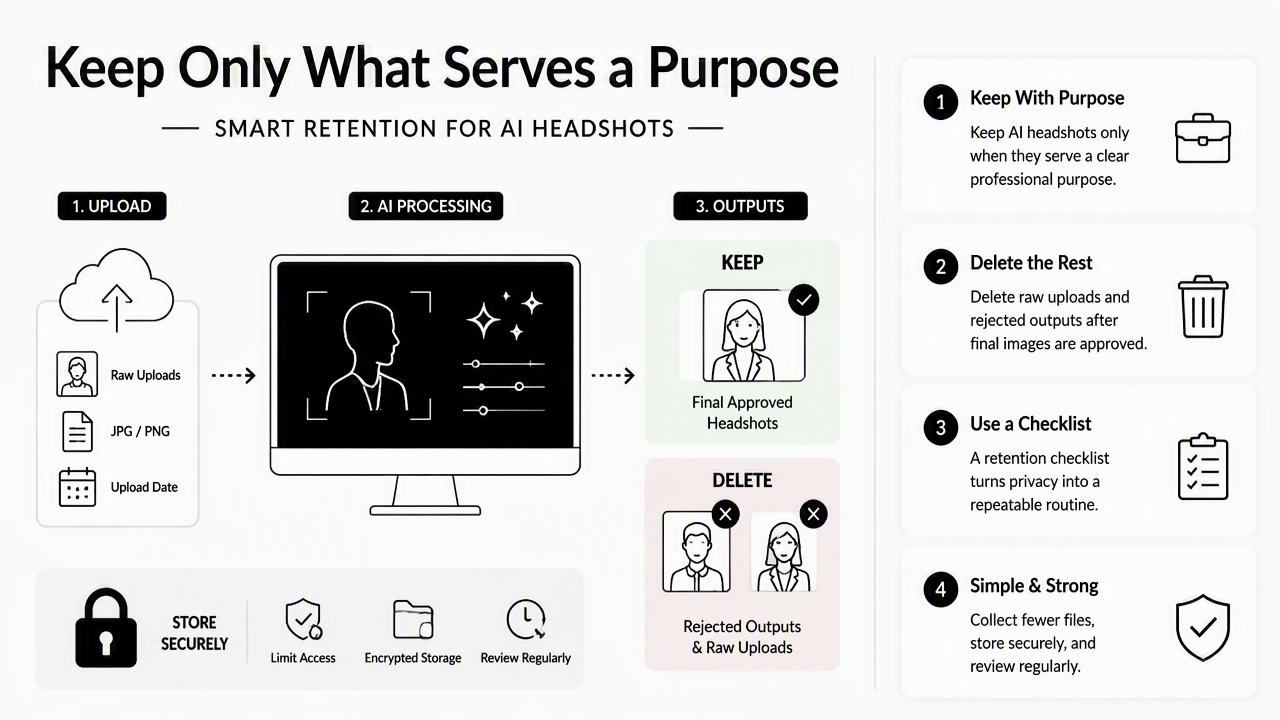
A retention checklist turns privacy from a vague concern into a repeatable routine. The strongest approach is simple: collect fewer files, store fewer copies, and keep only versions that have a planned use. That works for job seekers, founders, freelancers, creators, and dating app users because every group has a different public image goal but the same basic privacy need.
The Looktara platform fits this workflow best when the final image set is treated as the deliverable, not as a reason to keep every draft forever. A creator can use a final headshot for a LinkedIn post image, while the original uploads can be removed from general cloud sync once the preferred images are saved.
Retention checklist for source photos, outputs, and final downloads
| File type | Keep or delete | Suggested privacy action |
|---|---|---|
| Source selfies | Delete after approval | Remove from shared folders and device auto-backups if no longer needed |
| Reference portraits | Archive only if reused | Store in a private folder with limited account access |
| Rejected outputs | Delete | Avoid keeping inaccurate or unflattering facial variants |
| Final headshots | Keep | Store in a named folder for resumes, profiles, and media kits |
| Social crops | Keep briefly | Replace when profile branding changes |
| Public web versions | Keep | Use only images already approved for public display |
A practical file name system also helps. Use labels such as final-linkedin-2026.jpg, website-bio-2026.jpg, and press-kit-square.jpg. Avoid names that include sensitive job searches, private events, medical details, or personal addresses.
- Save the approved final images in one dedicated folder.
- Move source photos out of shared cloud albums.
- Delete rejected outputs from downloads, desktop folders, and trash.
- Check phone auto-backup apps for duplicate uploads.
- Review shared links every quarter and disable old ones.
Privacy improves fastest when deletion becomes part of the creative workflow, not a cleanup task months later.
How should final AI headshots be shared safely?
Final AI headshots should be shared through limited-access links, purpose-specific folders, and public versions that contain only the image needed for the intended profile or campaign.
Sharing creates the biggest privacy jump because a private image becomes portable. A recruiter, client, collaborator, or designer may download it, forward it, or add it to a content calendar. That does not make sharing unsafe, but it does mean the file should be prepared before it leaves a private storage area.
For professional branding, one image may need several public versions. A square crop can fit social profiles, a wider crop can support a website biography, and a high-resolution file can support press or speaker materials. A founder using a website hero image generator should keep public-facing files separate from the raw image set used to create them.
Safe sharing steps for headshots in cloud storage
- Create a public-ready folder: include only approved final images, not drafts or source photos.
- Strip unnecessary metadata: export a clean copy when location or device data is not needed.
- Use view-only links: avoid edit access unless a designer needs to crop or resize the file.
- Set link expiration when available: temporary access reduces forgotten exposure.
- Avoid public albums: direct links are easier to control than searchable or social albums.
- Keep a master copy private: store one high-quality final image outside shared folders.
Creators posting across channels may need multiple crops from the same headshot. A profile photo can support an X post graphic, a launch announcement, or an author bio. The safest setup stores those versions as approved exports, not as editable project folders with raw inputs attached.
Research by Sergi D. Bray, Shane D. Johnson, and Bennett Kleinberg tested human ability to detect deepfake face images in the Journal of Cybersecurity. The study topic is a useful reminder for 2026: realistic synthetic face images can be difficult to judge casually, so file provenance and controlled sharing matter.
A final headshot should also have context. Store a short note with approved uses, such as "LinkedIn, resume, website bio, speaker page." That makes future reuse easier and prevents a polished but outdated image from spreading into new campaigns without review.
Which cloud storage choices reduce privacy exposure in 2026?
The best cloud storage choice for AI headshots is the service whose encryption, scanning, sharing, and deletion controls match the sensitivity of the files being stored.
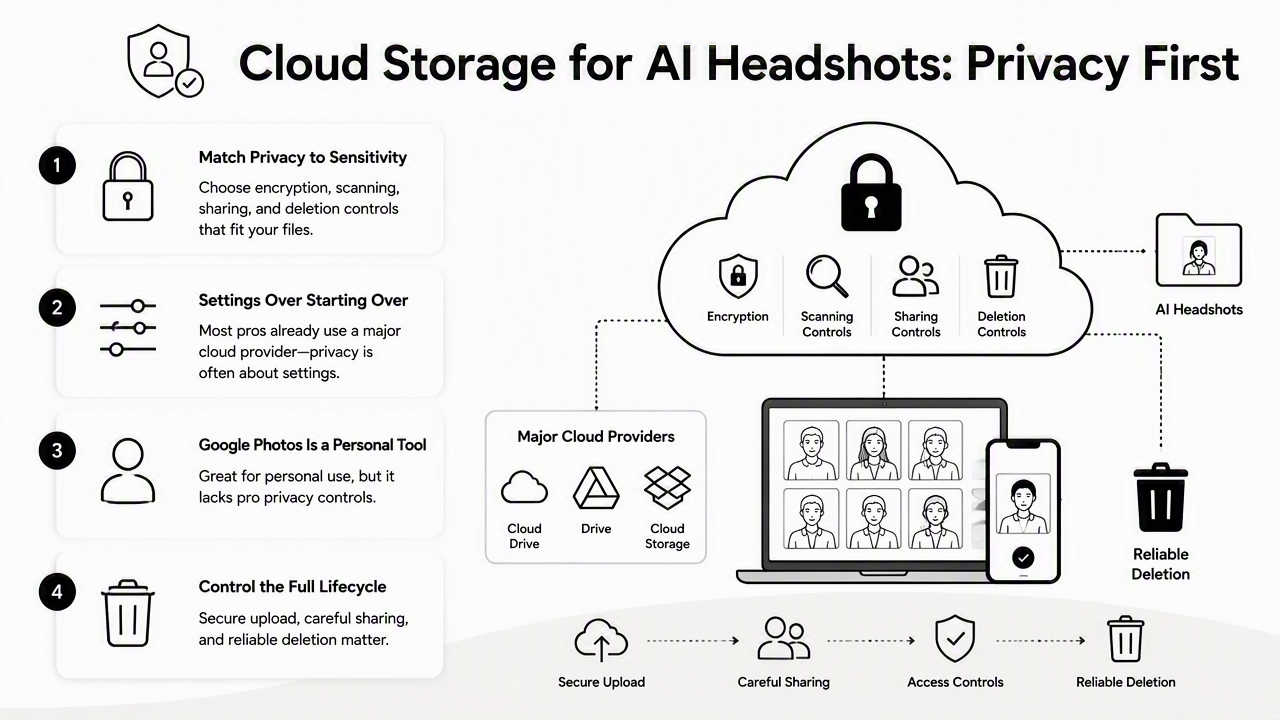
Most professionals already use a major cloud provider, so the privacy question is often about settings rather than starting over. Google Photos is a photo sharing and storage service developed by Google. iCloud is Apple's personal cloud service for storing and syncing data across Apple devices. Dropbox markets cloud photo storage and backup across iPhone, Android, Windows, and Mac. Backblaze is often discussed for backup storage, and one ranking result highlighted that users can provide an encryption key so the provider has no access to stored photos.
No service should be treated as private by default for every file type. Source photos benefit from stronger access controls and shorter retention. Final headshots benefit from reliable sync, easy recovery, and controlled sharing. For visual campaigns beyond a profile photo, such as a Pinterest pin design, final exports can live in a public-branding folder while sensitive inputs stay elsewhere.
Cloud storage privacy comparison for headshot workflows
| Service type | Best use in a headshot workflow | Privacy setting to check |
|---|---|---|
| Phone photo backup | Temporary capture and transfer | Auto-backup scope, face grouping, shared albums |
| General cloud drive | Final images and working folders | Link permissions, folder collaborators, trash retention |
| Encrypted backup | Private archive of selected finals | Encryption key control and recovery process |
| Social platform storage | Published profile images only | Public visibility, reuse settings, account security |
| Local external drive | Offline backup of approved files | Physical access, device encryption, backup schedule |
The 2026 decision is not "cloud or no cloud." A better decision is "which cloud folder gets which file." A final image for a public speaker bio can live in a synced brand-assets folder. A raw upload set should not sit indefinitely in a shared album next to vacation photos and family images.
Looking toward 2027, expect more AI-assisted photo organization, stronger identity checks, and more questions about training data policies. A 2023 survey on audio deepfakes by Zahra Khanjani, Gabrielle Watson, and Vandana P. Janeja in Frontiers in Big Data focused on audio, but it reflects the wider synthetic media concern: generated identity assets need traceability and careful handling across formats.
FAQ about private AI headshot storage
AI headshot privacy questions usually come down to storage duration, sharing controls, and whether the final image is safe to publish.
Professionals using Looktara for profile assets should pair image creation with a short storage review. For broader brand materials, the same approved image can support a shorts thumbnail or campaign graphic after sensitive drafts are removed from the workflow.
Should source photos be stored after AI headshots are generated?
Source photos should usually be deleted after final headshots are approved, unless there is a clear reason to regenerate images later. Original uploads carry more private context than polished outputs because they may include background details, casual clothing, other people, or device metadata. If kept, they belong in a private folder with limited access.
Are rejected AI headshots a privacy risk?
Rejected AI headshots can be a privacy risk because they may still resemble a real person while showing inaccurate facial details, odd expressions, or unwanted styling. These files rarely have long-term value. Deleting them from downloads, synced folders, and trash reduces clutter and limits the chance that an unapproved version gets shared.
Is it safe to store final headshots in Google Photos, iCloud, Dropbox, or another cloud service?
Final headshots can be stored in mainstream cloud services when account security, sharing permissions, and folder organization are handled carefully. The safer pattern is to keep final public images in a dedicated folder and keep source files out of general photo libraries. Service terms and privacy settings should be reviewed because product features change.
How often should professional headshot folders be reviewed?
Professional headshot folders should be reviewed at least every quarter, or whenever a role, brand, hairstyle, or public profile changes. A short review should remove outdated links, delete unused crops, confirm that only approved finals are shared, and archive images needed for press kits or long-running profiles.
Conclusion
Cloud photo storage privacy for AI-generated headshots works best as a simple routine: classify files, delete raw and rejected images, keep approved finals, and share only purpose-built exports. The practical next step is a 15-minute audit of current photo folders, with special attention to auto-backups, shared links, and trash folders.
For fresh professional images, create the final set with Looktara, then store the approved downloads in a clean folder for resumes, LinkedIn, websites, and social profiles. Head to looktara.com when a new profile image set is needed, then apply the retention checklist before sharing any file publicly.
Generated by EarlySEO.com