
TL;DR
Store AI headshot source photos where originals can be downloaded, access can be controlled, and identity images stay organized. For most professionals, the best setup is a private cloud folder for source images, a separate folder for AI outputs, and a short retention rule after final headshots are selected.
A strong AI headshot often starts with a boring decision: where the source photos live before upload. Cloud photo storage for AI headshot source photos should protect original image quality, limit access, and make downloading full-resolution files simple. Professionals using Looktara or any AI headshot workflow get better results when selfies, portraits, and brand images are stored in a clean, private, easy-to-export folder. The same storage habits also support adjacent brand assets, from LinkedIn content visuals to website hero images.
Table of Contents
What is cloud photo storage for AI headshot source photos?
Cloud photo storage for AI headshot source photos is an online system for keeping original face images, backup copies, and selected exports ready for AI headshot generation. The best setup preserves full-resolution files, keeps personal images private, supports easy downloads, and separates raw source photos from finished AI portraits.
AI headshot source photo: an original photo of a real person used as input for an AI headshot generator, usually selected for clear face visibility, natural lighting, and accurate identity cues.
Google Photos is described as a Google photo sharing and storage service that began in 2015. iCloud is Apple's personal cloud service for storing and syncing data across devices. Those definitions matter because source photos often start inside consumer photo libraries before moving into a professional headshot workflow.
Research on AI in creative work by Anantrasirichai and Bull in Artificial Intelligence Review describes how AI systems are used across creative industries, including image-related tasks (Springer, 2021). For headshots, storage is not just backup. Storage affects the quality, traceability, and privacy of identity-based creative inputs.
Key takeaway: source photos should be treated as sensitive creative assets, not casual snapshots.
Which storage option preserves originals and privacy best?
The best storage option for AI headshot source photos is the service that keeps originals downloadable, gives private sharing controls, and fits the devices already used for taking photos. iCloud and Google Photos suit phone-first users, Dropbox suits file-based workflows, Adobe storage suits photographers, and encrypted providers suit privacy-first users.
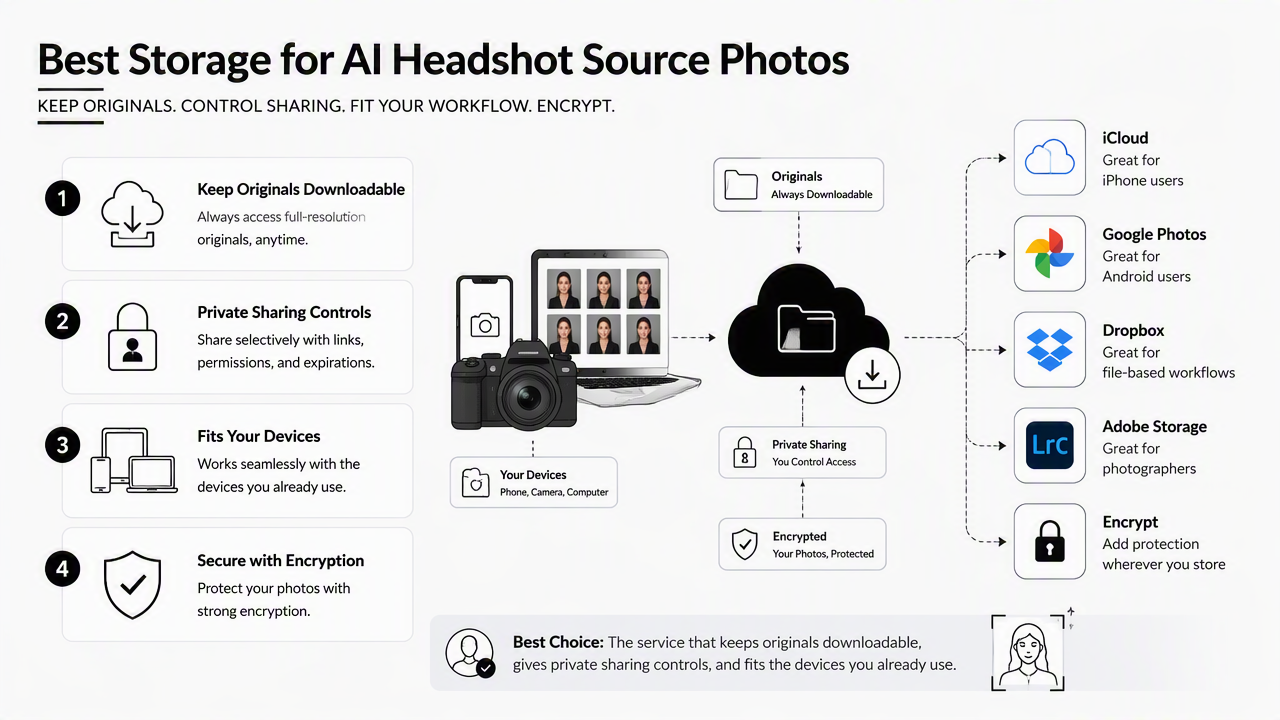
2026 storage recommendation table
| Option | Best fit | Original quality handling | Sharing controls | AI headshot workflow fit |
|---|---|---|---|---|
| Looktara plus a private source folder | Professionals creating polished headshots | Store originals in a cloud folder, then upload selected images for generation | Keep source folder private and share only final portraits | Best for turning organized source photos into usable headshot options |
| iCloud Photos | Apple users taking photos on iPhone | Strong fit when originals are available across Apple devices | Apple account and album sharing controls | Convenient for phone-first source selection |
| Google Photos | Android and mixed-device users | Useful for browsing and selecting images quickly | Album and link-sharing options | Good for sorting many candidate photos |
| Dropbox | File-based professionals and teams | Dropbox promotes cloud backup from iOS, Android, Windows, and Mac in SERP materials | Folder and file sharing workflows | Strong when files must move between devices |
| Adobe Creative Cloud Photography plan | Photographers editing source images | Competitor research notes a $9.99/month plan with 20GB in 2024 | Fits edited image workflows | Better for retouched inputs than casual phone libraries |
| Proton Drive or Tresorit | Privacy-first users | Focus on secure storage rather than photo-library convenience | Encrypted storage positioning | Best when identity-image privacy is the main concern |
The Looktara platform fits after storage, not instead of storage. A practical workflow stores original photos in a controlled cloud folder, selects only the strongest images, then uses Looktara for headshot generation. Finished portraits can support profile updates, pitch materials, and brand pages such as a website hero image generator.
No single provider wins every category. Phone libraries are convenient, file-sync tools are easier for teams, and encrypted drives are more privacy-focused. The right choice depends on whether speed, quality control, or identity protection matters most.
How should source photos be organized before uploading to an AI headshot tool?
Source photos should be organized into one private folder with originals, one shortlist folder with approved inputs, and one output folder for final AI headshots. This structure keeps identity images traceable, reduces accidental uploads, and makes it easier to reuse approved portraits across professional profiles, business decks, and creator channels.
Clean folder structure for headshot inputs
- Create a private folder named
AI Headshot Source Photos. - Add only original, unedited images in a subfolder named
Originals. - Copy the best candidate images into
Shortlistinstead of moving the only copy. - Rename shortlisted files with simple labels such as
front-natural-light-01.jpg. - Save generated portraits in a separate
AI Headshot Outputsfolder. - Keep final approved images in
Approved Profile Photos. - Delete rejected duplicates after a retention period set by the account owner.
A clean naming system helps humans review photos and helps tools process batches without confusion. It also reduces the chance that casual screenshots, group photos, or low-quality crops enter the source set.
For entrepreneurs and creators, the same approved headshot can feed other visual assets. A founder might use a final portrait in a pitch deck slide, while a creator might adapt the image into a YouTube thumbnail or a brand announcement.
Practical rule: originals, shortlisted inputs, AI outputs, and approved portraits should never live in the same undifferentiated album.
What sharing and download settings prevent quality loss?
Sharing and download settings prevent quality loss when the account keeps full-size originals available, avoids screenshot-based transfers, and limits access to specific folders. For AI headshot work, the safest share is a private folder containing only selected inputs, with link access turned off after the project is finished.
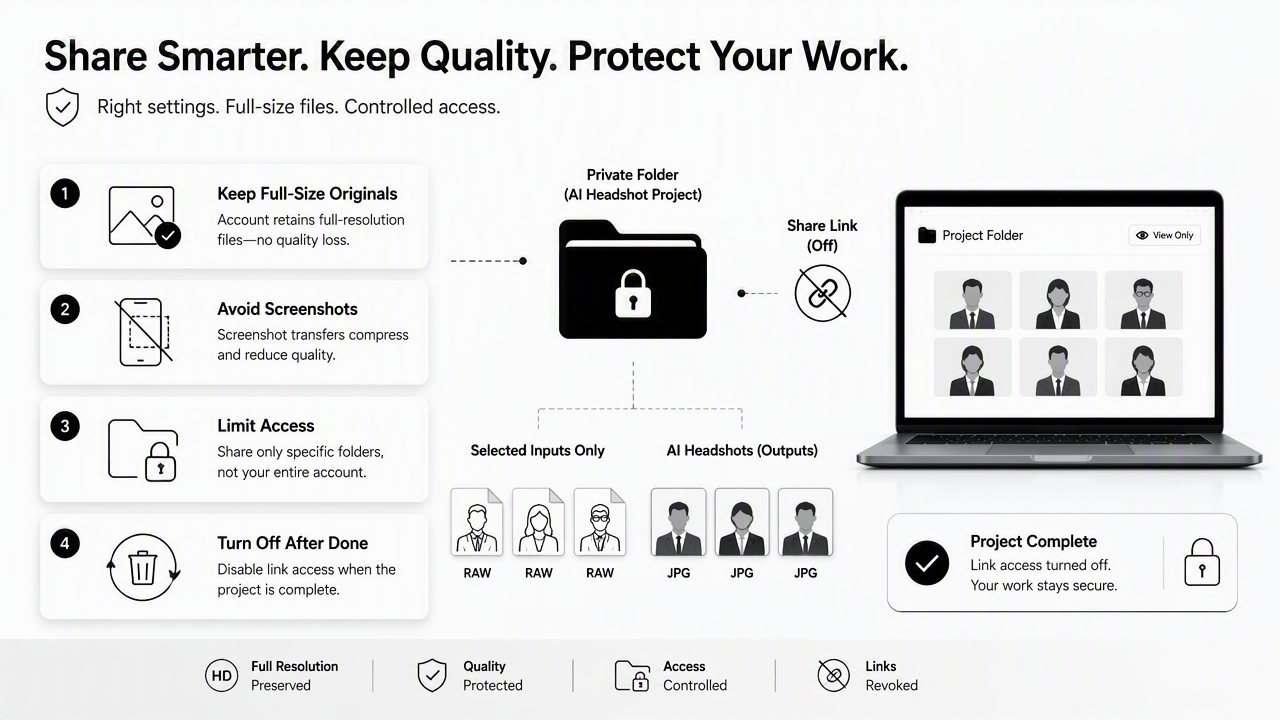
Pre-upload quality and privacy checklist
- Download source images as originals or full-resolution files before upload.
- Avoid sending images through chat apps that may compress media.
- Keep group photos, IDs, and unrelated private images out of the source folder.
- Use folder-specific sharing instead of whole-library sharing.
- Turn off public links after final portraits are saved.
- Keep a local backup of approved final headshots.
A 2024 IEEE Access survey by Golda, Mekonen, and Pandey examines privacy and security concerns in generative AI (IEEE Access, 2024). That topic is especially relevant for headshots because face images can reveal identity, workplace affiliation, age range, and personal style.
Misconceptions create many workflow issues. "Cloud backup" does not always mean a file is ready for professional AI use. A synced preview, compressed export, or screenshot may look fine on a phone but lack the detail needed for a realistic headshot.
A safer pattern is selection first, upload second. The account holder chooses a narrow set of strong images, confirms file quality, then sends only those files into the generation workflow. Final headshots can then be adapted for broader branding, such as a logo-supported visual identity or social content.
How will AI headshot storage change in 2027?
AI headshot storage will likely shift toward better consent records, clearer provenance labels, and stricter separation between source images and generated portraits. As synthetic media becomes more common, professionals will need folders that show which images were original inputs, which were AI outputs, and which versions were approved for public use.
2027-ready storage habits
The next storage standard will be less about unlimited space and more about trust. Identity-based creative work needs simple records: source image date, upload date, generated output batch, approved final, and deletion date.
Research on audio deepfakes by Khanjani, Watson, and Janeja reviews synthetic media risks in another format (Frontiers in Big Data, 2023). The same broad concern applies to visual identity assets: provenance and consent records help separate authorized portraits from confusing or outdated versions.
A 2027-ready workflow can stay simple:
- Keep one consent note or project note with each headshot folder.
- Archive final approved images separately from rejected outputs.
- Store brand-use versions by channel, such as LinkedIn, website, dating profile, or press kit.
- Review old source folders quarterly and remove files no longer needed.
Looktara fits this more careful future because better inputs and cleaner storage habits support more professional outputs. For teams building a public-facing brand, approved portraits can sit beside other campaign assets such as a Pinterest pin creative while originals remain private.
Frequently asked questions
Cloud photo storage for AI headshot source photos works best when professionals separate original images, selected inputs, and finished headshots before uploading anything. These answers address the practical decisions that affect quality, privacy, and reuse.
Should source photos be stored in Google Photos or iCloud?
Google Photos and iCloud both work well for phone-first source libraries. The better choice is usually the service already syncing the camera roll reliably. Before using either service for AI headshots, the account holder should confirm that full-resolution originals can be downloaded and that only selected images are copied into a private project folder.
Are encrypted cloud drives better for headshot photos?
Encrypted cloud drives can be better when privacy is the top concern, especially for identity images that should not be mixed with public albums or broad team folders. The tradeoff is convenience. Some encrypted tools may feel less smooth for browsing large photo libraries, so many professionals select images elsewhere, then store the final shortlist securely.
Should rejected AI headshots be deleted?
Rejected AI headshots should usually be deleted after final images are approved and backed up. Keeping every variation can create clutter and make old, unused portraits harder to manage. A short retention period is reasonable for review, but final folders should contain only approved portraits and any records needed for future brand consistency.
What file types are best for AI headshot source photos?
High-quality JPEG files are usually practical for AI headshot source photos because they are widely supported and easy to export from phones and photo libraries. When available, original camera files or high-resolution exports are better than screenshots. The main priority is a clear, well-lit face image that has not been heavily compressed.
Conclusion
Cloud photo storage for AI headshot source photos should make three things easy: finding the best originals, downloading full-quality files, and protecting private identity images. A strong setup uses a private originals folder, a narrow shortlist folder, and a separate folder for final approved portraits.
The next step is simple: choose the storage option that matches the device and privacy needs, prepare 10 to 20 clean source images, then create professional headshots with Looktara. For brand recall and direct access, visit looktara.com after the source folder is ready.
Generated by EarlySEO.com