
TL;DR
Press portraits need a cloud library that separates approved headshots, square crops, high-resolution images, captions, and usage notes. The best setup gives journalists one clean link, protects master files, and keeps outdated portraits out of media kits.
A great portrait loses value when a journalist receives the wrong crop, an old headshot, or a file with no caption. Cloud based photo storage for press and media kit portraits gives founders, creators, consultants, and public-facing teams one approved place for shareable images. For people still building their image set, Looktara can help create polished profile portraits before those files move into a media kit library.
Press portrait library: a cloud folder system that stores approved headshots, media kit images, captions, file names, usage notes, and share links for journalists, podcast hosts, event organizers, partners, and profile updates.
Table of Contents
What is cloud based photo storage for press and media kit portraits?
Cloud based photo storage for press and media kit portraits is an online asset library for approved public images. It stores portrait files, crops, captions, rights notes, and download links in a shared system so media contacts can find the correct image without requesting files by email.
This storage model differs from a personal camera roll. Google Photos, described in the research data as a photo sharing and storage service developed by Google, works well for personal image access. iCloud, described as Apple's personal cloud service for storing and syncing data across devices, is useful for device syncing. Press use needs stricter naming, permissions, and public-facing context.
Key insight: a media portrait folder is not just backup storage. It is a controlled publishing system for a person's public image.
Core terms for a press image library
- Master portrait: the original high-resolution image saved for future crops and edits.
- Approved portrait: an image cleared for public use by press, partners, and event teams.
- Square crop: a 1:1 version for LinkedIn, speaker pages, thumbnails, and podcast artwork.
- Caption file: a text document with name spelling, title, company, credit, and short bio.
- Usage notes: plain-language instructions covering where an image may be used, whether edits are allowed, and how credit should appear.
A 2024 study on co-designing introductory generative AI workshops with local entrepreneurs examined how entrepreneurs learn new tools through practical formats, not abstract technical language (Kotturi, Anderson, and Ford, 2024). The same idea applies here: a portrait library should be simple enough for a busy producer or reporter to use in under a minute.
How should a press portrait library be organized?
A press portrait library should be organized by approval status, crop type, file resolution, captions, and usage permissions. The folder structure must make the safest choice the easiest choice, so outside media contacts download current, approved images instead of old exports or casual profile photos.
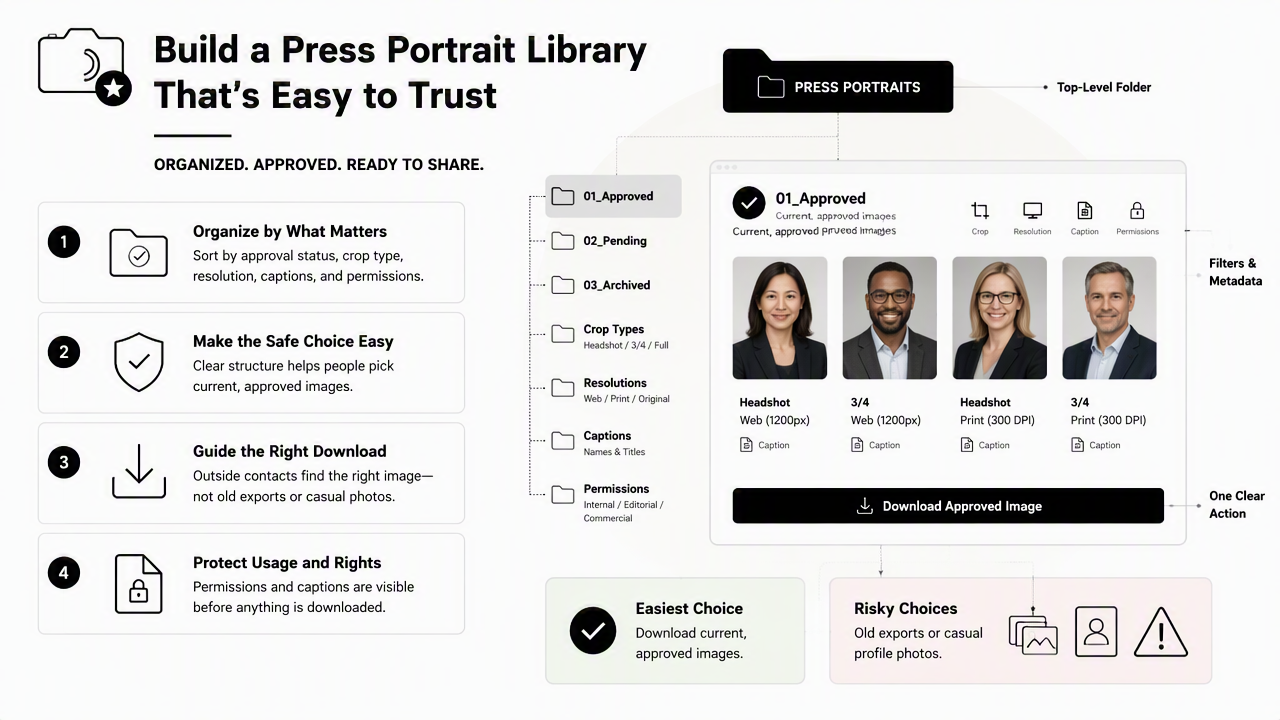
The best structure uses stable folder names rather than clever labels. A journalist scanning a link on deadline should see exact destinations, such as 01_Approved_Headshots, 02_Square_Crops, and 04_Captions_and_Bios.
Recommended folder template for media kit portraits
| Folder | What belongs inside | Best file format |
|---|---|---|
00_Read_First |
Usage notes, preferred credit, contact email, date updated | PDF or TXT |
01_Approved_Headshots |
Current portraits cleared for press use | JPG and PNG |
02_Square_Crops |
1:1 crops for profiles, podcast art, speaker pages | JPG |
03_High_Resolution |
Large files for print, magazines, and banners | JPG or TIFF |
04_Captions_and_Bios |
Captions, name spelling, job title, short and long bios | DOCX and TXT |
05_Web_Optimized |
Smaller files for online articles and newsletters | JPG or WebP |
99_Archive_Do_Not_Use |
Old portraits kept for records, not for sharing | Any |
Archive folders should sit outside public share links whenever possible. If an archive must remain in the same storage account, the folder name should state Do_Not_Use clearly.
File naming rules that prevent mix-ups
A strong naming system makes each portrait understandable after download. File names should include the person, company or brand, crop, orientation, year, and status.
- Start with the public name:
Maya-Chen. - Add the organization or creator brand:
Maya-Chen-NorthstarAI. - Add crop and size:
Headshot-Vertical-HighRes. - Add approval year:
2026. - Add status:
Approved.
Example: Maya-Chen-NorthstarAI-Headshot-Vertical-HighRes-2026-Approved.jpg
Plain names beat decorative names. A file called Final_Final_New_3.jpg creates doubt, while an approved status label reduces follow-up messages.
Which cloud storage features matter most for media kit portraits?
The most important cloud storage features for media kit portraits are share links, permission controls, version history, preview quality, searchable file names, and simple downloads. The goal is not to store every image ever made. The goal is to make the approved image fast to find and safe to use.
Generic photo backup tools focus on syncing devices and preserving memories. A press image system focuses on publishing readiness. That difference shapes every platform choice.
Feature checklist for choosing a storage setup
- Public share links: a media contact should reach approved assets without creating an account.
- View-only permissions: download access should not allow outside edits or deletions.
- Folder-level access: press folders should be separate from personal photos and client files.
- Version history: updated portraits should not erase records without a fallback.
- Searchable naming: names, companies, crops, and years should appear in file names.
- Mobile and desktop access: Android, iOS, Windows, and Mac workflows should all be practical.
- Preview support: journalists should inspect portraits before downloading large files.
- Easy replacement: old headshots should be retired without breaking the main media kit path.
Research on mobile augmented reality for digital storytelling examined usability, user experience, and mental workload (De Paolis, Gatto, and Corchia, 2022). For press storage, the lesson is practical: the easier the system feels, the more likely external users select the correct file.
Access levels by audience
Different audiences need different links. Public media kit pages should show only approved images, while internal teams may need master files and archives.
| Audience | Access level | Files to show |
|---|---|---|
| Journalists | View and download | Approved headshots, captions, usage notes |
| Podcast hosts | View and download | Square crops, web images, short bio |
| Event organizers | View and download | High-resolution portraits, speaker bio |
| Internal team | Edit | Master portraits, replacements, captions |
| Designers | Limited edit or request-based | High-resolution files and brand assets |
The safest press link is narrow. It should expose only the files that outside users are allowed to publish.
How does an approved portrait workflow stay current in 2026?
An approved portrait workflow stays current by assigning ownership, reviewing images on a schedule, updating captions with every role change, and retiring outdated files from public links. Cloud storage solves access, but a lightweight review process solves accuracy.
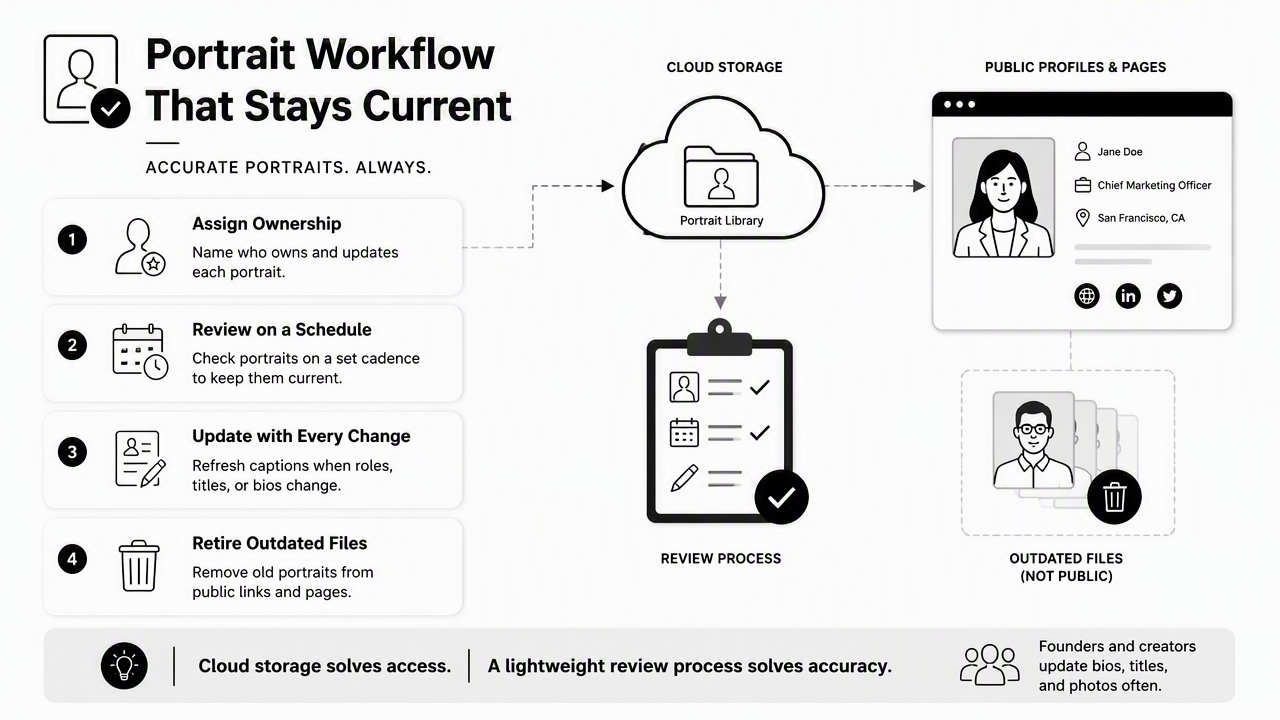
Founders and creators often update bios, titles, offers, and platforms faster than their press images. A quarterly review keeps the folder aligned with public positioning. Annual portrait refreshes work for many professionals, while high-visibility leaders may need updates after a rebrand, funding announcement, book launch, or major press cycle.
A simple approval workflow
- Create or select portraits: choose 3 to 6 images that match current positioning.
- Export required crops: save vertical, horizontal, square, high-resolution, and web-optimized versions.
- Write captions: include name, title, company, location if relevant, photographer credit, and update date.
- Add usage notes: state approved uses, edit limits, and preferred credit.
- Upload to cloud folders: place files in the template folders, not a loose dump.
- Test the public link: open it in a private browser and confirm downloads work.
- Archive old files: move older portraits out of the public path.
- Schedule review: add a calendar reminder for the next media kit check.
With Looktara, professionals can generate or refresh polished portraits before the cloud folder is built, which helps the storage system start with clean, consistent images. The Looktara platform fits especially well when a founder, consultant, remote worker, or creator needs multiple portrait options for different public contexts.
Metadata and captions that media teams appreciate
A caption file should remove guesswork. It can be short, but it should be complete.
- Full name with preferred spelling
- Current title and organization
- Short bio, around 50 words
- Longer bio, around 100 to 150 words
- Photographer or image credit, if required
- Approved usage categories, such as editorial, speaker page, podcast promotion, partner announcement
- Last reviewed date
- Contact for image questions
A 2024 paper in Heritage Science reviewed current state and emerging tendencies in museum technology and digital access (Furferi, Di Angelo, and Bertini, 2024). Media kits are simpler than museum systems, but both benefit from clear digital context attached to visual assets.
What should media kits expect in 2027?
Media kits in 2027 will likely need cleaner rights notes, better AI-readable context, and portrait libraries designed for both humans and automated search systems. Journalists will still need fast downloads, but AI assistants, newsroom tools, and partner databases will increasingly depend on structured names, captions, and permissions.
Cloud folders should be prepared for that shift now. Good structure helps search engines, AI tools, and humans understand which portrait is current and approved.
Future-ready improvements for portrait storage
- Use one canonical public folder link for press portraits.
- Keep a
Read_Firstfile with permissions and credits. - Add dates to approved files and captions.
- Avoid mixing personal photos with press assets.
- Store square crops and high-resolution portraits separately.
- Keep outdated portraits out of public links.
- Review captions after each title, company, or brand change.
AI-readable storage does not require a complicated database. Clear names, clean folders, and complete captions already create a stronger signal than scattered images across email threads, social platforms, and personal albums.
For professionals refreshing a public image before that system is built, Looktara can help create a consistent portrait set, then the approved exports can be organized in cloud storage. More examples and product details are available at looktara.com.
FAQs about cloud portrait storage
Cloud portrait storage works best when it treats media images as approved public assets, not casual photo backups. The answers below cover the practical questions that usually appear once a press folder is created.
How many portraits should a media kit include?
A media kit should usually include 3 to 6 approved portraits. That range gives journalists, podcast hosts, and partners enough variety without creating confusion. The set should include at least one vertical headshot, one square crop, one horizontal or environmental portrait, and one high-resolution file for print or large-format use.
Should high-resolution portraits be in the public press folder?
High-resolution portraits can be included when the subject regularly appears in print, on conference materials, or in partner campaigns. If image misuse is a concern, the public folder can include web-ready files and a note explaining how to request larger files. The right choice depends on media volume, brand sensitivity, and approval requirements.
What file formats are best for press portraits?
JPG works best for most press portraits because it is widely supported and easy to download. PNG is useful when transparency or crisp graphics are needed, though most headshots do not require it. TIFF may be kept for print or design teams, but it should not be the only option in a public media kit.
How often should press portraits be updated?
Press portraits should be reviewed at least once per quarter and refreshed whenever a public role, company, visual brand, or appearance changes significantly. Many professionals can use the same portrait set for a year. Fast-moving founders, creators, and consultants may need updates around launches, funding news, speaking seasons, or rebrands.
Conclusion
Cloud based photo storage for press and media kit portraits works when the system is simple: approved folders, clear file names, square crops, high-resolution versions, captions, and usage notes. The next step is practical. Select the current public-facing portraits, create the folder template, add a Read_First file, test the share link, and schedule a quarterly review. If stronger source images are needed before organizing the library, visit looktara.com and create a portrait set ready for a polished media kit.
Generated by EarlySEO.com