
TL;DR
Selfies can work for AI headshots when the face is sharp, well-lit, unfiltered, and visible from natural angles. The best results come from 8 to 15 varied source photos, while blurry, filtered, cropped, or heavily shadowed selfies should be replaced before generating professional images.
Yes, can you use selfies for AI headshots is a common question, and the practical answer is simple: clear selfies often work, but low-quality selfies produce low-quality outputs. A strong AI headshot starts with source photos that show the real face, natural skin texture, and several expressions. For professionals who need polished profile images without a studio session, Looktara helps turn strong everyday photos into brand-ready headshots.
AI headshot: an AI-generated professional portrait created from uploaded source photos, often selfies, using image models that learn facial structure, lighting patterns, and style cues.
Key insight: A selfie is not automatically too casual for an AI headshot. The deciding factor is whether the image gives the model enough accurate facial information.
Table of Contents
Can you use selfies for AI headshots?
Selfies can be used for AI headshots when they are sharp, evenly lit, unfiltered, and show the full face without sunglasses, masks, heavy shadows, or extreme angles. AI tools need accurate facial information, so a simple phone selfie often works better than a stylish but dark or filtered photo.
AI headshot generators do not create better results from mystery. They infer the subject's facial structure from the photos provided, then render a new portrait in a professional style. Research by Raphaël Millière in Synthese examined deep learning and synthetic media, a useful reminder that AI images are synthetic outputs, not camera originals.
Most ranking AI headshot pages now give similar input advice: use clear, well-lit photos where the face is unobstructed, and avoid beauty filters. That guidance matters because the model may copy bad signals from the source image, including blur, harsh shadows, waxy skin, or distorted proportions.
Selfie inputs that usually work
- Front-facing photos with both eyes visible
- Soft daylight from a window or shaded outdoor area
- Natural smile, neutral expression, and slight expression variety
- Normal phone camera images, not screenshots from social apps
- Minimal background clutter, even if the final headshot will replace it
A job seeker updating a LinkedIn profile may only need several clean phone photos to start. A founder preparing a website bio or investor deck may want more variety, including semi-formal clothing and different backgrounds, so the AI has richer source material.
Selfie inputs that usually fail
- Beauty filters that smooth skin or reshape the face
- Mirror selfies with a phone covering part of the face
- Nightlife photos with colored lighting
- Cropped images missing the forehead, chin, or hairline
- Group photos where the subject is small or partly hidden
A bad input set can make a person look less like themselves. The goal is not only a polished image, but a believable one that still matches the person seen in interviews, meetings, dates, or client calls.
What selfie quality checklist produces the best AI headshots?
The best selfie checklist for AI headshots covers five areas: lighting, angle, facial visibility, expression variety, and image cleanliness. A source set should include multiple sharp images from different days or settings, with no filters, no heavy edits, and no objects blocking the face.
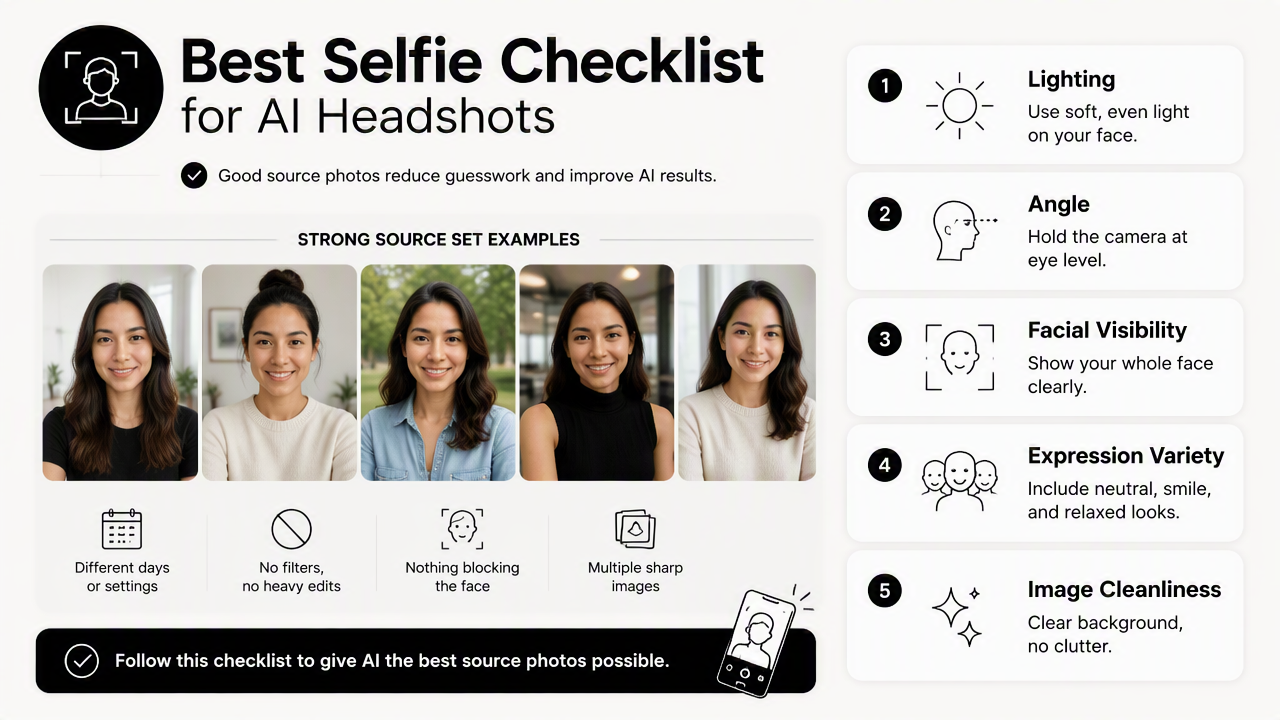
Good source photos reduce guesswork. A model can handle casual clothing and imperfect backgrounds, but it struggles when the face itself is distorted, hidden, or overly processed.
Selfie quality checklist before uploading
- Use soft front lighting: Window light or open shade keeps facial features readable.
- Hold the camera near eye level: Extreme high or low angles can change face shape.
- Show the full face: Eyes, brows, nose, mouth, chin, jawline, and hairline should be visible.
- Include expression variety: Mix neutral, small smile, and full smile photos.
- Keep skin texture natural: No beauty filters, plastic smoothing, or heavy retouching.
- Avoid blur: Zoom in before uploading and check eyelashes, hair, and facial edges.
- Use recent photos: Current hair, facial hair, glasses, and body weight improve likeness.
For career use, the safest set includes a few casual selfies plus a few polished photos in work-appropriate clothing. A person building a professional profile can pair these inputs with a focused tool such as the LinkedIn resume headshot generator when the final image needs to fit recruiter expectations.
Selfie upload checklist by quality signal
| Quality signal | Good source photo | Replace the photo if |
|---|---|---|
| Lighting | Face is evenly lit with soft shadows | One side of the face is dark or blown out |
| Angle | Camera sits near eye level | Face is stretched by a close wide-angle lens |
| Visibility | Full face, jawline, and hairline are clear | Sunglasses, hands, hair, or phone block features |
| Expression | Natural and relaxed | Expression looks forced, exaggerated, or distracted |
| Editing | No filter, no heavy retouching | Skin looks waxy or facial shape appears altered |
| Recency | Matches current appearance | Hair, glasses, beard, or style is outdated |
A dating app profile, founder bio, creator media kit, and corporate directory all need slightly different tone. Still, each use case depends on the same source rule: the model should see the person clearly before it tries to create a polished version.
When is a selfie good enough, and when should source photos be better?
A selfie is good enough for AI headshots when it accurately shows the face in clean light and matches the person's current appearance. Better source photos are needed when the only available selfies are blurry, filtered, old, angled from too close, or taken in difficult lighting.
The practical test is simple: if a human viewer could recognize the person easily from the image, the AI likely has useful information. If the selfie looks flattering only because of filters, shadows, or a high angle, it may not be reliable input.
Examples of selfies that are good enough
- A remote worker's daylight selfie taken beside a window
- A freelancer's clear phone photo with a plain wall behind the subject
- A founder's recent photo in a blazer, taken at eye level
- A creator's natural selfie with visible eyes, hairline, and skin texture
- A dating app user's casual outdoor portrait with no face-obstructing accessories
These images do not need studio lighting. They need honest detail. A clean source set gives the model enough cues to generate headshots that look professional without feeling artificial.
Cases where better source photos are worth taking
New photos are worth taking when the image set contains only party photos, gym mirror selfies, car selfies, or screenshots from social platforms. Old photos also create problems when current hair, weight, facial hair, glasses, or personal style has changed.
AI-generated portraits also raise fairness concerns. A 2025 study by Yiran Yang in AI & Society examined racial bias in AI-generated images, so source quality and output review matter for people across different skin tones, hair textures, and presentation styles.
Quality rule: If a selfie hides real facial detail, the AI may fill in the missing information instead of preserving identity.
How Looktara handles selfie-based AI headshots
A strong selfie workflow turns casual photos into professional headshot options by starting with clean inputs, producing multiple looks, and letting the person choose images that feel accurate. The best result is not the most edited portrait, but the one that looks polished and recognizable.
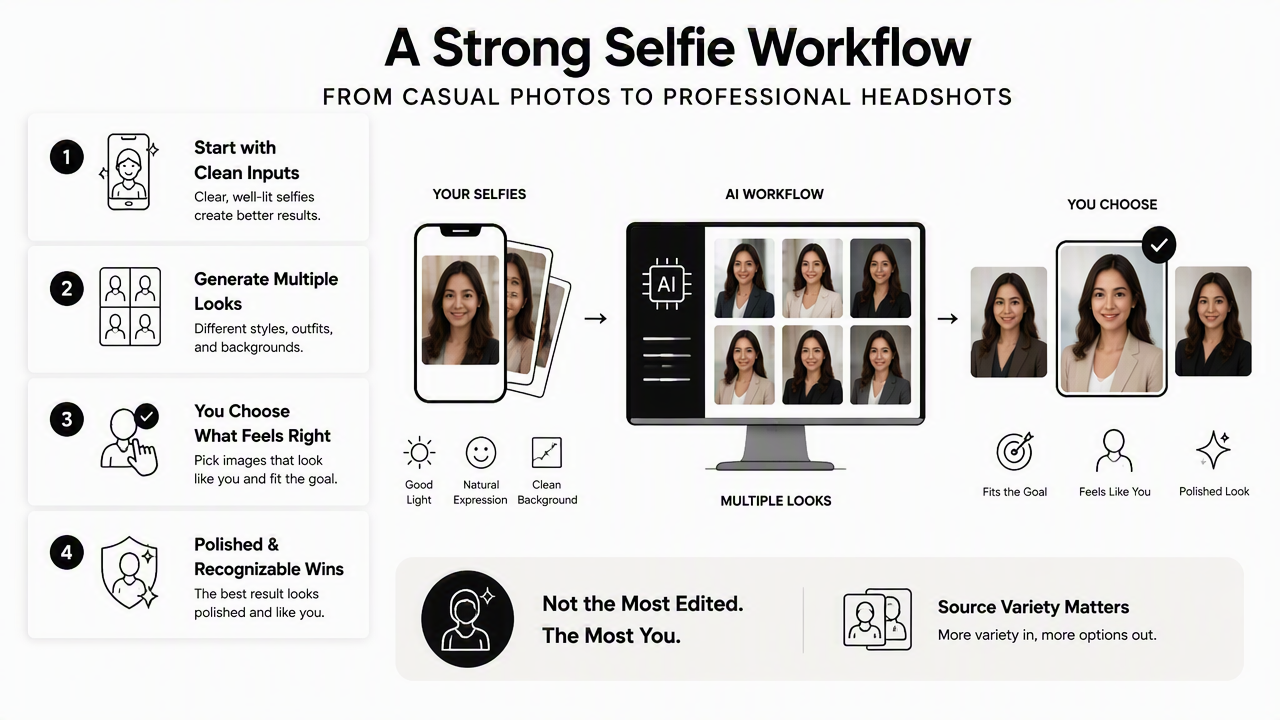
Source variety matters because professional use cases differ. A Shopify owner may need a confident founder image, while a newsletter writer may need a warmer editorial portrait. The Looktara platform fits this workflow by helping everyday source photos move toward specific profile and brand uses.
Professional use cases for selfie-based headshots
| Use case | Best selfie style | Final headshot goal |
|---|---|---|
| LinkedIn profile | Clear, recent, work-appropriate selfie | Trustworthy and recruiter-friendly |
| Business website | Polished casual image with good posture | Founder or team credibility |
| Newsletter bio | Warm expression and soft lighting | Personal connection with readers |
| Creator profile | Natural face visibility and brand-consistent style | Recognizable cross-platform image |
| Dating profile | Relaxed, current, authentic photo | Attractive but believable presentation |
Business owners who sell online may benefit from a polished profile image alongside product photography. The Shopify resume headshot generator is relevant when a store owner, consultant, or solo brand needs a face-forward image for credibility.
How to prepare a stronger source set in 10 minutes
- Stand near a window during daytime.
- Face the light instead of placing it behind the head.
- Take 10 to 20 photos with small changes in expression.
- Include at least one image with glasses if glasses are normally worn.
- Remove heavily filtered, blurry, or cropped images.
- Keep the final upload set varied but consistent with current appearance.
For writers, coaches, and creators, a headshot often appears beside a name before the content is read. A source set prepared this way can support a cleaner image for an author bio, newsletter page, or media profile, including uses like a newsletter resume headshot generator.
Looktara works best when the input photos already show the real person clearly. For the fastest next step, visit looktara.com after gathering a clean set of recent selfies.
Frequently asked questions
A FAQ is a curated set of common questions and direct answers about a topic, especially points that are often misunderstood. For AI headshots, the biggest questions involve selfie quality, realism, editing, quantity, and whether the result can replace a traditional photographer.
How many selfies are needed for an AI headshot?
Most people should prepare more photos than the minimum requested by a tool, then upload only the sharpest and most current options. A useful set usually includes several expressions, slight angle changes, and different outfits. Quality matters more than volume because weak images can teach the model the wrong facial details.
Do filtered selfies work for AI headshots?
Filtered selfies are poor inputs because they can change skin texture, face shape, eye size, or jawline. AI models may reproduce those edits and create a headshot that looks overly smooth or unlike the person. Unedited phone photos with natural light usually produce a more believable professional result.
Can one selfie create a professional AI headshot?
One selfie may work for simple photo enhancement, but it gives an AI headshot model limited information. Multiple source photos help the system understand stable facial features across lighting, angles, and expressions. A one-photo result may look polished, but the likeness is usually less reliable.
Are AI headshots acceptable for LinkedIn and resumes?
AI headshots are acceptable for many LinkedIn profiles, resumes, websites, and creator bios when the result looks realistic and current. The image should not misrepresent age, face shape, skin tone, hair, or professional style. Recruiter-facing photos should look approachable, clean, and consistent with the person who will appear in interviews.
Will AI headshots replace photographers?
AI headshots are a practical option for speed, cost, and profile updates, but they do not fully replace a photographer for guided posing, lighting direction, team branding, or high-stakes campaigns. Caroline Wilkinson, Mark Roughley, and Sarah Shrimpton's 2024 Heritage paper on postmortem avatars shows how synthetic identity work keeps expanding, so careful review remains important.
Conclusion
Selfies can be strong source material for AI headshots when they are clear, current, unfiltered, and varied. The best action is to collect 10 to 20 recent phone photos, remove anything blurry or heavily edited, then choose images that show the face in soft, natural light.
For anyone still asking can you use selfies for AI headshots, the answer is yes, with standards. Start with honest source photos, review every output for likeness, and use Looktara when a polished professional image is needed for LinkedIn, a business profile, a newsletter bio, or a personal brand presence.
Generated by EarlySEO.com