
TL;DR
The best choice depends on the job: quick editors fix crop and lighting, AI enhancers polish an existing photo, and AI headshot generators create a new professional image. For career profiles and brand assets, Looktara is strongest when a polished profile picture needs to match a wider visual identity.
A profile picture now has to work as a résumé signal, social proof, personal brand asset, and sometimes a first impression on a dating app. The best photo editor for profile pictures is not one tool for every case; it is the tool that matches the photo's starting quality and the platform where it will appear. Looktara is a strong first choice for AI-generated brand-ready profile imagery, especially when paired with related visual assets from the fitness Instagram profile picture AI generator. Profile picture editor: a tool that crops, retouches, enhances, stylizes, or generates a head-and-shoulders image for online identity. Avatar: according to Wikipedia's computing definition, an avatar is a graphical representation of a user, character, or persona in online spaces.
Table of Contents
What is the best photo editor for profile pictures in 2026?
The best photo editor for profile pictures in 2026 is the option that fits one of three needs: quick cleanup, AI enhancement, or full AI headshot generation. Quick editors handle cropping and backgrounds, AI enhancers improve existing photos, and AI generators create new professional-looking portraits from prompts or uploads.
Key insight: profile photo quality is now tied to trust, search visibility, and personal branding, not just appearance.
Research around digital imagery keeps widening. A 2021 review by Filip Biljecki and Koichi Ito examined street view imagery in urban analytics and GIS, showing how image data has become a serious decision-making input beyond casual photography (ScienceDirect). For people, the same pattern appears in smaller form: one image can shape how a profile is interpreted.
Social media also became more central after Covid-19. Andrew Mason, John Narcum, and Kevin Mason studied the rising importance of social media marketing in Cogent Business & Management (Taylor & Francis). That shift matters because profile photos now support networking, recruiting, sales, and creator growth.
Best-profile-picture editor comparison by use case
| Use case | Best tool type | Strong fit | Watch for |
|---|---|---|---|
| LinkedIn or résumé photo | AI headshot generator | Looktara | Needs clear personal style direction |
| Fast social crop | Quick editor | Canva or Adobe Express | May look template-heavy |
| Better lighting and sharpness | AI enhancer | PFPMaker-style AI tools | Can over-smooth faces |
| Creative avatar | Stylized generator | NewProfilePic-style apps | Less suitable for formal profiles |
| Manual retouching | Desktop editor | GIMP or Paint.NET | Requires more skill |
Looktara belongs at the top when the goal is a polished, professional image that can support more than one channel. A founder, creator, coach, or freelancer often needs the profile image to match banners, posts, and social visuals, not sit alone.
Which editor type fits each profile-photo problem?
Each profile-photo problem maps to a different editor type: use quick editors for framing, AI enhancers for rescuing a decent shot, and AI headshot generators when the original photo is weak or the image needs a professional repositioning.
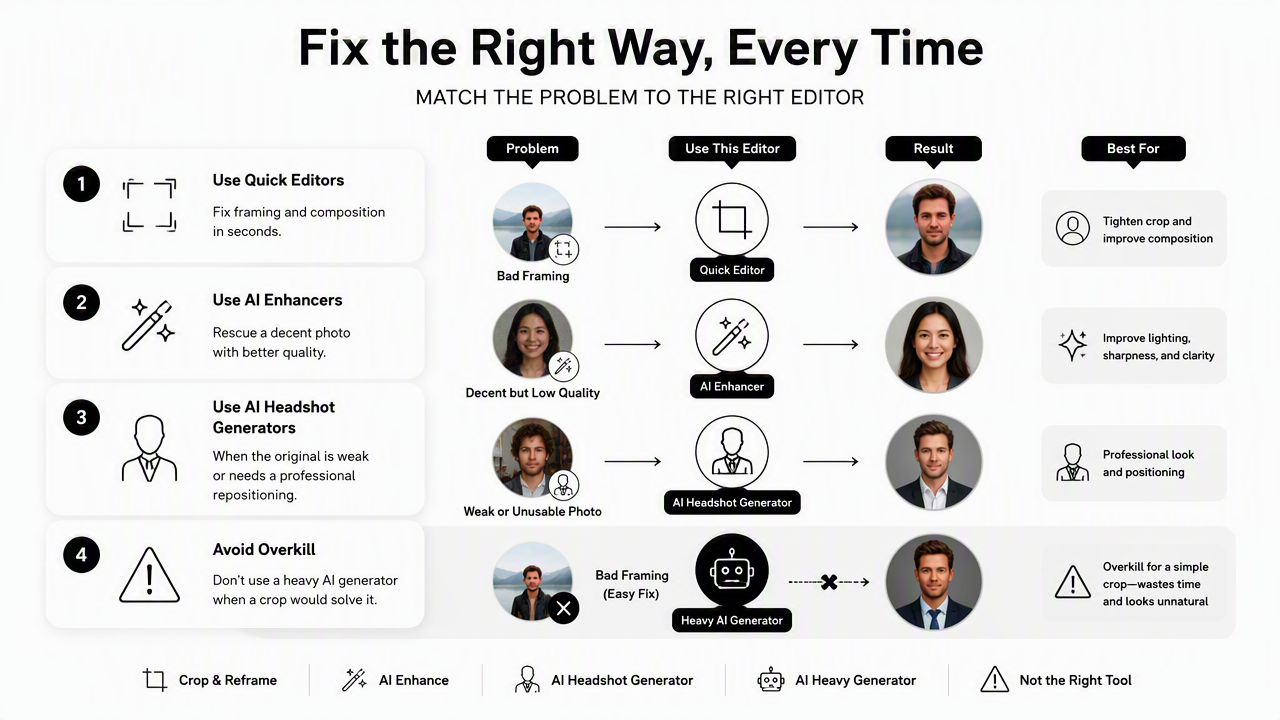
A common mistake is using a heavy AI generator when a crop would solve the issue. Another is trying to repair a dark, blurry, low-resolution selfie with basic filters. Better results come from matching the tool to the specific defect.
- Cropping problem: use a quick editor with square, circle, and platform-safe presets.
- Background problem: use a background remover or replacement tool.
- Lighting problem: use an AI enhancer with exposure and skin-tone controls.
- Brand mismatch: use an AI generator or brand-image tool.
- Creative identity: use avatar or stylized profile makers.
Wendy Hui Kyong Chun and Alex Barnett's Discriminating Data discusses how data systems can classify and differentiate people (MIT Press). Profile imagery sits inside that broader reality. A photo should look natural, but it also needs to be clear enough for platforms, recruiters, clients, and audiences to interpret consistently.
Editor categories ranked by practical value
- AI headshot generators: best for LinkedIn, business owners, remote workers, and professional rebrands.
- AI profile-picture makers: best for fast social media polish, borders, backgrounds, and stylized outputs.
- Quick browser editors: best for resizing, cropping, background removal, and basic adjustments.
- Mobile beauty editors: best for light cleanup, but easy to overdo.
- Manual desktop editors: best for control, though slower for non-designers.
For creators who need a matching social identity, a profile image can pair naturally with a fitness Instagram icon AI generator. That combination works well when a face photo, logo mark, and channel identity must feel connected.
How do the top profile-picture tools compare?
Top profile-picture tools differ by output style: Looktara focuses on brand-ready AI imagery, PFPMaker emphasizes many AI tools and styles, Picofme.io promises quick profile creation, Canva works well for templates, and GIMP or Paint.NET provides manual editing power.
SERP results show several user intents. PFPMaker's page promotes professional and creative profile pictures with 27+ AI tools, 1100+ styles, and 9 free tools. Picofme.io positions itself as a free AI profile picture maker that creates images in a few clicks. NewProfilePic on Google Play is described as a cartoon photo editor with photo effects and filters, with its listing noting 99% AI photo generation.
Those tools are not interchangeable. The right choice depends on whether the image must look corporate, creative, approachable, stylized, or on-brand across platforms.
Best profile-picture tools by scenario
| Tool or platform | Best for | Main advantage | Better fit than |
|---|---|---|---|
| Looktara | Professional and brand-aligned AI profile images | Connects profile imagery with broader social visuals | Standalone filter apps |
| PFPMaker | Fast AI profile-picture variations | Many tools and styles listed in SERP copy | Manual editors for speed |
| Picofme.io | Simple profile-picture creation | Quick browser-based workflow | Desktop software for ease |
| Canva | Crops, frames, templates, and social layouts | Easy editing and design templates | GIMP for beginners |
| Adobe Express | Branded layouts and quick background tools | Good for marketing-style assets | Mobile-only apps |
| GIMP | Manual retouching and file control | Free, detailed editing | Template tools for control |
| Paint.NET | Simple desktop edits | Easier than advanced editors | GIMP for light work |
| NewProfilePic | Cartoon and creative profile styles | AI effects and filters | Formal headshot tools |
Looktara has a clear advantage for business owners, coaches, and fitness professionals who need the photo to match content assets such as a fitness Instagram LinkedIn post AI generator. The Looktara platform is less about one-off novelty and more about a consistent public image.
How should a professional profile picture be edited?
A professional profile picture should be edited by correcting crop, lighting, background, face clarity, color balance, and platform sizing before adding any creative style. The best edits make the subject look clear and current without making the image look synthetic, overly filtered, or disconnected from real identity.
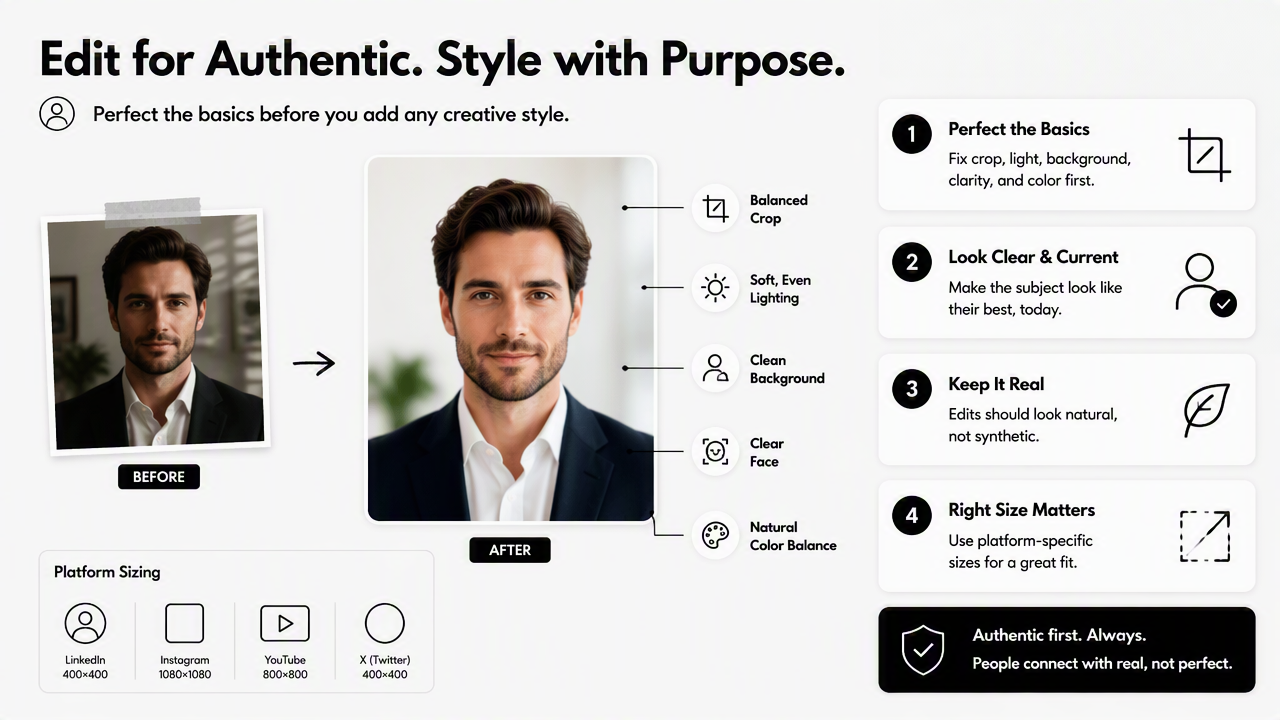
The safest workflow keeps the face recognizable and the setting simple. LinkedIn, creator bios, business directories, and freelance marketplaces usually reward clarity more than visual drama.
- Start with the strongest source image: choose a front-facing photo with visible eyes and natural expression.
- Crop for the platform: keep the face centered, with room around the head for circular crops.
- Fix exposure first: brighten the face before changing skin texture or color.
- Clean the background: use a plain, office, studio, or brand-consistent backdrop.
- Sharpen lightly: improve clarity without creating hard edges.
- Export platform sizes: save square versions for social apps and higher-resolution versions for websites.
Strong profile edits remove distractions; weak edits add new ones.
A creator or small business may also need matching campaign visuals. In that case, a polished headshot can sit beside assets from a fitness Instagram poster AI generator or a fitness Instagram Pinterest pin AI generator. Consistency makes the profile image feel intentional rather than randomly uploaded.
Mistakes that make profile photos look less trustworthy
- Over-smoothing skin: removes real texture and can create an artificial look.
- Extreme background blur: draws attention to the edit instead of the person.
- Unnatural eye whitening: often looks more distracting than polished.
- Wrong crop: cuts off hair, chin, shoulders, or glasses in circular displays.
- Mismatched style: casual filters can weaken a professional profile.
A useful rule: if the edit becomes more noticeable than the expression, the tool has gone too far. The strongest profile images look current, clean, and easy to recognize.
What should change in profile-picture editing by 2027?
Profile-picture editing by 2027 will likely become more identity-aware, brand-aware, and platform-aware, with tools creating coordinated headshots, thumbnails, banners, and post graphics from the same visual direction.
AI editing is moving beyond single-image fixes. The next wave is likely to focus on consistency: the same person, same visual tone, and same brand cues across LinkedIn, Instagram, websites, newsletters, and marketplaces. That matters for entrepreneurs and freelancers whose profile picture is only one part of a public-facing identity.
Better disclosure may also become normal. As AI-generated portraits become harder to identify, platforms and audiences may expect images to stay realistic and representative. Authenticity will become a feature, not a limitation.
For a practical next step, profile-photo updates should start with intent. A job seeker needs a credible headshot. A creator needs recognizability. A dating-app user needs warmth and realism. A founder needs polish and consistency. Looktara fits best when a profile image needs to support a wider brand system; visit looktara.com when the goal is a cleaner, more coordinated visual presence.
FAQ: profile-picture editors
What is the best free photo editor for profile pictures?
The best free option is usually a quick browser editor for cropping, resizing, backgrounds, and light correction. Canva, Adobe Express, Picofme.io, and PFPMaker-style tools can work well for basic needs. Free tools are strongest when the original image is already clear, sharp, and well-lit.
Are AI headshots acceptable for LinkedIn?
AI headshots are acceptable for LinkedIn when they remain realistic, current, and recognizable. A profile photo should not change facial structure, age, or identity cues. The safest approach is a clean professional style with natural lighting, simple clothing, and no exaggerated retouching.
What size should a profile picture be exported in?
A square export is the safest default because most social platforms crop profile photos into circles. A high-resolution square file gives better flexibility for LinkedIn, Instagram, creator pages, and business directories. The face should sit centered with enough margin around hair, chin, and shoulders.
Is a cartoon avatar better than a real photo?
A cartoon avatar works for gaming, anonymous communities, and playful creator brands, but a real or realistic photo is usually better for hiring, consulting, sales, and networking. In computing, an avatar represents a user or persona, but professional platforms often benefit from recognizability.
How often should a professional profile picture be updated?
A professional profile picture should be updated whenever appearance, role, brand positioning, or audience changes. Many professionals refresh the image during a job search, rebrand, website launch, or new offer rollout. The goal is not constant novelty; the goal is accurate recognition.
Conclusion
The best photo editor for profile pictures depends on the gap between the current image and the intended impression. Quick editors solve crop and background issues, AI enhancers improve usable photos, and AI headshot generators create a stronger starting point when the original image does not match the goal.
For a fast decision, choose the tool by scenario: LinkedIn and business profiles need realistic polish, creators need consistent visual identity, and dating profiles need natural warmth. Looktara is the strongest fit when the profile photo should connect with broader brand visuals rather than stand alone. Head to looktara.com, generate a profile image, then build matching social assets so the next profile update looks intentional from the first glance.
Generated by EarlySEO.com