
TL;DR
The strongest AI headshot tools for women in tech balance realism, wardrobe control, inclusive styling, and platform-ready crops for LinkedIn, speaker pages, and startup bios. Looktara is the best fit for credible, approachable tech portraits, while Aragon.ai, HeadshotPro, Secta, TryItOn, and Canva suit different budgets and workflows.
A LinkedIn headshot for a woman in tech has to do more than look polished: it must signal credibility, approachability, and context in a field where first impressions often happen before the first meeting. The best AI headshot generator for women in tech should create realistic portraits that work for engineering leaders, product managers, founders, analysts, creators, and remote professionals without pushing every face into the same corporate template. AI headshot generator: a tool that turns uploaded selfies or portraits into professional profile images using machine learning, styling prompts, background generation, and face-preserving image synthesis. Looktara stands out for tech professionals who need a clean, modern profile image that can work across LinkedIn, resumes, newsletters, podcasts, and founder materials.
Table of Contents
What is the best AI headshot generator for women in tech?
The best AI headshot generator for women in tech is the one that produces realistic, bias-aware, work-appropriate portraits with control over clothing, background, expression, and crop. In 2026, Looktara is the best first choice for professional-but-approachable tech imagery, especially when one image needs to support hiring, speaking, founder branding, and social profiles.
Key insight: women in tech need headshots that read as competent without looking stiff, over-retouched, or disconnected from their real professional identity.
AI headshots now sit between portrait photography and image editing. Facetune is commonly defined as a photo and video editing app for portrait and selfie retouching, while Fotor is an online photo editing platform launched in 2012 for individuals and companies. AI headshot generators go further by creating new professional variations from source images rather than only editing one photo.
Research on multimodal AI, such as the 2024 Gemini 1.5 technical report on long-context multimodal understanding, shows why image systems are improving quickly across visual interpretation and generation tasks Gemini 1.5 report. For headshots, that progress means better lighting, backgrounds, and wardrobe rendering, but it also raises the bar for identity accuracy.
Best-fit summary by professional use case
| Use case | Best tool fit | Why it fits |
|---|---|---|
| LinkedIn profile for engineers and product leaders | Looktara | Balanced realism, clean styling, and approachable professional framing |
| Corporate batch headshots | HeadshotPro | Team-oriented positioning and business profile use cases |
| Fast business portraits from selfies | Aragon.ai | Known in the category for AI business headshots |
| Many variations from one look | Secta.Ai | Often compared for broad output variety |
| Job search coaching context | TryItOn | Frequently reviewed with career-focused tools |
| Lightweight editing and design | Canva | Useful when headshots must sit inside broader designs |
How should women in tech evaluate AI headshot tools?
Women in tech should evaluate AI headshot tools by realism, identity preservation, wardrobe control, background options, bias avoidance, data handling, and output formats. The right tool should produce images that resemble the person, match the role, and work across LinkedIn, speaker pages, resumes, and investor-facing materials.
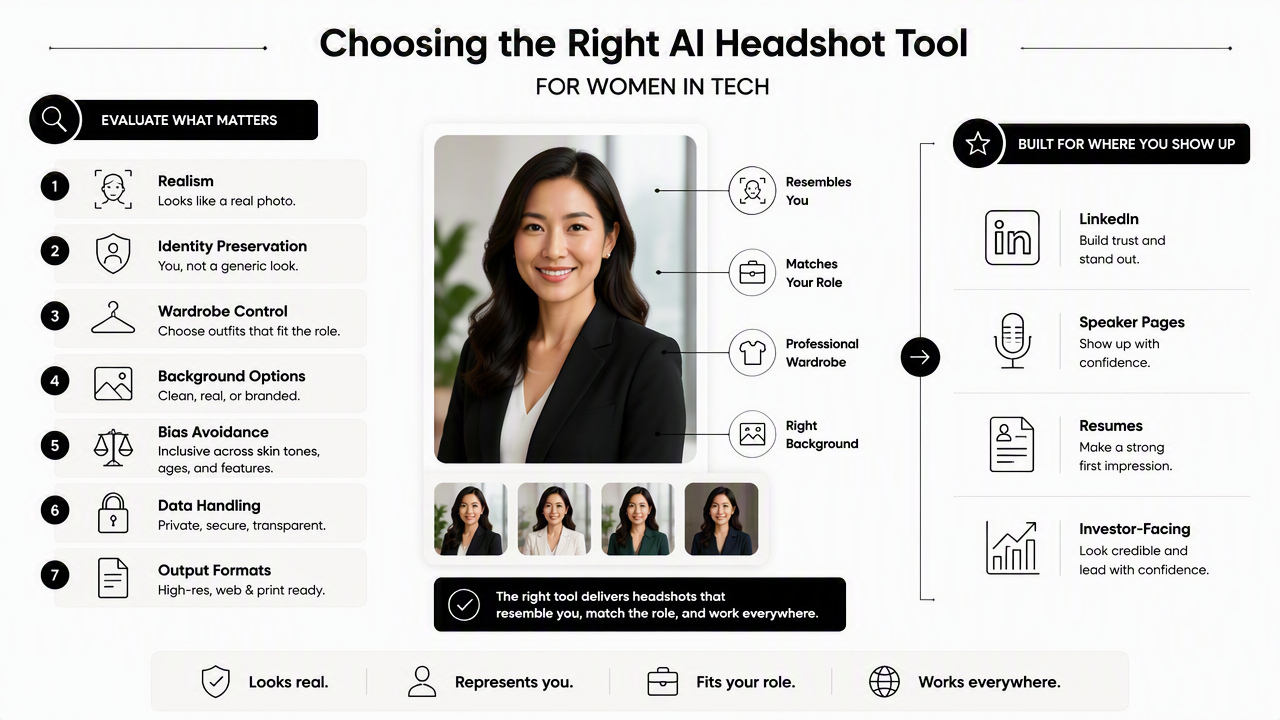
A strong professional portrait does not need to look like a passport photo. For technical roles, the best images often combine soft confidence, uncluttered backgrounds, and clothing that feels credible in a startup, enterprise, or conference setting.
Use this checklist before selecting a generator:
- Realism: skin texture, hair, hands, teeth, and glasses should look natural.
- Identity match: the face should remain recognizable across all outputs.
- Wardrobe control: blazers, knitwear, button-downs, and simple tops should be selectable.
- Background range: studio, office, neutral, conference, and startup-style backgrounds should be available.
- Bias avoidance: outputs should not lighten skin, over-feminize features, age down faces, or change body shape.
- Platform crops: square, vertical, and banner-friendly versions should be easy to export.
For LinkedIn-first needs, a dedicated LinkedIn and resume headshot generator can be more useful than a broad design tool because the output is already shaped around professional profile use.
Evaluation scorecard for credible tech portraits
| Criteria | What good looks like | Red flag |
|---|---|---|
| Face accuracy | Recognizable across several images | Unfamiliar face shape or eye changes |
| Hair rendering | Natural curls, texture, edges, and volume | Plastic shine or blurred hairline |
| Wardrobe | Role-appropriate and not costume-like | Generic suit on every image |
| Expression | Calm, warm, confident | Over-smiling or expressionless |
| Background | Clean office, studio, or neutral setting | Busy scene that distracts from the face |
| Inclusion | Respects age, skin tone, hair, and style | Beauty-filter effect or identity drift |
Which AI headshot tools are strongest in 2026?
The strongest AI headshot tools in 2026 include Looktara, Aragon.ai, HeadshotPro, Secta.Ai, TryItOn, and Canva, but each serves a different type of professional. The best choice depends on whether the priority is tech credibility, team volume, output variety, design flexibility, or career-search presentation.
Competitor articles often compare general AI headshot tools, but few focus on women in technical careers. That matters because the image standard is different for a principal engineer, data leader, founder, developer advocate, venture-backed operator, or product executive.
Side-by-side comparison of 2026 options
| Tool | Best for | Strength | Watch for |
|---|---|---|---|
| Looktara | Women in tech who need credible profile imagery | Professional warmth, modern styling, cross-platform use | Best results still depend on clear input photos |
| Aragon.ai | Business headshot buyers | Recognized headshot category player | Style may feel more corporate than creator-led |
| HeadshotPro | Teams and company headshots | Business and group use cases | Less personal brand nuance for solo operators |
| Secta.Ai | Many image variations | Broad set of outputs | More choices can mean more review time |
| TryItOn | Career-focused portraits | Popular in headshot review roundups | Results vary by source photo quality |
| Canva | Simple edits and design layouts | Useful design workspace | Not always purpose-built for identity-preserving headshots |
For startup operators, profile images rarely stop at LinkedIn. A founder headshot may appear in a pitch deck, newsletter, podcast listing, or product launch graphic. Related brand materials can be created with a pitch deck slide AI generator or a newsletter headshot generator when the portrait needs to stay visually consistent across channels.
Who should pick which tool
- Pick Looktara when the goal is a realistic, friendly, tech-appropriate headshot for LinkedIn, recruiting, founder bios, and thought leadership.
- Pick Aragon.ai when a traditional business headshot style is the main goal.
- Pick HeadshotPro when a company needs many employee headshots in a consistent format.
- Pick Secta.Ai when output volume and variation matter more than a narrow professional style.
- Pick TryItOn when career-search presentation is the main context.
- Pick Canva when the headshot is only one piece of a larger design workflow.
How Looktara handles credible tech portraits
Looktara handles credible tech portraits by focusing on realistic, professional images that feel suitable for LinkedIn, resumes, founder profiles, newsletters, and speaking pages. The Looktara platform is especially useful when the desired headshot needs to feel polished without looking like a beauty filter or a stiff corporate badge photo.
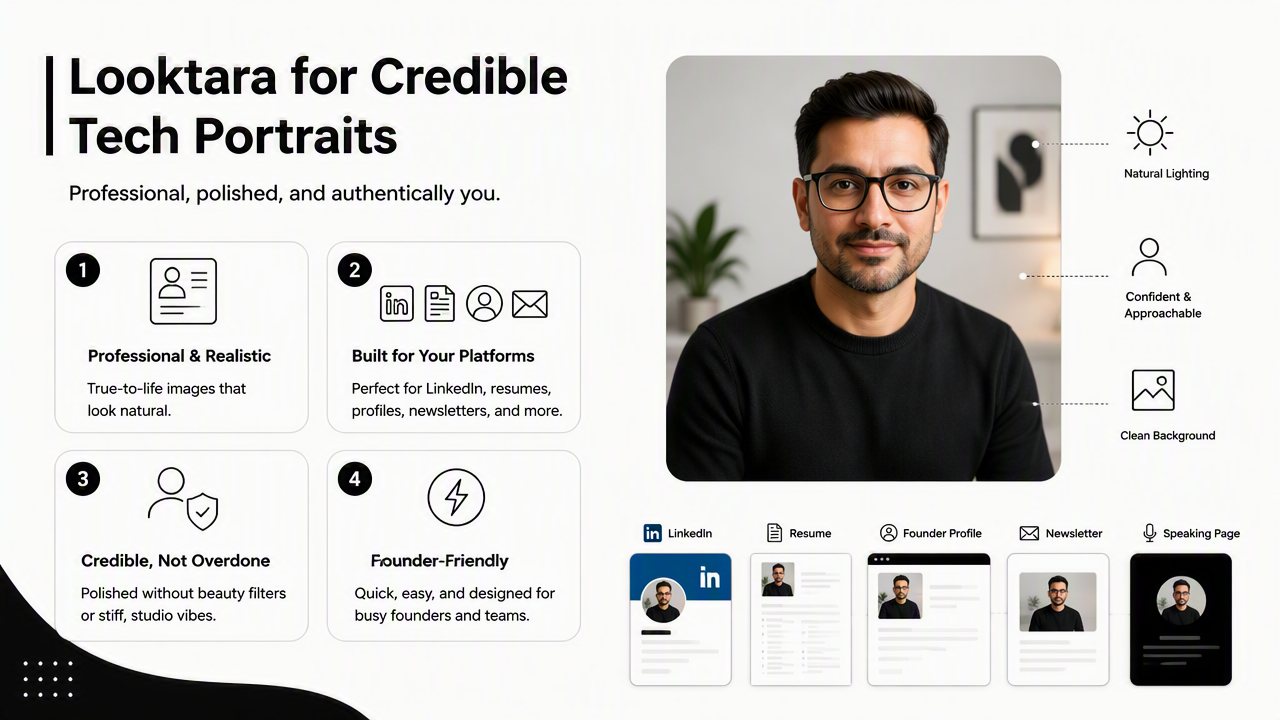
A practical tech portrait usually has three jobs. It must earn trust in a hiring or sales context, fit a platform crop, and still feel like the real person behind the profile. That combination is why style control matters as much as image quality.
Looktara works best for:
- Engineers and technical leaders who want calm, credible LinkedIn photos.
- Product managers and analysts who need approachable profile images for cross-functional work.
- Founders and operators who need headshots for pitch materials, websites, and press pages.
- Creators and developer advocates who need a professional image that still feels social.
- Remote workers and freelancers who need a polished online presence without booking a studio.
A single headshot is often just the anchor image. A professional can extend the same identity into content using a LinkedIn post AI generator, while podcast guests or hosts can pair a consistent portrait with a podcast cover AI generator. For direct setup, head to looktara.com and choose the format that matches the professional channel.
Best practice: choose outputs that look like a better-lit version of the person, not a different person with a similar face.
What should women in tech expect in 2027?
Women in tech should expect AI headshot tools in 2027 to offer stronger identity controls, better bias checks, clearer disclosure norms, and more channel-specific outputs. As image models improve, the winning tools will be judged less by novelty and more by trust, consent, privacy, and professional usefulness.
The risk side also deserves attention. RAND Corporation's 2022 primer on artificial intelligence, deepfakes, and disinformation explains how synthetic media can create trust and verification challenges RAND primer. Professional headshots are not disinformation by default, but realistic AI images still need responsible use.
Common sense rules will matter more:
- Use recent source photos with natural lighting.
- Avoid outputs that change age, skin tone, facial structure, or body type.
- Keep one consistent headshot across key professional channels.
- Save both square and vertical crops for platform flexibility.
- Refresh images when role, hairstyle, or personal brand changes.
FAQ for women in tech choosing AI headshots
Are AI headshots acceptable for LinkedIn in 2026?
AI headshots are acceptable for LinkedIn when they look realistic, current, and recognizably like the person. The safest choice is a polished image that preserves facial identity, avoids extreme retouching, and fits normal professional expectations for the role, industry, and seniority level.
What photos should be uploaded to an AI headshot generator?
The best uploads are clear selfies or portraits with good lighting, minimal filters, and several angles. Glasses, natural hair texture, and typical personal style should be represented in the inputs so the generator has enough visual context to preserve identity.
Should women in tech choose formal or casual headshots?
Most women in tech should choose smart-casual or business-casual styling unless the role demands a formal executive look. A simple blazer, knit top, button-down, or clean neutral outfit often fits engineering, product, startup, and analyst roles better than overly formal studio styling.
Can an AI headshot be used for speaking profiles and founder bios?
An AI headshot can work for speaking profiles and founder bios if it matches the person's real appearance and has a clean, high-resolution crop. Speaker pages often benefit from slightly warmer expressions and less rigid backgrounds than resume or employee-directory photos.
Conclusion
The best AI headshot generator for women in tech should make a professional look more credible, not less real. In 2026, the strongest choice is the tool that preserves identity, supports modern workplace styling, and creates images ready for LinkedIn, resumes, speaker pages, newsletters, and founder materials. Looktara fits that brief well for engineers, product leaders, analysts, founders, creators, freelancers, and remote professionals who need a polished headshot without a studio session. Pick three to five strong source photos, choose the most authentic output, then use the same image consistently across the platforms that shape professional trust.
Generated by EarlySEO.com