
TL;DR
A strong AI photo workflow starts with careful source-photo selection, then moves through generation, review, light edits, and channel-specific exports. Regenerate images when identity, lighting, or pose is wrong; fix small issues only when the portrait already looks natural and on-brand.
A polished portrait now depends less on one perfect camera session and more on a repeatable artificial intelligence photos editing workflow that protects likeness, brand tone, and final image quality. For job seekers, founders, creators, remote workers, and dating-app users, the best results come from treating AI as a production process, not a magic button. Looktara fits that process by turning everyday source photos into professional portrait options while leaving room for human review and final polish.
Table of Contents
What is an artificial intelligence photos editing workflow?
An artificial intelligence photos editing workflow is a step-by-step process for selecting source photos, generating or enhancing images with AI, reviewing the results, applying light edits, and exporting finished photos for specific platforms. The goal is consistent, realistic portrait output with fewer manual retouching steps and fewer unusable variations.
AI photo editing workflow: a repeatable system that uses artificial intelligence tools to improve, generate, retouch, resize, or export images while preserving the subject's recognizable identity.
Research on deep learning by Alzubaidi, Zhang, Humaidi, and coauthors explains how convolutional neural networks support image-recognition and image-processing tasks, which sit behind many modern editing features such as enhancement, segmentation, and cleanup Journal of Big Data, 2021. More recent foundation-model research, including work by Moor, Banerjee, Shakeri Hossein Abad, and coauthors, shows how general-purpose AI systems can adapt across tasks when trained on broad data Nature, 2023.
Key insight: AI editing works best when the human user defines the desired outcome before generation starts, including platform, crop, outfit tone, background, and realism level.
How should source photos be selected?
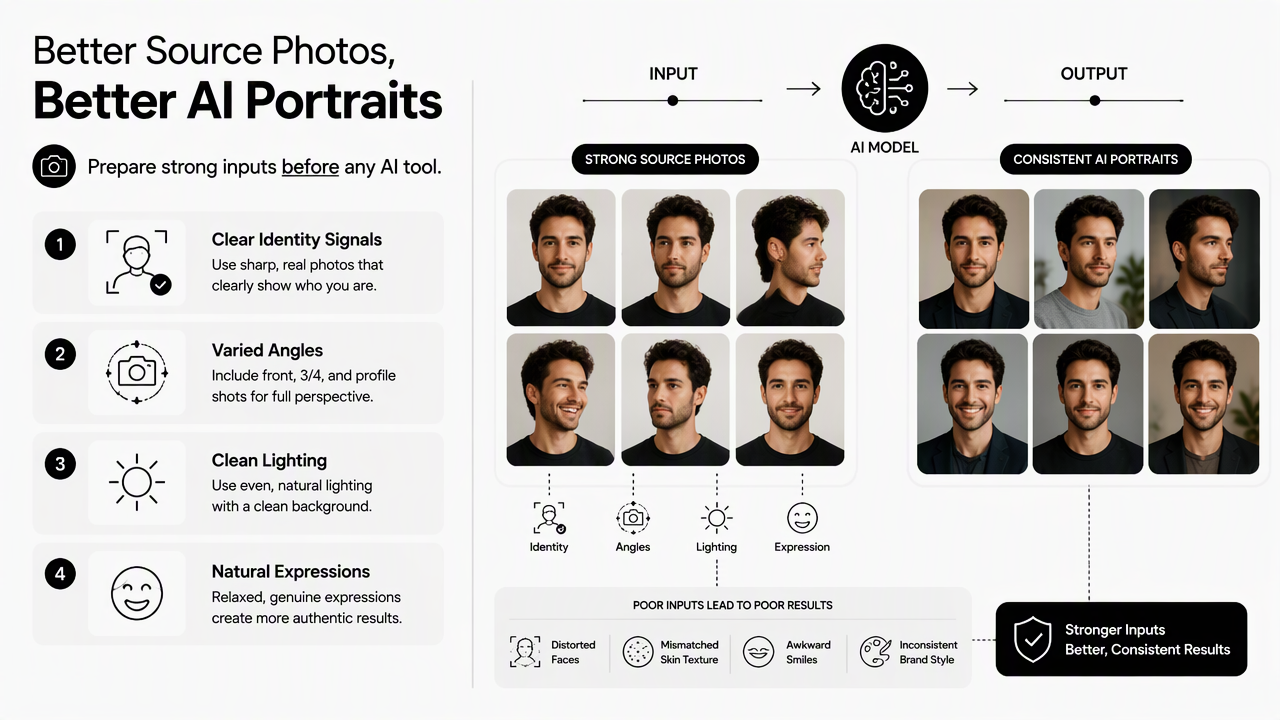
Source photos should be selected for clear identity signals, varied angles, clean lighting, and natural expressions before any AI tool is used. Better inputs reduce distorted faces, mismatched skin texture, awkward smiles, and inconsistent brand style in the final portrait set.
Source photo checklist before generation
A strong input set gives the model enough visual information to learn identity without copying one flawed pose. The best source bundle usually includes variety, not near-duplicates.
- Choose sharp photos where the face is unobstructed.
- Include several expressions, such as neutral, smiling, and relaxed.
- Mix angles, including front-facing and slight three-quarter views.
- Avoid heavy filters, extreme shadows, sunglasses, and face-covering hats.
- Include current hairstyle, facial hair, and glasses if those appear in daily life.
- Remove photos that show other people too close to the subject.
For career materials, source photos should match the intended level of formality. A LinkedIn headshot benefits from steady eye contact, clean grooming, and a calm expression, while a creator profile can carry more personality. Fitness professionals building a career-facing profile can extend the same workflow into a fitness LinkedIn product photo generator when business context matters as much as appearance.
Input quality standards by use case
| Use case | Best source traits | Avoid |
|---|---|---|
| LinkedIn headshot | Clear face, neutral background, current grooming | Party lighting, cropped group shots, heavy filters |
| Entrepreneur profile | Confident expression, brand colors, smart casual styling | Random backgrounds, outdated hair or glasses |
| Influencer content | Natural expressions, varied poses, recognizable style | Over-edited selfies, one repeated angle |
| Remote work bio | Friendly expression, balanced lighting, simple clothing | Low-resolution webcam stills, harsh shadows |
| Dating profile | Authentic smile, relaxed posture, realistic setting | Corporate-only styling, face-altering beauty filters |
Artificial intelligence can enhance images, but it cannot reliably rescue weak identity data. A blurry, filtered, or outdated input set usually creates output that feels polished but not believable.
What is the step-by-step AI portrait workflow?
The best AI portrait workflow moves in order: gather source photos, define the output goal, generate controlled variations, review likeness, apply light edits, export for each channel, and archive approved files. Skipping review or export planning usually creates attractive images that fail on the platform where they must perform.
Seven-step workflow from upload to export
- Define the final use. A recruiter-facing headshot, founder bio image, dating profile, and Instagram portrait need different crops and emotional tones.
- Collect source images. The input set should show current appearance from several angles.
- Pick a style direction. Common directions include studio headshot, outdoor natural light, editorial portrait, casual lifestyle, or clean product-adjacent branding.
- Generate multiple options. A larger set helps compare expression, realism, posture, and background fit.
- Review for likeness first. Identity accuracy matters more than outfit, color, or backdrop.
- Make light edits. Adjust crop, exposure, color warmth, blemishes, lint, and small distractions.
- Export by destination. Save platform-ready versions for LinkedIn, Instagram, newsletters, websites, and dating apps.
The Looktara platform is most useful in the generation and variation stage, where a person needs professional-looking portrait choices without managing a studio shoot. Fitness creators who publish heavily on social platforms can pair portraits with fitness Instagram product photo generation to keep personal-brand visuals consistent across posts.
Review criteria for a natural final image
The review pass should be strict because a technically sharp portrait can still feel artificial. The most important checks are identity, eyes, mouth, hands, hairline, clothing seams, background logic, and platform fit.
- Identity: the face should look like the real person, not a more generic version.
- Expression: the smile or neutral look should match normal facial movement.
- Skin texture: pores and natural variation should remain visible.
- Lighting: the face, clothing, and background should share one believable light source.
- Crop: the image should leave space for circular profile frames when needed.
A good AI portrait should look edited, not invented. The viewer should notice confidence and clarity before noticing the tool.
When should an AI photo be fixed or regenerated?
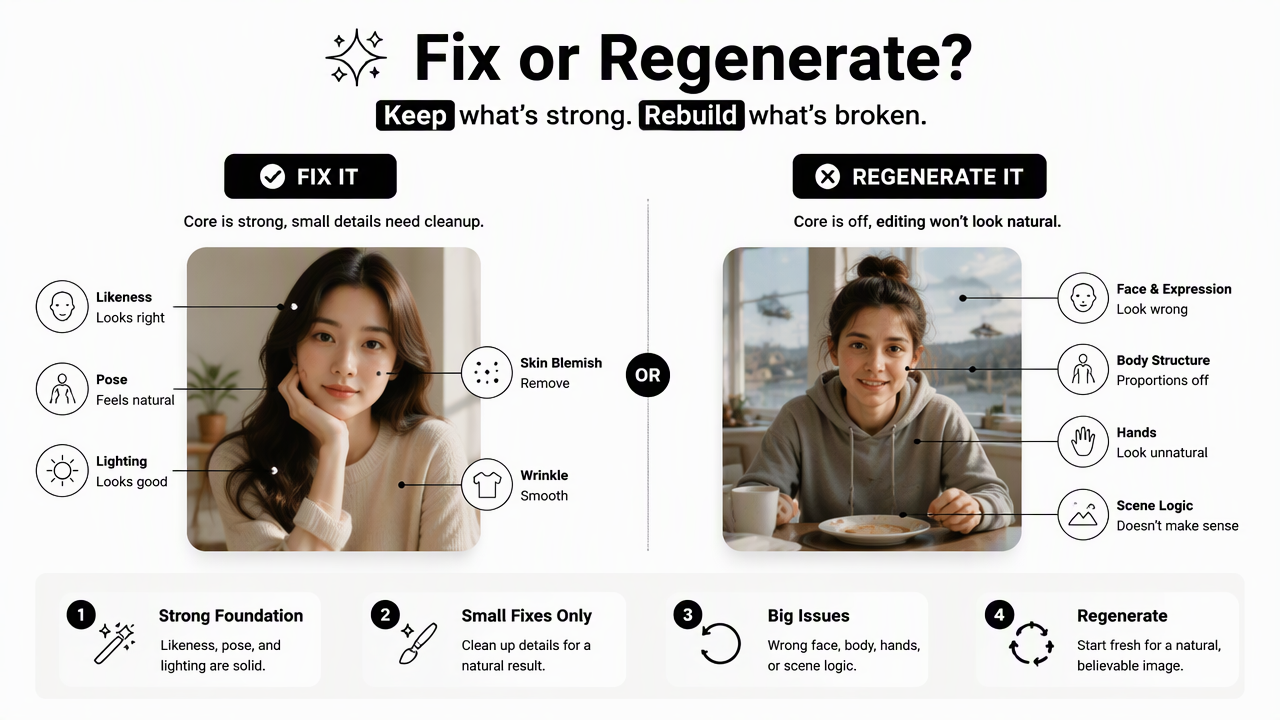
An AI photo should be fixed when the core likeness, pose, and lighting are strong, but small details need cleanup. It should be regenerated when the face, body structure, expression, hands, or scene logic feels wrong, because editing a flawed image often makes it look less natural.
Fix vs regenerate decision table
| Issue in the AI portrait | Fix with light editing | Regenerate instead |
|---|---|---|
| Slight crop imbalance | Yes | No |
| Minor exposure or warmth mismatch | Yes | No |
| Small background distraction | Yes | No |
| Skin too smooth but likeness is accurate | Yes | Sometimes |
| Different facial structure | No | Yes |
| Unnatural eyes or smile | No | Yes |
| Warped glasses, earrings, or hands | Sometimes | Yes |
| Outfit does not match brand goal | Sometimes | Yes |
| Background makes no real-world sense | No | Yes |
Fixing is efficient when the image already passes the identity test. Regeneration is safer when the portrait creates doubt about the person, because trust is the real product of a profile photo.
Safe edits that preserve credibility
Light editing should improve clarity without rewriting identity. Small exposure changes, color balancing, lint removal, crop adjustment, and gentle background cleanup usually keep the image credible.
Risk rises when edits change face shape, eye size, jawline, age, body size, or skin texture too heavily. Those changes may create a more glamorous image, but they can also create a mismatch between online presence and real-life recognition.
Creators using newsletters or brand emails should export a consistent portrait style for bylines, lead magnets, and author blocks. A creator in the health space can extend portrait assets into a fitness newsletter product photo generator when email visuals need the same clean identity.
How will AI photo workflows change in 2027?
AI photo workflows in 2027 will likely become more device-integrated, more identity-aware, and more focused on controlled brand systems rather than one-off edits. The practical shift will be from generating isolated portraits to maintaining approved visual profiles across platforms, campaigns, and content formats.
Apple Intelligence, announced in 2024, reflects a broader move toward AI features that combine on-device and server processing. That direction matters for photo editing because privacy, local processing, and app-level automation will shape how personal images are handled. Research on virtual environments and digital identity, including Park and Kim's taxonomy of metaverse components and challenges, also points toward more persistent visual avatars and brand representations IEEE Access, 2022.
For practical portrait work, three changes deserve attention:
- More guided generation: tools will ask for intent, audience, and channel before creating images.
- Better consistency controls: approved faces, outfits, and brand backgrounds will carry across projects.
- Stronger disclosure norms: professional and dating contexts may expect clearer boundaries between realistic enhancement and synthetic transformation.
Looktara already fits the direction of controlled, purpose-built image creation: generate a polished portrait set, review for realism, then export only the images that match the channel. Visual brands with Pinterest-heavy content can also adapt the same approach through a fitness Pinterest product photo generator when portrait style and content graphics need to feel connected.
FAQ
AI photo editing questions usually center on realism, source quality, and how much retouching is too much. The answers below focus on practical decisions that improve final portraits without making them feel fake.
How many source photos are needed for an AI portrait workflow?
Most workflows perform better with multiple clear source photos instead of one perfect selfie. A useful set includes varied angles, expressions, lighting conditions, and current appearance details. The exact number depends on the platform, but diversity matters more than volume because near-identical images teach the system less about real facial structure.
Can AI photo editing replace manual retouching?
AI can reduce manual retouching, especially for background cleanup, enhancement, resizing, and first-pass portrait generation. Manual review still matters for likeness, eye detail, skin texture, brand tone, and export quality. The strongest workflow treats AI as the production engine and human judgment as the quality-control layer.
Are AI-generated headshots acceptable for LinkedIn?
AI-generated headshots can work for LinkedIn when they look realistic, current, and professionally appropriate. The image should match the person's real appearance closely enough for recruiters, clients, and colleagues to recognize them. Overly perfect skin, dramatic fashion styling, or unrealistic office backgrounds can reduce trust.
What file exports should be saved after editing?
A practical export set includes a high-resolution master file, a square profile version, a vertical social version, and a web-optimized compressed file. Naming files by use case, date, and crop prevents confusion later. Archived approved portraits also make future refreshes faster.
Conclusion
A strong artificial intelligence photos editing workflow turns portrait creation into a repeatable system: select honest source photos, generate varied options, review identity first, fix only small issues, and export for each platform. The next step is simple: gather a current source set, choose one clear portrait goal, and create a first polished batch with Looktara. For direct access, visit looktara.com and start with the profile image that has the highest career or brand impact.
Generated by EarlySEO.com