
TL;DR
Amazon Photos works well as a backup and access layer for headshots, especially for Prime members who need full-resolution photo storage across devices. A dedicated portfolio folder, careful album naming, and separate final-image exports keep professional, social, and dating profile photos easier to manage.
Professional headshots get reused everywhere: LinkedIn, company bios, media kits, speaker pages, dating apps, and creator profiles. Amazon Photos for professional headshot storage can keep those images backed up and easy to access, while Looktara can help create polished profile-ready images before storage begins. The best workflow treats Amazon Photos as a photo vault, not a finished portfolio system.
Amazon Photos: a secure online photo and video storage service from Amazon that stores full-resolution photos, gives all Amazon customers 5 GB of free storage, and offers unlimited photo storage to Prime members according to the research data.
Key takeaway: Amazon Photos is strongest for backup, device access, and personal organization; a separate portfolio folder is better for final, share-ready headshots.
Table of Contents
What is Amazon Photos for professional headshot storage?
Amazon Photos for professional headshot storage is the use of Amazon's cloud photo service to back up, organize, and retrieve full-resolution headshots across phones, tablets, desktops, and Amazon-connected devices. It works best when final images, source files, and social-profile versions are separated before upload.
A headshot is a photographic portrait focused on a person's face, often used for professional profiles, social media, and online dating. That definition matters because a headshot library usually contains fewer files than a general photo library, but each file has higher reputational value.
Amazon Photos appears in search results as a storage service with 5 GB of free storage for all Amazon customers, unlimited photo storage for Prime members, and paid plans starting at $1.99 per month. That makes it practical for many professionals who need backup without building a full digital asset management system.
The service should be treated as one layer in a broader image workflow:
- Creation: generate or capture headshots through a studio, photographer, or the Looktara platform.
- Selection: choose final images for LinkedIn, resumes, press kits, and social profiles.
- Storage: upload approved files to Amazon Photos.
- Distribution: download the correct size or format for each platform.
Research on artificial intelligence in creative industries by Anantrasirichai and Bull (2021) examined how AI is changing creative production, including visual media workflows (Artificial Intelligence Review). In 2026, that matters because many headshot libraries now contain studio photos, AI-assisted edits, and platform-specific crops.
How should headshots be organized in Amazon Photos?
Headshots should be organized in Amazon Photos with albums for purpose, folders for source control, and filenames that identify the image version without opening the file. A simple naming system prevents accidental use of outdated, low-resolution, or overly casual images.
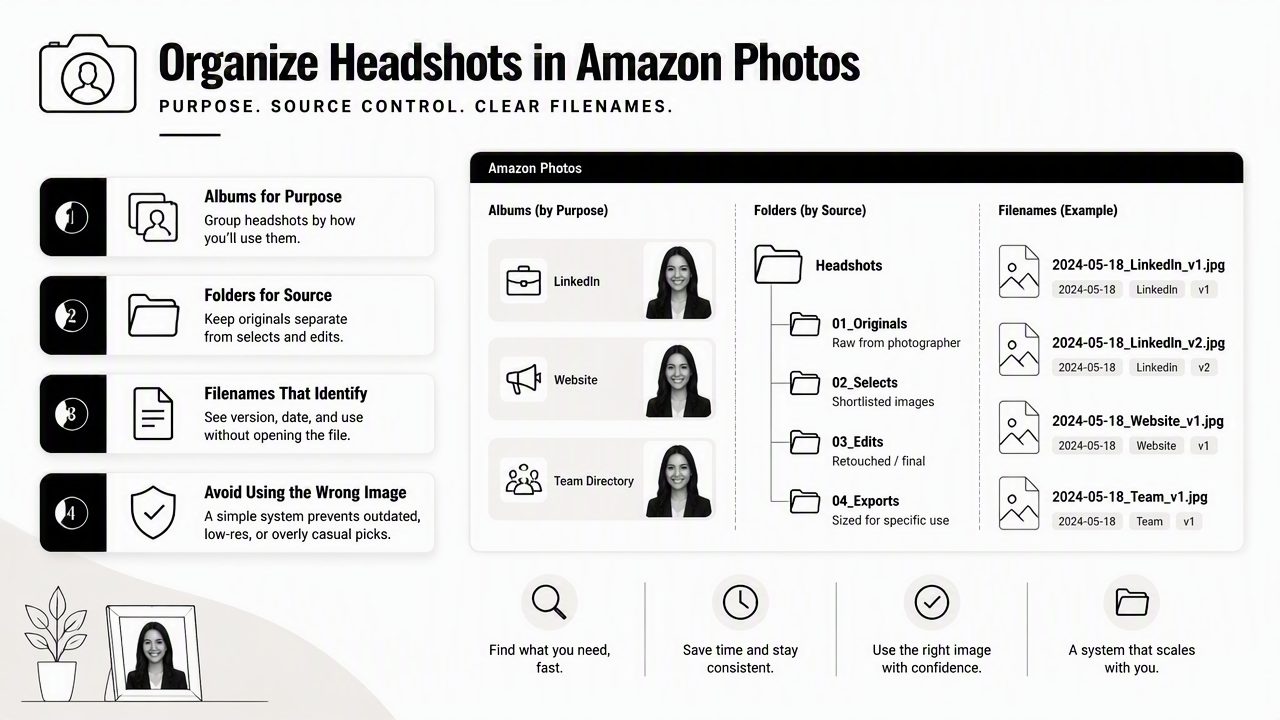
Amazon Photos albums are useful for grouping images without changing the original file. For a professional library, albums should reflect where the image will be used, not just when it was created.
Recommended album structure for headshot libraries
| Album name | Best use | What to include |
|---|---|---|
Headshots - Final |
Master approved set | Full-resolution final images |
LinkedIn Profile |
Career branding | Square or close-cropped professional images |
Company Bio |
Employer pages | Neutral background and formal options |
Speaker Kit |
Events and podcasts | High-resolution press-ready images |
Creator Profiles |
Social platforms | Friendly, expressive variations |
Dating Profile |
Personal profiles | Authentic, natural-looking portraits |
Archive - Old Headshots |
Historical storage | Retired images kept for reference |
Filenames should carry enough detail to survive downloads and reuploads. A good format is firstname-lastname-purpose-year-version.jpg, such as alex-morgan-linkedin-2026-v2.jpg. Dating, creator, and corporate files should not share vague names like IMG_4821.jpg.
A practical workflow keeps three versions of each approved headshot:
- Master file: highest-quality version for future editing.
- Profile file: cropped and ready for LinkedIn or company bios.
- Web file: smaller export for websites, media kits, and forms.
Key insight: Albums solve browsing. Filenames solve portability. A professional headshot system needs both.
Amazon Photos can handle backup and access, but a polished external folder may still be better for sharing with recruiters, clients, event organizers, or collaborators. A dedicated portfolio folder should contain only final images, no outtakes, no duplicates, and no experimental edits.
How can privacy and access stay professional?
Privacy stays professional when Amazon Photos is used as a private storage vault, shared albums are limited to specific use cases, and sensitive headshot variations remain outside public links. Professional imagery often blends personal identity, career positioning, and brand perception, so access control deserves careful handling.
Amazon Photos is commonly used for family and personal photo storage, but headshots require a stricter mindset. A casual image library may contain test shots, old dating profile photos, rejected expressions, or branding experiments that should not sit beside final professional assets in a shareable album.
Access choices for different headshot needs
| Scenario | Recommended access | Reason |
|---|---|---|
| Personal backup | Private album | Keeps all versions available without public exposure |
| Recruiter request | Download and send final file | Reduces accidental album sharing |
| Company bio update | Share one approved image | Keeps brand presentation consistent |
| Event organizer request | Use speaker kit folder | Gives press-ready options only |
| Dating profile refresh | Keep separate private album | Prevents mixing personal and work images |
Sensitive image handling also matters because face images are becoming harder to judge at a glance. A 2023 Journal of Cybersecurity study by Bray, Johnson, and Kleinberg tested human ability to detect deepfake images of human faces (Journal of Cybersecurity). The study topic supports a practical point: headshot libraries should preserve trusted originals and avoid losing track of edited versions.
Good privacy habits include:
- Keep unedited originals in a private album.
- Keep final approved images in a separate album.
- Avoid sharing entire albums when one file will do.
- Remove old shared links after a project ends.
- Store dating profile images separately from career images.
A professional image workflow should also include a local backup for business-critical files. Amazon Photos is useful, but no single cloud account should be the only place where final brand imagery exists.
How should duplicate control and download quality work?
Duplicate control should happen before and after uploading to Amazon Photos, while download quality should be checked by comparing the saved file with the original master image. Headshots often look similar, so visual review alone is not enough.
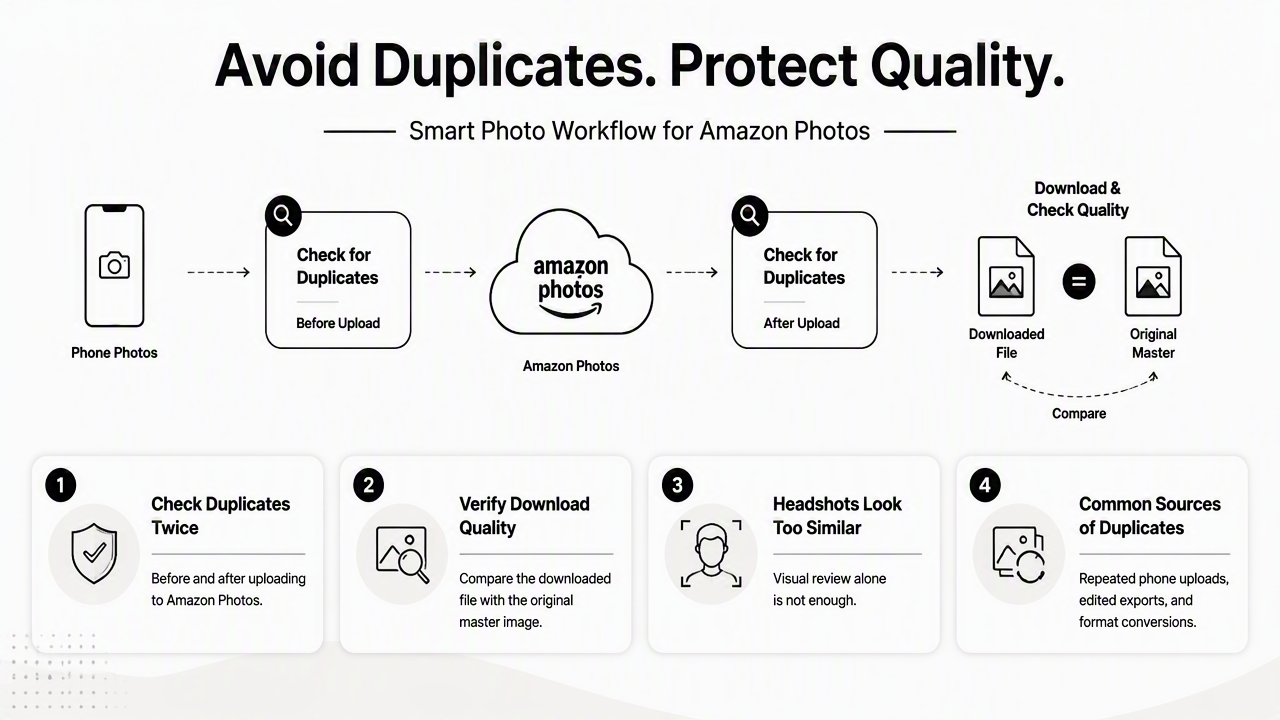
Duplicate issues usually come from repeated phone uploads, edited exports, screenshots, and multiple crops of the same image. For professional headshots, duplicates create two risks: the wrong version gets posted, or a low-quality export replaces a polished original.
Practical quality control checklist
- Select final images first. Only approved headshots should enter the main professional album.
- Rename files before upload. Clear filenames make duplicates easier to catch.
- Compare dimensions. A master image should have larger pixel dimensions than a web export.
- Check file type. Keep JPEG or PNG exports separate from RAW or editing files.
- Download a test file. Open it on desktop and confirm sharpness before relying on it.
- Archive retired versions. Old images should move out of active albums.
Amazon Photos is described in search data as storing full-resolution photos, which is a major advantage for headshot storage. Still, professionals should verify that downloaded files match the intended version, especially after editing, cropping, or transferring between devices.
A clean version system reduces mistakes:
v1: first approved editv2: revised crop, retouch, or color correctionfinal: current approved public versionarchive: retired but preserved version
Avoid using screenshots as final profile images. Screenshots often strip quality, change dimensions, and make faces look softer on platforms that already compress uploads. Original exports from the editing or headshot platform should remain the source of truth.
When is a dedicated portfolio folder better?
A dedicated portfolio folder is better when headshots need to be shared with other people, published across multiple platforms, or kept separate from a personal photo archive. Amazon Photos can store the library, but a curated folder should represent the public-facing set.
A portfolio folder is not just another album. It is a professional package. For job seekers, that package might include one LinkedIn-ready square crop, one resume or speaker headshot, and one casual but polished version. For entrepreneurs, it may include brand images for websites, proposals, and press mentions.
The main difference is audience. Amazon Photos serves the account holder. A portfolio folder serves recruiters, clients, editors, collaborators, and profile visitors.
Amazon Photos versus a dedicated portfolio folder
| Need | Amazon Photos | Dedicated portfolio folder |
|---|---|---|
| Long-term backup | Strong fit | Secondary fit |
| Full-resolution archive | Strong fit | Only final files |
| Quick private access | Strong fit | Good fit |
| Public sharing | Limited fit | Strong fit |
| Brand presentation | Basic | Stronger |
| Duplicate prevention | Requires discipline | Easier with fewer files |
Professionals who create headshots with Looktara can treat Amazon Photos as the backup layer and the final portfolio folder as the presentation layer. That split keeps storage broad and sharing focused. For direct brand recall, visit looktara.com when a fresh set of profile images is needed before building the storage system.
The best folder contents are simple:
- One master final image.
- One LinkedIn or resume crop.
- One website or media-kit version.
- One warmer image for creator or dating profiles.
- A short text file with preferred name, title, and usage notes.
Decision rule: If the image is for safekeeping, store it in Amazon Photos. If the image is for someone else to view or download, place it in a dedicated portfolio folder.
FAQ
Is Amazon Photos good for LinkedIn headshots?
Amazon Photos is good for LinkedIn headshots when the final image is uploaded at full quality, placed in a clearly named album, and downloaded from the original file rather than a screenshot. The service works best as backup and access storage, while the final LinkedIn crop should be stored separately for quick reuse.
Does Amazon Photos replace a professional portfolio folder?
Amazon Photos does not fully replace a professional portfolio folder because it is built for photo storage rather than public presentation. A curated folder is better for recruiters, clients, event teams, and collaborators because it contains only approved files. Amazon Photos remains useful for preserving originals, alternate crops, and archived versions.
How many headshot versions should be stored?
Most professionals should store three to five headshot versions: a master final file, a LinkedIn crop, a company bio or speaker image, a creator or social image, and an archived previous version. More versions can create confusion unless each file has a clear purpose and filename.
Should dating profile photos be stored with work headshots?
Dating profile photos should be stored in a separate private album because the tone, crop, and audience differ from work headshots. A shared photo library can still contain both categories, but separate albums reduce mistakes. Professional files should stay formal and brand-consistent, while dating images can look more natural and personal.
Conclusion
Amazon Photos for professional headshot storage works best as a dependable vault for full-resolution files, approved versions, and cross-device access. The strongest setup uses albums for browsing, filenames for control, privacy rules for sharing, and a dedicated portfolio folder for public-facing images.
For the next update, the practical path is simple: create fresh headshots with Looktara, save the master files, build a Headshots - Final album in Amazon Photos, then export only the polished set into a share-ready portfolio folder. Head to looktara.com when new professional, creator, or dating profile images are ready to be made.
Generated by EarlySEO.com