
TL;DR
AI portrait generators turn source photos or prompts into polished profile images, but the best results still depend on accurate inputs, clear use cases, and careful review. They work well for LinkedIn, creator profiles, small-business branding, and dating apps, while regulated IDs, formal press photography, and high-trust legal uses still call for stricter workflows.
Professional portraits no longer require a studio booking for every profile update, but the AI photo generator meaning for professional portraits is often misunderstood. AI photo generator: software that uses generative artificial intelligence to create or edit images from text prompts, reference photos, or both. For headshots, that usually means turning casual selfies into polished portraits with controlled lighting, wardrobe, background, and framing. Looktara fits this practical use case: fast, profile-ready visuals for professionals, creators, founders, and freelancers who need a consistent image presence across platforms.
Table of Contents
What is an AI photo generator for professional portraits?
An AI photo generator for professional portraits is a tool that creates business-ready images from a prompt, uploaded selfies, or reference photos. It predicts facial structure, lighting, clothing, pose, and background so the final image resembles a studio headshot, LinkedIn portrait, creator profile picture, or personal brand image.
Key terms:
- Generative AI: a model category that creates new content, including images, based on learned patterns.
- Reference image: an uploaded photo used to guide facial likeness, pose, or style.
- Prompt: a written instruction such as "corporate headshot, neutral background, soft studio lighting."
- Portrait consistency: the degree to which generated images preserve recognizable facial features.
Research by Nantheera Anantrasirichai and David Bull in Artificial Intelligence Review examined how AI systems are used across creative industries, including image generation and visual production workflows source. That matters because portrait tools are not simple filters. They are creative systems that synthesize new visual details.
Key insight: an AI headshot is not a camera capture. It is a generated image guided by existing photos, prompts, style controls, and model assumptions.
The practical meaning is simple: the image may look photographic, but it should be reviewed like brand collateral. Accuracy, facial realism, clothing fit, background context, and platform rules all matter.
How does an AI portrait generator turn selfies into headshots?
An AI portrait generator turns selfies into headshots by analyzing facial features, separating the subject from the background, applying a portrait style, and generating new versions with professional lighting, attire, and composition. The best workflows use several clear input photos, not a single blurry image, because likeness depends on source quality.
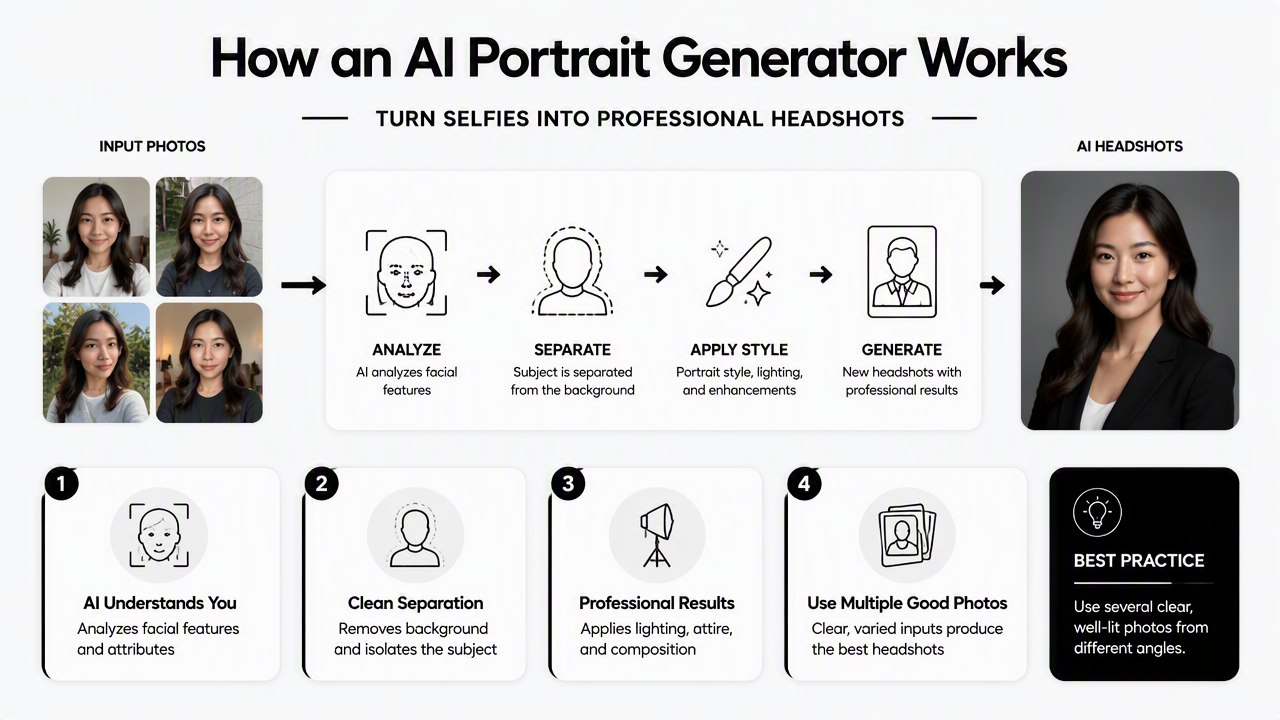
Typical workflow:
- Upload clear source photos with varied angles, neutral expressions, and good light.
- Choose the portrait goal such as LinkedIn, founder bio, creator media kit, or dating profile.
- Select style controls including background, clothing, crop, and tone.
- Generate multiple options because one output rarely fits every platform.
- Review facial accuracy before publishing anywhere public.
- Export sizes suited to profile photos, banners, newsletters, or posts.
Jürgen Rudolph, Shannon Tan, and Samson Tan discussed the rapid rise of generative AI tools in their 2023 review of chatbot systems and higher education source. The same adoption pattern appears in visual tools: users want fast production, but still need judgment, context, and review.
Comparison of portrait creation options
| Portrait method | Best for | Main strength | Main limitation |
|---|---|---|---|
| Prompt-only image generator | Concept art, mockups, style tests | Fast creative exploration | Weak identity accuracy |
| Selfie-based AI headshot tool | LinkedIn, profile pictures, founder bios | Better likeness and professional polish | Needs good input photos |
| AI photo editor | Improving an existing portrait | Keeps the original photo foundation | Less style variety |
| Human photographer | executive portraits, press kits, legal use | Highest control and trust | Higher cost and scheduling time |
A reference-photo workflow is usually the safest choice for portraits that must look like a real person. Prompt-only systems can produce impressive faces, but they are less reliable for identity-specific headshots.
For career-focused imagery, a page built for LinkedIn-ready professional product photos shows how AI portrait and product styling can support a more polished profile presence. For social-first creators, Instagram product photo generation can extend the same visual identity into feed content.
Where do AI portraits work best in 2026?
AI portraits work best when the goal is a polished, believable profile image rather than a legally verified identity document. Strong use cases include LinkedIn headshots, entrepreneur bios, creator media kits, remote-work profiles, newsletter author photos, dating app images, and small-business brand assets.
Best-fit portrait use cases
- Job seekers: cleaner LinkedIn photos, resume headshots where appropriate, and recruiter-facing profile images.
- Entrepreneurs: founder pages, speaker bios, investor decks, and product-led personal branding.
- Creators: profile photos, channel art, media kits, thumbnails, and sponsor materials.
- Remote workers: Slack, Teams, Notion, portfolio, and community profile images.
- Dating app users: natural-looking portraits with better lighting and framing.
The Looktara platform is useful when portrait work connects to brand imagery rather than a single static headshot. A fitness coach, for example, may need a professional profile photo, a newsletter author image, and campaign visuals that all feel consistent. Related formats include newsletter product photo assets, Pinterest-ready product visuals, and Shopify landing page banners.
Best result: a portrait style that matches the person, the platform, and the message. A polished image can still feel wrong if it looks too formal for a creator profile or too casual for an executive bio.
Professional portraits also work better when the output set includes variations. LinkedIn may need a tight crop and neutral background. A podcast cover may need more space around the subject. A landing page banner may need copy space and brand colors.
Product and resource paths for brand imagery
| Need | Better format | Practical next step |
|---|---|---|
| Profile credibility | Headshot or half-body portrait | Use a neutral background and direct eye contact |
| Social content | Square or vertical image | Match clothing and colors to feed style |
| Newsletter trust | Author portrait | Keep the expression warm and readable at small size |
| Sales page design | Wide banner | Leave empty space for headline copy |
| Thought leadership | LinkedIn post image | Pair a portrait with a clear content theme |
Business owners who publish often may also need Shopify LinkedIn post visuals to keep professional content consistent beyond the headshot itself.
When should professionals use or avoid AI portraits?
Professionals should use AI portraits for public profiles, brand consistency, social content, and fast creative testing. They should avoid AI-generated portraits when strict identity verification, legal documentation, news photography, formal credentials, or high-stakes trust requirements demand an unaltered camera image.
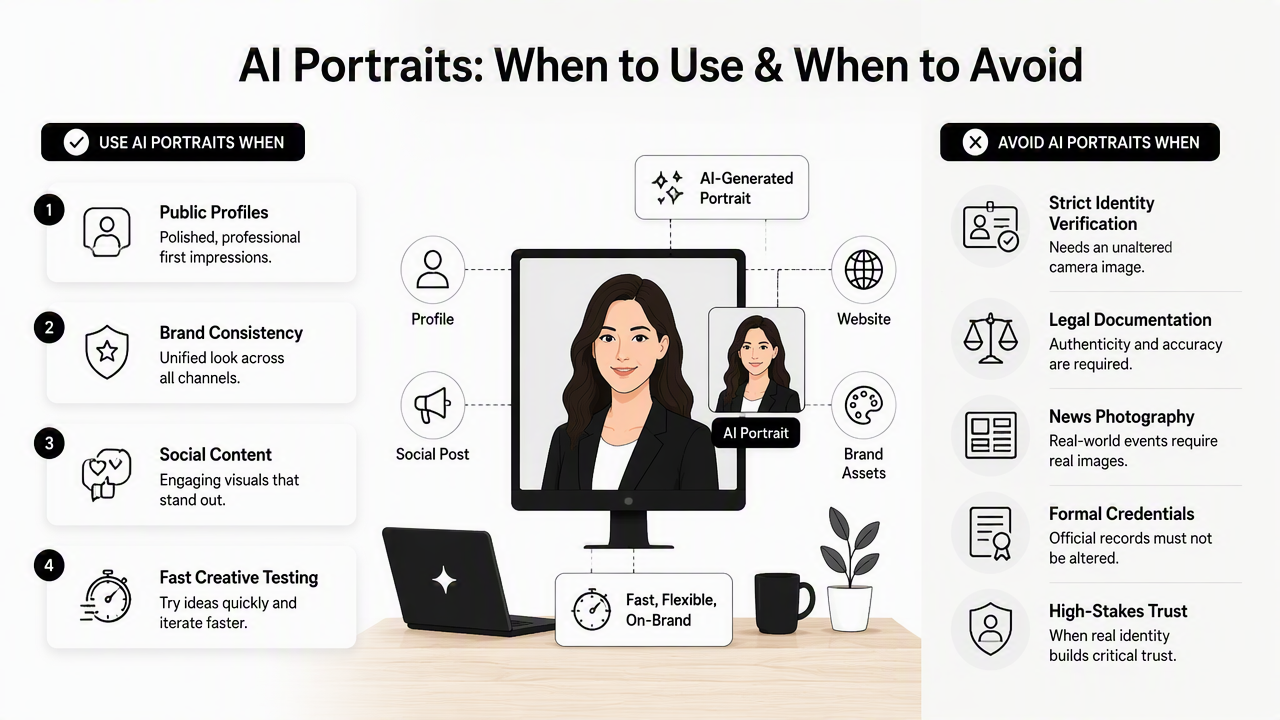
Use it / don't use it decision table
| Situation | Use AI portrait? | Reason |
|---|---|---|
| LinkedIn profile refresh | Yes | Polished lighting and framing can improve first impressions |
| Founder bio page | Yes | Consistent brand presentation matters |
| Creator media kit | Yes | Multiple styles support different sponsors and platforms |
| Dating app profile | Yes, with restraint | Natural realism matters more than perfection |
| Passport, license, visa, ID | No | Official images require strict capture standards |
| Journalism or documentary use | No, unless disclosed | Trust depends on authenticity |
| Court, medical, or legal record | No | Generated details can create risk |
| Corporate directory | Maybe | Company policy should decide acceptable editing levels |
Felix Juefei-Xu, Run Wang, and Yihao Huang surveyed deepfake threats and detection challenges in the International Journal of Computer Vision source. Their work is relevant because professional portraits sit close to identity. A harmless profile upgrade and a deceptive synthetic image can look technically similar, so disclosure and intent matter.
Common review checks:
- Does the face still look like the actual person?
- Are eye shape, teeth, skin texture, and hairline believable?
- Do hands, jewelry, glasses, and collars look natural?
- Does the outfit fit the role and industry?
- Would the image feel honest if seen beside a live video call?
Copyright and ownership also deserve attention. Generative AI in the 2020s raised unresolved questions about the copyright status of AI-generated works and training data. For commercial portraits, professionals should read the tool's license, privacy policy, and usage rights before publishing images in ads, paid media, or merchandise.
Safe rule: AI portraits are strongest as presentation assets, not proof-of-identity assets.
Frequently asked questions
What does AI photo generator mean in simple terms?
An AI photo generator is software that creates or changes images using generative artificial intelligence. For portraits, it can turn selfies or prompts into headshots with studio-style lighting, professional clothing, and clean backgrounds. The result may look like a photograph, but it is generated content and should be checked for accuracy.
Are AI headshots acceptable for LinkedIn?
AI headshots are generally acceptable for LinkedIn when they look realistic, professional, and honest. The portrait should preserve the person's actual appearance and avoid exaggerated skin smoothing, altered facial structure, or misleading luxury settings. A restrained, well-lit image usually performs better than one that looks obviously synthetic.
Can AI portraits replace a professional photographer?
AI portraits can replace a photographer for many routine profile updates, especially when time or budget is limited. A photographer remains better for executive campaigns, press photos, formal events, and situations needing exact lighting direction, art direction, or documented authenticity. The choice depends on risk, use case, and trust requirements.
What source photos create better AI portraits?
Better AI portraits usually come from clear, recent photos with visible facial features, natural expressions, and different angles. Sunglasses, heavy filters, extreme shadows, and group photos reduce accuracy. A mix of front-facing and slight side-angle images helps the model preserve likeness while generating more varied professional results.
What should happen after generating AI portraits?
Generated portraits should be reviewed before use on public profiles or brand materials. The reviewer should check likeness, anatomy, clothing, background, platform fit, and usage rights. For business use, saved versions should be organized by channel, such as LinkedIn, website bio, newsletter, and social posts.
Conclusion
The AI photo generator meaning for professional portraits comes down to practical image production: faster headshots, stronger profile consistency, and more visual options without a full studio session every time. The best results still come from clear inputs, realistic styles, and careful review before publishing.
A practical next step is to define the portrait's job first: career credibility, founder trust, creator branding, or personal profile appeal. Then generate a small set, choose the most believable option, and resize it for each platform. For profile and brand imagery connected to product or creator content, Looktara offers a focused path; visit looktara.com and start with one profile use case before expanding into banners, posts, and newsletter visuals.
Generated by EarlySEO.com