
TL;DR
AI-generated badge portraits can help teams standardize lighting, background, cropping, and brand presentation across offices and remote staff. They work best for low-risk workplace identification, but regulated workplaces should pair them with identity checks, consent rules, and access-control review.
Badge photos shape first impressions long before a meeting starts, and inconsistent portraits can make even a polished workplace look improvised. An AI photo generator for employee badge photos helps create uniform, professional portraits from submitted images, especially for remote teams, events, startups, and distributed hiring cycles. AI badge photo generator: software that creates or refines employee portrait images for ID cards, internal directories, visitor badges, and workplace profile systems. Looktara fits this need when teams want clean, brand-ready portraits without scheduling a traditional photo day.
Table of Contents
What is an AI photo generator for employee badge photos?
An AI photo generator for employee badge photos creates consistent staff portraits by adjusting background, lighting, framing, clothing style, and image quality from an uploaded or captured face photo. For badge use, the goal is not fantasy styling; it is clear identity presentation, repeatable formatting, and a professional look across a workforce.
The idea sits between a headshot editor and an ID-photo workflow. Competitor articles such as ID Wholesaler's 2025 learning-center piece on AI-driven photo IDs focus on badge card production and access control, but many leave out the practical difference between a polished employee portrait and a verified credential image.
Key insight: AI can standardize a badge portrait, but it should not be treated as proof of identity by itself.
A deepfake, according to the Wikipedia definition provided in the research data, is image, audio, or video content edited or generated with artificial intelligence and related tools. That matters because badge-photo workflows must distinguish helpful image cleanup from synthetic identity risk.
Core terms for badge photo planning
Generated portrait: an AI-created or AI-refined image based on a real person's submitted photo.
Badge photo: the face image printed on an employee ID card, visitor credential, internal directory, or event pass.
Identity verification: a separate process that confirms a person is who the organization believes they are.
Access control: the hardware, software, and policies that decide who can enter a building, room, device, or system.
Where AI badge photos help most
AI badge photos are most useful when an organization needs consistent employee images faster than a traditional photo session allows. The strongest use cases are visual consistency, remote onboarding, event check-in, and profile refreshes where the photo supports recognition rather than serving as the only security factor.
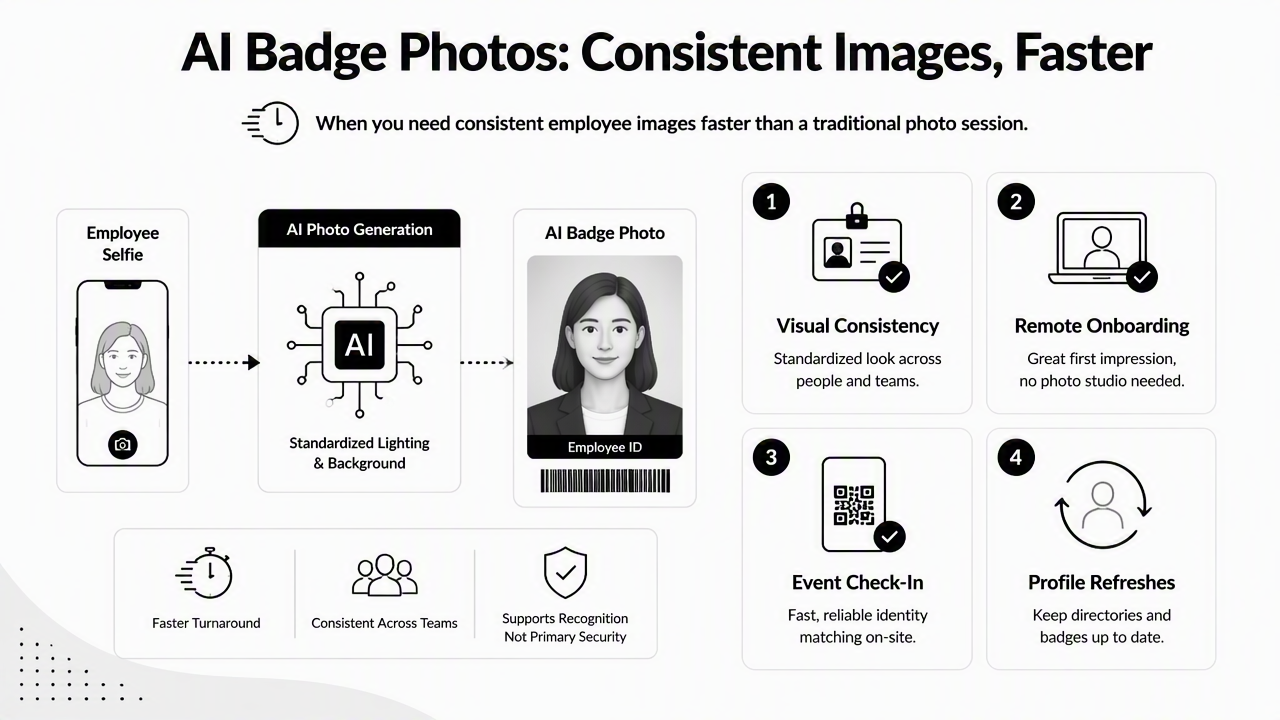
A startup hiring across cities may need fifty badge photos before office opening week. A remote company may need directory images that look consistent across time zones. A conference team may need temporary staff badges that still feel official. In those cases, AI portrait tools can reduce the messy mix of car selfies, dim webcam shots, and cropped vacation photos.
Looktara can also support broader professional-image needs beyond badge cards, such as profile refreshes and branded staff content. For employees updating public-facing career assets, the resume headshot generator offers a related route for polished professional portraits.
Decision matrix for workplace badge use
| Workplace need | AI badge photo fit | Best workflow | Extra review needed |
|---|---|---|---|
| Startups | High | Collect staff selfies, generate uniform portraits, print badges in batches | Basic HR approval |
| Remote teams | High | Standardize directory and badge images during onboarding | Manager or people-team review |
| Events | Medium to high | Create temporary staff or exhibitor badges with consistent styling | Expiration dates and role labels |
| Regulated workplaces | Limited | Use AI only for image cleanup after verified capture | Security, legal, and compliance sign-off |
| High-security facilities | Low | Prefer live capture tied to identity proofing | Formal access-control process |
The matrix points to a simple rule: AI works best when the portrait improves recognition, not when it replaces identity proofing. A badge can look professional and still require a separate HR, security, or compliance check.
Common badge-photo improvements
- Consistent neutral backgrounds across all employees
- Better crop around the face and shoulders
- Reduced glare, shadows, and low-resolution artifacts
- Brand-aligned clothing tone or business-casual styling
- Faster refreshes after promotions, rebrands, or office moves
- Cleaner staff directories for sales, support, and client-facing teams
For teams that also publish employee spotlights or hiring updates, professional portraits can pair naturally with branded content made through a LinkedIn post image generator. The badge photo stays functional, while the social asset supports employer branding.
How should teams create badge photos safely?
Teams should create badge photos safely by separating portrait generation from identity verification, collecting consent, limiting edits, and keeping a human approval step before printing or syncing images to access systems. The process should be simple enough for HR to run, but controlled enough for security teams to trust.
A 2023 case study in JMIR Human Factors examined generative AI tools in health care research solution development, showing how AI can support practical workflows when human oversight remains part of the process (Rodriguez, Lawrence, and González, 2023). Badge photos deserve the same mindset: assistance, not autopilot.
A safer five-step badge photo workflow
- Set portrait rules: define background color, crop, face visibility, clothing expectations, and image size.
- Collect source photos with consent: explain that AI may enhance or generate a professional badge portrait.
- Generate standardized options: create one or more compliant portraits per employee.
- Review against the real person: require HR, security, or a manager to confirm recognizable likeness.
- Store and rotate carefully: keep approved images in the proper HR or badge system, then refresh on a clear schedule.
This process keeps the badge image useful while reducing casual misuse. It also gives employees a clear path for requesting a retake or correction.
Controls that reduce identity risk
- Do not allow face swaps, fictional faces, or celebrity resemblance prompts.
- Do not alter age, facial structure, scars, religious clothing, medical devices, or other identity-relevant traits.
- Do not sync images automatically to door-access systems without review.
- Do keep a record of approval, date, and source-image ownership.
- Do confirm whether local privacy or employment rules require a notice or retention policy.
Research on human resources and software development teams in Industry 5.0 discusses how organizational technology can interact with workplace equality and human-capital systems (Aydın, Rahman, and Özeren, 2023). Badge-image policies should account for fairness, including consistent treatment across gender expression, ethnicity, disability, and religious appearance.
What are the compliance and security limits?
AI-generated portraits have clear limits because badge photos affect identity, privacy, physical access, and employee trust. A polished portrait should never be the only evidence used to issue a credential, approve building entry, or validate a worker in a regulated environment.
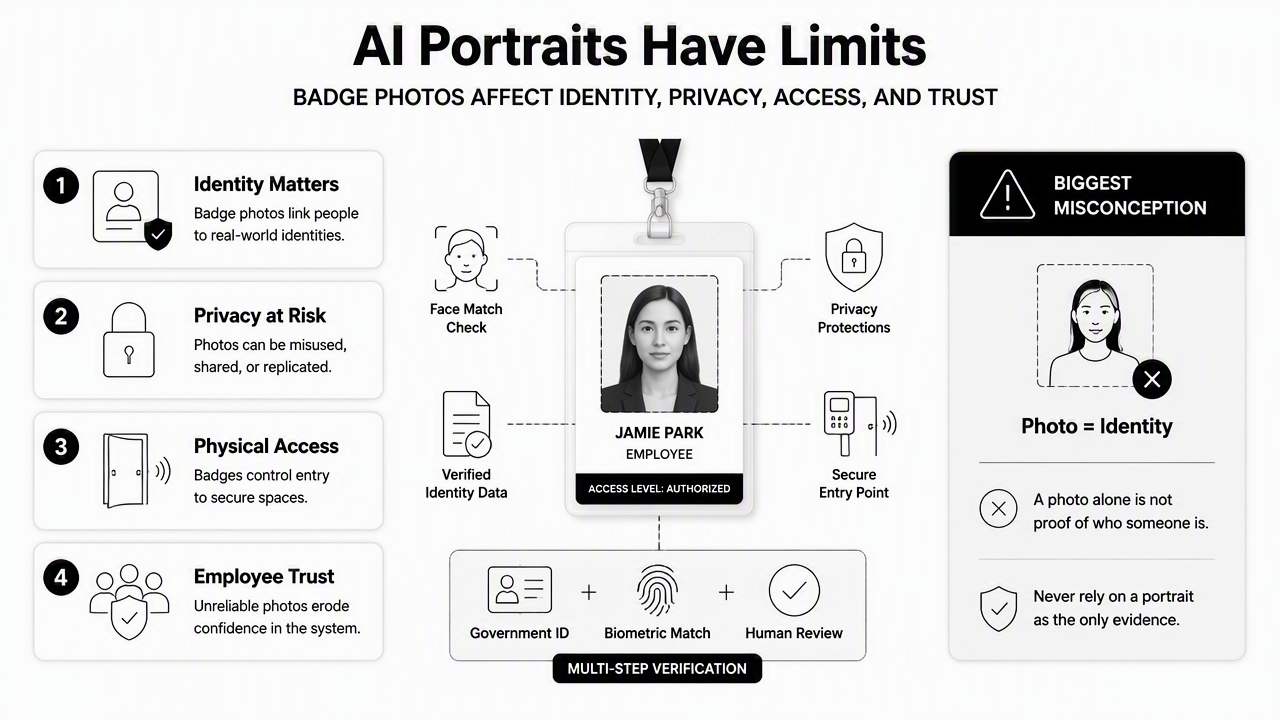
The biggest misconception is that photo realism equals accuracy. A highly realistic image can still exaggerate or soften features. In sensitive contexts, live capture, government ID review, HR records, and access-control logs may matter more than portrait quality.
Badge-photo risk checklist
| Risk area | What can go wrong | Safer practice |
|---|---|---|
| Identity mismatch | The generated face looks too different from the employee | Compare against a verified source photo |
| Privacy | Images get stored in too many tools | Limit storage to approved HR or security systems |
| Bias | Styling choices treat groups unevenly | Use the same rules for all employees |
| Security | A synthetic image supports false credential requests | Require separate identity proofing |
| Retention | Old photos remain after role changes or departures | Set deletion and refresh rules |
A 2023 survey on blockchain-enabled cybersecurity for heterogeneous networks covers security provisioning in complex connected systems (Islam, Rahman, and Ameedeen, 2023). Employee badges sit inside similar connected processes, including printers, directories, access gates, mobile credentials, and HR platforms.
When AI should not replace live capture
AI should not replace live capture when the badge grants access to labs, data centers, hospitals, schools, airports, government offices, financial facilities, or controlled industrial sites. In those settings, the safest model is verified capture first, then limited image cleanup if policy allows.
Event teams can usually accept more flexibility because badges expire quickly. Regulated workplaces need stricter controls because badge misuse may affect safety, legal duties, and incident response.
How does Looktara fit into the badge-photo workflow?
Looktara fits best as a professional-image creation step for teams that want consistent, modern portraits before final HR or security approval. The Looktara platform is most useful when the badge photo also needs to align with public-facing profiles, staff directories, onboarding documents, or brand materials.
Teams can use generated portraits for employee badges, then adapt the same visual style for company announcements, team pages, and launch materials. A founder updating investor materials may pair consistent staff imagery with branded slides from a pitch deck slide generator. A creator-led business may adapt headshots into social assets through an X post image generator or short-form thumbnails using a shorts thumbnail generator.
Best fit: use AI-generated portraits to improve visual consistency, then let HR, security, or event operations approve the final badge image.
By 2027, badge-photo workflows are likely to become more connected to digital credentials, mobile wallet IDs, automated onboarding, and privacy review. That does not mean synthetic portraits will replace identity checks. More likely, AI will handle formatting and brand consistency while verified capture and access-control systems handle trust.
For teams building a repeatable portrait workflow, visit looktara.com after badge-photo rules, consent language, and approval roles are defined.
FAQ about AI employee badge photos
AI employee badge photos can be practical, but the right policy depends on workplace risk, employee consent, and how the badge is used. These answers cover the most common planning questions for HR, operations, security, and brand teams.
Can AI-generated photos be used on official employee badges?
AI-generated photos can be used on employee badges when the organization allows them and the image remains a recognizable likeness of the employee. The safest approach is to use AI for standardizing background, lighting, and crop, then require human approval before printing or uploading the badge image.
Are AI badge photos secure enough for access control?
AI badge photos alone are not secure enough for access control. Physical or digital access should depend on verified identity records, badge issuance controls, permissions, and monitoring. The portrait helps guards and coworkers recognize a person, but it should not serve as the main security mechanism.
What photo rules produce better badge portraits?
Better badge portraits usually start with a clear face-forward source photo, plain background, even lighting, visible eyes, and no heavy filters. Organizations should define crop, background, clothing, file format, and approval standards before employees submit images, since consistent input makes AI output easier to review.
How often should employee badge photos be refreshed?
Employee badge photos should be refreshed when an employee's appearance changes significantly, after a company rebrand, during office moves, or when old photos no longer match current security expectations. Many organizations also refresh photos during scheduled badge replacement cycles to avoid one-off exceptions.
Conclusion
An AI photo generator for employee badge photos can save time, improve consistency, and make distributed teams look more organized. The smart workflow is simple: define badge-photo rules, collect consent, generate professional portraits, review likeness, then approve images inside the proper HR or security process. Looktara gives teams a friendly way to create polished portraits and related professional visuals, while identity checks stay where they belong. For a practical next step, document badge-photo standards first, assign an approver, then head to looktara.com to create the portrait set.
Generated by EarlySEO.com