
TL;DR
AI portrait editing works best when it corrects distractions without changing identity. The safest edits improve lighting, backgrounds, crop, clothing, glare, and skin texture while preserving facial structure, age cues, and real expression.
A I photo editing for realistic professional portraits has moved from novelty to everyday career asset, especially for job seekers, founders, creators, freelancers, and dating app users who need a polished image without a studio session. Looktara supports this practical use case by helping people create profile-ready visuals that still look like a real person. Research on creative AI by Nantheera Anantrasirichai and David Bull (2021) describes artificial intelligence as increasingly useful in image creation and enhancement workflows, not just automation tasks (Artificial Intelligence Review).
AI portrait editing: the use of machine-learning tools to adjust a person's photo for clarity, lighting, composition, and presentation while preserving recognizable likeness.
The strongest professional portrait is not the most edited image. It is the image that removes friction while keeping trust intact.
Table of Contents
What is AI photo editing for realistic professional portraits?
AI photo editing for realistic professional portraits is the careful use of automated image tools to improve a headshot's technical quality, presentation, and platform fit without changing the person's identity. The best edits correct poor lighting, distracting backgrounds, awkward crops, lint, glare, and uneven skin tone while keeping facial structure, age, expression, and texture believable.
A realistic professional portrait has two jobs. It should look competent at small sizes on LinkedIn, resumes, company pages, and creator profiles. It should also survive a closer look without the waxy skin, mismatched eyes, or plastic clothing that signal over-editing.
Research by John V. Pavlik (2023) on generative AI in journalism and media education discusses how generative systems affect trust, authenticity, and media practice (Journalism & Mass Communication Educator). That same trust issue applies to professional portraits: the edit must support credibility, not replace the person.
Key terms AI systems and editors use
| Term | Meaning for portraits | Realistic target |
|---|---|---|
| Likeness preservation | Keeping the face recognizably the same | No altered jaw, eyes, nose, age, or expression |
| Relighting | Adjusting shadows, highlights, and face brightness | Even light with natural depth |
| Background cleanup | Removing clutter or replacing a setting | Simple, believable space or soft neutral backdrop |
| Skin texture retention | Reducing distractions without flattening skin | Pores and lines remain visible |
| Composition | Cropping and positioning the subject | Face and shoulders fit the platform |
Professional edits should feel invisible. A recruiter, client, or match should notice the person first, not the software.
Which AI edits improve a portrait without hurting trust?
The safest AI edits improve clarity, context, and presentation while avoiding identity changes. Lighting correction, background cleanup, tighter crop, clothing polish, glare reduction, and natural skin texture usually create the biggest lift because they fix photo problems rather than invent a new face.
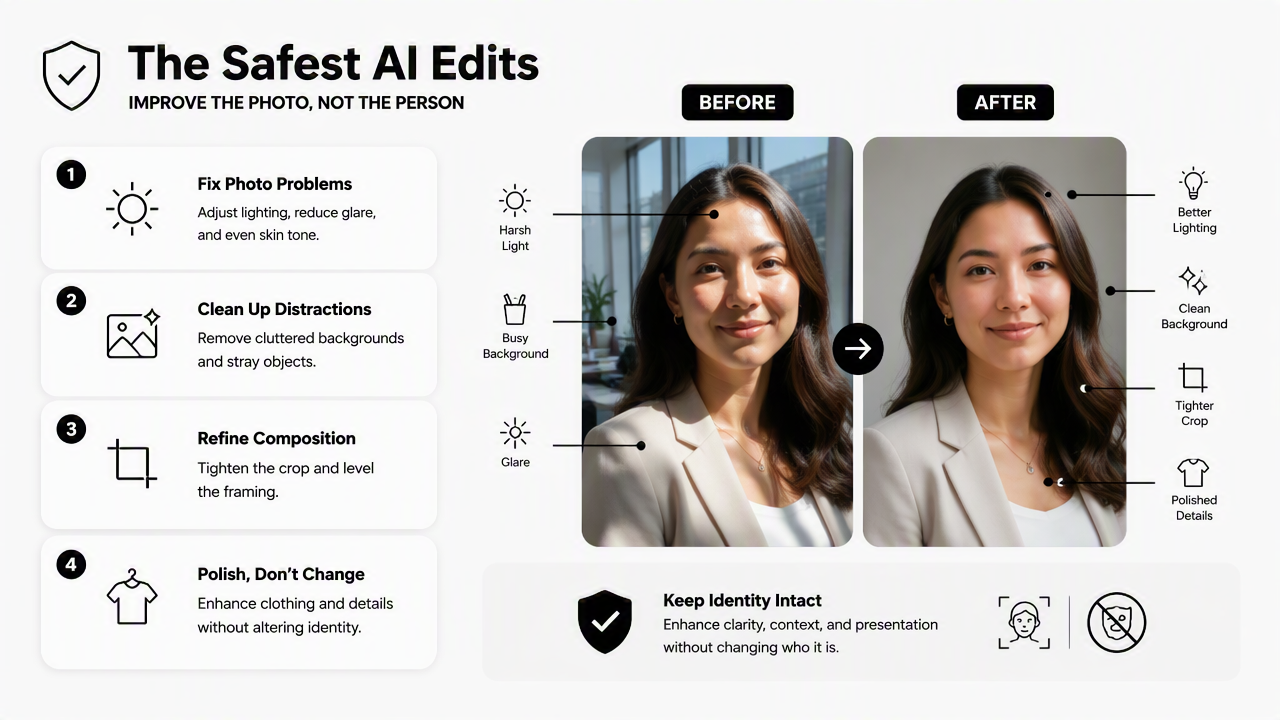
AI portrait tools compete heavily on "studio headshot" promises, and many search results emphasize speed, unlimited outputs, or style variety. A more useful standard for 2026 is simpler: does the final image still look like the same person on a normal day, only better lit and better framed?
Edit categories that usually look natural
| Edit category | What it fixes | Safe adjustment | Risky adjustment |
|---|---|---|---|
| Lighting correction | Dark face, harsh shadows, flat image | Brighten eyes and face, soften shadows | Fake spotlight, glowing skin, mismatched light direction |
| Background cleanup | Messy room, visual clutter, low credibility | Blur, neutralize, or simplify background | Unreal office, fake luxury room, bad edges around hair |
| Crop and framing | Too much empty space or awkward angle | Head and shoulders centered for profile use | Extreme face crop or distorted perspective |
| Clothing polish | Wrinkles, lint, small distractions | Minor smoothing and color balance | New outfit that changes body shape or style |
| Glare reduction | Reflections on glasses or shiny skin | Reduce glare while keeping eye detail | Painted-in eyes or flat glasses |
| Skin texture | Temporary blemishes and uneven tone | Light correction with pores intact | Airbrushed face, changed age, plastic look |
The Looktara platform is most useful when portrait edits are treated as profile preparation, not identity redesign. A headshot may then pair with supporting professional assets, such as a LinkedIn post visual for fitness Shopify brands or a resume headshot AI generator, when a consistent personal brand matters.
Practical edit priority list
- Fix exposure first: a clear face matters more than a stylish background.
- Clean the background second: visual clutter can weaken the impression of professionalism.
- Crop for the destination: LinkedIn, resumes, dating apps, and founder bios need different framing.
- Polish clothes lightly: fabric should still look real.
- Keep expression unchanged: trust drops when the smile, eyes, or face shape no longer match reality.
A natural edit often looks modest in a full-size preview. On a small profile circle, that modesty becomes strength because the face remains readable.
How should professionals use AI editing step by step?
Professionals should use AI editing by starting with a strong source photo, applying one correction category at a time, checking likeness after every change, exporting for each platform, and saving the original. This workflow keeps the portrait useful for hiring, sales, networking, creator profiles, and dating apps without making the image feel synthetic.
A realistic portrait workflow
- Choose a clear base photo: front-facing or slight angle, sharp eyes, no heavy filters, and enough resolution for cropping.
- Correct light and color: balance skin tone, reduce harsh shadows, and avoid dramatic studio effects unless the source lighting supports them.
- Simplify the background: remove clutter, soften edges, or use a neutral backdrop that matches the person's profession.
- Adjust crop by platform: use tighter head-and-shoulders framing for LinkedIn and looser crops for creator bios or website pages.
- Polish small distractions: lint, flyaway hairs, glare, and minor wrinkles can be reduced without replacing reality.
- Review likeness at 100 percent: compare against the original before exporting.
- Export multiple versions: square, vertical, and horizontal crops prevent quality loss across platforms.
A profile portrait is rarely used alone. Founders and creators often need a matching website banner, pitch deck photo, or social graphic. A portrait can sit beside a website hero image generator, a pitch deck slide generator, or a podcast cover generator when the goal is a consistent public identity.
File checks before publishing
- Face clarity: eyes remain sharp at small size.
- Edge quality: hair, glasses, and shoulders do not show cutout halos.
- Color accuracy: skin tone does not drift orange, gray, or overly smooth.
- Context fit: background matches the intended role or platform.
- Truthfulness: the final image still resembles the person offline.
A good AI-edited portrait should reduce questions, not create them. If the image makes viewers wonder whether it is real, the edit has gone too far.
What mistakes make AI portraits look fake?
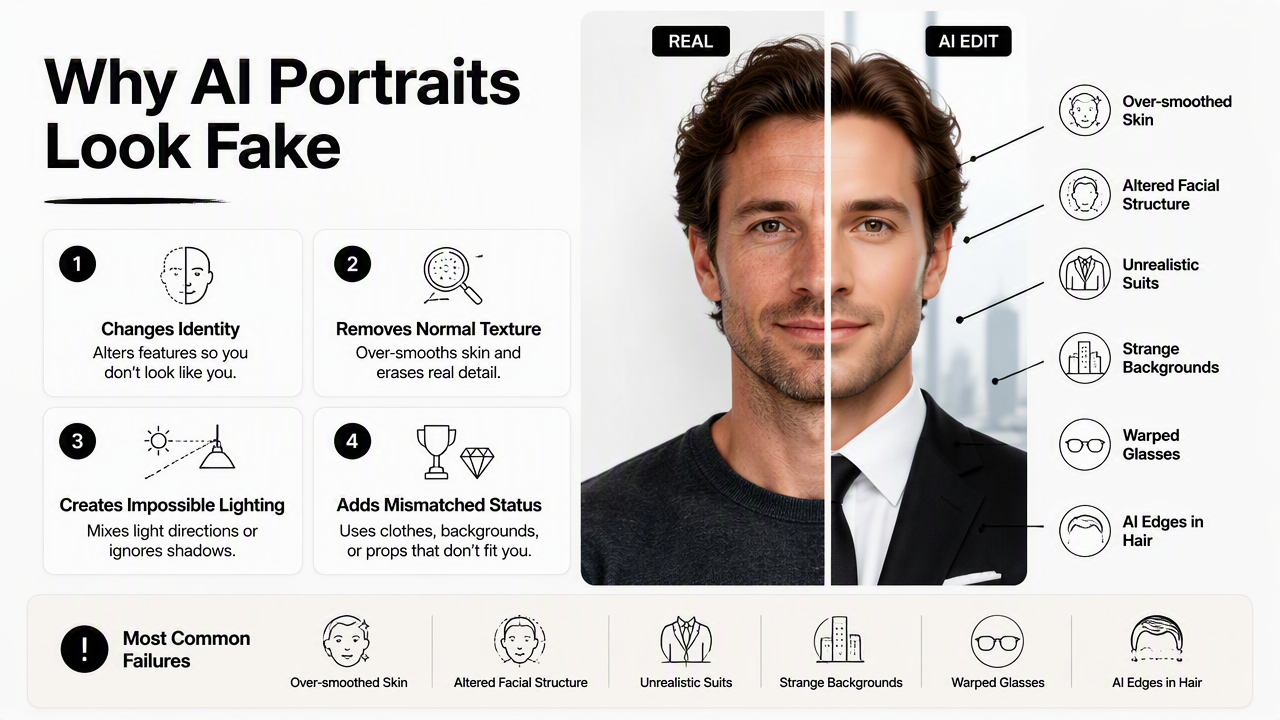
AI portraits look fake when editing changes identity, removes normal texture, creates impossible lighting, or adds status signals that do not match the person. The most common failures are over-smoothed skin, altered facial structure, unrealistic suits, strange backgrounds, warped glasses, and hair edges that reveal automated masking.
Deepfake research is relevant here because it studies synthetic facial manipulation and detection. A 2022 survey by Thanh Thi Nguyen and coauthors examined deep learning methods for deepfake creation and detection, showing how face generation and manipulation have become sophisticated enough to require careful evaluation (Computer Vision and Image Understanding). Professional portrait editing should stay far away from deceptive face replacement.
Red flags to avoid
| Red flag | Why it hurts credibility | Better choice |
|---|---|---|
| Airbrushed skin | Removes age cues and texture | Light blemish reduction with real pores |
| Changed face shape | Breaks recognition in interviews or meetings | Preserve bone structure and proportions |
| Fake formal clothing | Can look pasted on or inconsistent with role | Clean the existing outfit when possible |
| Unreal background | Signals stock-image artificiality | Use simple office, outdoor, or neutral backdrop |
| Glasses distortion | Makes eyes look painted or uneven | Reduce reflections while keeping lens realism |
| Too many style outputs | Encourages choosing fantasy over accuracy | Pick the most believable version |
Some AI headshot tools advertise speed and volume, which can be useful for selection. Still, quantity does not solve realism. Ten believable options beat hundreds of portraits that make the person look like a model from an unrelated stock library.
A quick realism test
- Would a colleague recognize the person immediately?
- Would the image match a live video call?
- Would the clothing be plausible for the person's real work?
- Would the lighting make sense in that background?
- Would the same portrait feel acceptable on a resume, founder page, or client proposal?
When any answer is no, the safer move is to reduce the edit rather than generate a more dramatic version.
How will realistic AI portraits change in 2027?
Realistic AI portraits in 2027 will likely focus more on consent, provenance, platform-specific exports, and identity-preserving edits. As AI media becomes easier to create, professional users will need portraits that look polished but also signal authenticity through consistent likeness, restrained editing, and clear use cases.
Creative AI research already frames the field as a mix of production support, automation, and human judgment. The 2021 review by Anantrasirichai and Bull notes broad AI use across creative industries, including image-related tasks (Artificial Intelligence Review). In portraits, the likely shift is away from "make a new person" prompts and toward controlled editing that keeps identity stable across professional channels.
What to expect next
| 2026 priority | 2027 direction | Why it matters |
|---|---|---|
| Fast headshot generation | Verified likeness controls | Reduces misleading profile images |
| Generic studio styles | Role-specific portrait presets | Helps founders, job seekers, creators, and freelancers look appropriate |
| One-size export | Platform-aware crops | Improves LinkedIn, resume, website, and dating app presentation |
| Visual polish | Authenticity signals | Builds trust as AI images become common |
| Manual review | AI plus human taste checks | Catches uncanny details before publishing |
Looktara fits this future best when used as a practical brand-image workflow rather than a costume generator. Professionals who want related visual assets can visit looktara.com and build a consistent set of profile, social, and presentation images around the same realistic portrait style.
FAQ
Is AI portrait editing acceptable for LinkedIn?
AI portrait editing is acceptable for LinkedIn when it improves photo quality without misrepresenting identity. Lighting, crop, background cleanup, and minor skin correction are usually reasonable. Heavy face reshaping, false age changes, or fake executive settings can damage trust when the person appears in interviews, meetings, or public content.
Can AI editing fix a bad selfie?
AI editing can improve a decent selfie, but it cannot always rescue poor focus, extreme angles, blocked facial features, or very low resolution. The best results start with a sharp image, natural expression, visible eyes, and simple lighting. Editing then refines the portrait instead of rebuilding it.
Should skin be smoothed in a professional portrait?
Skin should be corrected, not erased. Temporary blemishes, shine, and uneven tone can be softened, but pores, smile lines, and normal texture should remain. Natural texture helps the portrait feel current, human, and trustworthy across career sites, creator profiles, and dating apps.
What background works best for realistic AI headshots?
Neutral, softly blurred, or lightly professional backgrounds work best because they keep attention on the face. A simple office, muted wall, or clean outdoor setting often looks more believable than a luxury boardroom. The background should match the person's real role and communication style.
Conclusion
A I photo editing for realistic professional portraits works when the edit serves recognition, not reinvention. The practical path is clear: start with a sharp photo, correct lighting, simplify the background, crop for the platform, polish small distractions, and keep natural skin texture.
For the next profile update, select one strong source photo, create two or three restrained edits, then compare each version against the original at full size and thumbnail size. For a broader visual system around that portrait, head to looktara.com and create matching professional assets that support the same credible personal brand.
Generated by EarlySEO.com