
TL;DR
Transparent AI headshots work best for websites, pitch decks, media kits, and company directories where the portrait must sit cleanly on branded layouts. PNG is the safest export for transparency, while LinkedIn and dating profiles usually look more credible with a natural or softly branded background.
A polished portrait can look expensive and still fail if the background clashes with a website, slide deck, or team directory. An AI headshot transparent background solves that layout problem by turning a professional-looking portrait into a flexible cutout that can sit on brand colors, gradients, cards, and editorial designs.
AI headshot transparent background: a professional portrait generated or edited with artificial intelligence, then exported with the background removed so only the person remains visible.
Creative AI tools now sit inside everyday design workflows. A 2021 review by Nantheera Anantrasirichai and David Bull in Artificial Intelligence Review examined how artificial intelligence is being used across creative industries, including image-related production tasks (Springer). For professionals who need polished imagery without a studio session, Looktara can help create headshot options that fit modern profile and brand use cases.
Table of Contents
What is an AI headshot transparent background?
An AI headshot transparent background is a generated or edited portrait with the background removed, usually saved as a PNG so the subject can be placed on another design. It is most useful when the final image must match a brand layout rather than appear as a standalone photo.
A transparent portrait is not just a background-removal trick. The output must preserve hair, shoulders, glasses, clothing edges, and natural lighting so the cutout still looks like a credible professional headshot.
Key insight: Transparent backgrounds are a design asset, not always the best profile-photo choice.
Modern AI image systems are improving because they can interpret multiple visual elements at once. The 2024 Gemini 1.5 technical report discussed multimodal understanding across long contexts, a direction that helps explain why image tools are becoming better at recognizing subjects, backgrounds, and visual intent (arXiv).
Core terms for clean cutout decisions
- Transparent PNG: an image file that keeps invisible pixels behind the subject, making it suitable for websites, slides, and layered designs.
- Alpha channel: the part of an image file that stores transparency information.
- Edge halo: a light or dark outline left around hair, clothing, or shoulders after background removal.
- Natural background: a real or realistic setting, such as an office, studio wall, outdoor blur, or neutral interior.
- Brand background: a color, texture, or graphic layout chosen to match a company identity.
When should transparent headshots be used?
Transparent headshots should be used when consistency across designed assets matters more than showing a real environment. They are strongest for websites, speaker pages, pitch decks, media kits, sales pages, and company directories where portraits need to fit the same visual system.
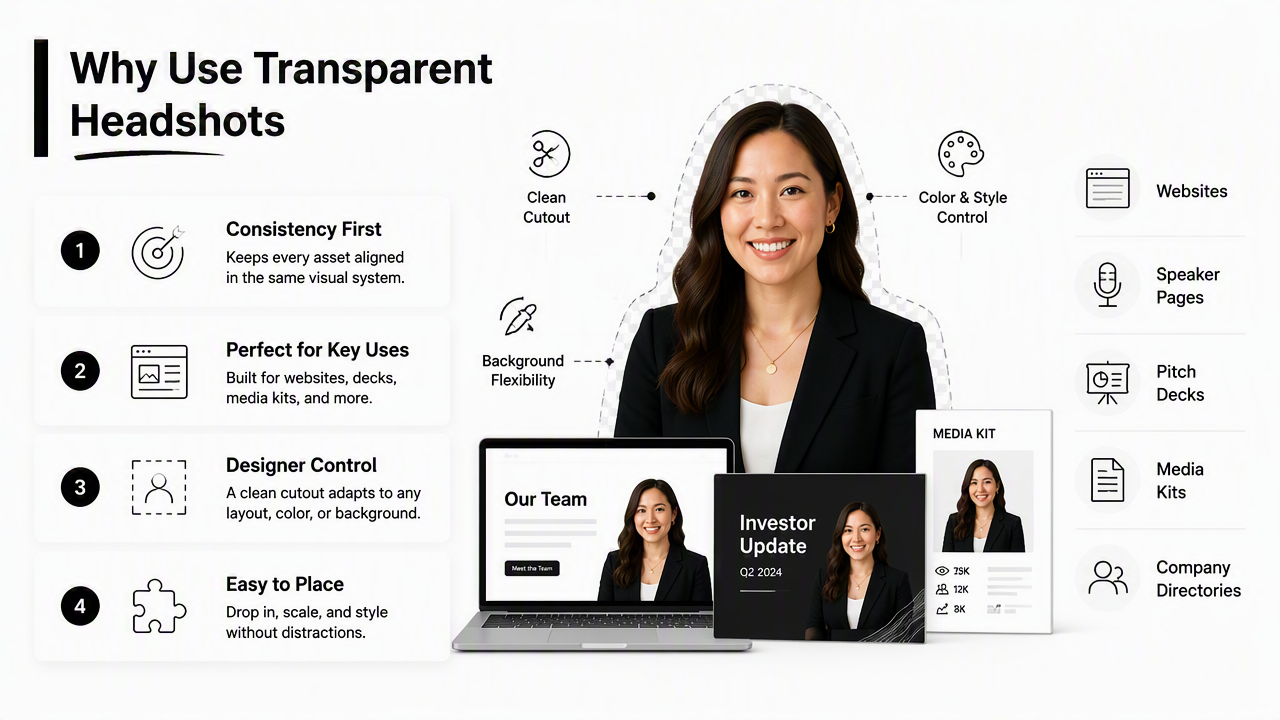
A cutout gives designers control. One founder photo can sit on a white website card, a dark investor deck, and a podcast media kit without reshooting.
Best use cases by channel
| Use case | Why transparency helps | Best background after export |
|---|---|---|
| Website hero section | The subject can overlap text blocks, shapes, or gradients | Brand color, subtle gradient, or image panel |
| About page | Team portraits look consistent even if source photos differ | Shared card style or neutral brand panel |
| Pitch deck | Founder images can match slide themes and investor materials | Solid color, dark slide, or branded shape |
| Media kit | Editors can place the portrait into articles, banners, and thumbnails | Transparent PNG supplied as a download |
| Company directory | Employee images can fit the same crop and layout | Uniform color or directory card |
| Newsletter bio | Portraits can sit inside headers, footers, and author boxes | Light neutral or brand accent |
Business owners with niche storefronts may need headshots for product pages, founder stories, and small-team trust signals. A fitness professional building a store can compare brand-photo ideas with a Shopify-ready resume headshot generator, especially when portrait consistency matters across sales pages.
Transparent cutouts also help media teams. A journalist, podcast producer, or event host can place the subject onto a banner without asking for another image format.
Design rule: Choose transparency when the headshot must adapt to the layout. Choose a finished background when the photo must stand alone.
How Looktara fits a transparent-background workflow
The Looktara platform is useful when a professional needs several polished headshot styles before selecting one for background removal, brand layouts, or profile updates. A strong transparent cutout starts with a realistic subject image, not with the export format alone.
For newsletter authors and creator-led businesses, a portrait often appears beside a bio, inside a header, and across social previews. A newsletter-focused resume headshot generator can support that kind of repeated placement.
How should a transparent PNG be created and checked?
A transparent headshot should be created by selecting a realistic portrait, removing the background, exporting a PNG, and checking the edges on both light and dark surfaces. The final test is simple: the subject should look natural when placed on the actual website, slide, or media-kit design.
- Start with a high-resolution portrait. Clear lighting, a visible face, and defined shoulders produce a better cutout.
- Remove the background with an AI editor. Keep the crop large enough for website and slide use.
- Export as PNG with transparency. Confirm that the file includes an alpha channel.
- Test on light and dark backgrounds. Hair and clothing edges should not show a visible halo.
- Check small-size readability. The face should still look clear in directory thumbnails.
- Save a master file. Keep the largest clean PNG before resizing for specific channels.
Edge quality matters more than most people expect. Hair, curls, glasses, earrings, jacket collars, and light-colored shirts are common stress tests because they create fine boundaries between the person and the removed background.
Edge-quality checklist before publishing
- Hair strands look natural, not chopped into a helmet shape.
- Glasses frames and transparent lenses are not warped.
- Shoulders and collars have clean, believable outlines.
- No white, gray, green, or blue halo appears around the subject.
- Skin tone does not change at the jawline, ears, or neck.
- The crop leaves enough space above the head for different layouts.
- The image still looks sharp at 400 pixels wide.
A transparent portrait should also be tested inside the exact design where it will appear. A cutout that looks clean on white may show a rough edge on navy, black, or saturated brand colors.
For creator profiles that need recurring visuals across boards, pins, and content graphics, a Pinterest-style resume headshot generator can be a useful starting point for consistent brand imagery.
Which file type is best for transparent headshots?
PNG is the safest file type for transparent headshots because it supports transparency and keeps edges crisp. WebP can also support transparency with smaller file sizes, but PNG remains the most widely accepted option for media kits, design handoffs, and business profile assets.
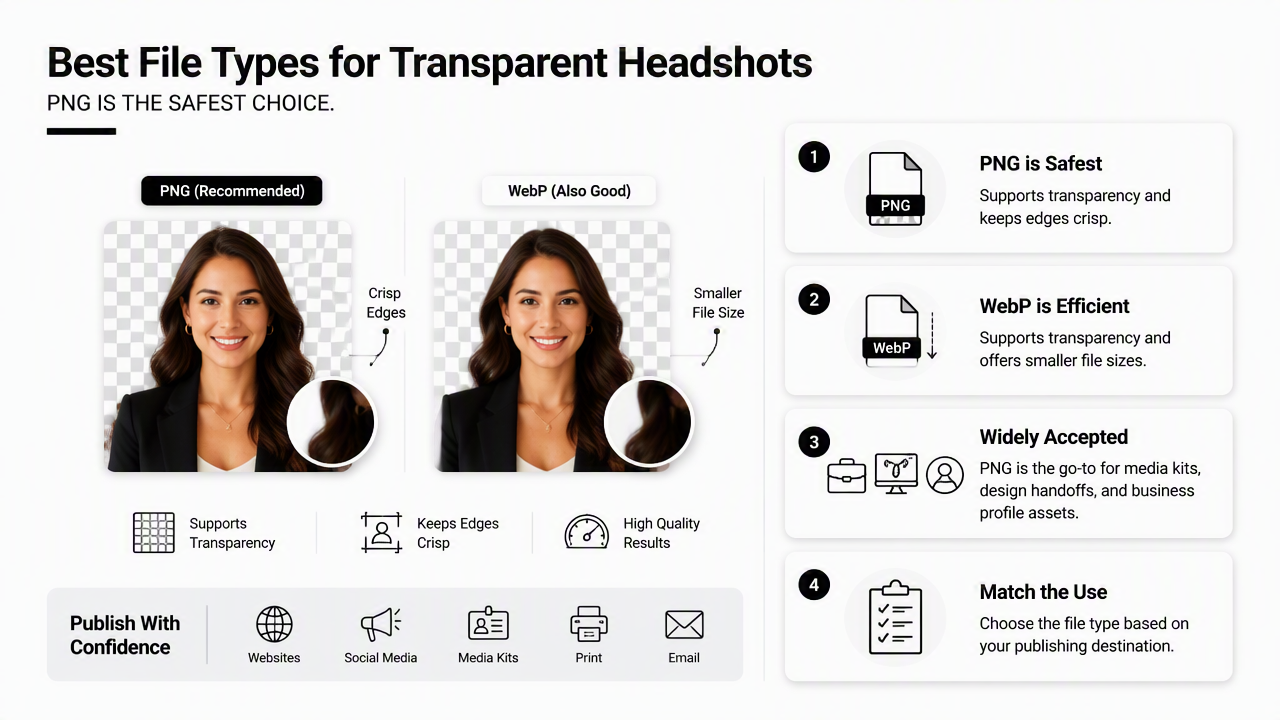
File choice should follow the publishing channel. A designer may want a transparent PNG master file, while a website developer may convert the final asset to WebP for faster loading.
File formats compared for headshot cutouts
| File type | Transparency support | Best use | Watchout |
|---|---|---|---|
| PNG | Yes | Media kits, pitch decks, website design, directories | Larger files than compressed web formats |
| WebP | Yes | Modern websites and fast-loading pages | Some workflows still prefer PNG handoffs |
| JPG | No | LinkedIn, dating apps, finished portraits with backgrounds | Cannot preserve a transparent background |
| SVG | Not ideal for photos | Logos, icons, vector shapes | Not suited to photographic headshots |
| TIFF | Sometimes | Print and professional production workflows | Too heavy for most web uses |
A practical workflow keeps two versions: a master PNG with transparency and a channel-specific export. The master stays editable; the final export fits the platform.
Format rule: PNG is best for sharing a transparent headshot. JPG is best only after a real or designed background has already been added.
Naming also helps teams avoid confusion. Use clear filenames such as founder-headshot-transparent.png, speaker-headshot-dark-bg.jpg, and team-directory-400.webp. Simple naming prevents the wrong version from ending up on a press page or investor slide.
When is a natural background better than transparency?
A natural background is better when trust, context, and personal warmth matter more than layout flexibility. LinkedIn, dating apps, and many freelancer profiles often benefit from a real-looking office, outdoor blur, studio wall, or lifestyle setting because the photo feels complete on its own.
Transparent cutouts can feel too designed on platforms where people expect an authentic profile image. LinkedIn visitors usually scan for credibility, approachability, and role fit. Dating app viewers often respond better to natural context than to a floating studio cutout.
Best background choice by profile goal
- LinkedIn job search: neutral studio, office, or soft indoor background.
- Executive bio page: transparent cutout if the website has a strong brand system.
- Dating profile: natural lifestyle background with clear face visibility.
- Founder pitch deck: transparent PNG placed on consistent slide design.
- Remote worker portfolio: either option, depending on whether the site uses branded cards.
- Company directory: transparent cutout for uniformity, or one shared neutral background for realism.
The best choice depends on the final viewer. Hiring managers may prefer a complete professional photo. Designers may prefer a cutout. Editors may prefer both.
Common mistakes include exporting only a transparent file, removing too much hair detail, placing a cutout on a busy pattern, or using a design that makes the portrait look artificial. A safer delivery package includes three assets: transparent PNG, finished JPG on a neutral background, and a square profile crop.
Looktara can support that broader profile-photo process by helping create professional-looking options before the final background decision. For direct access, head to looktara.com and choose a set that matches the intended channel.
FAQ
Can an AI-generated headshot have a transparent background?
Yes. An AI-generated or AI-edited headshot can have a transparent background when the image is exported in a format that supports transparency, most often PNG. The quality depends on the original portrait, subject detection, hair detail, and edge cleanup rather than the file extension alone.
Is PNG always better than JPG for professional headshots?
PNG is better when transparency is required, such as for websites, pitch decks, and media kits. JPG is often better for finished profile photos on LinkedIn, dating apps, and job platforms because those channels typically display a complete rectangular or square image with a visible background.
What size should a transparent headshot be?
A transparent headshot should be saved large enough for the biggest planned use, then resized for each channel. A master file with a clean crop and sharp face detail gives designers more flexibility. Smaller versions can then be created for directories, thumbnails, and web performance.
Do transparent backgrounds look professional on LinkedIn?
Transparent backgrounds are usually not the best LinkedIn choice unless placed onto a finished background first. A natural studio, office, or soft neutral setting tends to look more complete and credible inside a standard profile-photo frame. A transparent PNG works better as a design asset outside LinkedIn.
Conclusion
A strong AI headshot transparent background works best as a flexible brand asset for websites, pitch decks, company directories, newsletters, and media kits. PNG should be the master format, edge checks should happen on light and dark backgrounds, and a natural JPG should still be saved for LinkedIn, dating apps, and other standalone profiles.
The next step is simple: create several realistic headshot options, select the one with the cleanest face, hair, and shoulder detail, then export both a transparent PNG and a finished-background JPG. Professionals ready to refresh profile assets can visit looktara.com and build a headshot set suited for modern digital channels.
Generated by EarlySEO.com