
TL;DR
A strong AI headshot should look like the real person, fit the target platform, and pass close inspection for eyes, teeth, hair, hands, clothing, background, crop, and file quality. The best final review process is a short checklist: compare likeness first, inspect facial details second, then confirm technical specs before downloading.
A polished AI portrait can help a LinkedIn profile, resume, Shopify bio, creator page, or dating profile look current, but one strange eye or plastic-looking smile can ruin the effect. An AI headshot quality checklist before downloading protects the final image from common errors in likeness, facial detail, clothing, background, and platform fit. For professionals who want a guided portrait workflow, Looktara focuses on practical, profile-ready AI headshots rather than novelty images.
Table of Contents
What is an AI headshot quality checklist?
An AI headshot quality checklist is a final review aid used to catch realism, professionalism, and file-quality issues before an AI-generated portrait is saved or uploaded.
Checklist: A job aid used in repeated tasks to reduce mistakes caused by limits in memory and attention.
Headshot: A photographic portrait focused on a person's face, commonly used for professional profiles, social media, online dating, resumes, and business pages.
Wikipedia's definitions of checklist and head shot support the same practical idea: a good review process turns a subjective image choice into a repeatable quality control step. That matters because AI portraits are often judged quickly, especially in hiring, client outreach, and profile browsing.
A useful review should be short enough to use every time, but detailed enough to catch the details that make AI images feel artificial. The goal is not perfection. The goal is a headshot that looks accurate, confident, and appropriate for the platform.
Key insight: The best AI headshot is not the most dramatic image. It is the most believable image that still looks polished.
The 60-second pre-download scan
Use this fast order before inspecting fine details:
- Compare the face with recent real photos.
- Check both eyes at full size.
- Inspect teeth, lips, and skin texture.
- Review hair edges, ears, and neckline.
- Confirm clothing, background, and crop.
- Check resolution, file type, and platform fit.
This order prevents a common mistake: choosing an image for style first and noticing realism problems later. Likeness should always come before lighting, outfit, or background preference.
How should likeness and facial realism be checked?
Likeness and facial realism should be checked by comparing the AI headshot against recent photos, then reviewing eyes, teeth, skin texture, hairline, and expression at 100 percent zoom.
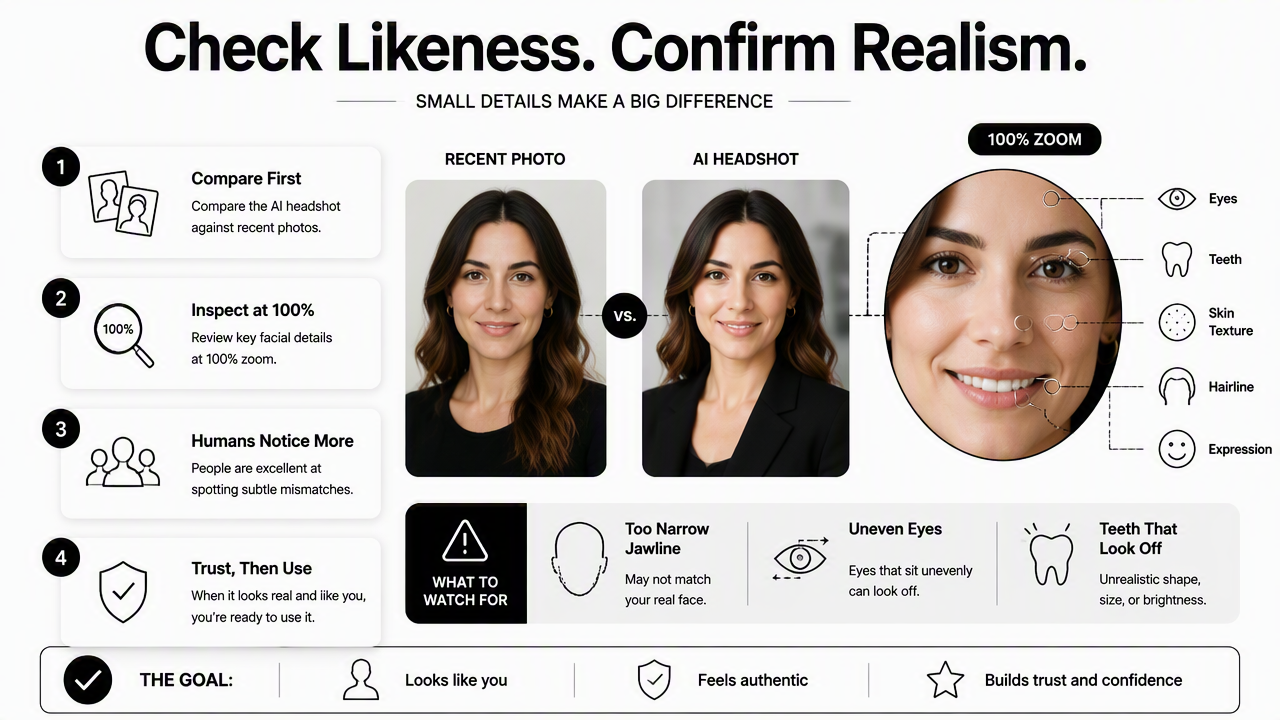
Human viewers are good at noticing small facial mismatches. A jawline that looks too narrow, eyes that sit unevenly, or teeth that appear too perfect can make the image feel less trustworthy even when the lighting looks professional.
The 2026 standard is simple: the image should look like a polished version of the real person, not a different person with similar features. A recruiter, client, match, or follower should be able to recognize the person in a video call or in real life.
Face and expression checks
A credible AI headshot keeps identity stable across the whole face. The reviewer should compare the generated image against two or three recent selfies, not an old favorite photo.
- Face shape: Jaw, cheeks, chin, and forehead should match current appearance.
- Expression: A smile should look natural, not frozen or overly symmetrical.
- Age accuracy: Skin should look polished without removing all signs of age.
- Facial hair: Beard lines, mustache shape, and stubble should look intentional.
- Distinctive features: Moles, freckles, dimples, and scars should not vanish if they are part of normal appearance.
For professional profiles, a slightly refined image usually performs better than an image that looks heavily altered. For dating apps and creator profiles, authenticity matters even more because the photo sets an expectation for real interaction.
Eyes, teeth, hair, and skin detail checks
AI portrait errors often hide in small facial areas. The image should be opened at full size before download, not judged from a thumbnail.
| Detail | Pass | Re-download or regenerate |
|---|---|---|
| Eyes | Same size, clear pupils, natural catchlights | Uneven gaze, cloudy iris, mismatched eyelids |
| Teeth | Natural spacing and shape | Extra teeth, melted edges, too-white smile |
| Hair | Clean but realistic strands | Helmet-like shape, fuzzy edges, odd hairline |
| Skin | Real texture with flattering light | Wax-like skin, blurred pores, patchy tones |
| Ears | Normal shape and placement | Missing, warped, or mismatched ears |
| Neck | Natural posture and shadows | Twisted angle, strange collar overlap |
A small imperfection can be acceptable if it looks like normal photography. A structural error should never pass, because viewers may read it as fake rather than polished.
What clothing, background, and crop details matter most?
Clothing, background, and crop matter because they signal context before any profile text is read; the image should match the platform, profession, and intended level of formality.
A headshot for a LinkedIn job search needs a different tone from a creator avatar or dating profile. Still, all strong headshots share three traits: a clear face, simple background, and clothing that supports the person rather than distracting from the person.
Looktara can be especially useful when the intended output is a career-ready profile image rather than a stylized avatar. Job seekers building a LinkedIn or resume presence may also find the LinkedIn resume headshot generator relevant for profile-focused results.
Wardrobe and brand fit review
Clothing should look believable, well-fitted, and appropriate for the use case. AI systems can create odd seams, fake buttons, broken collars, or inconsistent fabric patterns, so clothing needs the same close review as the face.
- Corporate roles: Blazer, collared shirt, knit top, or clean neutral layers.
- Entrepreneurs: Smart casual styling with a confident, approachable look.
- Creators: Brand-aligned colors, but no distracting logos or unreadable text.
- Remote workers: Clean, camera-ready outfit that looks natural on video calls.
- Dating profiles: Authentic clothing that looks like normal personal style.
Busy patterns are risky because AI can distort stripes, checks, and logos. Solid colors usually create a cleaner final result.
Background, crop, and composition review
The background should support the image without competing with the face. Plain studio backdrops, soft office settings, and lightly blurred environments usually work best for professional use.
| Use case | Best crop | Best background | Watch for |
|---|---|---|---|
| Head and shoulders | Neutral, office, soft gray | Overly glamorous lighting | |
| Resume | Tight headshot | Plain light backdrop | Distracting shadows |
| Shopify bio | Chest-up | Studio or brand-color backdrop | Background objects near head |
| Creator profile | Face-forward or chest-up | Branded but clean | Too much styling |
| Dating app | Natural portrait crop | Outdoor or casual indoor | Over-edited studio look |
A good crop leaves breathing room above the head and keeps the eyes in the upper third of the frame. The face should remain recognizable even when displayed as a small circle avatar.
For founders, consultants, and sellers who need polished commercial imagery, a Shopify resume headshot generator can support business profile use cases where brand presentation matters.
How can resolution and platform fit be confirmed?
Resolution and platform fit should be confirmed by checking sharpness at full size, saving the right file type, and testing whether the image still works as a small avatar.
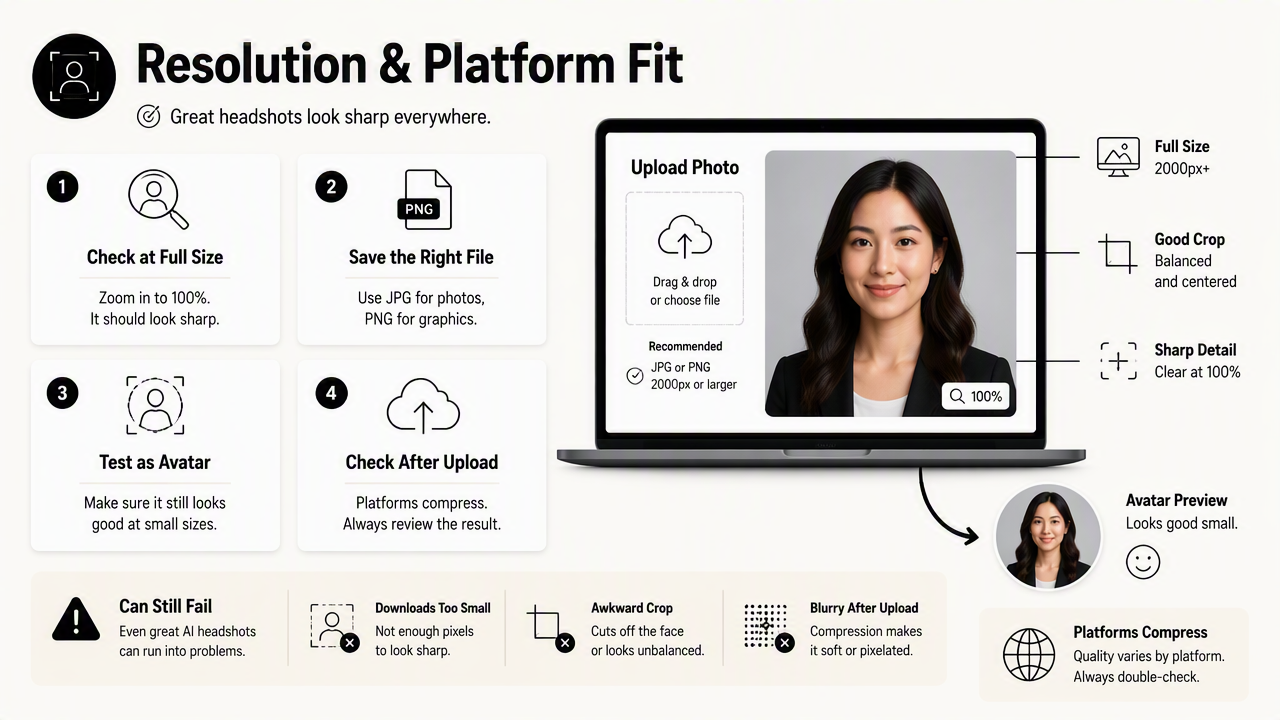
A beautiful AI headshot can still fail if it downloads too small, crops awkwardly, or looks blurry after upload. Social platforms often compress images, so the source file should be clean before any platform reduces quality.
The safest review method is to inspect the full-size image and the thumbnail version. Many AI flaws disappear in a large preview but become obvious when compressed into a profile circle, especially strange eyes, uneven smiles, and messy hair edges.
Technical download checklist
Use this practical file check before saving the final image:
- Open the largest preview available. Small previews hide distortion.
- Zoom to 100 percent. Facial details should stay sharp, not smeared.
- Check the file type.
JPGis common for profiles;PNGcan preserve cleaner edges. - Confirm portrait orientation. Most profile uses need vertical or square-friendly framing.
- Preview a circle crop. LinkedIn, dating apps, and messaging tools often crop avatars into circles.
- Check background edges. Hair and shoulders should not show cutout halos.
- Save one master copy. A full-size version should be kept before resizing.
A file that only looks good inside the generator is not ready. A finished headshot should survive download, compression, cropping, and upload without losing credibility.
Platform readiness table
Different platforms create different first impressions. The same image may work well on a resume but feel too formal for a creator profile.
| Platform | Image goal | Best final check |
|---|---|---|
| Competent and approachable | Face clear in a small circular crop | |
| Resume | Clean and professional | Neutral background and modest styling |
| Company bio | Trustworthy and brand-safe | Consistent crop with team images |
| Shopify profile | Founder or seller credibility | Clean background and commercial polish |
| Instagram or creator page | Recognizable personal brand | Strong expression and color harmony |
| Dating app | Attractive but realistic | Natural expression and honest likeness |
The Looktara platform is strongest when the final image needs to look polished without drifting into an unrealistic AI style. For a final pass, the reviewer should compare the chosen image against the platform's surrounding content, not just against other generated options.
What should be expected from AI headshots in 2027?
AI headshots in 2027 will likely face higher expectations for authenticity, disclosure, and cross-platform consistency as viewers become better at spotting synthetic-looking portraits.
The direction is already clear in 2026: simple portrait generation is no longer enough. Users expect better likeness control, cleaner facial details, and outputs tailored to specific platforms. Research on controllable digital systems, such as the 2024 ACL paper AppWorld: A Controllable World of Apps and People for Benchmarking Interactive Coding Agents, reflects a broader push toward testing AI systems in more realistic workflows.
For headshots, that means quality will be judged less by novelty and more by usefulness. The winning image will be the one that helps a person appear credible in the exact place the image appears.
2027 expectation: AI headshots will need to look less like AI samples and more like consistent personal brand assets across LinkedIn, resumes, business pages, creator profiles, and dating apps.
The practical review bar will rise
As AI portraits become common, obvious synthetic markers will stand out more. Over-smoothed skin, mismatched eyes, and generic studio backdrops may signal low effort rather than modern polish.
A stronger final review will include:
- Identity consistency across several generated options.
- Context matching for the target platform.
- Natural imperfection that keeps the face human.
- Technical durability after compression and crop.
- Brand consistency across profile images, bios, and business pages.
Professionals using Looktara should still run the same final checklist before download. Good tools improve the starting point, but final selection remains a human judgment about trust, likeness, and fit.
FAQ
Common questions about reviewing AI headshots often focus on realism, file quality, and whether a generated portrait is appropriate for professional use.
How realistic should an AI headshot look?
An AI headshot should look like a polished recent portrait of the actual person. Small lighting improvements, cleaner backgrounds, and neater styling are acceptable. Major changes to age, face shape, eye color, jawline, body size, or hairline should be rejected because they can create a trust gap during interviews, meetings, dates, or client calls.
Should an AI headshot be used on LinkedIn?
An AI headshot can be suitable for LinkedIn when it looks realistic, professional, and consistent with the person's real appearance. The image should pass a close facial review and a small circular crop test. Formal clothing, clean lighting, and a neutral background usually work better than dramatic styling or glamour-style edits.
What is the biggest sign that an AI headshot is not ready?
The biggest warning sign is a face that looks almost right but not fully recognizable. Uneven eyes, plastic skin, strange teeth, distorted ears, or a smile that feels frozen can make the image seem synthetic. If recognition or trust feels uncertain, another output should be selected before downloading.
Which file format is best for an AI headshot?
JPG is usually practical for LinkedIn, resumes, business bios, dating apps, and most social platforms because it keeps file sizes manageable. PNG can be helpful when a cleaner edge or higher-quality source file is needed. The final choice should be tested after upload because platforms may compress both formats differently.
Conclusion
A strong AI headshot passes three tests before download: it looks like the real person, it fits the target platform, and it stays sharp after crop and compression. The safest workflow is to review likeness first, inspect eyes and facial detail second, then confirm clothing, background, crop, and file quality.
For a cleaner final selection process, save the checklist, compare two or three recent photos, and reject any image that feels unrealistic even if the styling looks attractive. Professionals ready to generate profile-ready options can head to looktara.com and use this AI headshot quality checklist before downloading the final image.
Generated by EarlySEO.com