
TL;DR
AI headshots work best in personal CRM and networking apps when the face is recognizable at thumbnail size, the style feels approachable, and the same image supports follow-up across LinkedIn, event apps, and community profiles. Choose a warm, face-first crop rather than a stiff corporate portrait, then keep one primary photo consistent across key channels.
An AI headshot for personal CRM and networking apps has one job: help a new contact connect a name, face, and conversation fast. Unlike a formal LinkedIn portrait, a networking photo must work inside tiny contact cards, event attendee lists, Slack-style communities, and follow-up reminders. Looktara is built for professionals who need polished, recognizable profile imagery without booking a studio session.
AI headshot: a computer-generated or AI-enhanced portrait made from uploaded photos, used as a professional profile image across digital platforms.
Personal CRM: a relationship-tracking system for individuals, adapted from customer relationship management, which manages and improves interactions through organized contact data.
Networking app: a social networking service focused on building professional or community relationships, often around events, introductions, memberships, or shared interests.
Table of Contents
What is an AI headshot for personal CRM and networking apps?
An AI headshot for personal CRM and networking apps is a realistic profile portrait optimized for recognition, trust, and quick recall inside contact-management and event-networking tools. It should look like the person on a normal workday, not like a magazine cover, because its main use is name-to-face memory after conversations.
Personal CRM tools such as Dex, Clay, Folk, Wave Connect, and similar contact apps organize relationships beyond business sales pipelines. The 2026 search results for this topic show heavy demand, with 17,200,000 total SERP results and top articles focused on personal CRM rankings, in-person networking, LinkedIn syncing, and AI-powered contact enrichment.
LinkedIn remains the anchor profile for many professionals because it is a global business and employment-oriented social networking service used for professional networking and career development. Personal CRM apps, however, add a private memory layer: notes, reminders, context, social links, and the face attached to each relationship.
Key insight: in networking software, the headshot is not decoration. It is a memory cue that makes follow-up feel personal instead of transactional.
A strong CRM headshot supports quick recognition in four common moments:
- Before a conference meeting, when scanning an attendee list.
- After an event, when matching notes to faces.
- During a warm introduction, when reviewing mutual contacts.
- Inside community apps, when deciding which conversation thread to rejoin.
For creators and small business owners, the same profile image often sits beside brand assets such as a fitness Shopify website hero or a launch graphic. Consistency across profile and promotional imagery makes a digital presence easier to remember.
Why networking headshots should look less formal than LinkedIn portraits
Networking headshots should usually look warmer and less formal than LinkedIn portraits because event, community, and personal CRM settings depend on approachability as much as authority. A suit-and-gray-backdrop image may work for a corporate profile, but a softer photo often performs better when the goal is starting or continuing a conversation.
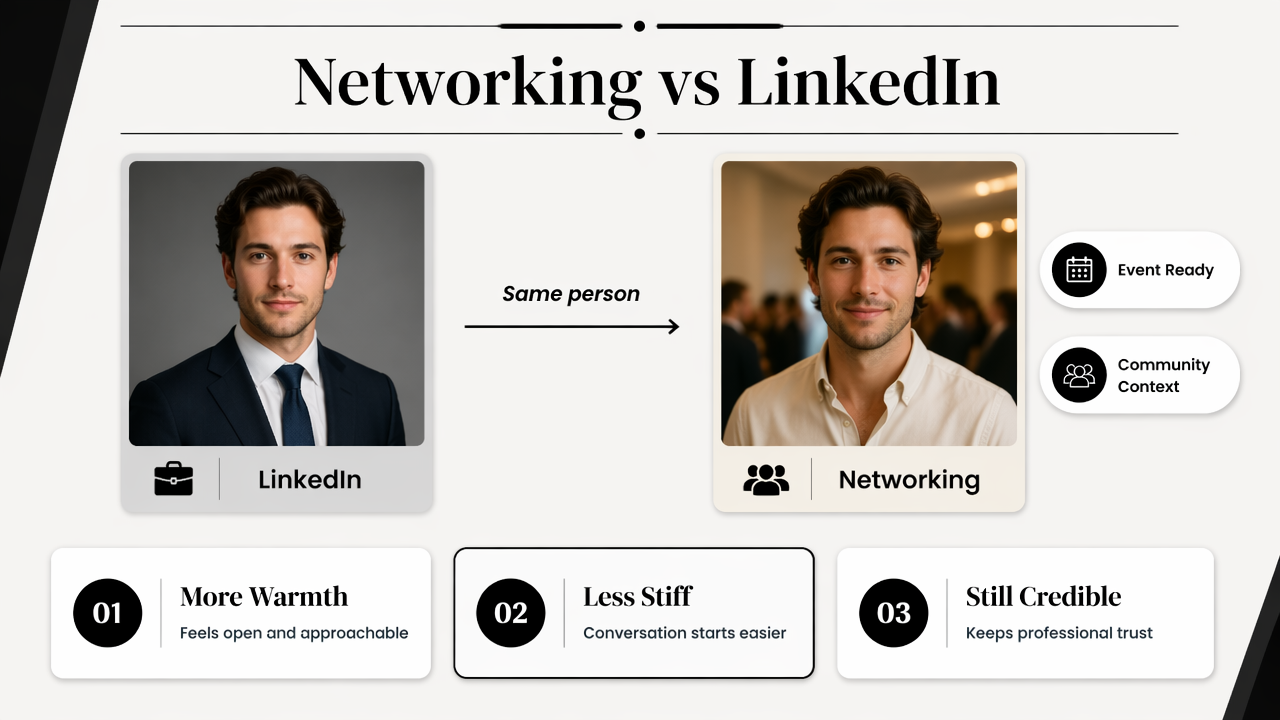
LinkedIn photos usually signal employability, seniority, and professional credibility. Networking app photos signal availability, recognition, and shared context. The best version still looks professional, but it leaves room for personality.
Best style choices by networking context
| Context | Best headshot style | Why it works |
|---|---|---|
| Conference app | Face-first crop, friendly expression, simple background | Easy to recognize in attendee grids |
| Personal CRM | Natural lighting, clear eyes, familiar appearance | Helps recall past conversations |
| Founder community | Smart-casual clothing, confident but relaxed pose | Balances credibility and openness |
| Creator network | Slightly expressive styling, brand-aligned colors | Signals personality without clutter |
| Dating-adjacent social profile | Authentic smile, casual polish, realistic edit | Builds trust through natural appearance |
Face-first composition matters more than studio drama. Crops should keep the eyes, mouth, and hairline visible at small sizes. Busy backgrounds, heavy shadows, and full-body photos reduce recognition in contact cards.
A practical rule works well: if the photo is reduced to a small circle, the person should still be identifiable. This standard is stricter than most profile-photo advice because personal CRM screens often compress images beside notes, tags, and timestamps.
The same visual logic applies to social content. A recognizable profile image paired with a consistent fitness Instagram post design helps coaches, creators, and solo operators connect their face with their content library.
How should a networking headshot be cropped, styled, and reused?
A networking headshot should be cropped close enough for instant recognition, styled to match the platform's social tone, and reused consistently where contact memory matters. The safest setup is a square master image with the face centered, enough shoulder area for circular crops, and a clean background.
- Start with a realistic source image where the face is unobstructed.
- Choose a head-and-shoulders crop, not a full-body frame.
- Keep the eyes near the upper third of the image.
- Use a background that does not compete with the face.
- Pick clothing that matches the normal networking environment.
- Export one square version and one wider version for banners or bios.
Practical image rules for 2026 profiles
| Image decision | Recommended choice | Avoid |
|---|---|---|
| Crop | Head and shoulders, centered face | Distant full-body shots |
| Expression | Warm, alert, relaxed | Overly serious or exaggerated smiles |
| Background | Plain, softly lit, brand-adjacent color | Crowded rooms or harsh patterns |
| Clothing | Smart casual or role-appropriate | Costumes, logos, or distracting prints |
| Retouching | Light cleanup and color balance | Plastic skin or changed facial structure |
Different platforms crop images differently, so the photo needs safe space around the head. Event apps often use circles. CRM dashboards may show tiny squares. Community platforms may compress the image even more.
Professional identity also stretches beyond the avatar. A consultant, coach, or founder may use the same face-first image near a fitness Shopify landing page banner, a speaker bio, and an email signature. That repetition creates recognition without requiring identical layouts everywhere.
Best practice: use one primary face image for recognition, then vary the surrounding design for each channel.
How Looktara handles professional networking images
Looktara helps professionals create polished profile visuals that feel credible, current, and usable across networking surfaces. The Looktara platform fits the middle ground many people need in 2026: more professional than a casual selfie, less stiff than a traditional corporate portrait, and practical for fast-moving digital profiles.
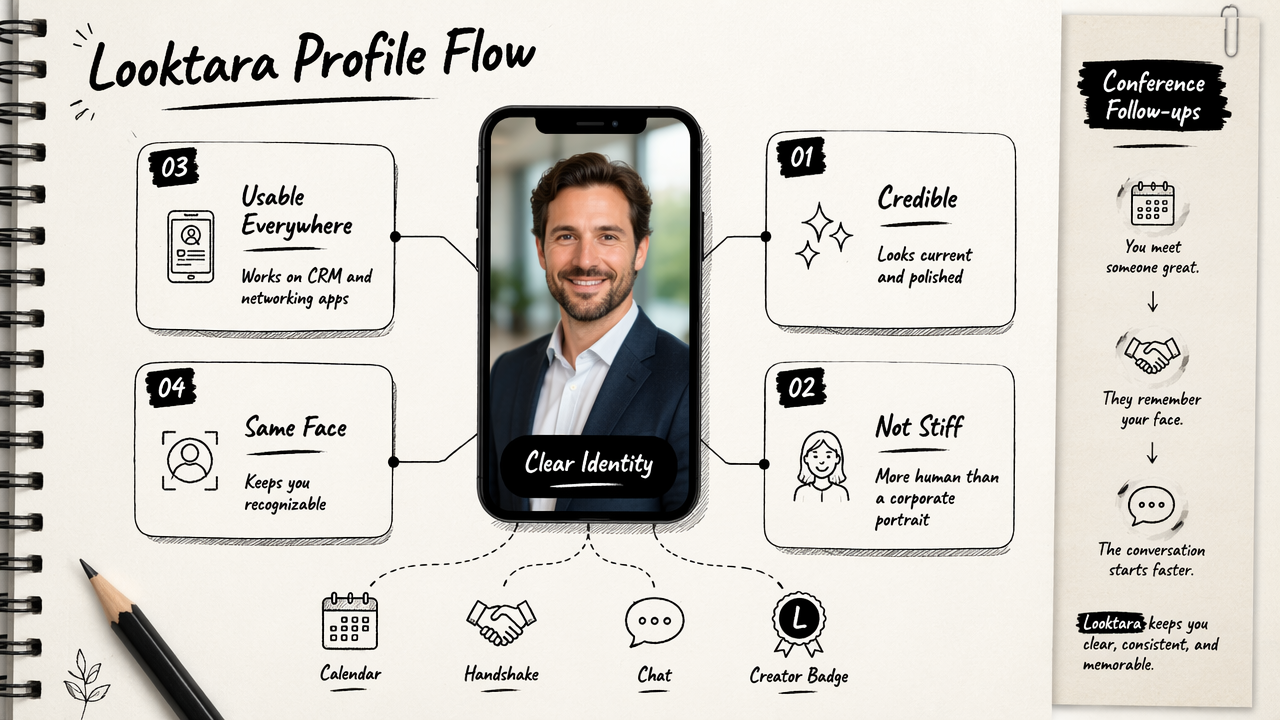
A personal CRM image should preserve identity. The goal is not to invent a different face; the goal is to present the same person clearly. That matters for conference follow-ups, founder networks, recruiter conversations, creator partnerships, and community memberships.
Looktara workflow for face-first profile consistency
- Select recognizable inputs: clear photos with direct facial visibility work best.
- Pick the networking tone: smart-casual, founder-friendly, creator-polished, or executive-light.
- Check thumbnail readability: the face should remain clear when reduced.
- Match adjacent assets: profile photos can sit beside posts, ads, banners, and thumbnails.
- Refresh seasonally: update styling when hair, glasses, role, or brand positioning changes.
The surrounding brand system matters too. A founder using a warm headshot in a personal CRM can carry the same visual identity into a fitness Instagram Facebook ad or a fitness Shopify YouTube thumbnail. That continuity helps contacts recognize the person across paid, social, and community channels.
Looktara is most useful when the required image set includes more than a single headshot. Profile photos, pitch visuals, launch graphics, and social creative can share color, tone, and visual rhythm. For brand recall, the simplest next step is to visit looktara.com and build a small set of consistent networking assets.
When should the same headshot be used across channels?
The same headshot should be used across channels when recognition matters more than platform-specific styling. Personal CRM, LinkedIn, conference apps, founder communities, and email signatures usually benefit from one consistent primary photo because repeated exposure strengthens name-to-face memory.
Different photos can still make sense when the audience changes. A dating profile may need a more personal, less business-focused image. A keynote speaker page may need a higher-production portrait. A creator profile may use more expressive styling than a recruiter-facing page.
Same photo or different photo decision guide
| Channel pair | Use same headshot? | Reason |
|---|---|---|
| Personal CRM and conference app | Yes | Recognition is the main goal |
| Personal CRM and LinkedIn | Usually yes | Professional identity stays consistent |
| Founder community and email signature | Yes | Trust builds through repetition |
| LinkedIn and dating app | Usually no | Context and expectations differ |
| Creator profile and paid ad creative | Sometimes | Brand style may need more expression |
A useful approach is a three-photo system:
- Primary recognition photo: used in CRM, LinkedIn, event apps, and email.
- Personality photo: used in creator communities, podcasts, and informal bios.
- Campaign photo: used in ads, landing pages, and launch materials.
Networking photos should not hide behind over-editing. If a contact meets someone at an event and the profile image feels unrelated, the CRM loses one of its main advantages: fast recall. Realistic styling protects trust.
Visual consistency can extend into educational or promotional assets. A coach or creator might pair the primary headshot with a fitness Instagram ebook cover so lead magnets, profiles, and follow-up emails feel connected.
Frequently asked questions
Can an AI headshot be used in Dex, Clay, Folk, or Wave Connect?
An AI headshot can be used in personal CRM tools when the image is realistic, current, and recognizable. Dex, Clay, Folk, Wave Connect, and similar tools focus on relationship context, so the best profile photo helps contacts remember a real interaction rather than presenting an overly polished identity.
Should a personal CRM photo match a LinkedIn photo?
A personal CRM photo should often match a LinkedIn photo because both support professional recognition. Matching is especially useful for recruiters, founders, consultants, and conference attendees. A different image may work better only when the LinkedIn portrait is too formal for community or event settings.
What makes an AI networking headshot look fake?
An AI networking headshot looks fake when skin texture is too smooth, facial structure changes, lighting conflicts with the background, or clothing appears unnatural. Recognition should be the quality test. If a contact would hesitate to identify the person in a meeting room, the image is not suitable.
How often should a networking profile photo be updated?
A networking profile photo should be updated when appearance, role, or brand positioning changes. Many professionals refresh the image yearly, but a new haircut, glasses, job search, founder launch, or speaking season can justify an earlier update. Current photos reduce friction during in-person follow-up.
Conclusion
An AI headshot for personal CRM and networking apps should make professional relationships easier to remember, not just make a profile look polished. The strongest image is realistic, face-first, lightly styled, and consistent across the places where follow-up happens.
For best results, professionals should choose one primary recognition photo, test it at thumbnail size, align it with LinkedIn and event profiles, then create a small set of matching brand visuals. With Looktara, that process can start with a clear headshot direction and expand into profile, social, and campaign imagery. Head to looktara.com to create a profile image set that supports the next networking season.
Generated by EarlySEO.com