
TL;DR
JPG is the best default for AI headshots used on LinkedIn, resumes, job portals, and most websites because it keeps photo quality high while reducing file size. PNG is better when the headshot needs transparency, sharp graphic edges, or repeated editing without extra compression loss.
A polished AI headshot can look weaker after export if the wrong file format adds blur, heavy file weight, or an unwanted background. The practical answer to AI headshot file format JPG vs PNG is simple: use JPG for most photographic profile photos, and use PNG when transparency or lossless editing matters. JPEG: a commonly used lossy compression method for digital photography, with adjustable compression levels. PNG: a lossless raster image format often used when transparency, crisp edges, or repeated editing are needed. For professionals creating brand-ready images, Looktara helps generate polished headshots that can then be saved in the format required by LinkedIn, resumes, portfolio pages, and media kits.
Table of Contents
What is the best AI headshot file format, JPG or PNG?
JPG is the best AI headshot file format for most professional profile photos because it is designed for photographic images and usually produces smaller files, while PNG is best for transparent backgrounds, graphic-heavy layouts, and lossless editing. The right choice depends on where the headshot will appear.
Competitor comparisons consistently frame the difference the same way: JPG stores less data and is usually smaller, while PNG preserves image data and supports transparency. That distinction matters more for headshots than abstract image quality claims, because headshots are usually photo-first assets.
Key insight: For a normal head-and-shoulders photo with a solid or natural background, JPG is usually the practical winner. For a cutout headshot placed over a custom design, PNG earns the spot.
Quick decision table by use case
| Use case | Best format | Why it fits |
|---|---|---|
| LinkedIn profile photo | JPG | Fast upload, strong photo compression, widely supported |
| Resume or CV PDF | JPG | Keeps document size lower while preserving a professional look |
| Personal website bio photo | JPG | Helps pages load faster than large PNG photos |
| Media kit with transparent background | PNG | Keeps the subject cut out cleanly |
| Email signature headshot | JPG | Smaller files reduce email bloat |
| Speaker one-sheet design | PNG | Works well over colored layouts and design templates |
| Ongoing photo edits | PNG during editing, JPG for final | Lossless working file, smaller final export |
A 2024 discussion in the OpenAI Developer Community also raised a related point for AI workflows: file format can affect how image data is interpreted and described. For headshot users, that supports a cautious approach: keep the highest-quality master file, then export the right delivery version for each platform.
How do JPG and PNG affect AI headshot quality?
JPG and PNG affect AI headshot quality differently because JPG compresses photo data to reduce file size, while PNG preserves image data more completely. JPG can show compression artifacts if saved too aggressively, but PNG can become unnecessarily large for regular portraits.
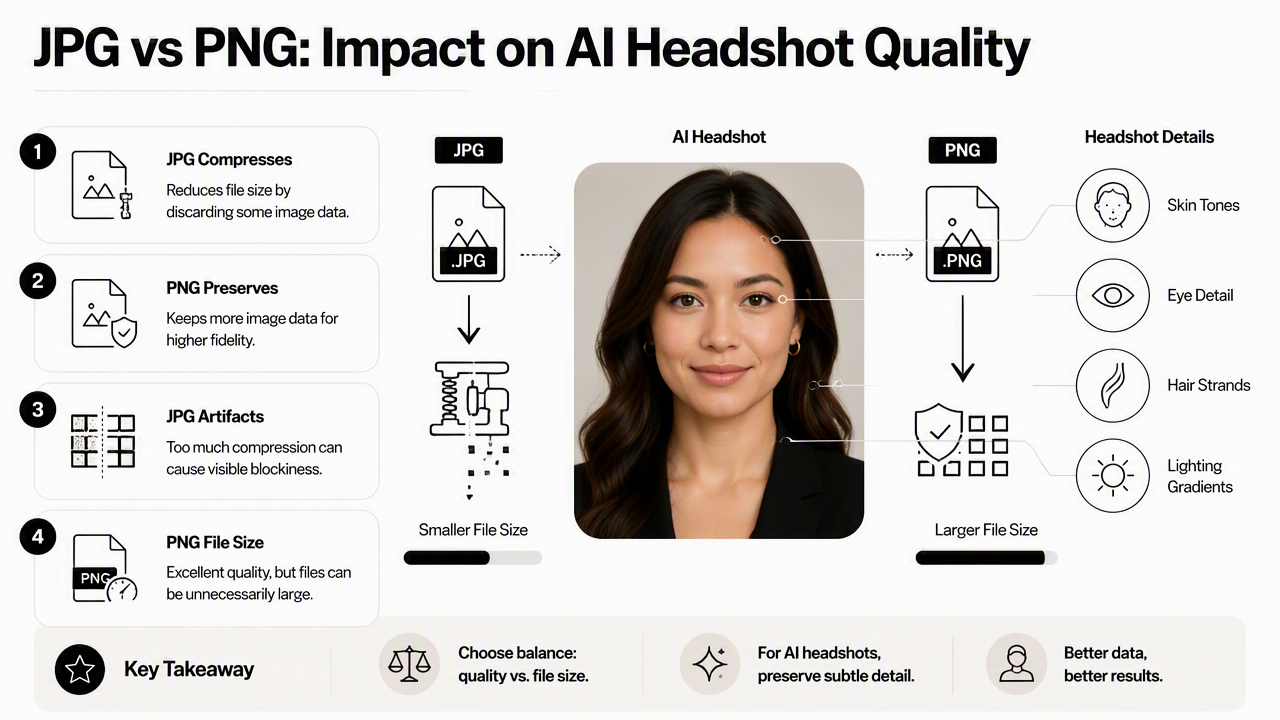
A headshot contains subtle gradients: skin texture, hair detail, fabric, eye highlights, and background blur. JPG handles those photographic elements efficiently. PNG keeps those details too, but often with a much heavier file, especially for full-color portraits.
Quality factors that matter in professional headshots
- Face detail: Eyes, skin tone, and hair should stay natural after export.
- Background treatment: Solid backgrounds, office scenes, and blurred backdrops usually work well as JPG.
- Edges: PNG is stronger when the shoulders, hair, or outline need to sit over another background.
- Editing history: Repeated JPG saves can add visible compression artifacts over time.
- File size: Smaller files upload faster and reduce friction across websites, forms, and documents.
JPG uses lossy compression, meaning some image information is discarded to make the file smaller. That tradeoff is acceptable for many professional photos when export quality is set high. PNG uses lossless compression, so it does not discard image information in the same way.
The mistake is treating PNG as automatically more professional. A huge PNG can slow a portfolio page or make a resume PDF bulky without giving a visible improvement. A well-exported JPG often looks identical to casual viewers in normal profile-photo sizes.
Where each format can disappoint
JPG can disappoint when it is saved at a low quality setting, uploaded repeatedly, or used for a cutout image that needs transparency. Common visual issues include blocky patches, fuzzy hair edges, and rough color transitions around the face.
PNG can disappoint when a full-size portrait is used where a smaller JPG would work. The image may look excellent, but the file can be too heavy for web pages, resumes, application forms, or email attachments.
Practical rule: PNG protects the file during editing. JPG usually performs better for final delivery when the headshot is a standard photo.
Which format works best for LinkedIn, resumes, websites, and media kits?
JPG works best for LinkedIn, resumes, email signatures, job portals, and standard website bios, while PNG works best for media kits, transparent-background portraits, Canva-style designs, and press assets. Platform context should decide the final export, not format loyalty.
LinkedIn and hiring platforms are built around photographic profile images. A high-quality JPG keeps the headshot crisp enough for recruiters, clients, and peers while avoiding unnecessary file weight. Resume files also benefit from JPG because a bloated PDF can be harder to send, preview, or upload.
For entrepreneurs, creators, and speakers, the answer becomes more mixed. A website About page may need JPG. A podcast guest kit may need PNG. A social banner with the subject placed over brand colors may need PNG with transparency.
Recommended exports by platform
- LinkedIn: Export as JPG at high quality, with a clean crop and no transparent background.
- Resume or CV: Place a JPG inside the document, then export the final resume as a PDF.
- Personal website: Use JPG for standard portrait blocks, especially on mobile-first pages.
- Media kit: Save a PNG when the headshot needs to appear over colored or textured layouts.
- Dating profile: Use JPG for natural photo presentation and broad app compatibility.
- Design templates: Keep PNG for cutouts, overlays, speaker graphics, and social headers.
The Looktara platform fits this workflow well because a single professional headshot can serve multiple contexts. A job seeker may need a JPG for LinkedIn, while a founder may also need a PNG version for a press page or investor deck.
Simple export checklist before uploading
- Check that the face remains sharp at small sizes.
- Keep the original high-resolution file untouched.
- Use JPG for photo-first uploads unless transparency is required.
- Use PNG when the background must be invisible.
- Avoid repeated JPG re-saves after each edit.
- Rename files clearly, such as
firstname-lastname-headshot.jpg.
Some platforms compress images after upload. Starting with a clean, high-quality export helps reduce visible damage after the platform processes the file. That matters for AI-generated headshots because fine details around eyes, teeth, and hair can reveal quality loss quickly.
How should AI headshots be exported in 2026?
AI headshots should be exported in 2026 as a high-quality JPG for everyday profile use and as a PNG master or transparent-background version when design flexibility is needed. A two-file workflow gives the best balance of quality, portability, and future reuse.
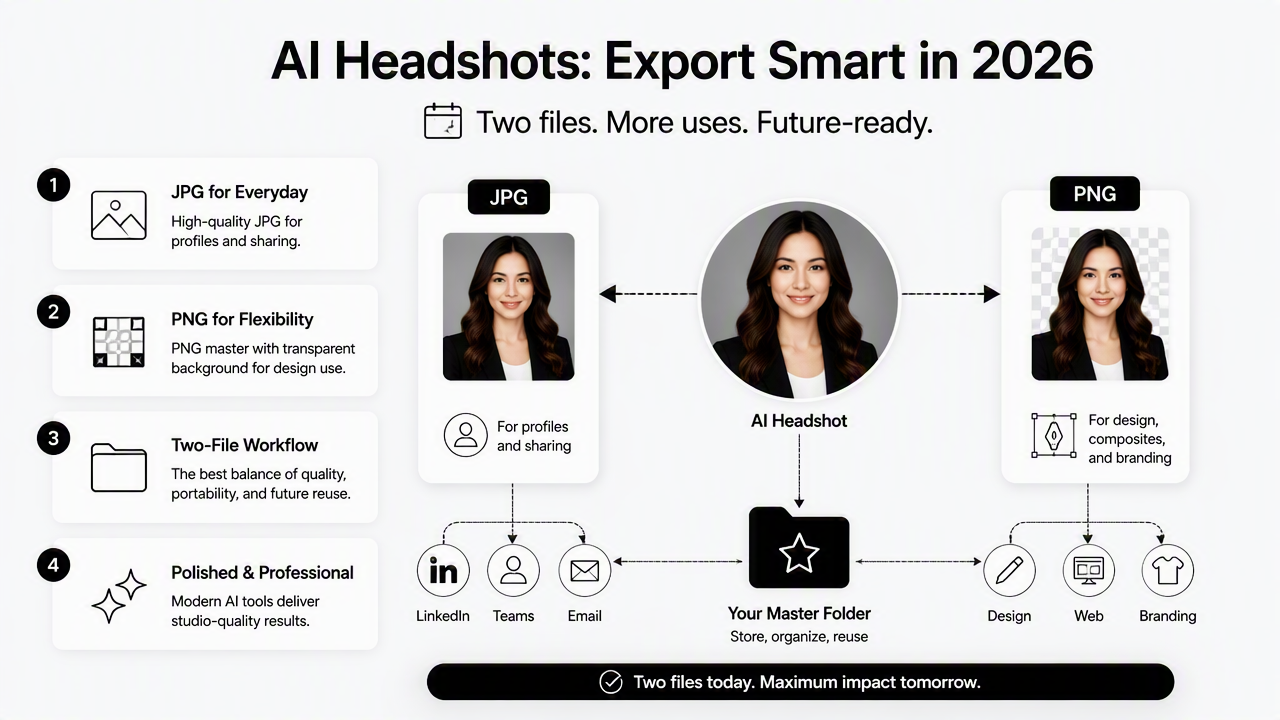
Modern AI headshot tools often create images that look polished right away, but the final file still needs sensible handling. The best workflow is not one format forever. It is a small set of purpose-built exports.
A two-file workflow for clean delivery
- Keep a master file: Save the highest-quality version available, preferably PNG if further edits or background removal are planned.
- Export a JPG for profiles: Use a high-quality JPG for LinkedIn, resumes, websites, and dating apps.
- Create a PNG cutout when needed: Use PNG only when transparency is part of the design.
- Resize for the destination: Avoid uploading oversized files when a platform displays a small crop.
- Review after upload: Check the live preview, not only the local file.
This workflow also protects brand consistency. A remote worker, consultant, or creator can use one recognizable headshot across channels, while still matching each platform's technical needs.
For users creating fresh professional photos with Looktara, the export plan should be considered part of the final brand polish. More guidance and product details are available at looktara.com.
What to expect from image formats in 2027
JPG and PNG will remain common for headshots in 2027 because they are widely supported across professional platforms, document editors, websites, and social apps. Newer formats may keep growing, but compatibility still wins for career assets.
AI tools may improve automatic resizing, compression, and background handling. Even then, hiring portals, resume builders, media pages, and social platforms will continue to favor familiar formats. For now, JPG and PNG remain the safest delivery pair.
Forward-looking takeaway: AI may change how headshots are created, but file format choice will still depend on the destination: JPG for standard photos, PNG for transparency and design control.
FAQ about AI headshot file format JPG vs PNG
These common questions cover the format choices that cause the most confusion when exporting AI headshots for professional, social, and personal profiles.
Is JPG or PNG better for a LinkedIn headshot?
JPG is better for a LinkedIn headshot in most cases because LinkedIn profile images are standard photos, not transparent design assets. A high-quality JPG keeps the face clear, uploads easily, and avoids the oversized files that PNG portraits can create. PNG is only useful if the image must first be edited or composited elsewhere.
Should a resume headshot be JPG or PNG?
A resume headshot should usually be JPG because it keeps the finished PDF smaller and easier to upload or email. The headshot should look clean at the size used in the resume layout. PNG can be used during design work, but the final resume generally benefits from a lightweight JPG image inside the document.
Does PNG make an AI headshot look more professional?
PNG does not automatically make an AI headshot look more professional. It preserves image data well and supports transparency, but many photographic portraits look equally polished as high-quality JPG files at normal display sizes. Professional quality depends more on lighting, expression, crop, background, resolution, and restrained editing than on PNG alone.
When should a transparent PNG headshot be used?
A transparent PNG headshot should be used when the subject needs to appear over a custom background, brand color, social graphic, pitch deck, speaker sheet, or media kit layout. PNG keeps the background invisible and protects clean edges around the person. Standard profile-photo uploads usually do not need transparency.
Can the same AI headshot be saved as both JPG and PNG?
The same AI headshot can be saved as both JPG and PNG, and that is often the best workflow. PNG works well as a master or design file, while JPG works well as the final upload file for LinkedIn, resumes, email signatures, websites, and most profile platforms.
Conclusion
The best answer to AI headshot file format JPG vs PNG is practical, not technical for its own sake: export JPG for standard professional profiles, resumes, websites, dating apps, and email signatures; keep PNG for transparency, design layouts, and editing masters. That approach keeps headshots sharp, portable, and ready for the platforms that matter.
A smart next step is to create one polished headshot, then save two versions: a high-quality JPG for everyday use and a PNG for design flexibility. For a fresh, professional image built for career profiles and personal branding, create a headshot with Looktara, then visit looktara.com for the next export-ready update.
Generated by EarlySEO.com